

- Posts: 60
- Thank you received: 1
Added A axis to XYZ mill, what can be done in AXIS?
8 years 7 months ago #107949
by Wirewrap
Added A axis to XYZ mill, what can be done in AXIS? was created by Wirewrap
I recently added a rotary workpiece holder to my working XYZ mill. It rotates around X, center of rotation is at Y = 70mm and Z is not known until after touchoff. Using AXIS 2.7.12
The actual physical motion works as expected, but the AXIS display is confusing, I have tried both axyz and xyza.
How can I tell AXIS where the rotational axis is centered?
Is there a (simulated or real) machine setup to look at? I have found 3-axis and 9-axis sim examples.
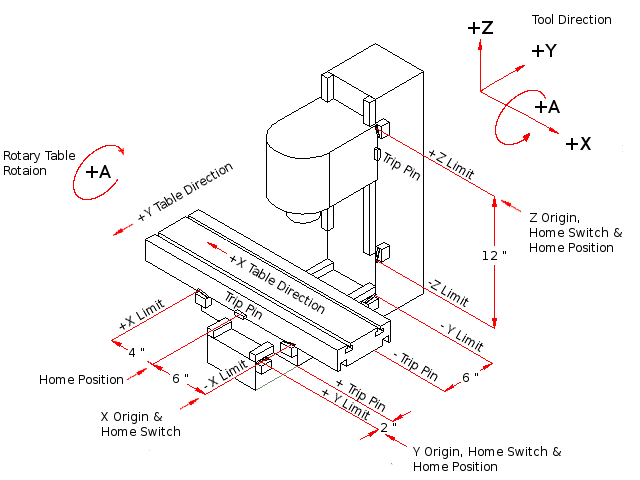
The actual physical motion works as expected, but the AXIS display is confusing, I have tried both axyz and xyza.
How can I tell AXIS where the rotational axis is centered?
Is there a (simulated or real) machine setup to look at? I have found 3-axis and 9-axis sim examples.
Please Log in or Create an account to join the conversation.

8 years 7 months ago #108011
by andypugh
Replied by andypugh on topic Added A axis to XYZ mill, what can be done in AXIS?
The Axis preview assumes that the centre of rotation of A is Z=0 X=0 (I think)
It doesn't have any way to know where the actual centre of rotation is, unfortunately.
It doesn't have any way to know where the actual centre of rotation is, unfortunately.
Please Log in or Create an account to join the conversation.
8 years 6 months ago #109404
by Wirewrap
Replied by Wirewrap on topic Added A axis to XYZ mill, what can be done in AXIS?
I have found
Rot4thaxiskins
in the Wiki.
It looks very promising, but I am not quite there yet. I am using 2.7.12 and my configuration files are attached.
Manual control has Joint 0,1,2,3 present.
MDI has the full axis set XYZAUVW
If I do an "empty" homing in "Manual control" and then switch to MDI then all axis shows as homed and motion preview looks really great. The tool is moving around the stationary workpiece.
But I have not got real homing to work The "Touch off" button is also grayed out..
If I do *any* manual movement in "Manual control" after homing, I cannot switch to MDI, the error "all joints must be homed before going into coordinated mode" appears.
I would like to touch off the tool tip to the center of the rotation axis in Y,Z and some suitable X. How to do this?
Please Log in or Create an account to join the conversation.
8 years 6 months ago #109944
by andypugh
Replied by andypugh on topic Added A axis to XYZ mill, what can be done in AXIS?
That all seems a bit odd.
Are you in a position to try with the Master (development) branch where no-cartesian machines are a little better handled?
Are you in a position to try with the Master (development) branch where no-cartesian machines are a little better handled?
Please Log in or Create an account to join the conversation.
8 years 5 months ago #110128
by Wirewrap
Replied by Wirewrap on topic Added A axis to XYZ mill, what can be done in AXIS?
OK,
I will try to setup a Master environment and see what happens.
Maybe I am currently running a too old release?
Linux debianRT 3.4-9-rtai-686-pae #1 SMP PREEMPT Debian 3.4.55-4linuxcnc i686 GNU/Linux
AXIS 2.7.12
I will try to setup a Master environment and see what happens.
Maybe I am currently running a too old release?
Linux debianRT 3.4-9-rtai-686-pae #1 SMP PREEMPT Debian 3.4.55-4linuxcnc i686 GNU/Linux
AXIS 2.7.12
Please Log in or Create an account to join the conversation.
8 years 5 months ago - 8 years 5 months ago #110132
by andypugh
That should be fine.
buildbot.linuxcnc.org
Your kernel seems to indicate Wheezy and RTAI, so you would use:
deb buildbot.linuxcnc.org/ wheezy master-rt
deb-src buildbot.linuxcnc.org/ wheezy master-rt
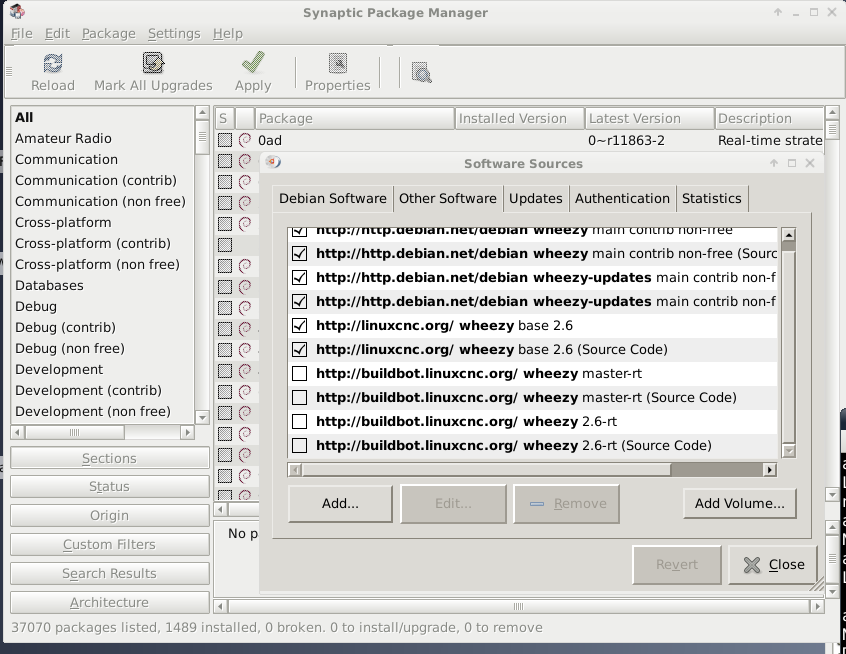
You can do this in the GUI if you want.
System->Synaptic Package Manager
Settings->Repositories
Then click the "Add" button.
This is what mine looks like (as you can see I have set it to an old 2.6 version for testing, but Master is there as an option)
Replied by andypugh on topic Added A axis to XYZ mill, what can be done in AXIS?
Wirewrap wrote: OK,
I will try to setup a Master environment and see what happens.
Maybe I am currently running a too old release?
Linux debianRT 3.4-9-rtai-686-pae #1 SMP PREEMPT Debian 3.4.55-4linuxcnc i686 GNU/Linux
AXIS 2.7.12
That should be fine.
buildbot.linuxcnc.org
Your kernel seems to indicate Wheezy and RTAI, so you would use:
deb buildbot.linuxcnc.org/ wheezy master-rt
deb-src buildbot.linuxcnc.org/ wheezy master-rt
You can do this in the GUI if you want.
System->Synaptic Package Manager
Settings->Repositories
Then click the "Add" button.
This is what mine looks like (as you can see I have set it to an old 2.6 version for testing, but Master is there as an option)
Last edit: 8 years 5 months ago by andypugh.
Please Log in or Create an account to join the conversation.
Time to create page: 0.082 seconds