

- Posts: 102
- Thank you received: 2
Change Tool Cone Size in Axis
6 years 8 months ago #158824
by mmt
Change Tool Cone Size in Axis was created by mmt
Can anyone tell me how to change it?
Thanks,
Kent
Thanks,
Kent
Please Log in or Create an account to join the conversation.

6 years 8 months ago #158849
by cmorley
Replied by cmorley on topic Change Tool Cone Size in Axis
Cone scaling is not exposed to the user - it seems to be based on the extents of xyz.
To change it would require code changes in glcanon.py
Chris
To change it would require code changes in glcanon.py
Chris
Please Log in or Create an account to join the conversation.
6 years 8 months ago #158850
by cmorley
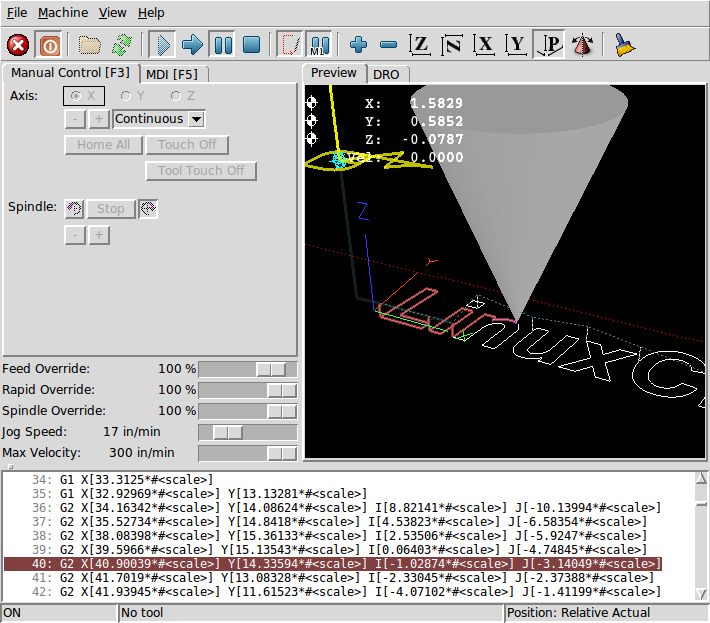
Here is the cone twice the size - is that what you want?
Chris
Replied by cmorley on topic Change Tool Cone Size in Axis
Here is the cone twice the size - is that what you want?
Chris
Please Log in or Create an account to join the conversation.
6 years 7 months ago #159099
by mmt
Replied by mmt on topic Change Tool Cone Size in Axis
I need it maybe 1/4 to 1/8 size possibly even smaller. My entire work envelope is about .060 inch.
Hey chris also did you have a chance to review my code for trying to open a camview window in axis. This thread here
Hey chris also did you have a chance to review my code for trying to open a camview window in axis. This thread here
Please Log in or Create an account to join the conversation.
6 years 7 months ago #159102
by cmorley
Replied by cmorley on topic Change Tool Cone Size in Axis
in python/rs274/glcanon
look for (I added a comment to highlight it) :
Change the *.5 to something smaller
Sorry I looked at the code, couldn't see anything obvious and realized I don't have any system that has linuxcnc installed rather then RIP.
And then forgot. I'll give instructions to do it manually.
Chris
look for (I added a comment to highlight it) :
Code:
if current_tool is None or current_tool.diameter == 0:
if self.canon:
g = self.canon
x,y,z = 0,1,2
cone_scale = max(g.max_extents[x] - g.min_extents[x],
g.max_extents[y] - g.min_extents[y],
g.max_extents[z] - g.min_extents[z],
2 ) * .5 # <- THIS HERE
else:
cone_scale = 1
Change the *.5 to something smaller
Sorry I looked at the code, couldn't see anything obvious and realized I don't have any system that has linuxcnc installed rather then RIP.
And then forgot. I'll give instructions to do it manually.
Chris
Please Log in or Create an account to join the conversation.


6 years 7 months ago #159104
by rodw
Replied by rodw on topic Change Tool Cone Size in Axis
It would be nice if that could be configured by the user maybe as an ini file setting (or GUI setting) in V 2.9.
I usually leave my machine set for an overhead view and I find the cone too big.
I usually leave my machine set for an overhead view and I find the cone too big.
Please Log in or Create an account to join the conversation.
Time to create page: 0.328 seconds