
Linuxcnc 2.9 jogging velocity fluctuations.
- tommylight
-
 Topic Author
- Away
- Moderator
-

Here is a short video.
--
--
Solution found by PCW :
in a terminal type
xset -r
That will get rid of fluctuations.
Thank you PCW
To make that permanent find "startup applications" from the menu, then add and put xset -r in the command field, close and reboot.
-
some more info about this:
In a terminal copy this:
xev | awk -F'[ )]+' '/^KeyPress/ { a[NR+2] } NR in a { printf "%-3s %s\n", $5, $8 }'
then press the arrow keys and pgup/pgdown, notice the numbers shown, now you can add only those numbers to the command so the rest of the keyboard functions as usual:
xset -r key number
example xset -r 113 will disable repeating only for the left arrow key on my keyboard. This has to be done for every key that is used for jogging the machine.
--
--
The same issue was present on the 2.8 RTAI version, and no amount of keyboard changes gets rid of that.
Will do some test on other PC's to check if that is present.
-
Added
This seems to be hardware related, not software. Had the same issue on another PC, but not on many others i have.
Some quick results:
Linux Debian or Mint has no influence, happened on both.
Linuxcnc 2.9 build 1350 on a Dell, no issues.
Linuxcnc 2.9 build 1427 on a Lenovo laptop, no issues.
This older HP core2duo does that with 3 builds, 1610 and two earlier versions.
-
First instinct was to look at the keyboard, as many of you pointed out, but it looks that the keyboard is not causing that as the same keyboards on the other PC's jog happily, and i have tested some 5 or 6 of them with PS/2 or USB connectors, does not change a thing.
This is most probably the "typematic rate' setting that was adjustable in older BIOS, but it is not on the new ones. Same thing happens when holding down any letter key, the speed of printing it on screen fluctuates !!!
Please Log in or Create an account to join the conversation.
- bbsr_5a
- Offline
- Platinum Member
-

- Posts: 544
- Thank you received: 106
Debian iso 2.9
Please Log in or Create an account to join the conversation.
- tommylight
-
Topic Author
- Away
- Moderator
-
I will test that right now.bbsr_5a wrote: if you change the cycle time in TASK just 0,01 up or down it becomes a different behavior
Debian iso 2.9
Please Log in or Create an account to join the conversation.
- tommylight
-
Topic Author
- Away
- Moderator
-
Please Log in or Create an account to join the conversation.
- Mike_Eitel
- Offline
- Platinum Member
-
- Posts: 1018
- Thank you received: 183
Please Log in or Create an account to join the conversation.
- tommylight
-
Topic Author
- Away
- Moderator
-
Nope, stopping systemd-timesyncd and starting (after install) of ntp, does not change the behaviour, so the fluctuations remain.Mike_Eitel wrote: In raspian there seems to be something around time synchronization if not by ntp.
Please Log in or Create an account to join the conversation.
- tommylight
-
Topic Author
- Away
- Moderator
-
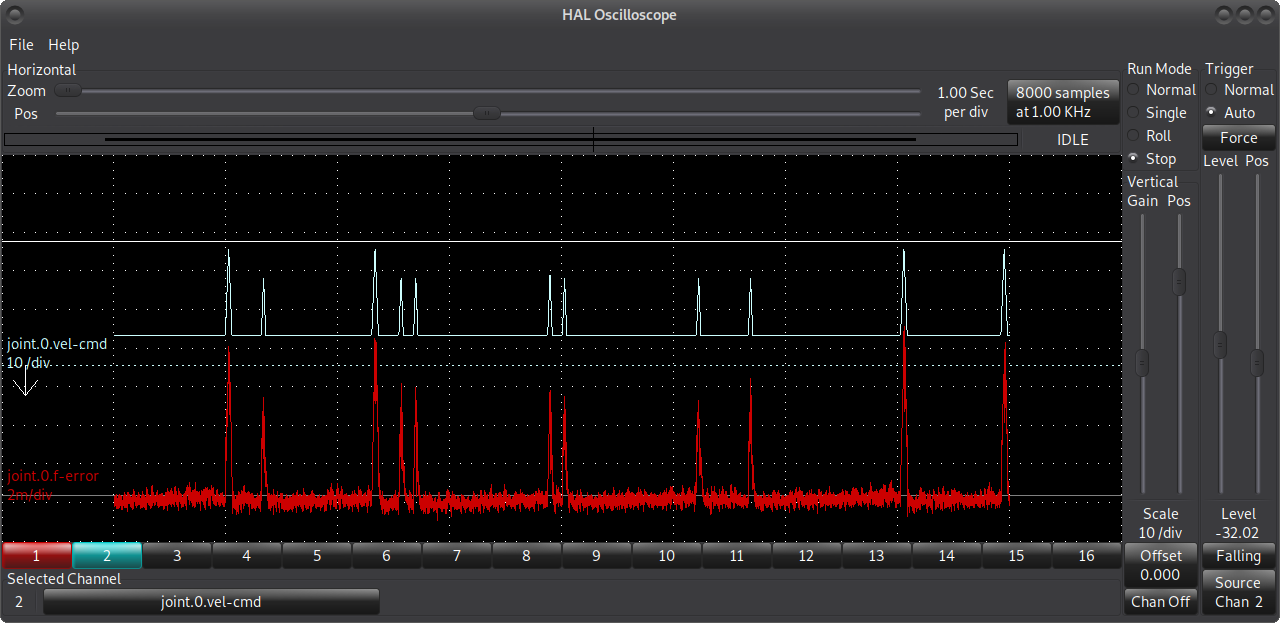
That can also be heard from the motors, and it makes stepper system stall at higher speeds.
Please Log in or Create an account to join the conversation.
- Todd Zuercher
- Offline
- Platinum Member
-
- Posts: 4737
- Thank you received: 1480
Please Log in or Create an account to join the conversation.
- PCW
- Offline
- Moderator
-
- Posts: 17533
- Thank you received: 5334
You could also check to see if the drops in velocity violate the acceleration
constraints (by plotting at a lower time per division and checking the slopes)
Another thing to try is to see if pure hal jogging shows the same issue
(maybe just setp-ing the correct halui pins with halcmd)
BTW I cannot duplicate this with keyboard jogging and LinuxCNC 2.9 here
Please Log in or Create an account to join the conversation.
- tommylight
-
Topic Author
- Away
- Moderator
-
Some quick results:
Linux Debian or Mint has no influence, happened on both.
Linuxcnc 2.9 build 1350 on a Dell, no issues.
Linuxcnc 2.9 build 1427 on a Lenovo laptop, no issues.
This older HP core2duo does that with 3 builds, 1610 and two earlier versions.
-
First instinct was to look at the keyboard, as many of you pointed out, but it looks that the keyboard is not causing that as the same keyboards on the other PC's jog happily, and i have tested some 5 or 6 of them with PS/2 or USB connectors, does not change a thing.
This is most probably the "typematic rate' setting that was adjustable in older BIOS, but it is not on the new ones. Same thing happens when holding down any letter key, the speed of printing it on screen fluctuates !!!
-
Thank you all for continued support, it is very much appreciated.
Marking the topic as solved.
regards,
Tom.
Please Log in or Create an account to join the conversation.