External ESTOP trouble

  • Billy Boy
  • Away
  • New Member
  • New Member
More
02 Sep 2026 19:25 #349231 by Billy Boy
External ESTOP trouble was created by Billy Boy
Hi, 

I am retro-fitting my 1968 Bridgeport Series 1 Papertape NC machine with rpi5/Mesa7i96s/Gecko203v.

I've got everything working pretty well it seems, except for the ESTOP.

I have (and want) an external/manual ESTOP-in button.  It is currently setup Normally Closed and appears to be successfully plumbed through to the GUI, which is to say that the GUI ESTOP button tracks the status of the hardware ESTOP-in button perfectly.

The issue is that my ESTOP-out is no-longer tracking either the GUI ESTOP or the hardware ESTOP-in.  It just stays asserted all the time with no change of state.

To be clear, before I attempted to plumb in the hardware ESTOP-in button, my GUI ESTOP was correctly plumbed through to my ESTOP-out so that it would allow me to disable the steppers.

Aside: I have not been able to find any documentation that really explains how ESTOP is expected to work?  I'm unclear on if I should work with estop_latch or not?  The estop_latch documentation is also pretty thin and does not appear to include any examples for either simple or complex configurations?

Here is my current configuration... (generated by pncconf)
# --- ESTOP-OUT ---
net estop-out  =>     hm2_7i96s.0.ssr.00.out-00
setp hm2_7i96s.0.ssr.00.invert-00 true# --- ESTOP-EXT ---
net estop-ext     <=  hm2_7i96s.0.inm.00.input-03#  ---estop signals---
net estop-out     <=  iocontrol.0.user-enable-out
net estop-ext     =>  iocontrol.0.emc-enable-in

Thanks,

B

Please Log in or Create an account to join the conversation.

  • tommylight
  • tommylight's Avatar
  • Away
  • Moderator
  • Moderator
More
02 Sep 2026 20:50 #349241 by tommylight
Replied by tommylight on topic External ESTOP trouble
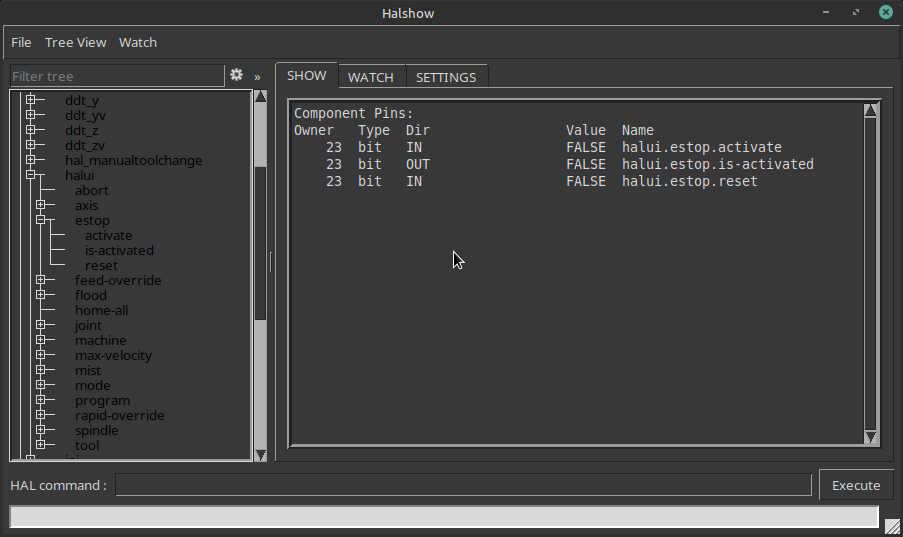
If using Axis GUI (other GUI's may also have this), use the "show hal configuration" from the machine menu to see if the hal stuff is working correctly, on the left side choose the pins to watch on the right side, then toggle e-stop and see what toggles and what not.

Please Log in or Create an account to join the conversation.

  • Billy Boy
  • Away
  • New Member
  • New Member
More
02 Sep 2026 23:32 #349245 by Billy Boy
Replied by Billy Boy on topic External ESTOP trouble
That is a cool trick! Glad to know about Show Hal Configuration. Thanks.

I am using the Axis GUI.

When I watch the ESTOP-ext variable (is variable the correct term here?) I see that it changes state when I toggle the hardware ESTOP. Hal Show Configuration shows yellow when the hardware ESTOP is not active and red when the hardware ESTOP is active. That seems right to me.

When I watch ESTOP-out, it just stays red the whole time regardless of what I do in hardware or software. This seems wrong to me, but it is also consistent with the problem I am having.

Please Log in or Create an account to join the conversation.
  • tommylight
  • tommylight's Avatar
  • Away
  • Moderator
  • Moderator
More
03 Sep 2026 02:19 #349251 by tommylight
Replied by tommylight on topic External ESTOP trouble

Probably needs to be tied to one of those pins, not as you have them to iocontrol as it is for enabling/disabling the machine so not controlled by e-stop.
You can also wire it directly in hal
net estop-ext  =>   hm2_7i96s.0.inm.00.input-03  hm2_7i96s.0.ssr.00.out-00
and it should work fine.
Attachments:

Please Log in or Create an account to join the conversation.

More
03 Sep 2026 03:05 #349256 by rodw
Replied by rodw on topic External ESTOP trouble

Aside: I have not been able to find any documentation that really explains how ESTOP is expected to work?  I'm unclear on if I should work with estop_latch or not?  The estop_latch documentation is also pretty thin and does not appear to include any examples for either simple or complex configurations?
 

Yes, you should use estop-latch if you have an external estop button (or a safety relay but that's another story). Its pretty well described in the man page and there was a hal tutorial about it on the forum.

Please Log in or Create an account to join the conversation.

  • tommylight
  • tommylight's Avatar
  • Away
  • Moderator
  • Moderator
More
03 Sep 2026 04:27 #349264 by tommylight
Replied by tommylight on topic External ESTOP trouble
If your machine has a single or more e-stops wired in series, and no other safety stuff >>>
>>>NO ROD, he does not need or should use e-stop latch.<<<
Having said that, it is nice to learn to use it, and it does what is supposed to do perfectly, but the built in simple e-stop works perfectly fine for simple safety e-stop, as proven by over 20 industrial machines i have retrofitted and having to use e-stop latch on two of them, some over 15 ton heavy.
-
E-stop is extremely important on many machines, on some it is just a nuisance, so not something you go around telling people "just use e-stop latch" and everything is fine.
On machines with brushed DC servos, that e-stop must be wired to "extreme limits" switches, not the same switches the machine uses as limits, so in case a MOS-FET/Transistor shorts and the motor goes full speed, the normal limits will do nothing, hence another set of limits wired to e-stop that cuts all power to servo drives and engages brakes if any.

Please Log in or Create an account to join the conversation.

More
03 Sep 2026 06:45 - 03 Sep 2026 06:51 #349266 by rodw
Replied by rodw on topic External ESTOP trouble
Actually, to be compliant for safety, a machine cannot depend on LinuxCNC to manage the estop. The compliant external safety circuit should be advising LinuxCNC when the an environment is safe via the iocontrol pins. That's how I have set up my last few machines.

And yes, your 15 tonne machine is a perfect case to adopt modern hardware. The servo drive needs to have a Safe Torque Off  (STO) input triggered by the redundant safety circuit so the servos are safely brought to a halt. In an ethercat environment, there is specific modules to manage this. To your Beckhoff EK1100 coupler you need to add a EL6900 safety PLC and a EL1904 that contains 4 compliant safe inputs. In the absence of STO, You can place two force guided relays in series to trigger the normal servo enable/disable. Siemens make  a 5 pole force guided relay and two of these would allow compliant shutdown of 5 servos (4 axis plus spindle) But you  would also need 2 more single pole force guided relays to fire the signal back to LinuxCNC's iocontrol to tell the controller an estop situation existed.

I'm sorry Tommy, but none of those 20 machines you retrofitted are compliant in today's safety concious world.
Last edit: 03 Sep 2026 06:51 by rodw.

Please Log in or Create an account to join the conversation.

  • tommylight
  • tommylight's Avatar
  • Away
  • Moderator
  • Moderator
More
03 Sep 2026 07:21 #349268 by tommylight
Replied by tommylight on topic External ESTOP trouble

I'm sorry Tommy, but none of those 20 machines you retrofitted are compliant in today's safety concious world.

Oh hell....
YES, they are Rod, and you know that for sure as you have read everything i did here, but still you have to protect your convoluted ways by demeaning me and my work.
Yet, you did not read what STO actually does and the explicit warnings that go with it.
-
Rod, i will not continue this discussion any further, please refrain from tainting topics and only reply with actual helpful posts, as you often and for a long time did. Thank you.

Please Log in or Create an account to join the conversation.

More
03 Sep 2026 10:05 #349275 by Todd Zuercher
Replied by Todd Zuercher on topic External ESTOP trouble
Rod, I agree with Tommy, the Linuxcnc E-stop Latch component isn't necessary for estop compliance. Linuxcnc doesn't even need to know about the hard E-stop loop for a machine to be compliant. The soft E-stops in Linuxcnc really have nothing to do with it, and shouldn't (I'm not even sure that it even can) be counted on if you want a compliant E-stop system. It is how the hard E-stop is implemented that makes a machine's E-stop system compliant.
The following user(s) said Thank You: tommylight

Please Log in or Create an account to join the conversation.

More
03 Sep 2026 10:57 #349276 by tuxcnc
Replied by tuxcnc on topic External ESTOP trouble

The issue is that my ESTOP-out is no-longer tracking either the GUI ESTOP or the hardware ESTOP-in.  It just stays asserted all the time with no change of state.
 

I don't have a 7i96s, but out of curiosity I checked it on my 7i92...

You can make two types of mistakes:
1. Electric.
2. Logical.
It looks like you did both.
First, about the electric one. It is true that there are inputs that detect all possible states (high, low and high impedance), but I have only seen such inputs in logic states analyzers. Typically, the input detects only one state or no this state. For example, shorting the input to ground causes the output to change to the opposite state, but it does not matter whether we short the input to Vcc or leave it unconnected anywhere. In this case, if the output of the previous gate is high, closing or opening the serial switch does not change anything because the high state and the high impedance state are interpreted the same.
Now about the logical one. By pressing the serial switch we do not change the input state, we only cut off the signal. And this is not the same as what I explained above.

Your configuration either doesn't work at all, or works in such a way that it cuts off the iocontrol.0.user-enable-out signal. This means that the serial switch does not turn off the machine, it only prevents it from being turned on/off via an icon in the GUI, which is definitely not what you wanted.

Can this be fixed?
Probably yes, but it makes no sense because you have a ready-made and 100% reliable solution - the estop-latch component. A switch between the input and ground is connected there, so that each time it is switched, the input status changes.

This is from my config:
net estop-ext hm2_7i92.0.gpio.027.in => estop-latch.0.fault-in
net estop-reset iocontrol.0.user-request-enable => estop-latch.0.reset
net estop-user-enable iocontrol.0.user-enable-out => estop-latch.0.ok-in
net estop-ok estop-latch.0.ok-out => iocontrol.0.emc-enable-in

And now a few words about the emergency stop switch. As the name suggests, it is used in an emergency situation when we want to stop the machine immediately to prevent it from causing damage.
Sometimes the emergency switch must also disconnect or enable something (for example, turn off the motors and apply the brakes), so simply connecting it to the control program may be insufficient or unreliable (the program may hang or respond with a delay).
You have to remember this, and the bigger the machine, the more seriously that should be treated...

Please Log in or Create an account to join the conversation.

Time to create page: 0.304 seconds
Powered by Kunena Forum
