

- Posts: 19311
- Thank you received: 4655
Forum Header
Forward Step / Backward Step - Vexta Question
8 years 5 months ago #110499
by andypugh
Replied by andypugh on topic Forward Step / Backward Step - Vexta Question
These signals are set up for an external e-stop switch / loop.
Many configs without an external e-stop use a short-circuit:
linuxcnc.org/docs/2.7/html/man/man1/iocontrol.1.html
There are a few ways to handle this. I think you can choose to connect user-enable-out to a parallel port pin then loop it back through an e-stop to emc-enable-in. But that probably isn't necessary in all situations (and there is also the option of using "real" safety relays when it really matters, or a software equivalent ( linuxcnc.org/docs/2.7/html/man/man9/estop_latch.9.html )
Anyway, as things stand with your HAL you probably need to bring pin 13 high to allow the machine out of e-stop.
Code:
net estop-ext <= parport.0.pin-13-in
...
net estop-out <= iocontrol.0.user-enable-out
net estop-ext => iocontrol.0.emc-enable-in
Many configs without an external e-stop use a short-circuit:
Code:
net estop-loop iocontrol.0.user-enable-out iocontrol.0.emc-enable-in
linuxcnc.org/docs/2.7/html/man/man1/iocontrol.1.html
There are a few ways to handle this. I think you can choose to connect user-enable-out to a parallel port pin then loop it back through an e-stop to emc-enable-in. But that probably isn't necessary in all situations (and there is also the option of using "real" safety relays when it really matters, or a software equivalent ( linuxcnc.org/docs/2.7/html/man/man9/estop_latch.9.html )
Anyway, as things stand with your HAL you probably need to bring pin 13 high to allow the machine out of e-stop.
Please Log in or Create an account to join the conversation.

8 years 5 months ago - 8 years 5 months ago #110503
by BrendaEM
Replied by BrendaEM on topic Forward Step / Backward Step - Vexta Question
@Andypugh, I feel bad because I am not used to needing help from other people this much. Thank you.
So, letting Stepconf set up the e-stop pin was not going to be enough....
This creates signal called "net estop-ext " which reads hardware parallel port 13, correct?
It does respond if I remove/add the jumper, as read with the Hal Meter, which only pulls it low like all the other inputs. I don't think I can pull any of the inputs high with the board I am using, but once again I can get a TRUE or FALSE state from the Hal Meter, by jumping/removing the wire bridge. Tomorrow, I will wire a normally closed switch in there.
I thought that the Linuxcnc wanted wants a FALSE state to proceed, meaning that a NC Estop switch hadn't been tripped.
Moving onward...
Does this create a signal called "estop-out" which pretty much gets its input from the GUI button in axis? (via LinuxCNC's subsystem)
If so, then that line not going to help me. I just want my hardware button to toggle the screen button. I want to shut off the estop event so I can enable the screen Power button, so I can turn my machine on.
The next problem I am having is: I don't know if LinuxCNC is going to watch a HAL pin, or if I have figure out how to create an event.
(I would state that this is one of the most complicated things I have ever ran across in computing, and this is coming from someone who set up an OpenFoam case. I also feel I see the power of LinuxCNC and the HAL implementation, and what's doubly frustrating for me is that I want to help by figuring out a way to make it easier, so idiots like me, wouldn't be asking questions like this, and I can't do it yet. Me, feeling better after my release, the reader hopefully forgiving me for it....)
Wouldn't this be enough on it's own? As it's connecting the "estop-ext" signal to Estop watcher.
To read the documentaiton also looks like this is involved somehow, but no one has brought it into play.
I don't understand why I would want to create signal loopback with nothing in between to control it, start it, or stop it. This would seem to lock the system into a state, but I how could I chose which?
Would this above line (from above) still have some control the state of the loop?
Sigh. I am not very confident my machine will be running soon : (
So, letting Stepconf set up the e-stop pin was not going to be enough....
This creates signal called "net estop-ext " which reads hardware parallel port 13, correct?
Code:
net estop-ext <= parport.0.pin-13-in
It does respond if I remove/add the jumper, as read with the Hal Meter, which only pulls it low like all the other inputs. I don't think I can pull any of the inputs high with the board I am using, but once again I can get a TRUE or FALSE state from the Hal Meter, by jumping/removing the wire bridge. Tomorrow, I will wire a normally closed switch in there.
I thought that the Linuxcnc wanted wants a FALSE state to proceed, meaning that a NC Estop switch hadn't been tripped.
Moving onward...
Does this create a signal called "estop-out" which pretty much gets its input from the GUI button in axis? (via LinuxCNC's subsystem)
Code:
net estop-out <= iocontrol.0.user-enable-out
If so, then that line not going to help me. I just want my hardware button to toggle the screen button. I want to shut off the estop event so I can enable the screen Power button, so I can turn my machine on.
The next problem I am having is: I don't know if LinuxCNC is going to watch a HAL pin, or if I have figure out how to create an event.
(I would state that this is one of the most complicated things I have ever ran across in computing, and this is coming from someone who set up an OpenFoam case. I also feel I see the power of LinuxCNC and the HAL implementation, and what's doubly frustrating for me is that I want to help by figuring out a way to make it easier, so idiots like me, wouldn't be asking questions like this, and I can't do it yet. Me, feeling better after my release, the reader hopefully forgiving me for it....)
Wouldn't this be enough on it's own? As it's connecting the "estop-ext" signal to Estop watcher.
Code:
net estop-ext => iocontrol.0.emc-enable-in
To read the documentaiton also looks like this is involved somehow, but no one has brought it into play.
Code:
iocontrol.0.user−request−enable
I don't understand why I would want to create signal loopback with nothing in between to control it, start it, or stop it. This would seem to lock the system into a state, but I how could I chose which?
Code:
net estop-loop iocontrol.0.user-enable-out iocontrol.0.emc-enable-in
Would this above line (from above) still have some control the state of the loop?
Code:
net estop-ext => iocontrol.0.emc-enable-in
Sigh. I am not very confident my machine will be running soon : (
Last edit: 8 years 5 months ago by BrendaEM.
Please Log in or Create an account to join the conversation.
8 years 5 months ago - 8 years 5 months ago #110507
by andypugh
[strike]setp parport.0.pin-13-invert 1[/strike] (Edit) Sorry, input pins use the in-not rather than being explicitly inverted.
 . I think that involves the pin you mention later, iocontrol.0.user-request-enable.
Well, that isn't entirely true, HAL pins are actually shared-memory locations and each HAL module reads its inputs and updates the outputs every time the thread it is in runs (and the modules run in the sequence of the "addf" commands in the HAL file)
If you open an axis sim config, then open Machine -> show HAL configuration you can set up a "watch" in the "watch" tab of the various HAL pins, and you can change their values in the command line at the bottom of the other tab.
However I prefer to issue the commands from a terminal window, because then you can have tab-completion.
Will link your terminal in to the running HAL session, and then you can link and unlink pins "live" and change their values. For example
You could comment-out the current e-stop lines (for the moment) and put in the loop
net estop-loop iocontrol.0.user-enable-out iocontrol.0.emc-enable-in
for testing.
Then you should be able to release e-stop and turn on the machine.
Replied by andypugh on topic Forward Step / Backward Step - Vexta Question
CNC systems are complicated. One of the most complicated overall systems that there are.BrendaEM wrote: I feel bad because I am not used to needing help from other people this much
I am not sure what options you chose. If you selected a parallel port pin to be e-stop then I think it did the right thing.So, letting Stepconf set up the e-stop pin was not going to be enough....
Yes, that is correct.This creates signal called "net estop-ext " which reads hardware parallel port 13, correct?
Code:net estop-ext <= parport.0.pin-13-in
You can invert the sense of the P-Port pin (in stepconf or by editing the HAL) to get this behaviour.I thought that the Linuxcnc wanted wants a FALSE state to proceed, meaning that a NC Estop switch hadn't been tripped.
[strike]setp parport.0.pin-13-invert 1[/strike] (Edit) Sorry, input pins use the in-not rather than being explicitly inverted.
Code:
net estop-ext parport.0.pin-13-in-not
Yes.Does this create a signal called "estop-out" which pretty much gets its input from the GUI button in axis? (via LinuxCNC's subsystem)
Code:net estop-out <= iocontrol.0.user-enable-out
That is certainly possible. I have a machine where the on-screen button is entirely under hardware control. (which isn't actually what I intendedIf so, then that line not going to help me. I just want my hardware button to toggle the screen button. I want to shut off the estop event so I can enable the screen Power button, so I can turn my machine on.
. I think that involves the pin you mention later, iocontrol.0.user-request-enable.Every HAL pin is polled every mS.The next problem I am having is: I don't know if LinuxCNC is going to watch a HAL pin, or if I have figure out how to create an event.
Well, that isn't entirely true, HAL pins are actually shared-memory locations and each HAL module reads its inputs and updates the outputs every time the thread it is in runs (and the modules run in the sequence of the "addf" commands in the HAL file)
Yes. I think that stepconf just creates the estop-out signal in case you want to use it in a different HAL file. As far as I can see it isn't used in your HAL?Wouldn't this be enough on it's own? As it's connecting the "estop-ext" signal to Estop watcher.
Code:net estop-ext => iocontrol.0.emc-enable-in
It might be worth fiddling with the pins in a simulator to see what happens.To read the documentaiton also looks like this is involved somehow, but no one has brought it into play.
Code:iocontrol.0.user−request−enable
If you open an axis sim config, then open Machine -> show HAL configuration you can set up a "watch" in the "watch" tab of the various HAL pins, and you can change their values in the command line at the bottom of the other tab.
However I prefer to issue the commands from a terminal window, because then you can have tab-completion.
Code:
halcmd -kf
Code:
unlinkp iocontrol.0.emc-enable-in
setp iocontrol.0.emc-enable-in 1
setp iocontrol.0.user-request-enable 0
setp iocontrol.0.user-request-enable 1
It seems to work for simulator systems with no hardware. Presumably it's due to the order of execution.I don't understand why I would want to create signal loopback with nothing in between to control it, start it, or stop it. This would seem to lock the system into a state, but I how could I chose which?
I think you are very close.Sigh. I am not very confident my machine will be running soon : (
You could comment-out the current e-stop lines (for the moment) and put in the loop
net estop-loop iocontrol.0.user-enable-out iocontrol.0.emc-enable-in
for testing.
Then you should be able to release e-stop and turn on the machine.
Last edit: 8 years 5 months ago by andypugh.
The following user(s) said Thank You: BrendaEM
Please Log in or Create an account to join the conversation.
8 years 5 months ago - 8 years 5 months ago #110536
by BrendaEM
Replied by BrendaEM on topic Forward Step / Backward Step - Vexta Question
Hi,
Thank you Andypugh, that got the F1/F2 working as advertised. : )
So far, I can enable the GUI and moves things around on the screen.
Though, the machine still doesn't move. I tried setting the step parameters, slowing them down to quite far at 50,000ns and 500,000ns just to be sure.
(I also set up the machine limits, which seem okay, though I still have to decide about homing points, but that seems like I will be able to do that.)
I checked the Halscope, and the xup and xdown signals pulses are being created by the system, but I am unsure if they are going out to the parallel port.
I've been heavily commenting the HALs that I've been uploading, so that they might help someone else.
Thanks you again.
Last edit: 8 years 5 months ago by BrendaEM.
Please Log in or Create an account to join the conversation.
8 years 5 months ago #110538
by andypugh
Replied by andypugh on topic Forward Step / Backward Step - Vexta Question
Do your drives have an "enable" input that needs to be set?
Are the motors free or locked?
Are the motors free or locked?
Please Log in or Create an account to join the conversation.
8 years 5 months ago - 8 years 5 months ago #110541
by BrendaEM
Replied by BrendaEM on topic Forward Step / Backward Step - Vexta Question
Hi Andypugh,
The disabling is not wired in. I usually run these drivers this way, and they have a separate holding current, which can be set fairly low, so they don't get to warm from holding.
The motors are indeed holding.
I might have found an issue. I hooked up the old Rigol 1054z, and I did see pulses coming from the parallel card.
The voltages look okay, not great but okay (I cursored them backwards in the pic, so the voltage is calculated backwards as well.)
The pulse is pretty rounded, but I don't think that's the problem.
However the pulse looks pretty short, not what I asked for.
I am going to try to make the high portion higher, and check a few more pins.
setp stepgen.0.steplen 50000 # High Portion of Step
setp stepgen.0.stepspace 500000 # Low Portion of Step
setp stepgen.0.dirdelay 500000 # Space Between Direction Change
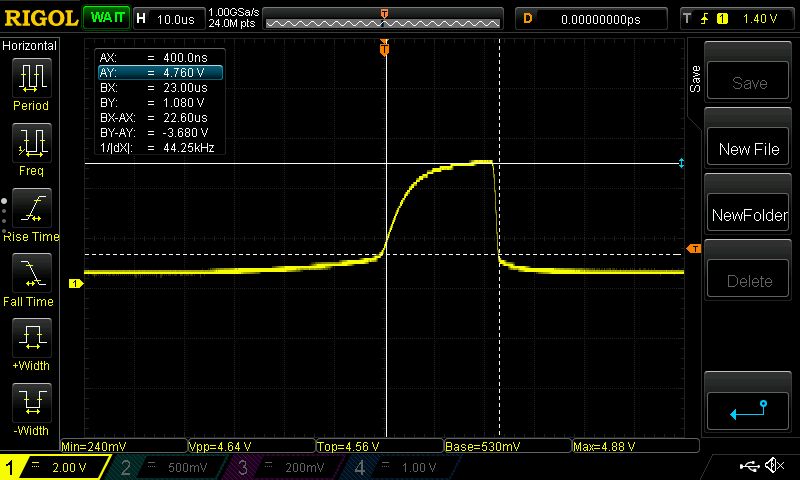
The disabling is not wired in. I usually run these drivers this way, and they have a separate holding current, which can be set fairly low, so they don't get to warm from holding.
The motors are indeed holding.
I might have found an issue. I hooked up the old Rigol 1054z, and I did see pulses coming from the parallel card.
The voltages look okay, not great but okay (I cursored them backwards in the pic, so the voltage is calculated backwards as well.)
The pulse is pretty rounded, but I don't think that's the problem.
However the pulse looks pretty short, not what I asked for.
I am going to try to make the high portion higher, and check a few more pins.
setp stepgen.0.steplen 50000 # High Portion of Step
setp stepgen.0.stepspace 500000 # Low Portion of Step
setp stepgen.0.dirdelay 500000 # Space Between Direction Change
Last edit: 8 years 5 months ago by BrendaEM.
Please Log in or Create an account to join the conversation.
Time to create page: 0.111 seconds