Hi
I bought a couple of arduino boards some while back, originally intending to use one of them for I/O within a machine.
That didn't happen, I solved it another way, but the idea of using one within an intelligent pendant took shape.
Someone else published something on the net about the same, but nothing that went beyond making lights flash was actually released.
This was accompanied by much grumbling about obfustication in Jeff Eplers arduino sample programs; since Jeff was squeezing everything into a couple of bytes using bitwise operators, it probably wasn't very easy to understand.
As I program in C / C++ not python, I just started from scratch.
The arduino has very good and easy to use, high level serial libraries.
It made sense to communicate with it by serial over USB, which meant the linking Linuxcnc module would have to be a userspace one.
This means the module runs in userspace rather than on a real time thread.
serialcon.comp
A userspace component can still create hal pins to connect with other parts of Linuxcnc, it will just be slower, but can use all the standard libraries for port access etc.
The first requirement for a component module is that it is launched from Linuxcnc and linked to the running system. Mine has HAL pins which connect to existing axis pins to fetch the current relative position of each axis.
It transmits these readings in fixed size charactor string packets to the arduino. This approach was chosen because the arduino then needs to display the readings onto a LCD screen and update approx every 1/4 of a second. It can display a string immediately without any extra processing, quite important with such a low powered processor.
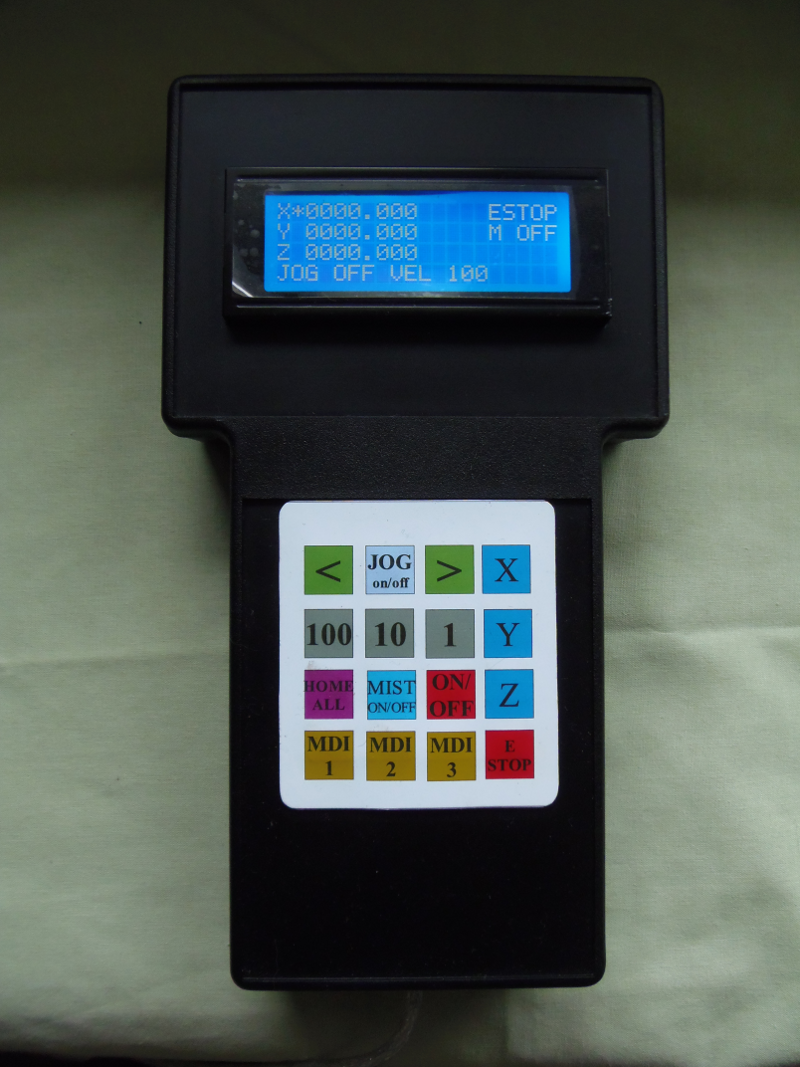
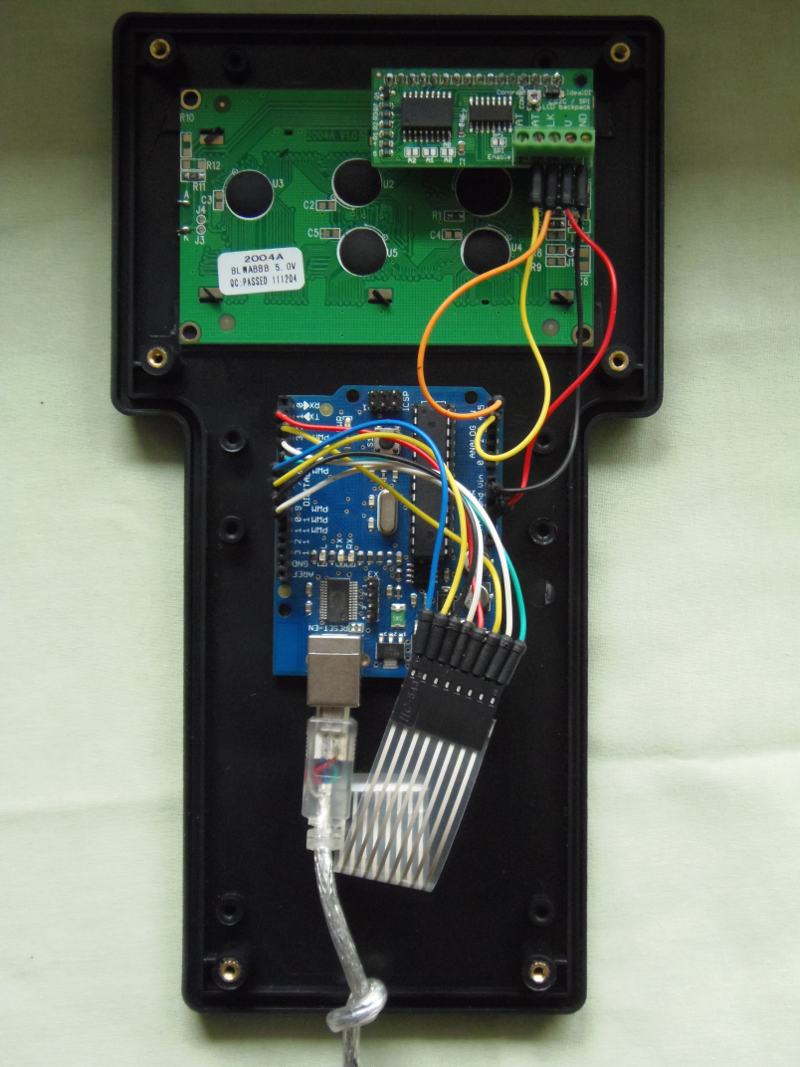
The output side of the pendant takes the form of a 16 key membrane keypad. I made a printed self adhesive mask for it, to change the key designations. The arduino transmits a single charactor code for each key pressed to the serialcon module.
This is processed and translated in the serialcon module, for the main part into system calls, using the halui interface to Linuxcnc.
halui is a very powerful interface, giving access to most of the commands and data necessary to run a GUI.
From the pendant I can set and reset ESTOP, Machine On, Home All, Mist on / off, select axes, select Jog rates, Jog all axes.
It also operates 3 pre-defined MDI commands.
These could be very powerful commands, running entire programs if so desired.
Mine are currently set to simple movement co-ordinates; MDI 1 commands G28, MDI 2 commands G0 X20 Y20 Z20 and MDI 3 another set of test moves.
Code:
/********************************************************************************
serialcon.comp
Serial communications with a userspace component
*********************************************************************************/
component serialcon "This component services the arduino pendant";
pin in float xposition "Receives current position from Xpos";
pin in float yposition "Receives current position from Ypos";
pin in float zposition "Receives current position from Zpos";
option singleton yes; // makes no sense to have more than one of these components running
option userspace yes;
author "ArcEye";
license "GPL";
;;
#include <stdio.h> /* Standard input/output definitions */
#include <stdlib.h>
#include <stdint.h> /* Standard types */
#include <string.h> /* String function definitions */
#include <unistd.h> /* UNIX standard function definitions */
#include <fcntl.h> /* File control definitions */
#include <errno.h> /* Error number definitions */
#include <termios.h> /* POSIX terminal control definitions */
#include <sys/ioctl.h>
#define BAUDRATE B9600
#define DEVICE "/dev/ttyUSB0"
#define _POSIX_SOURCE 1 /* POSIX compliant source */
// predefs of later functions
void sendCommand(char);
int serialport_init();
struct termios toptions;; // port setup
void user_mainloop(void)
{
char buffer[50];
char oldbuffer[50];
char ch;
int fd = serialport_init();
// bzero(oldbuffer, 50);
while(fd != -1)
{
// approx 1/4 sec appears to be optimum period for a steady display with min lag
// may differ on another system with different thread speeds
usleep(250000);
// ************************************************************************************
// IT DOESN'T MATTER IF THERE ARE NO OTHER INSTANCES ie SINGLETON, MUST USE THIS MACRO
// In this case, if you don't, no data gets written
// ************************************************************************************
FOR_ALL_INSTS()
{
// %08.03f = 8 digit including decimal point and sign, leading zeros & 3 digit precision with trailing zeros
bzero(buffer, 50);
sprintf(buffer, "X%08.03fY%08.03fZ%08.03f", xposition, yposition, zposition );
// if(strcmp(oldbuffer, buffer) != 0)
write(fd, buffer, sizeof(buffer));
// strcpy(oldbuffer, buffer);
if(read(fd,&ch,1) == 1) // if command byte read from arduino
sendCommand(ch);
}
}
close(fd);
exit(0);
}
//######################################################################
int serialport_init()
{
int fd;
fd = open(DEVICE, O_RDWR | O_NOCTTY | O_NDELAY);
if (fd == -1)
{
perror("init_serialport: Unable to open port ");
return -1;
}
if (tcgetattr(fd, &toptions) < 0)
{
perror("init_serialport: Couldn't get term attributes");
return -1;
}
speed_t brate = BAUDRATE;
cfsetispeed(&toptions, brate);
cfsetospeed(&toptions, brate);
// 8N1
toptions.c_cflag &= ~PARENB;
toptions.c_cflag &= ~CSTOPB;
toptions.c_cflag &= ~CSIZE;
toptions.c_cflag |= CS8;
// no flow control
toptions.c_cflag &= ~CRTSCTS;
toptions.c_cflag |= CREAD | CLOCAL; // turn on READ & ignore ctrl lines
toptions.c_iflag &= ~(IXON | IXOFF | IXANY); // turn off s/w flow ctrl
toptions.c_lflag &= ~(ICANON | ECHO | ECHOE | ISIG); // make raw
toptions.c_oflag &= ~OPOST; // make raw
// see: http://unixwiz.net/techtips/termios-vmin-vtime.html
toptions.c_cc[VMIN] = 0;
toptions.c_cc[VTIME] = 20;
if( tcsetattr(fd, TCSANOW, &toptions) < 0)
{
perror("init_serialport: Couldn't set term attributes");
return -1;
}
return fd;
}
//###################################################################################
// want these 2 to persist between calls
char selected_axis = '0';
int bJogging = false;
void sendCommand(char ch)
{
char cmdbuff[50];
switch(ch)
{
case 'X':
selected_axis = '0';
break;
case 'Y':
selected_axis = '1';
break;
case 'Z':
selected_axis = '2';
break;
case 'E':
system("halcmd setp halui.estop.activate 1");
system("halcmd setp halui.estop.reset 0");
break;
case 'e':
system("halcmd setp halui.estop.reset 1");
system("halcmd setp halui.estop.activate 0");
break;
case 'M':
system("halcmd setp halui.machine.on 1");
system("halcmd setp halui.machine.off 0");
break;
case 'm':
system("halcmd setp halui.machine.off 1");
system("halcmd setp halui.machine.on 0");
break;
case 'H':
system("halcmd setp halui.home-all 1");
break;
case 'C':
system("halcmd setp halui.mist.on 1");
system("halcmd setp halui.mist.off 0");
break;
case 'c':
system("halcmd setp halui.mist.off 1");
system("halcmd setp halui.mist.on 0");
break;
case '1':
system("halcmd setp halui.mdi-command-10 1");
system("halcmd setp halui.mdi-command-11 0");
system("halcmd setp halui.mdi-command-12 0");
break;
case '2':
system("halcmd setp halui.mdi-command-10 0");
system("halcmd setp halui.mdi-command-11 1");
system("halcmd setp halui.mdi-command-12 0");
break;
case '3':
system("halcmd setp halui.mdi-command-10 0");
system("halcmd setp halui.mdi-command-11 0");
system("halcmd setp halui.mdi-command-12 1");
break;
case '4': // 100mm jog /min
system("halcmd setp halui.jog-speed 100");
break;
case '5': // 10mm jog / min
system("halcmd setp halui.jog-speed 10");
break;
case '6': // 1mm jog / min
system("halcmd setp halui.jog-speed 1");
break;
case 'J':
bJogging = true;
break;
case 'j':
bJogging = false;
sprintf(cmdbuff, "halcmd setp halui.jog.%c.minus 0?", selected_axis );
system(cmdbuff);
sprintf(cmdbuff, "halcmd setp halui.jog.%c.plus 0?", selected_axis );
system(cmdbuff);
break;
case '<':
if(bJogging)
{
sprintf(cmdbuff, "halcmd setp halui.jog.%c.minus 1?", selected_axis );
system(cmdbuff);
bzero(cmdbuff, sizeof(cmdbuff));
}
break;
case '>':
if(bJogging)
{
sprintf(cmdbuff, "halcmd setp halui.jog.%c.plus 1?", selected_axis );
system(cmdbuff);
bzero(cmdbuff, sizeof(cmdbuff));
}
break;
default:
break;
}
}
The Arduino sketch
The arduino sketch first sets up everything we need, which basically is Serial, Keypad and LCD
I used an i2c backpack on the LCD display which allows everything to be done through 2 wires.
You might not need to do this, the keypad takes up 8 inputs and you could redefine some others
But I had one so I used it.
The main loop listens to the serial port and waits for 9 or more bytes, since that is the packet size
The normal packet consists of the axis letter in upper case and a 8 place float value in a string.
As explained previously this enables the arduino to just write the string to the LCD.
The extra code size and time taken to format to a string from a real float number outweighed any extra time spent sending or receiving the packet.
Things can be kept very simple if you stick to strings over the arduino Serial.
After each check for a serial packet a check is made for keypad inputs
If found they are processed and sent as a single charactor command back to the serialcon component.
Code:
#include <SoftwareSerial.h>
#include <Key.h>
#include <Keypad.h>
#include "Wire.h"
#include "LiquidCrystal.h"
// predef
void sendCommand(char);
// Here we define how the keypad is laid out
char padKeys[4][4] = { {'1','2','3','A'}, {'4','5','6','B'}, {'7','8','9','C'}, {'*','0','#','D'} };
byte rowPins[4] = {5, 4, 3, 2}; // The Arduino pins to connect to the row pins of the keypad
byte colPins[4] = {9, 8, 7, 6}; // The Arduino pins to connect to the column pins of the keypad
Keypad ourKeypad = Keypad( makeKeymap(padKeys), rowPins, colPins, 4, 4); // Set up an instance of the keypad
/*
The circuit: using i2c backpack
* 5V to Arduino 5V pin
* GND to Arduino GND pin
* CLK to Analog #5
* DAT to Analog #4
*/
// Connect via i2c, default address #0 (A0-A2 not jumpered)
LiquidCrystal lcd(0);
char XReading[9]; // 0000.000? pos
char YReading[9];
char ZReading[9];
bool bEstop = true;
bool bMist = false;
bool bJog = false;
bool bMachine = false;
void zeroX() { for(int x = 0; x < 9; x++) XReading[x] = 0;}
void zeroY() { for(int x = 0; x < 9; x++) YReading[x] = 0;}
void zeroZ() { for(int x = 0; x < 9; x++) ZReading[x] = 0;}
void setup()
{
// start serial port at 9600 bps:
Serial.begin(9600);
// initialize the digital pin as an output.
// Pin 13 has an LED connected on most Arduino boards:
// pinMode(13, OUTPUT);
// set up the LCD's number of rows and columns:
lcd.begin(20, 4);
// Print a message to the LCD.bool bMachine = false;
lcd.setBacklight(HIGH);
lcd.noAutoscroll();
// set the initial field identifiers
lcd.setCursor(0, 0);
lcd.print("X*");
lcd.setCursor(0, 1);
lcd.print("Y ");
lcd.setCursor(0, 2);
lcd.print("Z ");
zeroX();
zeroY();
zeroZ();
}
void loop()
{
int x;
char ch, ky;
if(Serial.available() >= 9)
{
ch = Serial.read();
switch(ch)
{
case 'X':
while(Serial.available() < 8)
delay(10);
for(x = 0; x < 8; x++)
XReading[x] = Serial.read();
lcd.setCursor(0, 0);
lcd.print("X");
lcd.setCursor(2, 0);
lcd.print(XReading);
zeroX();
break;
case 'Y':
while(Serial.available() < 8)
delay(10);
for(x = 0; x < 8; x++)
YReading[x] = Serial.read();
lcd.setCursor(0, 1);
lcd.print("Y");
lcd.setCursor(2, 1);
lcd.print(YReading);
zeroY();
break;
case 'Z':
while(Serial.available() < 8)
delay(10);
for(x = 0; x < 8; x++)
ZReading[x] = Serial.read();
lcd.setCursor(0, 2);
lcd.print("Z");
lcd.setCursor(2, 2);
lcd.print(ZReading);
zeroZ();
break;
default:
break;
}
}
if((ky = ourKeypad.getKey()) != NO_KEY )
sendCommand(ky);
}
//#############################################################################################################
void sendCommand(char keyPress)
{
switch(keyPress)
{
case 'D': // ESTOP
if(bEstop)
{
// send estop reset
Serial.write('e');
lcd.setCursor(15, 0);
lcd.print(" ");
bMachine = false;
bEstop = false;
}
else
{
// send estop activate & switch machine off too
Serial.write('E');
lcd.setCursor(15, 0);
lcd.print("ESTOP");
bEstop = true;
sendCommand('P'); // M OFF
sendCommand('Q'); // blank MDI display
sendCommand('R'); // JOG OFF
sendCommand('S'); // MIST OFF
}
break;
case '9': // MACHINE ON / OFF
if(bMachine)
{
// send machine off
Serial.write('m');
sendCommand('P'); // M OFF
sendCommand('Q'); // blank MDI display
sendCommand('R'); // JOG OFF
sendCommand('S'); // MIST OFF
}
else
{
// send machine on unless in estop
if(!bEstop)
{
Serial.write('M');
lcd.setCursor(15, 1);
lcd.print("M ON ");
bMachine = true;
}
}
break;
case '7': // HOME ALL
if(!bEstop)
{
lcd.setCursor(16, 3);
lcd.print(" ");
bMist = false;
Serial.write('H');
}
break;
case '*': // MDI 1
if(!bEstop && bMachine)
{
Serial.write('1');
lcd.setCursor(15, 2);
lcd.print("MDI 1");
}
break;
case '0': // MDI 2
if(!bEstop && bMachine)
{
Serial.write('2');
lcd.setCursor(15, 2);
lcd.print("MDI 2");
}
break;
case '#': // MDI 3
if(!bEstop && bMachine)
{
Serial.write('3');
lcd.setCursor(15, 2);
lcd.print("MDI 3");
}
break;
//###########################################
// re-entrant cases to carry out blanking etc
// to save duplicating code
//###########################################
case 'P': // machine off
lcd.setCursor(15, 1);
lcd.print("M OFF");
bMachine = false;
break;
case 'Q': // MDI off for use by estop etc
lcd.setCursor(15, 2); // blank MDI display
lcd.print(" ");
break;
case 'R': // JOG OFF
lcd.setCursor(0, 3);
lcd.print("JOG OFF");
bJog = false;
break;
case 'S': // MIST OFF
lcd.setCursor(16, 3);
lcd.print(" ");
bMist = false;
break;
//###########################################
case '8': // Mist On / OFF
if(bMist)
{
// send mist off
Serial.write('c');
sendCommand('S');
}
else
{
// send mist activate
if(!bEstop && bMachine)
{
Serial.write('C');
lcd.setCursor(16, 3);
lcd.print("MIST");
bMist = true;
}
}
break;
case 'A': // X
Serial.write('X');
lcd.setCursor(1, 0);
lcd.print("*");
lcd.setCursor(1, 1);
lcd.print(" ");
lcd.setCursor(1, 2);
lcd.print(" ");
break;
case 'B': // Y
Serial.write('Y');
lcd.setCursor(1, 0);
lcd.print(" ");
lcd.setCursor(1, 1);
lcd.print("*");
lcd.setCursor(1, 2);
lcd.print(" ");
break;
case 'C': // Z
Serial.write('Z');
lcd.setCursor(1, 0);
lcd.print(" ");
lcd.setCursor(1, 1);
lcd.print(" ");
lcd.setCursor(1, 2);
lcd.print("*");
break;
case '2': // JOG ON /OFF
if(bJog)
{
// send jog off
Serial.write('j');
sendCommand('R'); // JOG OFF
}
else
{
// send jog activate
if(!bEstop && bMachine)
{
Serial.write('J');
lcd.setCursor(0, 3);
lcd.print("JOG ON ");
bJog = true;
}
}
break;
case '4': // 100mm/min
Serial.write('4');
lcd.setCursor(8, 3);
lcd.print("VEL 100");
break;
case '5': // 10mm/min
Serial.write('5');
lcd.setCursor(8, 3);
lcd.print("VEL 010");
break;
case '6': // 1mm/min
Serial.write('6');
lcd.setCursor(8, 3);
lcd.print("VEL 001");
break;
case '1': // Jog minus <
if(bJog)
Serial.write('<');
break;
case '3': // Jog plus >
if(bJog)
Serial.write('>');
break;
default:
break;
}
}
Limitations of the Arduino
I did create many more pins and try to display much more system data originally, but found that the poor little arduino just could not cope.
My priority was axis position display as near to real-time as possible, coupled with the swift re-action to keypad commands.
I found that 1/4 second usleep() pauses in the main LinuxCNC component loop, gave the best performance in terms of steady display updating. Any faster and the arduino could not keep up.
If more data was transmitted, the arduino spent too long processing it and keystrokes went unsent.
I am still working upon a reliable method of only sending data if it differs from the previous packet, thus cutting down needless refreshes, without spending the same amount of time doing the checks.
The whole thing is 'work in progress' to an extent, it may take a while to get it exactly as I want, but it works and shows what can be done
What precisely you do, especially with the keypad commands, is entirely down to you
Enjoy if of use
regards
PS. Remove the spurious ? symbols in the code. It seems to be something added by forum software when I cut and pasted into the post
If you enter something that looks like a HTML markup, it sometimes auto completes it or changes it.
In this case it was the % sign, but & or # might trigger it too in the right context
Code attached here
File Attachment:
File Name:
arduino.zip
File Size:4.42 KB