Hey, sorry if this isn't the spot to ask for help with this issue.
So I've decided to try to build a new controller for my CNC converted lathe. Did some searching around and found remora. I already had an SKR 1.4 Turbo sitting in a closet from an old Voron machine. As far as I remember, I was running Klipper on it, but didn't mess with the bootloader or anything.
So far I have:
grabbed the firmware.bin from the "
github.com/scottalford75/Remora/tree/mai.../FirmwareBin/LPC1769
"
placed it on a freshly flashed FAT32 4GB SD card.
placed my extremely minimal config.txt on the SD card as well
inserted into my SKR 1.4 Turbo and powered it for 10-20 seconds, cut power.
removed the SD card and inserted it into my card read on my windows machine and confirmed the firmware.bin did in fact change to firmware.cur
ejected the SD card, re-inserted it into the SKR 1.4 Turbo.
Powered on my raspberry pi 4 running the: LinuxCNC 2.9.4 Raspberry Pi 4 OS based on Debian Bookworm Raspberry Pi 4 Uspace compatible with Mesa Ethernet and SPI interface boards. Img. from the linuxcnc downloads page.
SPI enabled in the /boot/firmware/config.txt on the raspberry pi 4
SPI and Serial Debugging wired and configured in the SKR 1.4 Turbo config.txt
Hal file for my config is setup minimally to only include two axis's and the rest of the standard Remora hal related stuff. (I may have missed something but I followed the remora documentation as best I could)
Everything "seemed" okay at first, with the SKR not powered, I could launch my probe basic lathe config, but couldn't take it out of e-stop (expected as the hal file has a remora e-stop function that prevents this without an active SPI link)
Boot the SKR up, and launch my probe basic lathe config and I am able to take the machine out of e-stop.
However, this is where I hit a dead end. I went to add my limit switches, I configured my hal file to reflect what was in my SKR's config.txt for those data bits and I was hit with "remora.input.00" does not exist and the obviously probe basic lathe doesn't launch.
I double checked my config.txt to make sure I didn't having any duplicated data bits etc. etc. etc.
That's when I "tried" to watch the serial debug in terminal by adding the serial debug section into my SKR's config.txt.
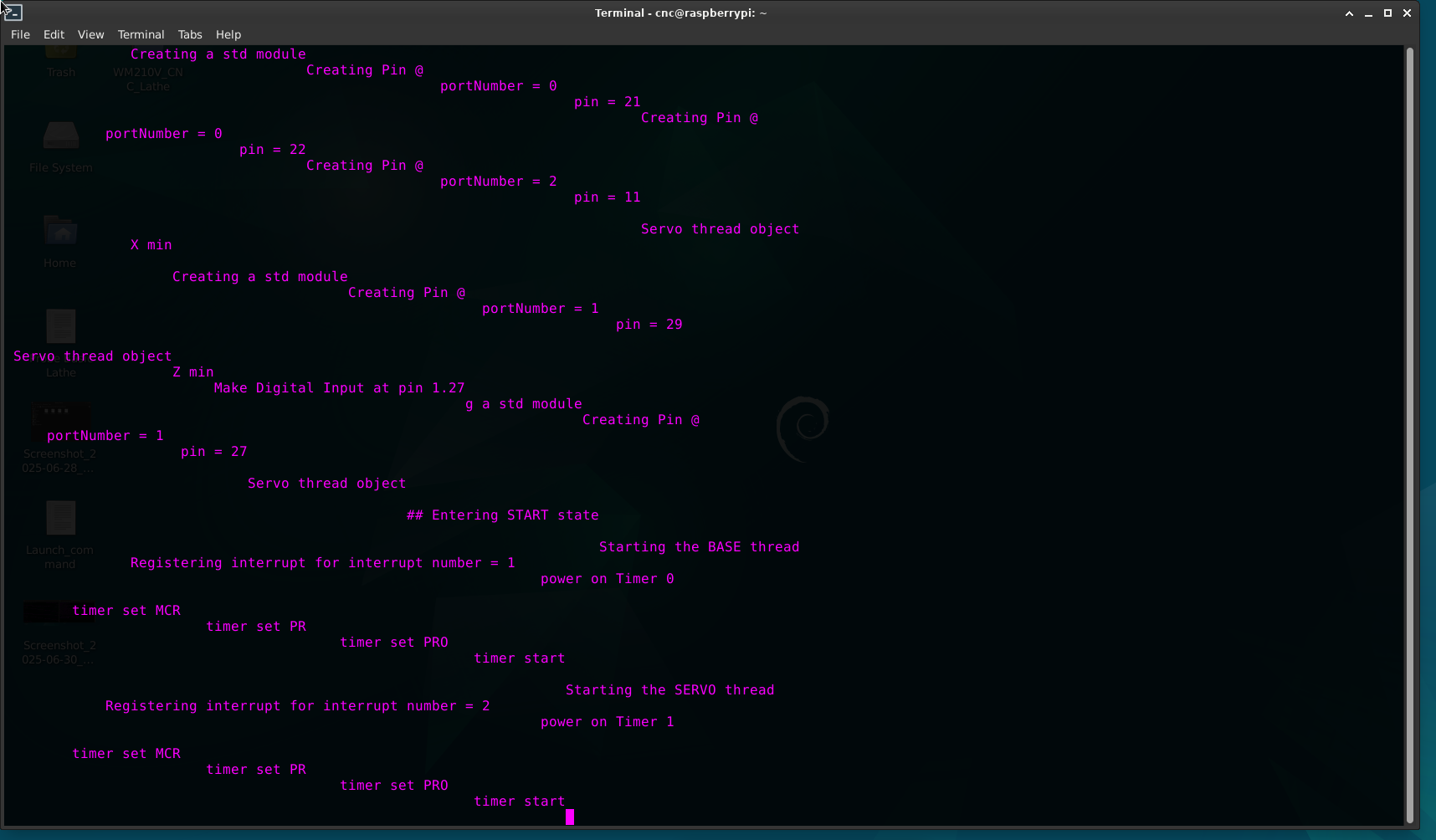
booted the pi 4, ran: screen /dev/serial0 115200 in terminal, started watching the window, powered the SKR up and it showed some things, however, not what I was expecting. It sets up some pins for the limits, but they aren't what I had in my config.txt... not based on the data bits I had selected. I also tried a variation of different data bits etc. and still couldn't get it to load the correct ones. I ended up just updating the hal file to reflect what it DID assign those pins to and probe basic lathe did launch at that point. So I triggered the input pins for both limits on the SKR while monitoring halshow and it's not showing a trigger. I also don't even think my serial debug screen is displaying correctly. I've tried re-flashing the SD card, double checked I was using the correct firmware.bin for my board. triple check my SPI wiring, replaced with shorter wiring, etc. I'm really stumped. I was going to try flashing the default SKR 1.4 turbo firmware and try re-flashing after that, but I was having trouble finding a pre-built firmware.bin to flash and I'm terrible at building from source. Any help with getting this running correctly would be really appreciated. I've spent the last 4 days or so struggling to figure it out on my own. I've attached a copy of my current hal file (it's rough/ not complete yet but it launches)
a copy of my config.txt that is in the root directory of the SKR SD card, and a screenshot of what my serial debug monitoring is showing in screen.
(note: I left the pins for the x and z limit in my hal setup to whatever it created for them based on the serial debug screen because that's what allowed me to launch)
thanks again in advance.