manual-toolchange-with-tool-length-switch sim fails mill upgraded to 2.9.2

More
2 years 4 months ago #304132 by seuchato
Hi all
Not sure this is the right place to post my problem. So, moderators, feel free to move it to the correct place.

I have a small three axis router that has a tool length sensor sitting idle for the last few years. I want to make use of it. So digging up the forums, I came accross "examples/sample-configs/sim/axis/remap/manual-toolchange-with-tool-length-switch" to get familiar with it. This "sim" just worked on 2.8.4. runing debian buster.

I upgraded to bookworm and 2.9.2. Same "manual-toolchange-with-tool-length-switch" does not work anymore. OK, using gitzip, I downloaded the latest source from github , unpacked in a new directory and ran it again, to no avail. I positively verified that all files downloaded *ARE* really the same as on  github .

os: debian bookworm
LCNC: 2.9.2
user/group cnc:users
owner/group of manual-toolchange-with-tool-length-switch: cnc:users
when I run: "linuxcnc manualtoolchange.ini", I get the following errors (full messages attached)
  • [GladeVCP.QTVCP.QT_ISTAT][WARNING]  INI Parsing Error, No DEFAULT_LINEAR_VELOCITY Entry in DISPLAY, Using: 25 (qt_istat.py:532)
    ... couple of similar warnings more
    Guess, as warning only ignorable
  • [GladeVCP][DEBUG]  **** GLADE VCP INFO:    Not a builder project, trying to load as a lib glade project (gladevcp:205)
    Problem?
  • gtk-builder-error-quark: manualtoolchange.ui:13:38 Invalid property: HAL_Table.n_rows (11)
    Problem?
  • **** GLADE VCP ERROR:    With xml file: manualtoolchange.ui : 'gi.repository.Gtk' object has no attribute 'glade'
    Guess, that's where it fails?
  • <commandline>:0: gladevcp exited without becoming ready
    Guess, my guess confirmed?
  • Embeded tab command "halcmd loadusr -Wn gladevcp gladevcp -c gladevcp -d -x 79691919 -u python/gladevcp-handler.py manualtoolchange.ui" exited with error: 1
How can I get this up and running again?
Any help greatly appreciated

greez chris


Please Log in or Create an account to join the conversation.
More
2 years 4 months ago #304155 by Aciera
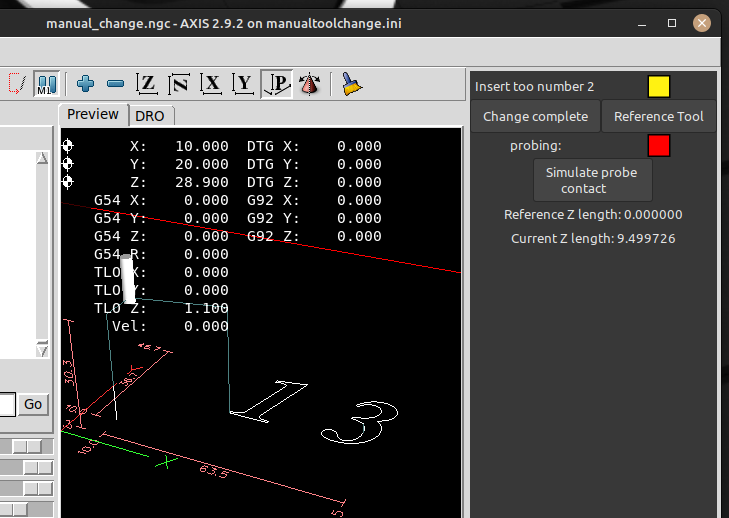
Not sure how far behind the bookworm package is but '/sim/axis/remap/manual-toolchange-with-tool-length-switch' runs for me on a 2.9 build from February:


Maybe updating from the linuxcnc.org sources would help:
linuxcnc.org/docs/2.9/html/getting-start...dating-linuxcnc.html
The following user(s) said Thank You: seuchato

Please Log in or Create an account to join the conversation.

More
2 years 4 months ago - 2 years 4 months ago #304159 by seuchato
Aciera
Thx a ton, sure looks nice!

To my believe, bookworm is as new as can be, so not "behind"
cat /etc/os*
PRETTY_NAME="Debian GNU/Linux 12 (bookworm)"
NAME="Debian GNU/Linux"
VERSION_ID="12"
VERSION="12 (bookworm)"
VERSION_CODENAME=bookworm
ID=debian
HOME_URL=" www.debian.org/ "
SUPPORT_URL=" www.debian.org/support "
BUG_REPORT_URL=" bugs.debian.org/ "

What os are you running?
Greez
chris

PS: opening up manualtoolchange.ui using glade_gtk (version 3.40) says, manualtoolchange.ui is vor GTK 2.16 but this (my) version is only for GTK+ 3. So I should make sure I can start it with glade 3.8 without outdated widgets. This is my translation from German to English. Actual wording will be different, for sure :-)

PPS: as you may notice, I am on 2.9.2 already. So, would you like me to jump to 2.10x? Guess that's not released, yet?
Last edit: 2 years 4 months ago by seuchato.

Please Log in or Create an account to join the conversation.

More
2 years 4 months ago #304161 by Aciera

To my believe, bookworm is as new as can be, so not "behind"

Not quite, what you get with bookworm is what has been sent to the debian organization at the time.  There have been bug fixes in 2.9.2 since that are not in the current bookworm packages.

 So, would you like me to jump to 2.10x? Guess that's not released, yet?

I was suggesting to change the linuxcnc package sources to linuxcnc.org instead of the official debian bookworm repositories. The link I posted should show you how to do that.
The following user(s) said Thank You: seuchato

Please Log in or Create an account to join the conversation.

More
2 years 4 months ago #304169 by seuchato
Aciera
Thanks for iterating. I AM on the latest version.

"cat /etc/apt/sources.list

deb deb.debian.org/debian/ bookworm main contrib
deb deb.debian.org/debian bookworm main non-free-firmware

deb linuxcnc.org/ bookworm 2.9-uspace base "

"linuxcnc
LINUXCNC - 2.9.2"

Guess, I am up to date
greez
chris

Please Log in or Create an account to join the conversation.

More
2 years 4 months ago #304181 by rodw
You are up to date with what is in Debian but it is very old and out of date. Please read heading #7 in the 2.9.2 docss titled "Getting Linuxcnc"  and follow those steps
The following user(s) said Thank You: seuchato

Please Log in or Create an account to join the conversation.

Time to create page: 0.217 seconds
Powered by Kunena Forum
