

- Posts: 21
- Thank you received: 1
Axis errors out when ran from an RDP session
8 years 6 months ago #109573
by stioc
Axis errors out when ran from an RDP session was created by stioc
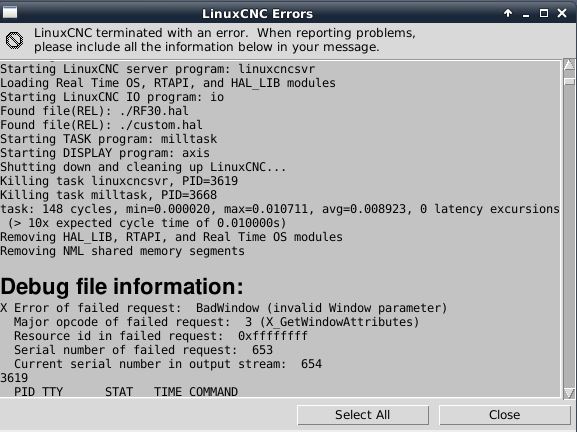
I can RDP in OK and display the desktop, run the mousepad editor, Iceweasel browser etc ok but when I launch Axis it fails. I can post the full error log too but I for now I just grabbed a quick screenshot in case this is a known issue with a simple fix:
Please Log in or Create an account to join the conversation.
- tommylight
-

- Away
- Moderator
-

8 years 6 months ago #109613
by tommylight
Replied by tommylight on topic Axis errors out when ran from an RDP session
Well that "bad window" should explain it, it can not make a window to display the content as it is software emulated, and i am fairly certain that there is no way of running GL apps over RDP.
There is a nice way of running it over SSH that works nicely, so search for it or Andy can mention how if he reads this.
There is a nice way of running it over SSH that works nicely, so search for it or Andy can mention how if he reads this.
Please Log in or Create an account to join the conversation.
8 years 6 months ago - 8 years 6 months ago #109614
by stioc
Replied by stioc on topic Axis errors out when ran from an RDP session
Oh ok, I didn't know it won't run on a remote session like that. SSH would work if you're on a system that runs an X Server. I'll try VNC and see if that works, if not I'll install an X server on my windows box. Thanks.
Last edit: 8 years 6 months ago by stioc.
Please Log in or Create an account to join the conversation.
- tommylight
-
- Away
- Moderator
-
8 years 6 months ago #109617
by tommylight
Replied by tommylight on topic Axis errors out when ran from an RDP session
VNC does work but lags a lot, so not really usable.
Please Log in or Create an account to join the conversation.
8 years 6 months ago #109964
by andypugh
Replied by andypugh on topic Axis errors out when ran from an RDP session
I use SSH. I seem to need to use the -Y flag to make it work.
(But this is using a Mac as the display end, might be different in Windows)
(But this is using a Mac as the display end, might be different in Windows)
Please Log in or Create an account to join the conversation.
8 years 5 months ago #110035
by stioc
Replied by stioc on topic Axis errors out when ran from an RDP session
Yes the -Y just bypasses the security restrictions of X11 but on a windows computer you need an X server. I haven't gotten around to it yet as there are other things taking priority but I'll update once I have it working.
Please Log in or Create an account to join the conversation.
Time to create page: 0.054 seconds