Debian 10 Buster Linuxcnc iso little issues

More
4 years 11 months ago #226480 by bevins
A couple things that bug me about this dist.
Using default with this iso uses xfce and lightdm.

1. nm-tray icon (network-manager) everytime you login it adds a new icon in the tray. I ended up with 9 of them at one point.
Fix: uninstall nm-tray with sudo apt-get remove nm-tray. logout/login reinstall with sudo apt-get install nm-tray.
logout and log back in and you should have one. Then go into MENU: settings/session and startup then select Apllication Autostart tab and remove nm-tray check in checkbox. close, logoout/login and it won't keep adding it.

2. Screen Blanking:  by default it blanks screen every 600 seconds xset says.
type xset q  in a terminal and you should see DPMS is Enabled
to turn this off type in terminal:  cd ~   then sudo pico ./bashrc
edit at the bottom of the file and put these lines in.

export DISPLAY=;0.0
xset s off
xset s noblank
xset -dpms

then ctrl X  then Y  then enter

3. Synaptics won't add repository for master:
Remove the existing linuxcnc repositories, sudo apt-get update and upgrade, mark all linuxcnc for removal and apply.
For me, however I try it wont add the master buildbot repositories.
Edit /etc/apt/sources.list  and add them at the end of the file save and close then sudo apt-get update and sudo apt-get upgrade and you are good to go.


Maybe this will save someone some time......


Please Log in or Create an account to join the conversation.

More
4 years 11 months ago #226482 by bevins
after editing the .bashrc, logging out and back in type xset q and you should see that dpms is disabled.
The following user(s) said Thank You: RotarySMP, tommylight

Please Log in or Create an account to join the conversation.

More
4 years 11 months ago #226486 by bevins
another one; autologin

edit  /etc/lightdm/lightdm.conf
scroll down and uncomment the following lines:

#autologin-user=user1
#autologin-user-timeout=0

add your username to the first one, save file and reboot. IT should automatically log you in.
The following user(s) said Thank You: RotarySMP

Please Log in or Create an account to join the conversation.

More
4 years 11 months ago - 4 years 11 months ago #227093 by RotarySMP
Do you have any idea what I need to do to address the nm-tray failing to open it's editor, please? Here is the behaviour...
forum.linuxcnc.org/26-turning/41498-scha...fit?start=270#227091

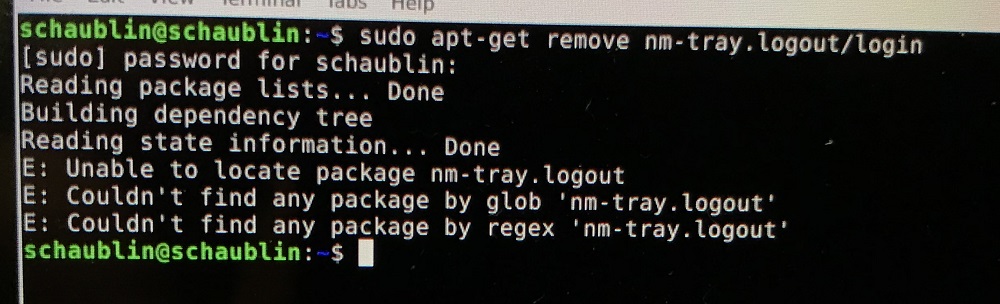
I also have the multiple instances of nm-tray, so I tried your remove, but get:
 
Regards,
Mark
Last edit: 4 years 11 months ago by RotarySMP.

Please Log in or Create an account to join the conversation.

More
4 years 11 months ago #227099 by tommylight
logout login means you log out and in after removing nm-tray so they should not be on the command line, at least i do not think they belong there.
The following user(s) said Thank You: RotarySMP

Please Log in or Create an account to join the conversation.

More
4 years 11 months ago #227106 by bevins
its just sudo apt-get remove nm-tray
 
The following user(s) said Thank You: RotarySMP

Please Log in or Create an account to join the conversation.

Time to create page: 0.235 seconds
Powered by Kunena Forum