

- Posts: 39
- Thank you received: 0
toolchange.ngc error calling subroutine
3 years 6 months ago #268125
by mloser
toolchange.ngc error calling subroutine was created by mloser
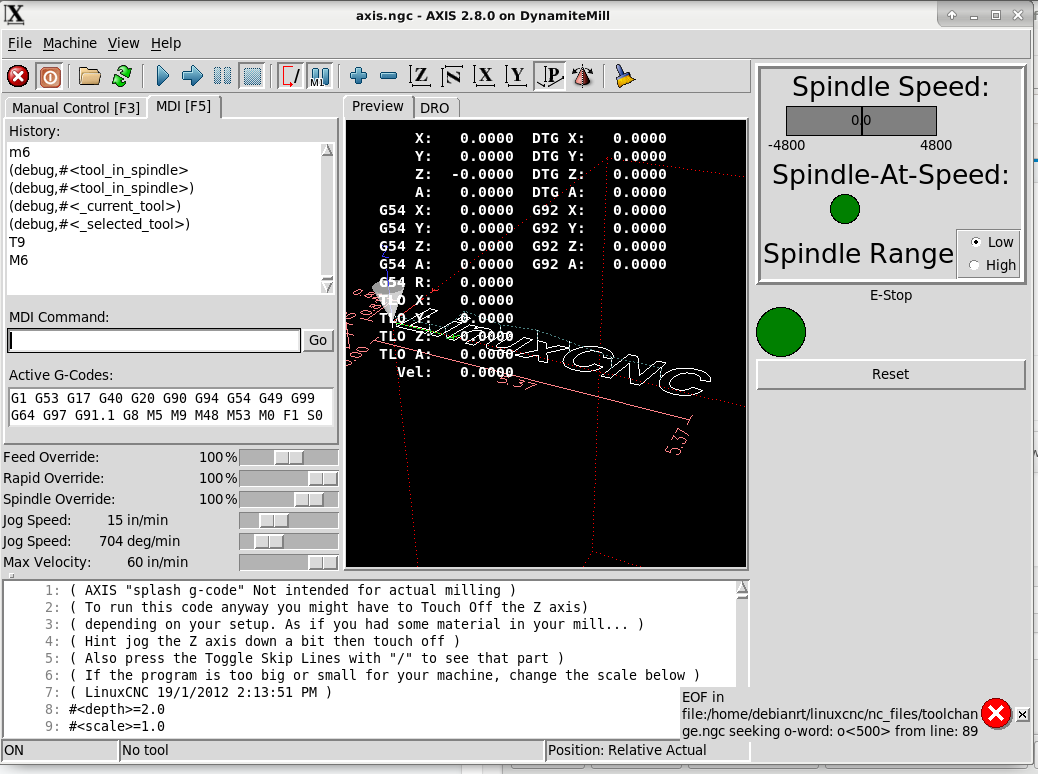
I followed the toolchange.ngc example as best I could. I have the errors all fixed as far as I can tell.I get the attached error message when I run the M6 command. I attached the .hal and .ini filesalong with the toolchange.ngc file. I have the PROGRAM_PREFIX and SUBROUTINE_PATH lines in the .ini file.
Thanks,
Mike
Thanks,
Mike
Please Log in or Create an account to join the conversation.

3 years 6 months ago #268127
by spumco
Replied by spumco on topic toolchange.ngc error calling subroutine
Need the toolchange.ngc file too
The following user(s) said Thank You: tommylight
Please Log in or Create an account to join the conversation.
- tommylight
-

- Away
- Moderator
-

3 years 6 months ago #268135
by tommylight
Replied by tommylight on topic toolchange.ngc error calling subroutine
Seems like inside the above ngc file is a call for 0<500> that does not exist.Need the toolchange.ngc file too
Please Log in or Create an account to join the conversation.
3 years 6 months ago #268141
by mloser
Replied by mloser on topic toolchange.ngc error calling subroutine
Sorry about that. Here is toolchange.ngc
Please Log in or Create an account to join the conversation.
3 years 6 months ago #268173
by mloser
Replied by mloser on topic toolchange.ngc error calling subroutine
o500 is at the top of toolchange.ngc;ARM_IN subroutine
o500 sub
M64 P0 ; Move arm in
G4 .25 ;wait
M65 P0 ;Remove "arm in" signal
M66 P0 L4 Q4 ; Wait for arm-in LS (low)
O501 if [#5399 LT 0]
(abort, failed to move arm in)
O501 endif
o500 endsub
o500 sub
M64 P0 ; Move arm in
G4 .25 ;wait
M65 P0 ;Remove "arm in" signal
M66 P0 L4 Q4 ; Wait for arm-in LS (low)
O501 if [#5399 LT 0]
(abort, failed to move arm in)
O501 endif
o500 endsub
Please Log in or Create an account to join the conversation.
3 years 6 months ago #268181
by spumco
Replied by spumco on topic toolchange.ngc error calling subroutine
Ok, hopefully someone else will come along and correct me as I'm a little hazy on O-words and subroutines.
I think what you want to do is put the subroutines at the end of the file, or rename them and save them as separate files.
Like so:
and in your subroutines folder you have files named:
arm_in
arm_out
unclamp
etc.
In my ATC sequence the functions you've got as subroutines have been remapped as M-codes. My version of your "O500" is "M25", and m25.ngc has been saved in my sub folder. My version of the sequence above would look like this:
Try sticking the subs at the end of the file first. If that doesn't help, try saving each sub function as a separate file.
I think what you want to do is put the subroutines at the end of the file, or rename them and save them as separate files.
Like so:
Code:
o<toolchange> sub
...
o200 IF [#<_selected_tool> GT 0]
o<arm_in> call ;Arm In
o<unclamp> call ; Unclamp
G53 G0 Z #2 'TODO Move Z to tool change clearance height
...
o<toolchange> endsub
and in your subroutines folder you have files named:
arm_in
arm_out
unclamp
etc.
In my ATC sequence the functions you've got as subroutines have been remapped as M-codes. My version of your "O500" is "M25", and m25.ngc has been saved in my sub folder. My version of the sequence above would look like this:
Code:
o<toolchange> sub
...
o200 IF [#<_selected_tool> GT 0]
M25 ;Arm In
M24 ; Unclamp
G53 G0 Z #2 'TODO Move Z to tool change clearance height
...
o<toolchange> endsub
Try sticking the subs at the end of the file first. If that doesn't help, try saving each sub function as a separate file.
The following user(s) said Thank You: mloser
Please Log in or Create an account to join the conversation.
Time to create page: 0.068 seconds