How to call a python script in gcode

More
1 year 9 months ago #318957 by Ehsan_R
I want to create a python script that generates 12 non-repeating random numbers every time the gcode file is run and then stores these numbers in variables that can be used in the rest of the gcode.
It is also necessary to save the values ​​of these variables in a file and to be able to see them in the graphical interface to avoid creating a string of duplicate numbers.

Please Log in or Create an account to join the conversation.

More
1 year 9 months ago - 1 year 9 months ago #318976 by programador
Hello, you can create a custom command it would be M100-M199 User Defined Commands link  linuxcnc.org/docs/html/gcode/m-code.html#mcode:m100-m199  Custom command
In the command file, place the python file to be executed, for example:
Code:
#! /usr/bin/python2.7 import sys print("Hello World")
This way, every time you execute the in the g-code script, it will execute the command desired python file.
Last edit: 1 year 9 months ago by programador.

Please Log in or Create an account to join the conversation.
More
1 year 9 months ago #318977 by Aciera
There are different ways of doing this. I would do it with a python remap.
Here is a basic example that creates an 'M456' command that generates a random number and stores it in a gcode parameter named #<_random_value>.  You would need to add the other stuff with the file.

1. save this as 'toplevel.py' to a folder named 'python' in your configuration folder:
Code:
import remap

2. save this as 'remap.py' tot the folder named 'python' created above:
Code:
from interpreter import * def m456(self):     import random     random_value = random.randint(0, 10000000000)     self.execute("#<_random_value> = %f " % random_value, 1)     yield INTERP_EXECUTE_FINISH

3. Add this line to the [RS274NGC] section of your ini file:
Code:
REMAP = M456  modalgroup=10   python=m456

4. make sure you have  this in your ini file:
Code:
[PYTHON] PATH_PREPEND= python # import the following Python module TOPLEVEL= python/toplevel.py # the higher the more verbose tracing of the Python plugin LOG_LEVEL = 8

5. start your config and run MDI command:
Code:
M456

6. to check the result run MDI command:
Code:
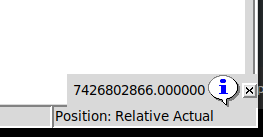
(debug, #<_random_value>)

should return something like this:

 
The following user(s) said Thank You: onceloved, Unlogic, Cant do this anymore bye all, Ehsan_R

Please Log in or Create an account to join the conversation.

More
1 year 9 months ago - 1 year 9 months ago #319299 by Ehsan_R
Thank you very much for your reply
I acted in this way
By running the following program, two txt files will be created, one to save the new numbers created in a specified format and the other to save all the numbers to avoid repetition.
Code:
import random import os existing_filename = 'random_numbers.txt' new_numbers_filename = 'new_random_numbers.txt' if os.path.exists(existing_filename):     with open(existing_filename, 'r') as file:         existing_numbers = [list(map(int, line.split())) for line in file.readlines()] else:     existing_numbers = def generate_new_numbers():     numbers = set()     while len(numbers) < 12:         number = random.randint(0, 20)         numbers.add(number)     return list(numbers) while True:     new_numbers = generate_new_numbers()              if len(new_numbers) == len(set(new_numbers)):               for existing_row in existing_numbers:             if new_numbers == existing_row:                                break         else:               break with open(new_numbers_filename, 'w') as file:     for index, number in enumerate(new_numbers):         file.write(f'#{200 + index}={number}\n') existing_numbers.append(new_numbers) with open(existing_filename, 'w') as file:     for line in existing_numbers:         file.write(' '.join(map(str, line)) + '\n') Then I defined an M code to run the program And in the Gcode file, by calling the file that contains variables #200 to #212, I entered the value of these variables into the Gcode program.  
Last edit: 1 year 9 months ago by Ehsan_R.

Please Log in or Create an account to join the conversation.

More
1 year 9 months ago - 1 year 9 months ago #319301 by Ehsan_R
Now I want to see the created text file in the GUI
How can I do this?
 
Last edit: 1 year 9 months ago by Ehsan_R.

Please Log in or Create an account to join the conversation.

More
1 year 9 months ago #319317 by Ehsan_R

Code:
2. save this as 'remap.py' tot the folder named 'python' created above: [code]from interpreter import * def m456(self):     import random     random_value = random.randint(0, 10000000000)     self.execute("#<_random_value> = %f " % random_value, 1)     yield INTERP_EXECUTE_FINISH
[/code]
 

I changed this part to the code below
Code:
from interpreter import * def m456(self):    import random    import os   existing_filename = 'random_numbers.txt'  if os.path.exists(existing_filename):     with open(existing_filename, 'r') as file:         existing_numbers = [list(map(int, line.split(':')[1].strip().split())) for line in file.readlines()]  else:     existing_numbers = []  def generate_new_numbers():     numbers = list(range(21))     random_numbers = random.sample(numbers, 12)     return list(random_numbers)  while True:     new_numbers = generate_new_numbers()     for existing_row in existing_numbers:         if new_numbers == existing_row:             break     else:         break  index = len(existing_numbers) + 1  existing_numbers.append(new_numbers)  with open(existing_filename, 'w') as file:     for idx, line in enumerate(existing_numbers):         file.write(f"{idx + 1} :  " + ' '.join(map(str, line)) + '\n')         self.execute("#<_random_value_1> = %f " % new_numbers[0], 1)     self.execute("#<_random_value_2> = %f " % new_numbers[1], 1)     self.execute("#<_random_value_3> = %f " % new_numbers[2], 1)     self.execute("#<_random_value_4> = %f " % new_numbers[3], 1)     self.execute("#<_random_value_5> = %f " % new_numbers[4], 1)     self.execute("#<_random_value_6> = %f " % new_numbers[5], 1)     self.execute("#<_random_value_7> = %f " % new_numbers[6], 1)     self.execute("#<_random_value_8> = %f " % new_numbers[7], 1)          yield INTERP_EXECUTE_FINISH

But I get the  error
How do I fix it?

Please Log in or Create an account to join the conversation.

Time to create page: 0.092 seconds
Powered by Kunena Forum
