
XYZA Simulation Install Problems
- currinh
-
 Topic Author
- Offline
- Senior Member
-

Less
More
- Posts: 70
- Thank you received: 3
08 Jun 2026 04:14 #346958
by currinh
XYZA Simulation Install Problems was created by currinh
I've been using CAMotics for some time to visualize and check G-Code programs. I'm now hand coding some simple programs with a fourth axis (XYZA). I've found CAMotics doesn't recognize the rotary axis and also doesn't recognize the global variables used in LinuxCNC, like #<_variable>. So, in a weak moment of delusion, I thought I could install a simulation version of LinuxCNC on my office computer to verify G-Code files. Great idea, I've now spent 2 solid days on it but I'm "almost" there.
I have a VirtualBox on my office computer for Windows/Fusion 360. I've been able to install a simulation mode LinuxCNC 2.9.4 (bookworm) on the Virtual Box. I could not find a four axis (XYZA) simulation version so I've installed this "sim.axis" XYZ version. It simulates fine for 3 axis (XYZ). I'm trying to add a fourth axis to this version. I think this can be done by modifying only the axis.ini file? But, with the mods I've done, the simulation doesn't move in the axis display and then faults with "joint 3 following error".
If anyone has insight in this area I'd sure like to find out what I'm doing wrong. Attached is the axis.ini file with mods noted. If you can offer assistance I'd be grateful. Thank you.
I have a VirtualBox on my office computer for Windows/Fusion 360. I've been able to install a simulation mode LinuxCNC 2.9.4 (bookworm) on the Virtual Box. I could not find a four axis (XYZA) simulation version so I've installed this "sim.axis" XYZ version. It simulates fine for 3 axis (XYZ). I'm trying to add a fourth axis to this version. I think this can be done by modifying only the axis.ini file? But, with the mods I've done, the simulation doesn't move in the axis display and then faults with "joint 3 following error".
If anyone has insight in this area I'd sure like to find out what I'm doing wrong. Attached is the axis.ini file with mods noted. If you can offer assistance I'd be grateful. Thank you.
Please Log in or Create an account to join the conversation.
- grandixximo
-

- Away
- Platinum Member
-

Less
More
- Posts: 339
- Thank you received: 406
08 Jun 2026 05:47 - 08 Jun 2026 05:54 #346961
by grandixximo
Replied by grandixximo on topic XYZA Simulation Install Problems
Your core assumption is unfortunately mistaken, it cannot be done by only modifying the INI file, coresim.hal is only 3 axis, the fourth axis will f-error as it is not receiving any feedback, this is expected behavior.
My suggested quick fix, in your INI file after
HALFILE = cooling.hal
add a connection to a local file like
HALFILE = fouth-axis.hal
then create the file next to the ini file with contents
net Apos joint.3.motor-pos-cmd => joint.3.motor-pos-fb
This will allow you to move your fourth axis, don't expect the rotation to look like what you expect I think A axis is rotation around X, so it might look unexpected depending on what your fourth axis does, but it should work.
If you are looking for a deeper sense of accomplishment, read the coresim.hal file and research and understand what it is doing, and why it is needed, that will get you much more satisfaction and future know how.
My suggested quick fix, in your INI file after
HALFILE = cooling.hal
add a connection to a local file like
HALFILE = fouth-axis.hal
then create the file next to the ini file with contents
net Apos joint.3.motor-pos-cmd => joint.3.motor-pos-fb
This will allow you to move your fourth axis, don't expect the rotation to look like what you expect I think A axis is rotation around X, so it might look unexpected depending on what your fourth axis does, but it should work.
If you are looking for a deeper sense of accomplishment, read the coresim.hal file and research and understand what it is doing, and why it is needed, that will get you much more satisfaction and future know how.
Last edit: 08 Jun 2026 05:54 by grandixximo.
Please Log in or Create an account to join the conversation.
- currinh
-
Topic Author
- Offline
- Senior Member
-
Less
More
- Posts: 70
- Thank you received: 3
08 Jun 2026 19:11 #346979
by currinh
Replied by currinh on topic XYZA Simulation Install Problems
Thank you. This morning I started to realize the *.hal file(s) would be involved. I implemented your fix and it seems to work, at least for jogging and MDI. Thank you.
I'm still getting an "Unexpected real time delay". Also having some trouble with homing as I don't know the configuration in sim.axis. I could likely strip the homing out and fix the real time delay. However, trying to load a program file locks the simulator, infinite loop which eventually crashing VBox.
Poking at the MDI I found another problem for my use. This model rotates the spindle about X and what I need is to rotate the part around X. In the first case the part is fixed to the table and the tool tilts relative to both, tilting the spindle. In the second case the part rotates relative the the table and the XYZ cutting axes are fixed to the table, rotary table on X axis. I'm surprised as I suspect the rotary table on X is much more common that a tilting spindle (as a 5 axis machine would have).
I could likely dig thru the *.hal files and get a 4th axis working, time if the constraint here. But I doubt I could implement a new motion control model. I have it working on my mill but that was developed with PnCconf. I suppose I'll look for another way to test G-Code files.
Thank you for your help.
I'm still getting an "Unexpected real time delay". Also having some trouble with homing as I don't know the configuration in sim.axis. I could likely strip the homing out and fix the real time delay. However, trying to load a program file locks the simulator, infinite loop which eventually crashing VBox.
Poking at the MDI I found another problem for my use. This model rotates the spindle about X and what I need is to rotate the part around X. In the first case the part is fixed to the table and the tool tilts relative to both, tilting the spindle. In the second case the part rotates relative the the table and the XYZ cutting axes are fixed to the table, rotary table on X axis. I'm surprised as I suspect the rotary table on X is much more common that a tilting spindle (as a 5 axis machine would have).
I could likely dig thru the *.hal files and get a 4th axis working, time if the constraint here. But I doubt I could implement a new motion control model. I have it working on my mill but that was developed with PnCconf. I suppose I'll look for another way to test G-Code files.
Thank you for your help.
Please Log in or Create an account to join the conversation.
- currinh
-
Topic Author
- Offline
- Senior Member
-
Less
More
- Posts: 70
- Thank you received: 3
08 Jun 2026 21:52 #346980
by currinh
Replied by currinh on topic XYZA Simulation Install Problems
I found the "locking up" mentioned above was due to a loop counting in the wrong direction. I'm back to the stock XYZ sim.axis version. Other than the "real time delay" at start up this seems to work.
For hand coding, which is what I wanted the simulator for, I'm only doing fourth axis positioning. If I just comment out the A axis moves I can go a long ways towards de-bugging code. Then uncomment and carefully check the A moves before going to the real machine. Should work OK.
But if anyone has a XYZA simulator that works like a mill with rotary table I'd sure like to get a copy. Thank you.
For hand coding, which is what I wanted the simulator for, I'm only doing fourth axis positioning. If I just comment out the A axis moves I can go a long ways towards de-bugging code. Then uncomment and carefully check the A moves before going to the real machine. Should work OK.
But if anyone has a XYZA simulator that works like a mill with rotary table I'd sure like to get a copy. Thank you.
Please Log in or Create an account to join the conversation.
- tommylight
-

- Away
- Moderator
-

Less
More
- Posts: 21980
- Thank you received: 7480
09 Jun 2026 01:19 #346983
by tommylight
Replied by tommylight on topic XYZA Simulation Install Problems
There should be many included 4 axis sims with LinuxCNC, so what am i missing?
Please Log in or Create an account to join the conversation.
- grandixximo
-
- Away
- Platinum Member
-
Less
More
- Posts: 339
- Thank you received: 406
09 Jun 2026 08:44 #346989
by grandixximo
Replied by grandixximo on topic XYZA Simulation Install Problems
axis has 3 axis or 9, I mean 9 will work for testing 4...
Please Log in or Create an account to join the conversation.
- Aciera
-

- Offline
- Administrator
-

Less
More
- Posts: 4818
- Thank you received: 2176
09 Jun 2026 13:42 - 09 Jun 2026 14:44 #346993
by Aciera
Replied by Aciera on topic XYZA Simulation Install Problems
For a preview with A axis work side rotation have a look at the '!' feature that can be used in the [DISPLAY] GEOMETRY setting in the ini file:
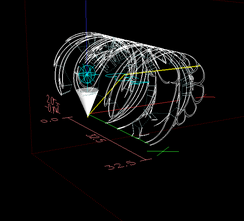
Note that the above option cannot handle offsets.
See this thread for more:
forum.linuxcnc.org/10-advanced-configura...axis-display?start=0
If you want a vismach model to run the code and have the tool path rotating with the part have a look at:
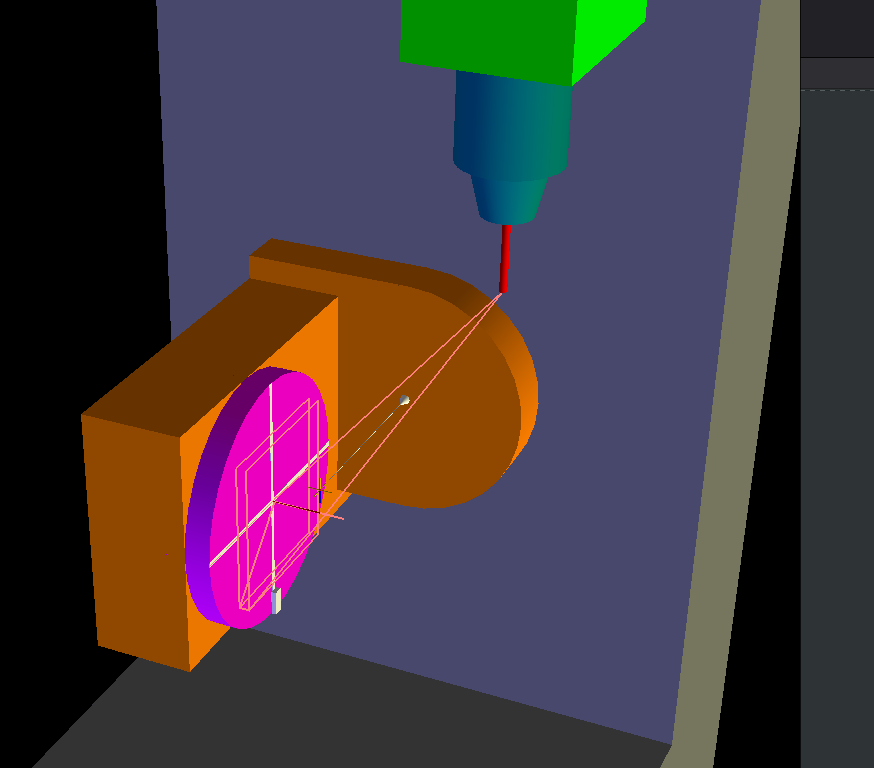
configs/sim/axis/vismach/5axis/table-dual-rotary
This is an XYZAB kinematic with A being a work side rotation (for your purpose you can simply ignore the B axis and the 'TCP' mode):
GEOMETRY = !AXYZNote that the above option cannot handle offsets.
See this thread for more:
forum.linuxcnc.org/10-advanced-configura...axis-display?start=0
If you want a vismach model to run the code and have the tool path rotating with the part have a look at:
configs/sim/axis/vismach/5axis/table-dual-rotary
This is an XYZAB kinematic with A being a work side rotation (for your purpose you can simply ignore the B axis and the 'TCP' mode):
Attachments:
Last edit: 09 Jun 2026 14:44 by Aciera.
The following user(s) said Thank You: grandixximo
Please Log in or Create an account to join the conversation.
- currinh
-
Topic Author
- Offline
- Senior Member
-
Less
More
- Posts: 70
- Thank you received: 3
09 Jun 2026 17:56 #346999
by currinh
Replied by currinh on topic XYZA Simulation Install Problems
YES. I finally found a simulation model, sim.axis.wrapped-rotary, using XYZA. I added the line GEOMETRY = !AXYZ to [DISPLAY] and the axis display acts as it should for a rotary table on A. The "!" did the trick.
I loaded the vismach axis sim model. The axis display has the same problem as above, I'll try the "!" fix which I expect will also work here. The vismach display does function as I expected, moving part with table(s).
These should work for me. Thank you very much for the help. I will have to change units to inches and the envelope size of the machine before my code(s) will run. Also figure out how these simulations implement tool offsets. But thanks to you I see a light at the end of the tunnel.
THANK YOU!
I loaded the vismach axis sim model. The axis display has the same problem as above, I'll try the "!" fix which I expect will also work here. The vismach display does function as I expected, moving part with table(s).
These should work for me. Thank you very much for the help. I will have to change units to inches and the envelope size of the machine before my code(s) will run. Also figure out how these simulations implement tool offsets. But thanks to you I see a light at the end of the tunnel.
THANK YOU!
Please Log in or Create an account to join the conversation.
- currinh
-
Topic Author
- Offline
- Senior Member
-
Less
More
- Posts: 70
- Thank you received: 3
09 Jun 2026 18:05 #347000
by currinh
Replied by currinh on topic XYZA Simulation Install Problems
Tommy: I finally found one as "sim.axis.wrapped-rotary". If you, or others, know of more I'd like to hear of them. But you're not missing anything I see, it's more my search skills that are missing.
Aciera's comment regarding adding a "!" to [DISPLAY] GEOMETRY line implements a rotary axis over a tilting spindle motion. That seems to be the missing link to get "axis" working for my implementation.
Thank you.
Aciera's comment regarding adding a "!" to [DISPLAY] GEOMETRY line implements a rotary axis over a tilting spindle motion. That seems to be the missing link to get "axis" working for my implementation.
Thank you.
Please Log in or Create an account to join the conversation.
- tommylight
-
- Away
- Moderator
-
Less
More
- Posts: 21980
- Thank you received: 7480
10 Jun 2026 02:20 #347007
by tommylight
Replied by tommylight on topic XYZA Simulation Install Problems
Beside what Aciera and you already found, there are several under Vismach section of Axis GUI, gmoccappy and QtDragon have some for 4 and/or 5 axis, WoodPecker also has some.
And, Vismach also shows a machine working in 3D.
And, Vismach also shows a machine working in 3D.
Please Log in or Create an account to join the conversation.
Time to create page: 0.287 seconds