
- Posts: 14
- Thank you received: 0
Newbie: 1st LinuxCNC install, crashes when I run it
- vasiliy
- Topic Author
- Offline
- New Member
-

Less
More
9 years 10 months ago #84621
by vasiliy
Newbie: 1st LinuxCNC install, crashes when I run it was created by vasiliy
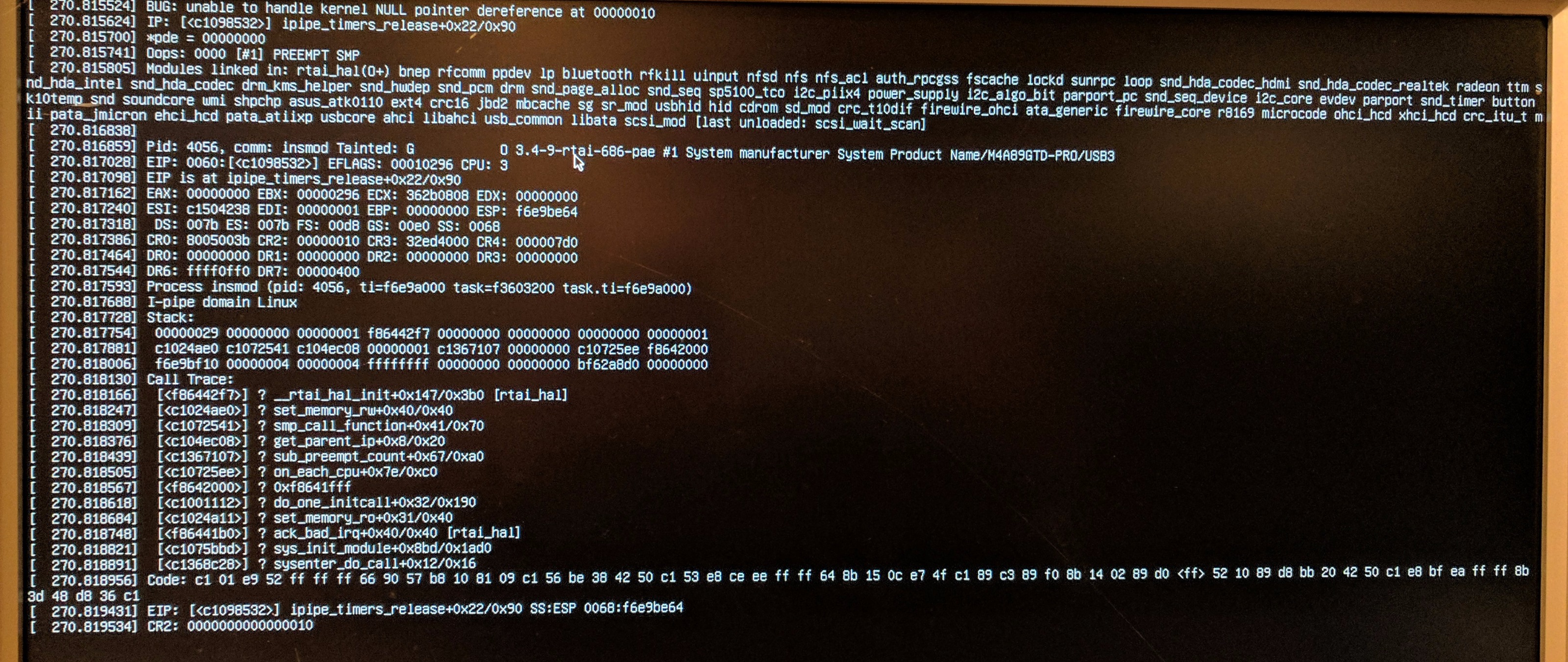
It is my 1st install of LinuxCNC. I just downloaded it and installed fresh. Pretty clueless what to do, so..
I ran LinuxCNC config picker, selected something like stepper sim_inch.
Got some black screen, which looks like crash dump. After reboot I found it in syslog.
Help?!
Thanks for your help in advance
I ran LinuxCNC config picker, selected something like stepper sim_inch.
Got some black screen, which looks like crash dump. After reboot I found it in syslog.
Help?!
Thanks for your help in advance
Please Log in or Create an account to join the conversation.
- tommylight
-

- Away
- Moderator
-

9 years 10 months ago #84624
by tommylight
Replied by tommylight on topic Newbie: 1st LinuxCNC install, crashes when I run it
Can you please attach the linuxcnc error log? Look under "debug info" for errors.
Please Log in or Create an account to join the conversation.
- vasiliy
- Topic Author
- Offline
- New Member
-
Less
More
- Posts: 14
- Thank you received: 0
9 years 10 months ago #84628
by vasiliy
Replied by vasiliy on topic Newbie: 1st LinuxCNC install, crashes when I run it
Where do I find "linuxcnc error log"?
Please Log in or Create an account to join the conversation.
- tommylight
-
- Away
- Moderator
-
9 years 10 months ago #84631
by tommylight
Replied by tommylight on topic Newbie: 1st LinuxCNC install, crashes when I run it
When you start Linuxcnc, if there is an error it will show a screen with informations about what went wrong. Thers you have a button to copy it to clipboard.
Or you can start Linuxcnc from the terminal and see what is going on.
Or you can start Linuxcnc from the terminal and see what is going on.
Please Log in or Create an account to join the conversation.
- vasiliy
- Topic Author
- Offline
- New Member
-
Less
More
- Posts: 14
- Thank you received: 0
9 years 10 months ago #84636
by vasiliy
Replied by vasiliy on topic Newbie: 1st LinuxCNC install, crashes when I run it
There was no button, just black text screen. I got a picture of it. Could not do much more
Please Log in or Create an account to join the conversation.
- tommylight
-
- Away
- Moderator
-
9 years 10 months ago #84638
by tommylight
Replied by tommylight on topic Newbie: 1st LinuxCNC install, crashes when I run it
That looks like a computer problem. Did you check the downloaded image with md5sum?
I would advice to check the image and do a new install, or even beter make a bootable usb with that image and start it from usb so you can test it.
That might just work.
I would advice to check the image and do a new install, or even beter make a bootable usb with that image and start it from usb so you can test it.
That might just work.
Please Log in or Create an account to join the conversation.
- PCW
- Offline
- Moderator
-
Less
More
- Posts: 17533
- Thank you received: 5334
9 years 10 months ago #84639
by PCW
Replied by PCW on topic Newbie: 1st LinuxCNC install, crashes when I run it
That's a linux kernel oops (crash)
This may indicate bad or incompatible hardware of some kind
What hardware is this running on?
Have you run memtest86 to verify the the memory is OK?
This may indicate bad or incompatible hardware of some kind
What hardware is this running on?
Have you run memtest86 to verify the the memory is OK?
Please Log in or Create an account to join the conversation.
- vasiliy
- Topic Author
- Offline
- New Member
-
Less
More
- Posts: 14
- Thank you received: 0
9 years 10 months ago #84648
by vasiliy
Replied by vasiliy on topic Newbie: 1st LinuxCNC install, crashes when I run it
So I downloaded and verified ISO image again. Burned it. reinstalled. Same thing
Memtest86 from boot menu passes. It surely takes some loooong time to complete.
Problem still persists.
I have ASUS M4A49GTD PRO/USB3 motherboard with AMD Phenom II CPU.
3GB of memory.
Let me know if there is a command I can use to dump more hardware info.
Memtest86 from boot menu passes. It surely takes some loooong time to complete.
Problem still persists.
I have ASUS M4A49GTD PRO/USB3 motherboard with AMD Phenom II CPU.
3GB of memory.
Let me know if there is a command I can use to dump more hardware info.
Please Log in or Create an account to join the conversation.
- andypugh
- Offline
- Moderator
-
Less
More
- Posts: 19311
- Thank you received: 4655
9 years 10 months ago #84726
by andypugh
Replied by andypugh on topic Newbie: 1st LinuxCNC install, crashes when I run it
uname -a
on the machine would let us see if we recognise the kernel, but really that should be right with a liveCD install.
Does the latency test (in the CNC manu) run without crashing? What numbers?
on the machine would let us see if we recognise the kernel, but really that should be right with a liveCD install.
Does the latency test (in the CNC manu) run without crashing? What numbers?
Please Log in or Create an account to join the conversation.
- vasiliy
- Topic Author
- Offline
- New Member
-
Less
More
- Posts: 14
- Thank you received: 0
9 years 10 months ago - 9 years 10 months ago #84756
by vasiliy
Latency test was failing too. But, I got a break through of sorts.
Was monkeying around BIOS settings. Disabled "ACPI APIC support" which described as "Include ACPI APIC table pointer to RSDT pointer list" (All of that has no meaning to me). And it started to work.
Latency test shows:
Not sure how to read those
When I try to run LinuxCNC Config Picker and select "by interface" / parport / stepper / sim_inch, I get some window show, titled "axis.ngs - AXIS 2.7.0 on LinuxCNC-HAL-STEP-SIM". It also shows some error message in bottom right corner: "RTAPI: ERROR: Unexpected realtime delay on task 1. This Message will only display ones per session. Run the Latency Test and resolve before continuing."
So I'm guessing my latencies are not so good.
Replied by vasiliy on topic Newbie: 1st LinuxCNC install, crashes when I run it
Linux debian 3.4-9-rtai-686-pae #1 SMP PREEMPT Debian 3.4.55-4linuxcnc i686 GNU/Linuxandypugh wrote: uname -a
on the machine would let us see if we recognise the kernel, but really that should be right with a liveCD install.
andypugh wrote: Does the latency test (in the CNC manu) run without crashing? What numbers?
Latency test was failing too. But, I got a break through of sorts.
Was monkeying around BIOS settings. Disabled "ACPI APIC support" which described as "Include ACPI APIC table pointer to RSDT pointer list" (All of that has no meaning to me). And it started to work.
Latency test shows:
| Max Interval (ns) | Max Jitter (ns) | |
| Servo thread (1ms) | 1200846 | 202526 |
| Base thread (25m-s) | 215668 | 190716 |
When I try to run LinuxCNC Config Picker and select "by interface" / parport / stepper / sim_inch, I get some window show, titled "axis.ngs - AXIS 2.7.0 on LinuxCNC-HAL-STEP-SIM". It also shows some error message in bottom right corner: "RTAPI: ERROR: Unexpected realtime delay on task 1. This Message will only display ones per session. Run the Latency Test and resolve before continuing."
So I'm guessing my latencies are not so good.
Last edit: 9 years 10 months ago by vasiliy.
Please Log in or Create an account to join the conversation.
Time to create page: 0.130 seconds