
- Posts: 532
- Thank you received: 327
Complete HOW-TO Linux Mint 18.1 32/64 RTAI or PREEMPT with RIP install or deb
9 years 9 months ago #86952
by Joco
Replied by Joco on topic Complete HOW-TO Linux Mint 18.1 32/64 PREEMPT with RIP or build a .deb
Post #1 worked like a charm for me and that's doing it on a Core2Duo iMac. 
Nice and clear instructions - well done and thanks.
Nice and clear instructions - well done and thanks.
Please Log in or Create an account to join the conversation.
- cncnoob1979
- Topic Author
- Offline
- Platinum Member
-

Less
More
- Posts: 403
- Thank you received: 75
9 years 9 months ago #86964
by cncnoob1979
Replied by cncnoob1979 on topic Complete HOW-TO Linux Mint 18.1 32/64 PREEMPT with RIP or build a .deb
Glad it helped you! You're welcome.
Please Log in or Create an account to join the conversation.

9 years 8 months ago - 9 years 8 months ago #87300
by jtc
Replied by jtc on topic Complete HOW-TO Linux Mint 18.1 32/64 RTAI or PREEMPT with RIP install or deb
Today I have time to test this tutorial, work great
I'm using linux mint 18.1 cinnamon 64bit
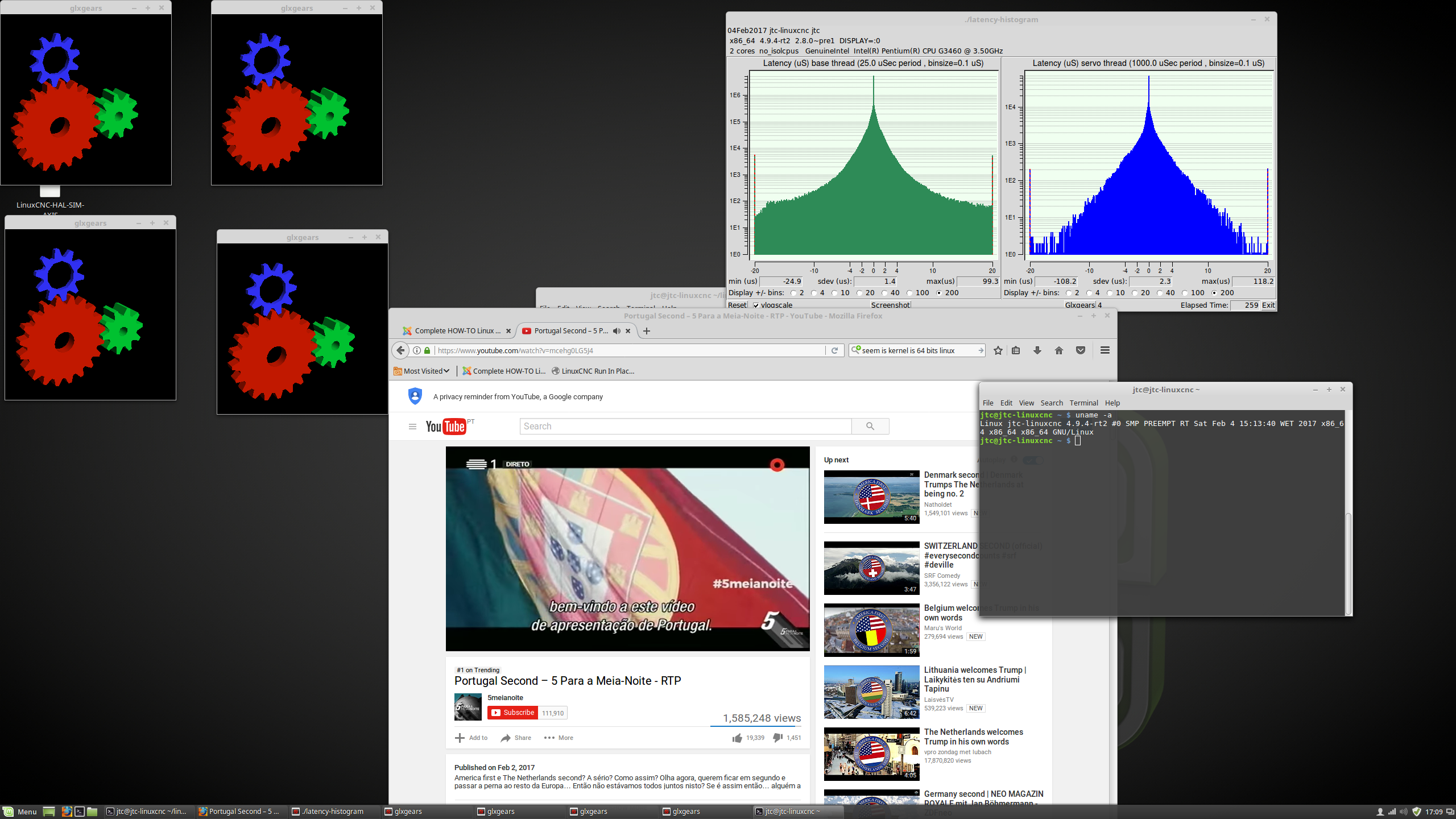
I'm with a 2560x1440 resolution on on board graphics(msi h97m-e35). the latency could be better but at least I can get a decent resolution.
Two minor bugs for now, Axis starts minimized, and no shortcut for linuxcnc on the start menu, next time I compile linux I will "make install menus" and see if it solves this.
João
I'm using linux mint 18.1 cinnamon 64bit
I'm with a 2560x1440 resolution on on board graphics(msi h97m-e35). the latency could be better but at least I can get a decent resolution.
Two minor bugs for now, Axis starts minimized, and no shortcut for linuxcnc on the start menu, next time I compile linux I will "make install menus" and see if it solves this.
João
Last edit: 9 years 8 months ago by jtc.
Please Log in or Create an account to join the conversation.
- cncnoob1979
- Topic Author
- Offline
- Platinum Member
-
Less
More
- Posts: 403
- Thank you received: 75
9 years 8 months ago #87302
by cncnoob1979
Replied by cncnoob1979 on topic Complete HOW-TO Linux Mint 18.1 32/64 RTAI or PREEMPT with RIP install or deb
There is a fix for the menus issue. If you read at the bottom of the post it tells you how to get the menu to show.
Glad you found the tutorial helpful!
Thanks!
Glad you found the tutorial helpful!
Thanks!
Please Log in or Create an account to join the conversation.
9 years 8 months ago #87945
by Reinhard
Replied by Reinhard on topic Complete HOW-TO Linux Mint 18.1 32/64 RTAI or PREEMPT with RIP install or deb
at debian add-apt-repository (for highlab.com) does not import the key.
So I had to issue these commands too:
Then the apt-get update succeeds without errors.
So I had to issue these commands too:
Code:
wget http://highlab.com/rtai/2017-01-10/dists/archive-signing-key.gpg
apt-key add archive-signing-key.gpg
The following user(s) said Thank You: cncnoob1979
Please Log in or Create an account to join the conversation.

9 years 8 months ago #88021
by cut2cut
Replied by cut2cut on topic Complete HOW-TO Linux Mint 18.1 32/64 PREEMPT with RIP or build a .deb
Hi,
I'm having an issue getting past one of the very first steps of POST 1. When I run the Synaptic Package Manager I am not seeing a way to "check for removal" the two items you suggest that need removal : virtualbox and ndiswrapper. For instance "virtualbox"'s only option available is to "Mark for Installation". Can you provide more detail as to how these two items are to be removed ? Or if they are not installed, perhaps they do not need removal anyway ?
Also, later when I get to the point of selecting the "Fully Preemptable Kernel" in the Processor types and Features section there was no option to select a "fully preemptable Kernel". Perhaps this was due to using the 64bit Mint installer instead of the 32 bit version you used ? Now, I am starting from scratch with a fresh install of the 32 bit version of Linux Mint but have yet to get past the above issue with regard to removing virtualbox and ndiswrapper. I think I'll try anyway, without removing those two (uninstalled) items but would like this addressed so other "noobs" can benefit from my early frustration.
Jake
Please Log in or Create an account to join the conversation.
Time to create page: 0.155 seconds