
Debian 12 - Bookworm Live installer ISO for linuxcnc (x86_64)

More
2 years 11 months ago #285366 by rodw
The ISO in the first post  has been updated today. The live installer that built the ISO is now the official Linuxcnc one.
There were some changes today and it might take a few days to the linuxcnc downloads page.
The main change is that linuxcnc 2.9.1 is installed from the Linuxcnc repositories so normal apt-get updates are supported.
This should be the final  version. 

Please read the first post as it has a few changes
 
The following user(s) said Thank You: JohnnyCNC

Please Log in or Create an account to join the conversation.

More
2 years 11 months ago #286511 by JohnnyCNC

The download in the first post has now ben updated as a fork of the Official Linuxcnc live installer DVD.
Please reread the first post as its changed.
I have sent a pull request to linuxcnc
github.com/LinuxCNC/linuxcnc-live-build/pull/27

After installation, to get the latest 2.9 version of linuxcn just type
Code:
sudo apt update sudo apt upgrade Mods might like to sticky this.   
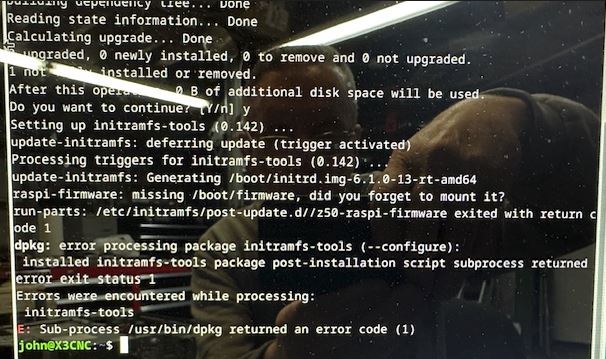
I am getting an error when I run the "sudo apt upgrade"
dpkg: error processing package initramfs-tools (--configure):
 installed initramfs-tools package post-installation script subproces returned
error exit status 1
Errors were encountered while processing:
 initramfs-tools
E: Sub-process /usr/bin/dpkg returned an error code (1)

I believe that I have installed this in the past without getting this error.   Any ideal what is going on here?
Thanks
John

Please Log in or Create an account to join the conversation.

More
More
2 years 11 months ago #286514 by JohnnyCNC

Please Log in or Create an account to join the conversation.
More
2 years 11 months ago #286516 by rodw
From the screen dump, you have nothing to upgrade so its not an issue.
That raspberry pi bug seems to have returned to Debian core code. Its not a Linuxcnc thing
SO the error is in relation to the  rasppi firmware it thinks is installed.

try sudo apt remove z50-raspi-firmware or
sudo apt remove raspi-firmware if it errors

Please Log in or Create an account to join the conversation.

More
2 years 11 months ago #286518 by JohnnyCNC
That is why I downloaded the ISO again. I thought I might have grabbed the wrong one.

I tied both commands and they both error.

john@X3CNC:~$ sudo apt remove z50-raspi-firmware
[sudo] password for john:
Reading package lists... Done
Building dependency tree... Done
Reading state information... Done
E: Unable to locate package z50-raspi-firmware

john@X3CNC:~$ sudo apt remove raspi-firmware
Reading package lists... Done
Building dependency tree... Done
Reading state information... Done
The following packages will be REMOVED:
raspi-firmware
0 upgraded, 0 newly installed, 1 to remove and 0 not upgraded.
1 not fully installed or removed.
After this operation, 22.8 MB disk space will be freed.
Do you want to continue? [Y/n] y
(Reading database ... 161782 files and directories currently installed.)
Removing raspi-firmware (1.20220830+ds-1) ...
Setting up initramfs-tools (0.142) ...
update-initramfs: deferring update (trigger activated)
Processing triggers for initramfs-tools (0.142) ...
update-initramfs: Generating /boot/initrd.img-6.1.0-13-rt-amd64
raspi-firmware: missing /boot/firmware, did you forget to mount it?
run-parts: /etc/initramfs/post-update.d//z50-raspi-firmware exited with return code 1
dpkg: error processing package initramfs-tools (--configure):
installed initramfs-tools package post-installation script subprocess returned error exit status 1
Errors were encountered while processing:
initramfs-tools
E: Sub-process /usr/bin/dpkg returned an error code (1)


I then tried this and it did not error:

john@X3CNC:~$ sudo apt purge raspi-firmware
Reading package lists... Done
Building dependency tree... Done
Reading state information... Done
The following packages will be REMOVED:
raspi-firmware*
0 upgraded, 0 newly installed, 1 to remove and 0 not upgraded.
1 not fully installed or removed.
After this operation, 0 B of additional disk space will be used.
Do you want to continue? [Y/n] y
Setting up initramfs-tools (0.142) ...
update-initramfs: deferring update (trigger activated)
(Reading database ... 161754 files and directories currently installed.)
Purging configuration files for raspi-firmware (1.20220830+ds-1) ...
Processing triggers for initramfs-tools (0.142) ...
update-initramfs: Generating /boot/initrd.img-6.1.0-13-rt-amd64

That seemed to do it.
Thanks Rod.

Please Log in or Create an account to join the conversation.

Time to create page: 0.207 seconds
Powered by Kunena Forum
