
- Posts: 1
- Thank you received: 0
installing of linxcnc
- rines_design
- Topic Author
- Offline
- New Member
-

Less
More
3 months 6 days ago #348107
by rines_design
installing of linxcnc was created by rines_design
Hello everyone,I am new to LinuxCNC and would like some help with the installation process.I would appreciate guidance on:
- The recommended Linux distribution for the latest version of LinuxCNC.
- The installation steps for a fresh system.
- Any prerequisites or dependencies I should install.
- Common installation issues and how to resolve them.
- Whether there are any official installation guides or tutorials for beginners.
Please Log in or Create an account to join the conversation.
- tommylight
-

- Away
- Moderator
-

3 months 6 days ago #348112
by tommylight
Replied by tommylight on topic installing of linxcnc
Please Log in or Create an account to join the conversation.
- andypugh
- Offline
- Moderator
-
Less
More
- Posts: 19311
- Thank you received: 4655
3 months 6 days ago #348127
by andypugh
(more details here linuxcnc.org/docs/stable/html/getting-st...etting-linuxcnc.html )
Download this file: www.linuxcnc.org/iso/linuxcnc_2.9.10-amd64.hybrid.iso
Write the file to a USB stick (at least 4.1GB) using the instructions here:
linuxcnc.org/docs/stable/html/getting-st...to_a_bootable_device
Plug the USb drive into the PC, turn it on, go to the BIOS screen (often by pressing F2 during boot) to set the USB stick as the boot device, save and exit, then follow the on-screen instructions.
Replied by andypugh on topic installing of linxcnc
On a fresh system:
- The installation steps for a fresh system.
(more details here linuxcnc.org/docs/stable/html/getting-st...etting-linuxcnc.html )
Download this file: www.linuxcnc.org/iso/linuxcnc_2.9.10-amd64.hybrid.iso
Write the file to a USB stick (at least 4.1GB) using the instructions here:
linuxcnc.org/docs/stable/html/getting-st...to_a_bootable_device
Plug the USb drive into the PC, turn it on, go to the BIOS screen (often by pressing F2 during boot) to set the USB stick as the boot device, save and exit, then follow the on-screen instructions.
Please Log in or Create an account to join the conversation.
- tuxcnc
- Offline
- Elite Member
-

Less
More
- Posts: 299
- Thank you received: 57
3 months 6 days ago #348132
by tuxcnc
It is a good idea to manually partitioning and don't use swap partitions (Modern computers with at least few GB of RAM not need swap.)
LinuxCNC without CAD/CAM fits in 8 GB of disk space, 16 GB is better, more will be never used.
You should chose some lightweight window manager. (I preffered xfce4.)
LinuxCNC installation is simple, but I don't have the time or inclination to check now whether I made a mistake, but it should be like this:
I don't remember the apt-get build-dep should be before or after ./debian/configure, the rest seems be properly.
Replied by tuxcnc on topic installing of linxcnc
Download latest Debian iso image (current 13.6) and install. (There are thousands guides at the net.)The recommended Linux distribution for the latest version of LinuxCNC.
It is a good idea to manually partitioning and don't use swap partitions (Modern computers with at least few GB of RAM not need swap.)
LinuxCNC without CAD/CAM fits in 8 GB of disk space, 16 GB is better, more will be never used.
You should chose some lightweight window manager. (I preffered xfce4.)
LinuxCNC installation is simple, but I don't have the time or inclination to check now whether I made a mistake, but it should be like this:
Code:
apt-get update
apt-get dist-upgrade
apt-get install linux-image-rt-amd64
reboot
apt-get install build-essential dpkg-dev git
cd ~
git clone https://github.com/LinuxCNC/linuxcnc.git linuxcnc-source
cd linuxcnc-source
./debian/configure
apt-get build-dep .
dpkg-checkbuilddeps
# install unmet dependencies if some
dpkg-buildpackage -b --jobs=12
cd ..
apt-get install ./linuxcnc-doc-en_2.10.0~pre1_all.deb
apt-get install ./linuxcnc-uspace_2.10.0~pre0_amd64.deb
apt-get install ./linuxcnc-uspace-dev_2.10.0~pre0_amd64.deb
Please Log in or Create an account to join the conversation.
- tommylight
-
- Away
- Moderator
-
3 months 5 days ago #348154
by tommylight
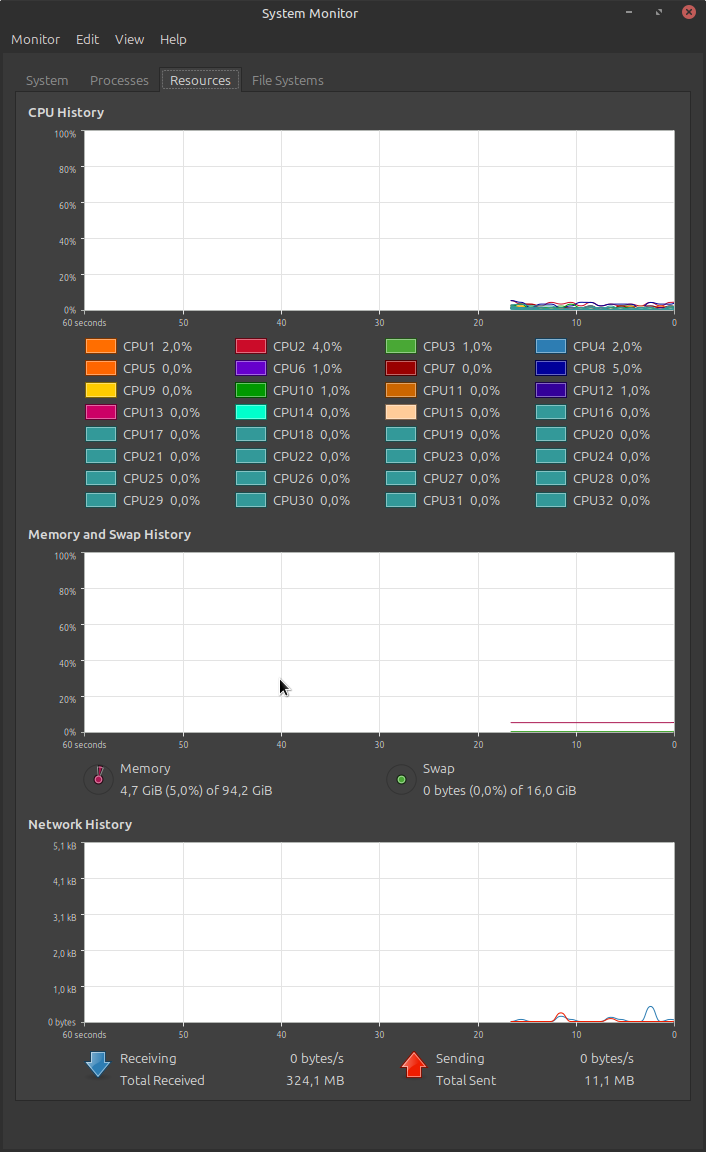
After you are done counting the CPU's, see lower on the right side, 16GB of swap space on a PC with 96GB of RAM memory. On laptops with 16GB of RAM i do 32GB of swap always.
Although you are correct that usually it is not needed, if you do need it and do not have it the PC will slow to a crawl.
Replied by tommylight on topic installing of linxcnc
It is a good idea to manually partitioning and don't use swap partitions (Modern computers with at least few GB of RAM not need swap.)
After you are done counting the CPU's, see lower on the right side, 16GB of swap space on a PC with 96GB of RAM memory. On laptops with 16GB of RAM i do 32GB of swap always.
Although you are correct that usually it is not needed, if you do need it and do not have it the PC will slow to a crawl.
Please Log in or Create an account to join the conversation.
- tuxcnc
- Offline
- Elite Member
-
Less
More
- Posts: 299
- Thank you received: 57
3 months 5 days ago #348156
by tuxcnc
The more memory, the more Linux reserves for disk buffers, which does not mean that it needs that much, or that it actually uses that much.
With 8 GB RAM, the Linux installer creates a 1 GB swap partition, which won't help anyway.
If you really need swap space, you can use a file instead of a separate partition.
The problem is basically that modern Linux stores the existence of the swap partition in multiple places, not just in the /etc/fstab file as it used to be, which results in the system failing to boot when the swap partition is deleted...
Replied by tuxcnc on topic installing of linxcnc
It's not like that...
After you are done counting the CPU's, see lower on the right side, 16GB of swap space on a PC with 96GB of RAM memory. On laptops with 16GB of RAM i do 32GB of swap always.
Although you are correct that usually it is not needed, if you do need it and do not have it the PC will slow to a crawl.
The more memory, the more Linux reserves for disk buffers, which does not mean that it needs that much, or that it actually uses that much.
With 8 GB RAM, the Linux installer creates a 1 GB swap partition, which won't help anyway.
If you really need swap space, you can use a file instead of a separate partition.
The problem is basically that modern Linux stores the existence of the swap partition in multiple places, not just in the /etc/fstab file as it used to be, which results in the system failing to boot when the swap partition is deleted...
Please Log in or Create an account to join the conversation.
- NWE
-

- Offline
- Elite Member
-
Less
More
- Posts: 271
- Thank you received: 84
3 months 5 days ago - 3 months 5 days ago #348158
by NWE
Replied by NWE on topic installing of linxcnc
Sure you can delete your swap space and most stuff will just work. Some apps won't. SSD space is so much cheaper than 10yr. ago, do your pc a favor and allow at least 1GB swap space if you have to cut it short.
Long ago I read swap kills SSDs so I carefully removed swap from all my linux os. After a long time I learned some of my mysterious linux troubles were swap related (because I used no swap space). It seems most stuff just works without swap, but it hurts stability a little, even if you have more RAM than you'll ever use. Also, nowadays the OS and SSDs are designed in ways so swap is not so hard on SSDs.
Nowadays I make sure to provide swap space bigger than my RAM. Like 64GB RAM and 90GB swap. This allows hibernation to work. Then I completely disable hibernation because I don't like it. go figure. image missing /media/kunena/emoticons/wink.png
Long ago I read swap kills SSDs so I carefully removed swap from all my linux os. After a long time I learned some of my mysterious linux troubles were swap related (because I used no swap space). It seems most stuff just works without swap, but it hurts stability a little, even if you have more RAM than you'll ever use. Also, nowadays the OS and SSDs are designed in ways so swap is not so hard on SSDs.
Nowadays I make sure to provide swap space bigger than my RAM. Like 64GB RAM and 90GB swap. This allows hibernation to work. Then I completely disable hibernation because I don't like it. go figure. image missing /media/kunena/emoticons/wink.png
That works, also. I recall seeing that automatically created on one of my Linux boxes a while back upon install. I don't remember which distro it was. Might have been Ubuntu.tuxcnc post=348156
If you really need swap space, you can use a file instead of a separate partition.
Last edit: 3 months 5 days ago by NWE.
The following user(s) said Thank You: tommylight
Please Log in or Create an account to join the conversation.
- rodw
-

- Offline
- Platinum Member
-

3 months 5 days ago #348160
by rodw
Replied by rodw on topic installing of linxcnc
I don't know why this conversation got down to swap drives and building LinuxCNC from source. None of that is necessar. LinuxCNC only requires 4-8 gb RAM but I think I'd lean towards 8 gb today.
Just follow Andy's directions, accept the default partitions and have fun. After all he is the Release Manager so should know a thing or two about how to install his releases!
Just follow Andy's directions, accept the default partitions and have fun. After all he is the Release Manager so should know a thing or two about how to install his releases!
The following user(s) said Thank You: NWE
Please Log in or Create an account to join the conversation.
- tuxcnc
- Offline
- Elite Member
-
Less
More
- Posts: 299
- Thank you received: 57
3 months 5 days ago #348171
by tuxcnc
The latest version of LinuxCNC is compiled from latest sources...
Compilation of LinuxCNC is easy, easier than many things you have to do after.
Where see you problem?
I agree, many things are not neccessary, for example PC computer is not neccessary, and LinuxCNC is not neccessary, you could use GRBL controolled from smartphone, but this is not the subject of the topic.
Modern Linux needs 2 (two) gigabytes of RAM.
Some programs needs more, but LinuxCNC not belongs to them.
My computer I use to write this post (Ryzen 5 with 16 GB of RAM running Firefox on Debian 13.6 with xfce4) uses now 2 GB of RAM, and believe me, this may be less if less memory is installed.
I see, we are on different levels of using Linux...
For me copying whole partition to other disk is normal and often used procedure. I don't need unwanted dependiences, like system not starts without swap partion leaved on old disk. I not need any swap partition, because Linux can use for swap file placed on any mounted partition, and you can turn on/off swap when you need (swapon/swapoff).
Swap file is correct solution, swap partition is a prayer for troubles...
You may use defaults installation settings, and it should works, but why you deny talk about how do it better?
Replied by tuxcnc on topic installing of linxcnc
The author of topic asked for the latest version of LinuxCNC.I don't know why this conversation got down to swap drives and building LinuxCNC from source. None of that is necessar. LinuxCNC only requires 4-8 gb RAM but I think I'd lean towards 8 gb today.
The latest version of LinuxCNC is compiled from latest sources...
Compilation of LinuxCNC is easy, easier than many things you have to do after.
Where see you problem?
I agree, many things are not neccessary, for example PC computer is not neccessary, and LinuxCNC is not neccessary, you could use GRBL controolled from smartphone, but this is not the subject of the topic.
Modern Linux needs 2 (two) gigabytes of RAM.
Some programs needs more, but LinuxCNC not belongs to them.
My computer I use to write this post (Ryzen 5 with 16 GB of RAM running Firefox on Debian 13.6 with xfce4) uses now 2 GB of RAM, and believe me, this may be less if less memory is installed.
I see, we are on different levels of using Linux...
For me copying whole partition to other disk is normal and often used procedure. I don't need unwanted dependiences, like system not starts without swap partion leaved on old disk. I not need any swap partition, because Linux can use for swap file placed on any mounted partition, and you can turn on/off swap when you need (swapon/swapoff).
Swap file is correct solution, swap partition is a prayer for troubles...
You may use defaults installation settings, and it should works, but why you deny talk about how do it better?
Please Log in or Create an account to join the conversation.
Time to create page: 0.068 seconds