installing of linxcnc

More
3 months 5 days ago #348107 by rines_design
Hello everyone,I am new to LinuxCNC and would like some help with the installation process.I would appreciate guidance on:
  • The recommended Linux distribution for the latest version of LinuxCNC.
  • The installation steps for a fresh system.
  • Any prerequisites or dependencies I should install.
  • Common installation issues and how to resolve them.
  • Whether there are any official installation guides or tutorials for beginners.
Thank you for your assistance!

Please Log in or Create an account to join the conversation.

More
3 months 5 days ago #348112 by tommylight

Please Log in or Create an account to join the conversation.

More
3 months 4 days ago #348127 by andypugh
Replied by andypugh on topic installing of linxcnc

  • The installation steps for a fresh system.
On a fresh system:
(more details here  linuxcnc.org/docs/stable/html/getting-st...etting-linuxcnc.html )
Download this file:  www.linuxcnc.org/iso/linuxcnc_2.9.10-amd64.hybrid.iso
Write the file to a USB stick (at least 4.1GB) using the instructions here:
linuxcnc.org/docs/stable/html/getting-st...to_a_bootable_device
Plug the USb drive into the PC, turn it on, go to the BIOS screen (often by pressing F2 during boot) to set the USB stick as the boot device, save and exit, then follow the on-screen instructions. 
 

Please Log in or Create an account to join the conversation.

More
3 months 4 days ago #348132 by tuxcnc
Replied by tuxcnc on topic installing of linxcnc

The recommended Linux distribution for the latest version of LinuxCNC.
 
Download latest Debian iso image (current 13.6) and install. (There are thousands guides at the net.)
It is a good idea to manually partitioning and don't use swap partitions (Modern computers with at least few GB of RAM not need swap.)
LinuxCNC without CAD/CAM fits in 8 GB of disk space, 16 GB is better, more will be never used.
You should chose some lightweight window manager. (I preffered xfce4.)
LinuxCNC installation is simple, but I don't have the time or inclination to check now whether I made a mistake, but it should be like this:
Code:
apt-get update apt-get dist-upgrade apt-get install linux-image-rt-amd64 reboot apt-get install build-essential dpkg-dev git cd ~ git clone https://github.com/LinuxCNC/linuxcnc.git linuxcnc-source cd linuxcnc-source ./debian/configure apt-get build-dep . dpkg-checkbuilddeps # install unmet dependencies if some dpkg-buildpackage -b --jobs=12 cd .. apt-get install ./linuxcnc-doc-en_2.10.0~pre1_all.deb apt-get install ./linuxcnc-uspace_2.10.0~pre0_amd64.deb apt-get install ./linuxcnc-uspace-dev_2.10.0~pre0_amd64.deb
I don't remember the apt-get build-dep should be before or after ./debian/configure, the rest seems be properly.

Please Log in or Create an account to join the conversation.

More
3 months 4 days ago #348154 by tommylight
Replied by tommylight on topic installing of linxcnc

It is a good idea to manually partitioning and don't use swap partitions (Modern computers with at least few GB of RAM not need swap.)


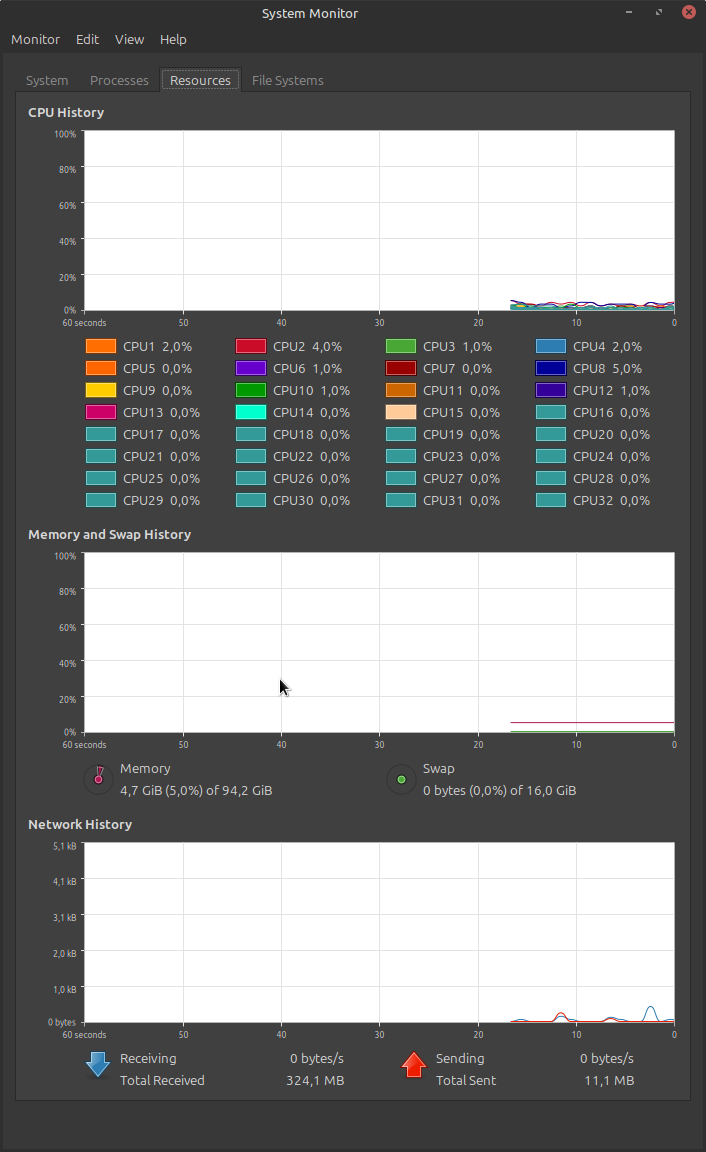
After you are done counting the CPU's, see lower on the right side, 16GB of swap space on a PC with 96GB of RAM memory. On laptops with 16GB of RAM i do 32GB of swap always.
Although you are correct that usually it is not needed, if you do need it and do not have it the PC will slow to a crawl.

Please Log in or Create an account to join the conversation.

More
3 months 4 days ago #348156 by tuxcnc
Replied by tuxcnc on topic installing of linxcnc

After you are done counting the CPU's, see lower on the right side, 16GB of swap space on a PC with 96GB of RAM memory. On laptops with 16GB of RAM i do 32GB of swap always.
Although you are correct that usually it is not needed, if you do need it and do not have it the PC will slow to a crawl.

It's not like that...
The more memory, the more Linux reserves for disk buffers, which does not mean that it needs that much, or that it actually uses that much.
With 8 GB RAM, the Linux installer creates a 1 GB swap partition, which won't help anyway.
If you really need swap space, you can use a file instead of a separate partition.
The problem is basically that modern Linux stores the existence of the swap partition in multiple places, not just in the /etc/fstab file as it used to be, which results in the system failing to boot when the swap partition is deleted...

Please Log in or Create an account to join the conversation.

Time to create page: 0.121 seconds
Powered by Kunena Forum
