Can't save file to samba share

More
6 years 4 months ago - 6 years 4 months ago #173309 by andypugh

Bats wrote: [edit: it should be noted that bats are not known for their burrowing prowess

www.batcon.org/resources/media-education...zine/bat_article/228
Last edit: 6 years 4 months ago by andypugh.

Please Log in or Create an account to join the conversation.

More
6 years 4 months ago - 6 years 4 months ago #173343 by Bats
Replied by Bats on topic Can't save file to samba share

andypugh wrote:

[edit: it should be noted that bats are not known for their burrowing prowess

www.batcon.org/resources/media-education...zine/bat_article/228

That's uncle Henry. Should've known someone would bring up his branch of the family. We don't discuss them. Nesting in rotten logs? Filthy! And that whole "walking" thing is just plain undignified.

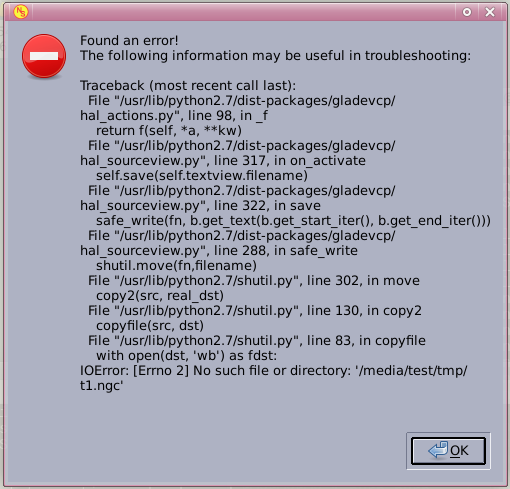
But, while we're talking about digging anyhow... On a whim/following a lead, I decided to try replacing os.rename() with shutil.move(), annnnd...

...that didn't work either.


One possible workaround - although I couldn't find anything in the docs... I know Axis is supposed to be able to use vi - Is there any way to use an alternative editor with Gmoccapy?
This time it looks like it's specifically the destination file that it's having trouble finding - suggesting the removal of the hard link had already happened by the time the rename rolls around.

There's definitely something ugly happening between the rename process(es) and the samba share, but I'll be damned if I can figure out what it is. After spending the day struggling with this, I've pretty much hit a wall. I just don't know that I understand python or linux well enough at this point to make much progress. I'd already been forced to resort to trial and error, and now I've pretty much run out of errors to try.

Any other suggestions, ideas, or sheer random guessing?

[ edit: One possible workaround - although I couldn't find anything in the docs... I know Axis is supposed to be able to use vi - Is there any way to use an alternative editor with Gmoccapy? ]


-Bats
(not the digging kind, more's the pity)
Last edit: 6 years 4 months ago by Bats.

Please Log in or Create an account to join the conversation.

More
6 years 4 months ago #173346 by andypugh

Bats wrote: [ edit: One possible workaround - although I couldn't find anything in the docs... I know Axis is supposed to be able to use vi - Is there any way to use an alternative editor with Gmoccapy? ]


In general the GUIs use the editor specified by [DISPLAY] EDITOR.

linuxcnc.org/docs/2.7/html/config/ini-co...tml#_display_section

It's probably worth a try.

Keep flapping about and you will get there. I had never coded in C or Python (or much at all) until I decided that I wanted a feature that the existing Mesa drivers didn't support. Now I a peering in a puzzled sort of way at disassembly of buggy kerrnel modules trying to work out why LinuxCNC and RTAI crashes ever few hours on Buster.

Please Log in or Create an account to join the conversation.

More
6 years 4 months ago #173358 by tommylight

andypugh wrote: .......... trying to work out why LinuxCNC and RTAI crashes ever few hours on Buster.

FIY, installed that yesterday on an older HP dual core Athlon on Mint 19.3 with Mate, works like a charm and the latency is below 20K at all times.
So thank you for the hard work in making that work.

Please Log in or Create an account to join the conversation.

More
6 years 4 months ago #173364 by andypugh

tommylight wrote: [quote="andypugh" post=173346LinuxCNC and RTAI crashes ever few hours on Buster.

FIY, installed that yesterday on an older HP dual core Athlon on Mint 19.3 with Mate, works like a charm[/quote]

Yes, it seems stable when up. But sometimes crashes on load or unload.

Please Log in or Create an account to join the conversation.

More
6 years 4 months ago #173371 by Bats
Replied by Bats on topic Can't save file to samba share

andypugh wrote: In general the GUIs use the editor specified by [DISPLAY] EDITOR.
linuxcnc.org/docs/2.7/html/config/ini-co...tml#_display_section

Sadly this looks like another of those times when Gmoccapy decided to go its own way. I'd actually tried that, before I (belatedly) got around to reading the next sentence in the docs:

"EDITOR = gedit - The editor to use when selecting File > Edit to edit the G code from the AXIS menu. This must be configured for this menu item to work. Another valid entry is gnome-terminal -e vim. This entry does not apply to gmoccapy, as gmoccapy has an integrated editor. "

It's especially frustrating, because the default editor in Axis doesn't have this problem.

Keep flapping about and you will get there. I had never coded in C or Python (or much at all) until I decided that I wanted a feature that the existing Mesa drivers didn't support. Now I a peering in a puzzled sort of way at disassembly of buggy kerrnel modules trying to work out why LinuxCNC and RTAI crashes ever few hours on Buster.

I followed a similar path - and then moved on from programming to working as a linux admin. But I eventually left both behind, and, frankly, was much happier for it.

At this point in my life I'm far more interested in having a working CNC machine than I am in having a new pet coding project, so if I don't manage to flap my way to a solution in the next day or so, I'm going to have to call it quits and resign myself to swearing like a drunk bat every time I fire up vi in a terminal just to edit whatever I'm trying to run.

-Bats
(no, I don't know what a drunk bat swears like either)

Please Log in or Create an account to join the conversation.

Moderators: newbynobi, HansU
Time to create page: 0.396 seconds
Powered by Kunena Forum
