
Launching gladevcp panel with gmoccapy
- scsmith1451
-
 Topic Author
- Offline
- Premium Member
-

Less
More
- Posts: 98
- Thank you received: 3
19 Apr 2026 19:26 #345745
by scsmith1451
Launching gladevcp panel with gmoccapy was created by scsmith1451
I'm struggling to launch a gladevcp panel from my gmoccapy interface. I've queried the web for examples and feel that I'm on the right track, but without success. I'm open to any suggestions.
I've attached my .ini file along with my gladevcp.ui and custom_postgui.hal for reference.
FYI - I have a laser crosshair that I use to locate the program start for a project. The laser can be toggled by either the gladevcp panel or via a toggle switch on the machine. I've wired up the machine such that either source will set an input pin high to turn on the panel LED. If the laser is toggled via the machine toggle, I want a visual indicator to remind me to turn it off manually.
Once I get the panel to display and the led to toggle properly, I may split the input to I get a visual indicating which source toggled the LED, but for now I just want to get the panel up and working. There is no custom python handler needed at this time.
I've attached my .ini file along with my gladevcp.ui and custom_postgui.hal for reference.
FYI - I have a laser crosshair that I use to locate the program start for a project. The laser can be toggled by either the gladevcp panel or via a toggle switch on the machine. I've wired up the machine such that either source will set an input pin high to turn on the panel LED. If the laser is toggled via the machine toggle, I want a visual indicator to remind me to turn it off manually.
Once I get the panel to display and the led to toggle properly, I may split the input to I get a visual indicating which source toggled the LED, but for now I just want to get the panel up and working. There is no custom python handler needed at this time.
Please Log in or Create an account to join the conversation.
- grandixximo
-

- Away
- Platinum Member
-

Less
More
- Posts: 339
- Thank you received: 406
20 Apr 2026 07:46 #345755
by grandixximo
Replied by grandixximo on topic Launching gladevcp panel with gmoccapy
EMBED_TAB_LOCATION = ntb_preview
or
EMBED_TAB_LOCATION = ntb_user_tabs
Did you try these?
or
EMBED_TAB_LOCATION = ntb_user_tabs
Did you try these?
Please Log in or Create an account to join the conversation.
- Aciera
-

- Offline
- Administrator
-

Less
More
- Posts: 4818
- Thank you received: 2176
20 Apr 2026 08:26 - 20 Apr 2026 08:42 #345757
by Aciera
Replied by Aciera on topic Launching gladevcp panel with gmoccapy
Just a stab, you are loading 'custom_postgui.hal' twice, which does not make a lot of sense:
Generally it would be quite helpful if you told us what actually is not working.
Start your config from the terminal and share the output you get there.
EMBED_TAB_COMMAND = gladevcp -x {XID} crosshair-panel.ui -H custom_postgui.halPOSTGUI_HALFILE = custom_postgui.halGenerally it would be quite helpful if you told us what actually is not working.
Start your config from the terminal and share the output you get there.
Last edit: 20 Apr 2026 08:42 by Aciera.
Please Log in or Create an account to join the conversation.
- grandixximo
-
- Away
- Platinum Member
-
Less
More
- Posts: 339
- Thank you received: 406
20 Apr 2026 10:46 #345764
by grandixximo
Replied by grandixximo on topic Launching gladevcp panel with gmoccapy
Also new 2.10 will not start with your .ini configuration having names with hyphens, use underscores
Please Log in or Create an account to join the conversation.
- scsmith1451
-
Topic Author
- Offline
- Premium Member
-
Less
More
- Posts: 98
- Thank you received: 3
21 Apr 2026 14:46 #345810
by scsmith1451
Replied by scsmith1451 on topic Launching gladevcp panel with gmoccapy
Yes, I've tried both, neither surfaced the gvcp panel with gmoccapy.
Please Log in or Create an account to join the conversation.
- scsmith1451
-
Topic Author
- Offline
- Premium Member
-
Less
More
- Posts: 98
- Thank you received: 3
21 Apr 2026 14:53 #345811
by scsmith1451
Replied by scsmith1451 on topic Launching gladevcp panel with gmoccapy
Attachments:
Please Log in or Create an account to join the conversation.
- HansU
-

- Offline
- Moderator
-

Less
More
- Posts: 729
- Thank you received: 217
07 May 2026 09:33 #346243
by HansU
Replied by HansU on topic Launching gladevcp panel with gmoccapy
Several errors.
1. A typo. You wrote "EMBED_TAB_HAME = CROSSHAIR" instead of "EMBED_TAB_NAME = CROSSHAIR". Unfortunately you don't get an error because the interpreter just thinks "this value is not for me".
2. you need to define where the VCP should be shown like Aciera mentioned, e.g.
Then you get a meaningful error message
This points out that you used an old glade editor. Saving it with a up-to-date Glade 3 editor (3.40 e.g.) removes this and other obsolete properties.
Then the VCP is displayed:
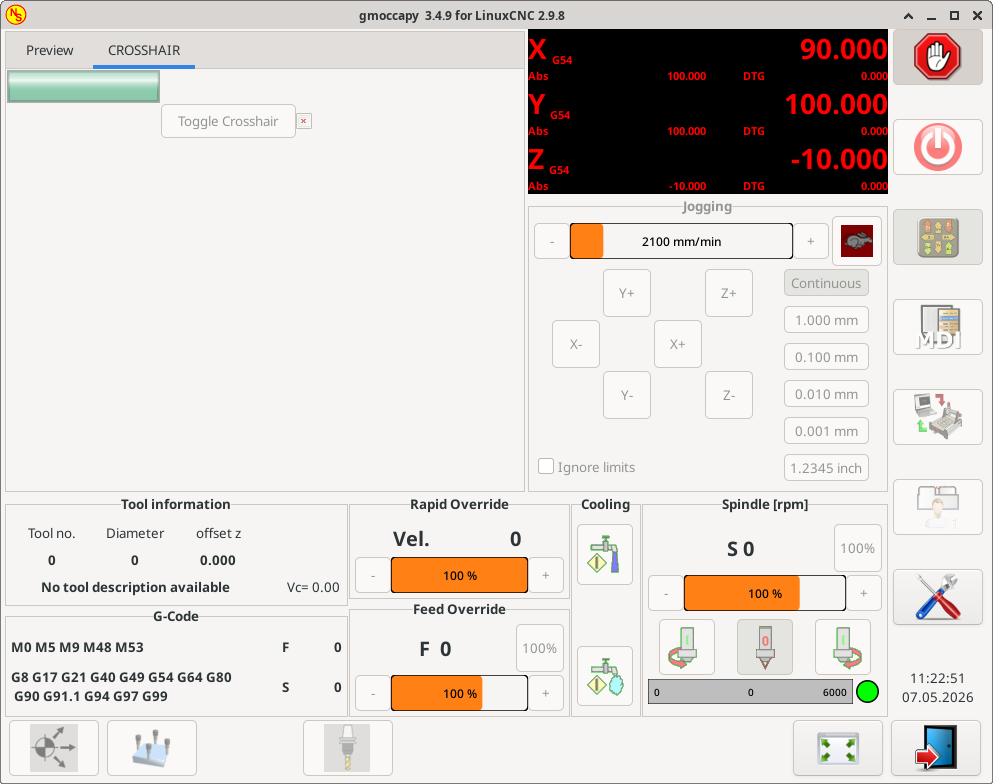
Further you have a handler "on-changed" defined in your glade (ui) file, but no python file where this handler is defined
1. A typo. You wrote "EMBED_TAB_HAME = CROSSHAIR" instead of "EMBED_TAB_NAME = CROSSHAIR". Unfortunately you don't get an error because the interpreter just thinks "this value is not for me".
2. you need to define where the VCP should be shown like Aciera mentioned, e.g.
EMBED_TAB_LOCATION = ntb_previewThen you get a meaningful error message
gtk-builder-error-quark: crosshair-panel.ui:12:34 Invalid property: HAL_Table.n-rows (11)This points out that you used an old glade editor. Saving it with a up-to-date Glade 3 editor (3.40 e.g.) removes this and other obsolete properties.
Then the VCP is displayed:
Further you have a handler "on-changed" defined in your glade (ui) file, but no python file where this handler is defined
AttributeError: Handler on-changed not foundAttachments:
The following user(s) said Thank You: besriworld
Please Log in or Create an account to join the conversation.
- scsmith1451
-
Topic Author
- Offline
- Premium Member
-
Less
More
- Posts: 98
- Thank you received: 3
12 May 2026 18:52 #346347
by scsmith1451
Replied by scsmith1451 on topic Launching gladevcp panel with gmoccapy
Thanks for the information HansU, I'll update my glade and fix the errors.
The GMOCCAPY documentation indicates that if no EMBED_LOCATION is defined, the the glade VCP will be floating. Is that no longer valid?
The GMOCCAPY documentation indicates that if no EMBED_LOCATION is defined, the the glade VCP will be floating. Is that no longer valid?
Please Log in or Create an account to join the conversation.
- HansU
-
- Offline
- Moderator
-
Less
More
- Posts: 729
- Thank you received: 217
17 May 2026 19:27 #346467
by HansU
AFAIK this was never supported. Where do you have this info from? I can't find such in the current Gmoccapy documentation.
Replied by HansU on topic Launching gladevcp panel with gmoccapy
The GMOCCAPY documentation indicates that if no EMBED_LOCATION is defined, the the glade VCP will be floating. Is that no longer valid?
AFAIK this was never supported. Where do you have this info from? I can't find such in the current Gmoccapy documentation.
Please Log in or Create an account to join the conversation.
- scsmith1451
-
Topic Author
- Offline
- Premium Member
-
Less
More
- Posts: 98
- Thank you received: 3
21 May 2026 13:33 #346535
by scsmith1451
Replied by scsmith1451 on topic Launching gladevcp panel with gmoccapy
I misspoke. The documentation indicates that if the gladevcp is launched without specifying -x {pid} the panel would be floating. I interpreted that as EMBED_LOCATION was not required. Subsequent testing determined that even if the panel is floating, EMBED_LOCATION must still be defined for the panel to launch correctl.
Fixing the my misspelling of EMBED_TAB_NAME, fixed the launch issue. However, I am now struggling with connecting up the panel to HAL.
During the first investigation I discovered that GMOCCAPY does not toggle the motion.machine-is-on signal as with AXIS. A bit of probing with halmeter I was able to determine that halui.machine-is-on is toggled by GMOCCAPY when the machine is on. I edited my crosshair_panel.hal file to use the halui.machine-is-on, but the panel did no respond.
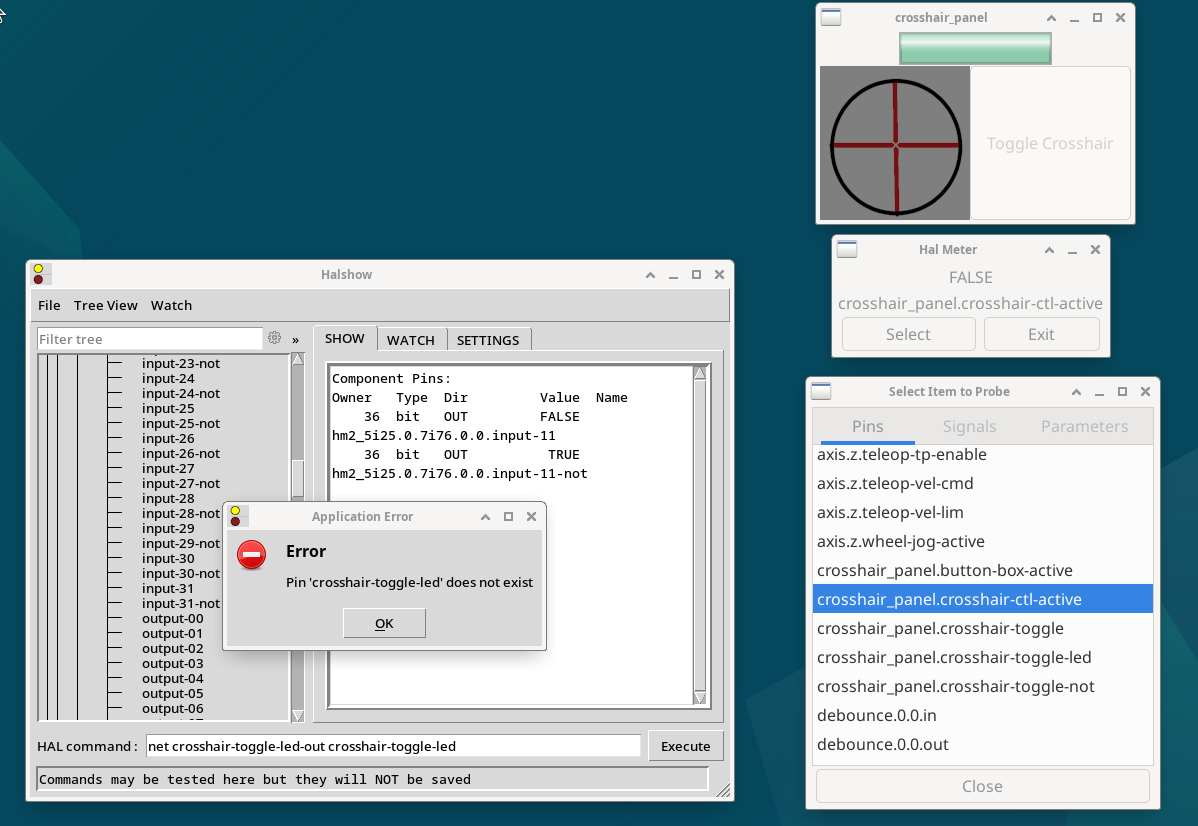
I've done a bit more testing and discovered that halmeter sees the glade pins as expected, however, halscope does not. Therefore, attempting to manually connect the pins via halscope results in a Pin 'xxx' does not exist error.
At this point I'm lost as to why halscope does not see the panel pins and therefore cannot connect them properly.
Any help would be appreciated.
Currently running:
LinuxCNC 2.9.4
GMOCCAPY 3.4.9
Glade 3.40.0
I've attached all relevant files.
I've attached all of the relevant
Fixing the my misspelling of EMBED_TAB_NAME, fixed the launch issue. However, I am now struggling with connecting up the panel to HAL.
During the first investigation I discovered that GMOCCAPY does not toggle the motion.machine-is-on signal as with AXIS. A bit of probing with halmeter I was able to determine that halui.machine-is-on is toggled by GMOCCAPY when the machine is on. I edited my crosshair_panel.hal file to use the halui.machine-is-on, but the panel did no respond.
I've done a bit more testing and discovered that halmeter sees the glade pins as expected, however, halscope does not. Therefore, attempting to manually connect the pins via halscope results in a Pin 'xxx' does not exist error.
At this point I'm lost as to why halscope does not see the panel pins and therefore cannot connect them properly.
Any help would be appreciated.
Currently running:
LinuxCNC 2.9.4
GMOCCAPY 3.4.9
Glade 3.40.0
I've attached all relevant files.
I've attached all of the relevant
Please Log in or Create an account to join the conversation.
Moderators: newbynobi, HansU
Time to create page: 0.341 seconds