
- Posts: 863
- Thank you received: 240
Multi-line text engraving g-code generator
- ArcEye
- Topic Author
- Offline
- Platinum Member
-

Less
More
14 years 4 months ago - 12 years 1 week ago #20816
by ArcEye
Multi-line text engraving g-code generator was created by ArcEye
Hi
I have recently been using my small CNC mill to do a large batch of drag engraving of small brass trophy plaques.
Each plaque requires 3 lines of different text, and each plaque differs from the last.
Lawrence Glaister's engrave.py program is excellent, but for this sort of work very time consuming because it only outputs one line at a time.
This requires you to cut and paste several files, each of one line of text, remove unwanted bits and ensure that the text line offsets produce the required output.
I don't normally program in python, but saw no merit in re-writing a perfectly good python font parsing routine into C, just for the sake of it, so slithered into my limited python mode.
The result is a command-line program (yes, old habits die hard, but they are the most flexible and powerful) which takes a plethora of switches (nearly all of which have sensible defaults) which will automatically generate code for engraving up to 10 lines of text
There is built in help
Just invoke engrave-lines.py -h
and get
engrave-lines.py G-Code Engraving Generator for command-line usage
(C) ArcEye <2012>
based upon code from engrave-11.py
Copyright (C) <2008> <Lawrence Glaister> <ve7it at shaw dot ca>
engrave-lines.py -X -x -Y -y -S -s -Z -D -C -W -M -F -P -p -0 -1 -2 -3 ..............
Options:
-h Display this help message
-X Start X value Defaults to 0
-x X offset between lines Defaults to 0
-Y Start Y value Defaults to 0
-y Y offset between lines Defaults to 0
-S X Scale Defaults to 1
-s Y Scale Defaults to 1
-Z Safe Z for moves Defaults to 2mm
-D Z depth for engraving Defaults to 0.1mm
-C Charactor Space % Defaults to 25%
-W Word Space % Defaults to 100%
-M Mirror Defaults to 0 (No)
-F Flip Defaults to 0 (No)
-P Preamble g code Defaults to "G17 G21 G40 G90 G64 P0.003 F50"
-p Postamble g code Defaults to "M2"
-0 Line0 string follow this
-1 Line1 string follow this
-2 Line2 string follow this
-3 Line3 string follow this
-4 Line4 string follow this
-5 Line5 string follow this
-6 Line6 string follow this
-7 Line7 string follow this
-8 Line8 string follow this
-9 Line9 string follow this
Example
engrave-lines.py -X7.5 -x0 -Y12.75 -y5.25 -S0.4 -s0.5 -Z2 -D0.1 -0'Line0' -1'Line1' -2'Line2' -3'Line3' > test.ngc
So run the example
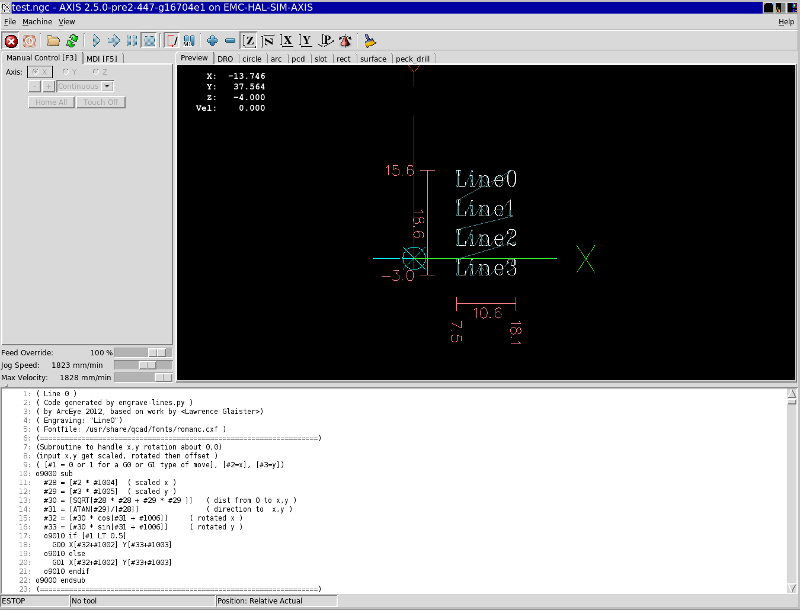
engrave-lines.py -X7.5 -x0 -Y12.75 -y5.25 -S0.4 -s0.5 -Z2 -D0.1 -0'Line0' -1'Line1' -2'Line2' -3'Line3' > test.ngc
and test.ngc will look like this in Axis
image missing http://www.linuxcnc.org/media/kunena/attachments/legacy/images/Selection_004.png
It takes a bit of time to work out what your line offsets need to be and the best starting point X and Y to balance the text on the workpiece, but once you have that sorted you can fly through
I generated all the code required to engrave a further 19 plaques, whilst the mill was engraving the first one!
If it helps you - enjoy
regards
File in later post
Last edit: 12 years 1 week ago by ArcEye.
Please Log in or Create an account to join the conversation.
- ArcEye
- Topic Author
- Offline
- Platinum Member
-
Less
More
- Posts: 863
- Thank you received: 240
14 years 4 months ago - 12 years 1 week ago #20817
by ArcEye
Replied by ArcEye on topic Re:Multi-line text engraving g-code generator
File available from the wiki
wiki.linuxcnc.org/cgi-bin/wiki.pl?Simple...t_Engraving_Software
(file in later post)
wiki.linuxcnc.org/cgi-bin/wiki.pl?Simple...t_Engraving_Software
(file in later post)
Last edit: 12 years 1 week ago by ArcEye.
Please Log in or Create an account to join the conversation.
- ArcEye
- Topic Author
- Offline
- Platinum Member
-
Less
More
- Posts: 863
- Thank you received: 240
14 years 4 months ago - 12 years 1 week ago #21154
by ArcEye
Replied by ArcEye on topic Re:Multi-line text engraving g-code generator
Hi
AMENDED - see subsequent posts for new downloads
Having used my program for a while, I decided that something needed to be done with the X offset value.
As it stood, if this value was applied, each line would be indented by XLineOffset from the previous one
which started to lose usefulness after 2 lines unless engraving on a slanted face.
When engraving several lines of text, the generally most useful thing to be able to do is to indent lines.
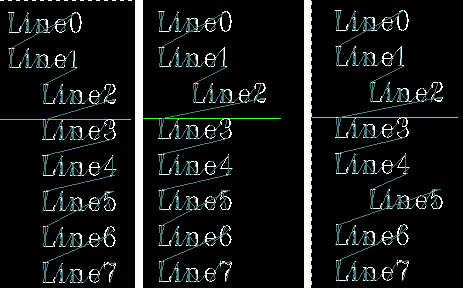
Accordingly I have added functionality which allows any lines specified in a string
eg -i'1357'
to be indented by the -x X offset
The built in help now covers these options
Examples are shown in screenshot
Indent 234567 -i'234567' - Indent only line 2 -i'2' - Indent lines 2,5 -i'25'
image missing http://www.linuxcnc.org/media/kunena/attachments/legacy/images/all3.png
regards
(File in later post)
AMENDED - see subsequent posts for new downloads
Having used my program for a while, I decided that something needed to be done with the X offset value.
As it stood, if this value was applied, each line would be indented by XLineOffset from the previous one
which started to lose usefulness after 2 lines unless engraving on a slanted face.
When engraving several lines of text, the generally most useful thing to be able to do is to indent lines.
Accordingly I have added functionality which allows any lines specified in a string
eg -i'1357'
to be indented by the -x X offset
The built in help now covers these options
Code:
engrave-lines.py G-Code Engraving Generator for command-line usage
(C) ArcEye <2012>
based upon code from engrave-11.py
Copyright (C) <2008> <Lawrence Glaister> <ve7it at shaw dot ca>
engrave-lines.py -X -x -i -Y -y -S -s -Z -D -C -W -M -F -P -p -0 -1 -2 -3 ..............
Options:
-h Display this help message
-X Start X value Defaults to 0
-x X offset between lines Defaults to 0
-i X indent line list String of lines to indent in single quotes
-Y Start Y value Defaults to 0
-y Y offset between lines Defaults to 0
-S X Scale Defaults to 1
-s Y Scale Defaults to 1
-Z Safe Z for moves Defaults to 2mm
-D Z depth for engraving Defaults to 0.1mm
-C Charactor Space % Defaults to 25%
-W Word Space % Defaults to 100%
-M Mirror Defaults to 0 (No)
-F Flip Defaults to 0 (No)
-P Preamble g code Defaults to "G17 G21 G40 G90 G64 P0.003 F50"
-p Postamble g code Defaults to "M2"
-0 Line0 string follow this
-1 Line1 string follow this
-2 Line2 string follow this
-3 Line3 string follow this
-4 Line4 string follow this
-5 Line5 string follow this
-6 Line6 string follow this
-7 Line7 string follow this
-8 Line8 string follow this
-9 Line9 string follow this
Example engrave-lines.py -X7.5 -x5 -i'123' -Y12.75 -y5.25 -S0.4 -s0.5 -Z2 -D0.1 -0'Line0' -1'Line1' -2'Line2' -3'Line3' > test.ngc
Examples are shown in screenshot
Indent 234567 -i'234567' - Indent only line 2 -i'2' - Indent lines 2,5 -i'25'
image missing http://www.linuxcnc.org/media/kunena/attachments/legacy/images/all3.png
regards
(File in later post)
Last edit: 12 years 1 week ago by ArcEye.
Please Log in or Create an account to join the conversation.
- ArcEye
- Topic Author
- Offline
- Platinum Member
-
Less
More
- Posts: 863
- Thank you received: 240
14 years 4 months ago - 12 years 1 week ago #21168
by ArcEye
Replied by ArcEye on topic Re:Multi-line text engraving g-code generator
Outdated - see later post for file
Last edit: 12 years 1 week ago by ArcEye.
Please Log in or Create an account to join the conversation.
- ArcEye
- Topic Author
- Offline
- Platinum Member
-
Less
More
- Posts: 863
- Thank you received: 240
14 years 4 months ago - 14 years 4 months ago #21169
by ArcEye
Replied by ArcEye on topic Re:Multi-line text engraving g-code generator
Man file for engrave-lines.py here ( rename it /usr/share/man/man3/engrave-lines.3)
Last edit: 14 years 4 months ago by ArcEye.
Please Log in or Create an account to join the conversation.
- BigJohnT
- Offline
- Administrator
-

Less
More
- Posts: 3410
- Thank you received: 994
14 years 4 months ago #21174
by BigJohnT
Replied by BigJohnT on topic Re:Multi-line text engraving g-code generator
ArcEye,
I made this a sticky... nice work.
John
I made this a sticky... nice work.
John
Please Log in or Create an account to join the conversation.
- ArcEye
- Topic Author
- Offline
- Platinum Member
-
Less
More
- Posts: 863
- Thank you received: 240
13 years 9 months ago #28910
by ArcEye
Replied by ArcEye on topic Re:Multi-line text engraving g-code generator
See also this thread for an example of how to use a script to automate G Code output for engraving incrementing serial numbers
www.linuxcnc.org/index.php/english/forum...gram-possible-#28879
www.linuxcnc.org/index.php/english/forum...gram-possible-#28879
Please Log in or Create an account to join the conversation.
- cparsons
- Offline
- New Member
-

Less
More
- Posts: 18
- Thank you received: 2
12 years 1 week ago #52404
by cparsons
Replied by cparsons on topic Multi-line text engraving g-code generator
Has anyone managed to get this to run?
I have been trying for a while but there are several errors mainly relating to variables referenced before assignment, which I have added hopefully in the right place and now get another error saying KeyError: 'A'
Running it from the LinuxCNC (2.6.1) desktop, I had to install QCAD to get the fonts referenced, and correct the path in the file but it looks like I am going to have to learn Python to get it to work
Chris
Please Log in or Create an account to join the conversation.
- BigJohnT
- Offline
- Administrator
-
Less
More
- Posts: 3410
- Thank you received: 994
12 years 1 week ago #52405
by BigJohnT
Replied by BigJohnT on topic Multi-line text engraving g-code generator
Works for me... while not to intuitive if you just start it without any options. I did forgo trying to find the qcad font locations and just copied romanc.cxf to the same directory as engrave-lines.py and changed line 35 to reflect the new location.
JT
JT
The following user(s) said Thank You: cparsons
Please Log in or Create an account to join the conversation.
- BigJohnT
- Offline
- Administrator
-
Less
More
- Posts: 3410
- Thank you received: 994
12 years 1 week ago #52406
by BigJohnT
Replied by BigJohnT on topic Multi-line text engraving g-code generator
I did add this around line 469 to make it show the help file if no arguments are passed.
Makes it a little more intuitive.
JT
Code:
if len(sys.argv[1:]) == 0:
help_message()
sys.exit(0)
Makes it a little more intuitive.
JT
The following user(s) said Thank You: ArcEye
Please Log in or Create an account to join the conversation.
Time to create page: 0.808 seconds