
- Posts: 457
- Thank you received: 124
NativeCam raspberry Pi 4
- FernV
- Topic Author
- Offline
- Platinum Member
-

Less
More
9 years 4 months ago - 9 years 4 months ago #94274
by FernV
Use NativeCAM as a deb package now was created by FernV
Hi,
LinuxCNC has released version 2.7.9 that fully support applications like NativeCAM as deb package.
If your version is updated to 2.7.9, you should now change your setup to use the deb with automatic updates
Download this script that will do everything for you, setting up your repository and install NativeCAM
Open a terminal where it is downloaded (do not rename this file)
Copy this command and run :
That's all there is, run LinuxCNC as you did before
You can now delete old ~/NativeCAM directory
Fern
LinuxCNC has released version 2.7.9 that fully support applications like NativeCAM as deb package.
If your version is updated to 2.7.9, you should now change your setup to use the deb with automatic updates
Download this script that will do everything for you, setting up your repository and install NativeCAM
Open a terminal where it is downloaded (do not rename this file)
Copy this command and run :
Code:
sudo bash ncam_debsetup.txt
That's all there is, run LinuxCNC as you did before
You can now delete old ~/NativeCAM directory
Fern
Last edit: 9 years 4 months ago by FernV. Reason: Replaced commands with a single sh script
Please Log in or Create an account to join the conversation.
- gmouer
- Offline
- Elite Member
-

Less
More
- Posts: 189
- Thank you received: 9
9 years 4 months ago #94285
by gmouer
Replied by gmouer on topic Use NativeCAM as a deb package now
Hi Fern,
I will follow your instructions this morning when I go into the shop. I do have a question: For future automatic deb updates, do I have to add that location to my repository lists in Debian? I am not very proficient with linux but it appears NativeCam code is stored at a different repository url than linuxcnc and wouldn't be found without adding it to the repository list.
Thanks.
George
I will follow your instructions this morning when I go into the shop. I do have a question: For future automatic deb updates, do I have to add that location to my repository lists in Debian? I am not very proficient with linux but it appears NativeCam code is stored at a different repository url than linuxcnc and wouldn't be found without adding it to the repository list.
Thanks.
George
Please Log in or Create an account to join the conversation.
- grump
- Offline
- Premium Member
-

Less
More
- Posts: 158
- Thank you received: 10
9 years 4 months ago #94292
by grump
Replied by grump on topic Use NativeCAM as a deb package now
Damn, now the Ncam tab has gone blank again.
Please Log in or Create an account to join the conversation.
- FernV
- Topic Author
- Offline
- Platinum Member
-
Less
More
- Posts: 457
- Thank you received: 124
9 years 4 months ago #94294
by FernV
Then : ncam -t -i (inifilename)
This is the fastest way to re-initialize it.
ncam.ui is in a new directory and it should be reflected in your inifile
Fern
P.S. Your repository has been updated
Replied by FernV on topic Use NativeCAM as a deb package now
Change directory to where your inifile is and restore your inifile backup.grump wrote: ...the Ncam tab has gone blank again.
Then : ncam -t -i (inifilename)
This is the fastest way to re-initialize it.
ncam.ui is in a new directory and it should be reflected in your inifile
Fern
P.S. Your repository has been updated
Please Log in or Create an account to join the conversation.
- grump
- Offline
- Premium Member
-
Less
More
- Posts: 158
- Thank you received: 10
9 years 4 months ago #94296
by grump
Replied by grump on topic Use NativeCAM as a deb package now
I didn't want to do this just when it was all sorted and working great after all the aggro we had to get it working.
Just a note that I am still on previous version after updating everything, tell me it's me doing it wrong again.


Just a note that I am still on previous version after updating everything, tell me it's me doing it wrong again.
Please Log in or Create an account to join the conversation.
- FernV
- Topic Author
- Offline
- Platinum Member
-
Less
More
- Posts: 457
- Thank you received: 124
9 years 4 months ago - 9 years 4 months ago #94301
by FernV
Replied by FernV on topic Use NativeCAM as a deb package now
Not a good idea to revert to pre-release version but if you really want to do it, be aware that nondeb_setup.py is not part of NativeCAM github anymore and I will not make it possible in the future to use as a non-deb.
You make me giving you support much more complicated.
First, issue the same command : ./nondeb_setup.py
Then I need to see your inifile
Fern
You make me giving you support much more complicated.
First, issue the same command : ./nondeb_setup.py
Then I need to see your inifile
Fern
Last edit: 9 years 4 months ago by FernV.
Please Log in or Create an account to join the conversation.
- grump
- Offline
- Premium Member
-
Less
More
- Posts: 158
- Thank you received: 10
9 years 4 months ago - 9 years 4 months ago #94303
by grump
Replied by grump on topic Use NativeCAM as a deb package now
Ok so I'll just wipe the Hdd and start again. Again.
It's not me reverting it's the git won't give me 2.9 nor does synaptic.
I give in.
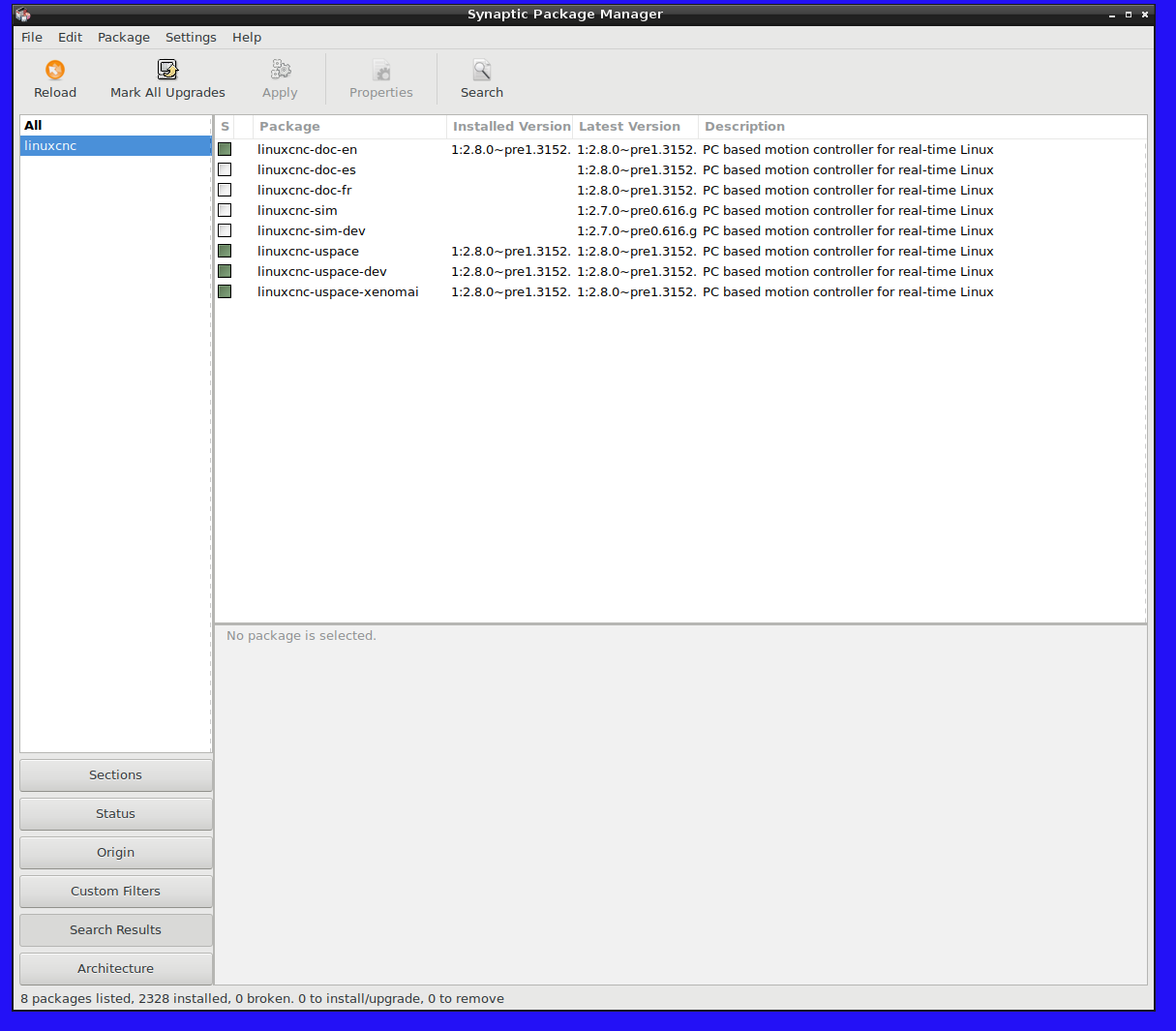
It's not me reverting it's the git won't give me 2.9 nor does synaptic.
I give in.
Last edit: 9 years 4 months ago by grump.
Please Log in or Create an account to join the conversation.
- FernV
- Topic Author
- Offline
- Platinum Member
-
Less
More
- Posts: 457
- Thank you received: 124
9 years 4 months ago #94308
by FernV
Replied by FernV on topic Use NativeCAM as a deb package now
If you have not erased your HDD yet, don't.
I had a version for development that was not in continuity with any other
Here what I did and succeeded the first time
The information you need is here :
but I did not follow all steps and I did not reboot at all.
First in Synaptic remove completely linuxcnc-uspace,
Then I followed only steps 7 to 10
Voila, I had version 2.7.9 installed
I was then able to install NativeCAM as described in the first post
Fern
I had a version for development that was not in continuity with any other
Here what I did and succeeded the first time
The information you need is here :
Code:
http://linuxcnc.org/docs/html/getting-started/getting-linuxcnc.html#_installing_on_debian_wheezy_with_preempt_rt_kernel
but I did not follow all steps and I did not reboot at all.
First in Synaptic remove completely linuxcnc-uspace,
Then I followed only steps 7 to 10
Voila, I had version 2.7.9 installed
I was then able to install NativeCAM as described in the first post
Fern
Please Log in or Create an account to join the conversation.
- Clive S
- Offline
- Platinum Member
-
Less
More
- Posts: 2203
- Thank you received: 486
9 years 4 months ago #94329
by Clive S
First a big thank you to Fern for a great package.
I have done my update from 2.7.8 to 2.7.9
I have tried to run the command "curl -s packagecloud.io/install/repositories/Fer...iveCAM/script.deb.sh | sudo bash" from a terminal and I get the error "curl" command not found
Dose it matter which directory it is run from?
Replied by Clive S on topic Use NativeCAM as a deb package now
FernV wrote: Hi,
LinuxCNC has released version 2.7.9 that fully support applications like NativeCAM as deb package.
If your version is updated to 2.7.9, you should now change your setup to use the deb with automatic updates
Follow these simple steps.
- copy this command (it will setup your repository) :
and enter pwd when askedCode:curl -s https://packagecloud.io/install/repositories/FernV/NativeCAM/script.deb.sh | sudo bash- copy this command : sudo apt-get install nativecam
and enter pwd when asked
That's all there is
You can now delete ~/NativeCAM directory
Fern
First a big thank you to Fern for a great package.
I have done my update from 2.7.8 to 2.7.9
I have tried to run the command "curl -s packagecloud.io/install/repositories/Fer...iveCAM/script.deb.sh | sudo bash" from a terminal and I get the error "curl" command not found
Dose it matter which directory it is run from?
Please Log in or Create an account to join the conversation.
- FernV
- Topic Author
- Offline
- Platinum Member
-
Less
More
- Posts: 457
- Thank you received: 124
9 years 4 months ago - 9 years 4 months ago #94342
by FernV
It seems not installed in your distribution, what is it ?
Your can try to locate it with : "locate curl"
usually you should have "/usr/bin/curl" in the list
then try "man curl"
I do not know if another command can be used to replace it at this moment
Fern
P.S. maybe this command can install it
Btw, script.deb.sh should install curl if not found but the script can not be imported by curl, I will check with packagecloud.io
Replied by FernV on topic Use NativeCAM as a deb package now
It can be run from any directory.Clive s wrote: I have done my update from 2.7.8 to 2.7.9
I have tried to run the commandfrom a terminal and I get the error "curl" command not foundCode:"curl -s https://packagecloud.io/install/repositories/FernV/NativeCAM/script.deb.sh | sudo bash"
Dose it matter which directory it is run from?
It seems not installed in your distribution, what is it ?
Your can try to locate it with : "locate curl"
usually you should have "/usr/bin/curl" in the list
then try "man curl"
I do not know if another command can be used to replace it at this moment
Fern
P.S. maybe this command can install it
Code:
sudo apt-get install -q -y curl
Btw, script.deb.sh should install curl if not found but the script can not be imported by curl, I will check with packagecloud.io
Last edit: 9 years 4 months ago by FernV.
Please Log in or Create an account to join the conversation.
Time to create page: 0.272 seconds