
- Posts: 3
- Thank you received: 0
Probe Basic Cutaway
- dang133
- Topic Author
- Offline
- New Member
-

Less
More
2 months 3 weeks ago #348474
by dang133
Probe Basic Cutaway was created by dang133
Hi everyone,
I'm new, so go easy on me. My team is using Probe Basic as a GUI for a 5-axis CNC Mill. We're trying to create a cutaway button that will show only half of a part at a time. It will virtually slice the part and show the cutaway. After some google earching, it looks like this is not a common request. How should we go about doing this? What is the best route to take?
Thanks,
Dan
I'm new, so go easy on me. My team is using Probe Basic as a GUI for a 5-axis CNC Mill. We're trying to create a cutaway button that will show only half of a part at a time. It will virtually slice the part and show the cutaway. After some google earching, it looks like this is not a common request. How should we go about doing this? What is the best route to take?
Thanks,
Dan
Please Log in or Create an account to join the conversation.
- cmorley
- Offline
- Moderator
-

Less
More
- Posts: 6803
- Thank you received: 2181
2 months 3 weeks ago #348478
by cmorley
Replied by cmorley on topic Probe Basic Cutaway
You are in the wrong topic. Probe basic is a QtPyVCP project not QtVCP.
You'll get better response there.
You'll get better response there.
Please Log in or Create an account to join the conversation.
- tommylight
-

- Away
- Moderator
-
2 months 3 weeks ago #348486
by tommylight
Replied by tommylight on topic Probe Basic Cutaway
Moved, thank you Chris.
Please Log in or Create an account to join the conversation.
- Lcvette
- Offline
- Moderator
-
Less
More
- Posts: 1683
- Thank you received: 784
2 months 3 weeks ago #348529
by Lcvette
Replied by Lcvette on topic Probe Basic Cutaway
Probe Basic does not show the part at all it only shows the toolpath so im not exactly sure what your post is requesting/stating etc can you be more clear of what part of probe basic you are referring too?
Please Log in or Create an account to join the conversation.
- TelegramSam
- Offline
- New Member
-
Less
More
- Posts: 2
- Thank you received: 0
2 months 2 weeks ago #348847
by TelegramSam
Replied by TelegramSam on topic Probe Basic Cutaway
I'm working on the same project.
The goal would be to show and hide portions of the machine visualization, based on what this thread describes:
forum.linuxcnc.org/qtpyvcp/56945-qtpyvcp...led-into-one?start=0
We have the machine showing, but would like to be able to have buttons show and hide portions of the machine - say one stl in the yaml config file.
Any help that can move us forward?
The goal would be to show and hide portions of the machine visualization, based on what this thread describes:
forum.linuxcnc.org/qtpyvcp/56945-qtpyvcp...led-into-one?start=0
We have the machine showing, but would like to be able to have buttons show and hide portions of the machine - say one stl in the yaml config file.
Any help that can move us forward?
Please Log in or Create an account to join the conversation.
- Aciera
- Offline
- Administrator
-

Less
More
- Posts: 4819
- Thank you received: 2177
2 months 2 weeks ago - 2 months 2 weeks ago #348854
by Aciera
Replied by Aciera on topic Probe Basic Cutaway
I have a vtk version of vismach that offers a feature to show/hide certain objects. Maybe that helps to come up with an idea:
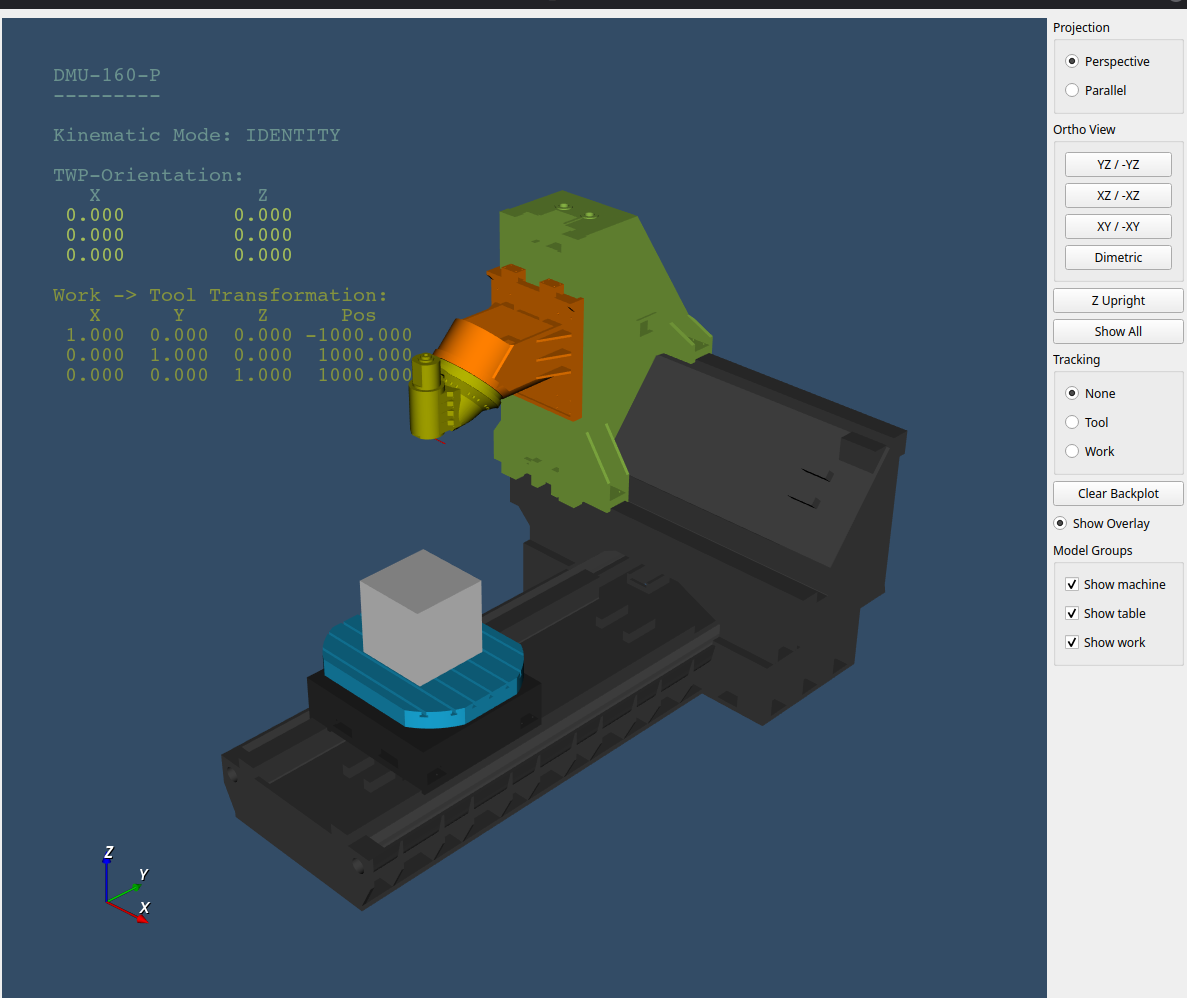
github.com/Sigma1912/vtk-vismach
Outline of my solution:
Each object in the model has a simple class variable 'group'.
When the window is created a checkbox is created for each group found in the model.
In each update cycle the objects with the matching 'group' variable value are shown or hidden according to the relevant checkbox state
Note that the vtk 'SetVisibility()' method did not seem to work for me so I use 'item.SetScale(0,0,0)' to hide an object:
github.com/Sigma1912/vtk-vismach
Model groups:
Each object of a model can optionally be assigned to a group. The assignment method can be called
on an existing object (2 lines of code)
Example 1: 'work_piece = Box(600,600,600)'
'work_piece.set_group('work')'
or the object can be created and the 'set_group' method called in one line.
Example 2: 'ReadPolyData('work_piece.stl', path_stl).set_group('work')'
Vismach will automatically create a checkbutton to show or hide each group used in the model.
Outline of my solution:
Each object in the model has a simple class variable 'group'.
When the window is created a checkbox is created for each group found in the model.
In each update cycle the objects with the matching 'group' variable value are shown or hidden according to the relevant checkbox state
Note that the vtk 'SetVisibility()' method did not seem to work for me so I use 'item.SetScale(0,0,0)' to hide an object:
Code:
class ModelGroups(object):
def __init__(self, model):
self.groups_in_model = {}
self.get_groups(model)
self.has_groups = len(self.groups_in_model.keys()) > 0
def get_groups(self, objects):
for item in objects.GetParts():
if hasattr(item, 'group'):
if item.group:
if item.group in self.groups_in_model.keys():
self.groups_in_model[item.group].append(item)
else:
self.groups_in_model[item.group] = [item]
if isinstance(item, vtk.vtkAssembly):
self.get_groups(item)
def update(self, checkboxes):
# SetVisibility does not seem to work on modifier objects so we use Scale
for group in self.groups_in_model.keys():
for checkbox in checkboxes:
if checkbox.objectName() == group:
if checkbox.isChecked():
for item in self.groups_in_model[group]:
item.restore_scale()
else:
for item in self.groups_in_model[group]:
item.store_scale()
item.SetScale(0,0,0)
Last edit: 2 months 2 weeks ago by Aciera.
Please Log in or Create an account to join the conversation.
Moderators: KCJ, Lcvette
Time to create page: 0.377 seconds