

- Posts: 57
- Thank you received: 10
QTPlasmaC Crashing bug report
5 years 7 months ago #203574
by Nick7251
QTPlasmaC Crashing bug report was created by Nick7251
I would like to start out by saying QTPlasmaC is sweet! All involved in its creation should be commended. I do want to report a bug though, and hopefully get some ideas to fix my issue.
I am updated to version 1.0.5. (The latest at the time of writing this) I was cutting some stuff out tonight and I kept getting an error while cutting that would result in a complete crash of the software.
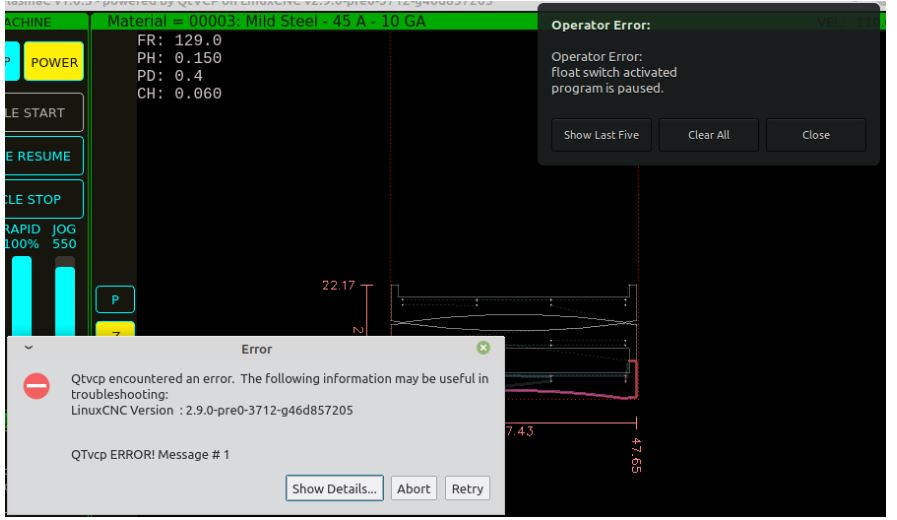
I switched over to PlasmaC (Not QT) and ran the same file. I got a pause program over there saying that my float switch activated. The big difference is it didn't crash the tool over in PlasmaC. It just paused, and would allow me to resume. So the fact it is crashing instead of pausing is the bug.
Now my question. I think the float switch activating during cut is an EMI issue that I don't have the expertise or equipment or knowledge to track down. Is there a way to deactivate the float switch during the cut, then reactivate it for the next pierce so the controller stops reading any signals coming from it while cutting? If not, is there a way to add debounce or something like that so that false signals don't interrupt? I didn't see anything in the config for that. I probably missed it. I saw the Arc OK debounce.
My controller is the 7i96. It is an awesome controller, but a little too sensitive for it's own good in my noisy, crappy cheap table, environment.
Thanks in advance.
I am updated to version 1.0.5. (The latest at the time of writing this) I was cutting some stuff out tonight and I kept getting an error while cutting that would result in a complete crash of the software.
I switched over to PlasmaC (Not QT) and ran the same file. I got a pause program over there saying that my float switch activated. The big difference is it didn't crash the tool over in PlasmaC. It just paused, and would allow me to resume. So the fact it is crashing instead of pausing is the bug.
Now my question. I think the float switch activating during cut is an EMI issue that I don't have the expertise or equipment or knowledge to track down. Is there a way to deactivate the float switch during the cut, then reactivate it for the next pierce so the controller stops reading any signals coming from it while cutting? If not, is there a way to add debounce or something like that so that false signals don't interrupt? I didn't see anything in the config for that. I probably missed it. I saw the Arc OK debounce.
My controller is the 7i96. It is an awesome controller, but a little too sensitive for it's own good in my noisy, crappy cheap table, environment.
Thanks in advance.
Please Log in or Create an account to join the conversation.

5 years 7 months ago #203576
by phillc54
Replied by phillc54 on topic QTPlasmaC Crashing bug report
Can you click "Show Details" on the error message and post the result.
There is debounce on the float switch in the connections.hal file.
linuxcnc.org/docs/devel/html/plasma/qtpl...ml#_contact_debounce
There is debounce on the float switch in the connections.hal file.
linuxcnc.org/docs/devel/html/plasma/qtpl...ml#_contact_debounce
Please Log in or Create an account to join the conversation.
5 years 7 months ago #203577
by Nick7251
Thanks Phill. I will go find the debounce setting in the .hal. I figured you already had my back on this one. Haha
As far as clicking "show details". I tried. Any button I pressed would crash the software. Show details, about, retry, the little x at the top. All attempts resulted with a crash.
Replied by Nick7251 on topic QTPlasmaC Crashing bug report
phillc54 wrote: Can you click "Show Details" on the error message and post the result.
There is debounce on the float switch in the connections.hal file.
linuxcnc.org/docs/devel/html/plasma/qtpl...ml#_contact_debounce
Thanks Phill. I will go find the debounce setting in the .hal. I figured you already had my back on this one. Haha
As far as clicking "show details". I tried. Any button I pressed would crash the software. Show details, about, retry, the little x at the top. All attempts resulted with a crash.
Please Log in or Create an account to join the conversation.
5 years 7 months ago #203580
by phillc54
I would not recommend doing this if you don't have a breakaway switch for safety reasons.
Replied by phillc54 on topic QTPlasmaC Crashing bug report
If you were running from a terminal was the a error message in the terminal. If you weren't running from a terminal can you try that.Nick7251 wrote: As far as clicking "show details". I tried. Any button I pressed would crash the software. Show details, about, retry, the little x at the top. All attempts resulted with a crash.
This is untested but you may be able to enable ohmic sensing, this then has a hal pin plasmac.ohmic-enable which is only active while probing. You could connect this to a relay and run you float switch signal through the relay contacts.Is there a way to deactivate the float switch during the cut, then reactivate it for the next pierce so the controller stops reading any signals coming from it while cutting?
I would not recommend doing this if you don't have a breakaway switch for safety reasons.
Please Log in or Create an account to join the conversation.
5 years 7 months ago #203581
by Nick7251
Replied by Nick7251 on topic QTPlasmaC Crashing bug report
Yeah I can try that. I hope I'll get a chance to try tomorrow. If not it won't be until Saturday until I can get back out there.
Also I don't have a breakaway yet so I won't try the ohmic hack advice you offered. I hope to replicate the error to get you a log file, then fix it with debounce.
Also I don't have a breakaway yet so I won't try the ohmic hack advice you offered.
I hope to replicate the error to get you a log file, then fix it with debounce.
The following user(s) said Thank You: phillc54
Please Log in or Create an account to join the conversation.
5 years 7 months ago #203583
by phillc54
Replied by phillc54 on topic QTPlasmaC Crashing bug report
It might be worthwhile posting a compressed copy of your config, you can do that from the Parameters tab.
Please Log in or Create an account to join the conversation.
Moderators: snowgoer540
Time to create page: 0.118 seconds