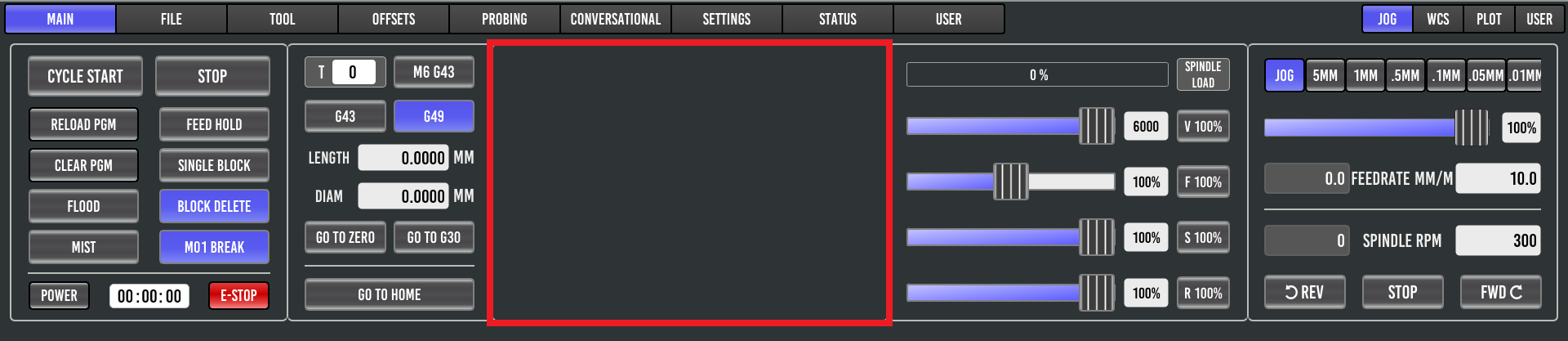
Probe Basic Screen missing axes

More
1 year 3 months ago - 1 year 3 months ago #331455 by Roger S
Dear community,After I performed system (Debian 12) updates, the axes are missing in the GUI
Code:
[code][code]sudo apt update sudo apt uprade
[/code][/code]


Does anyone have any idea what could be causing this?
Last edit: 1 year 3 months ago by Roger S.

Please Log in or Create an account to join the conversation.

More
1 year 3 months ago #331462 by Roger S
Hello Langdons,

Even with clean and autoremove, the axes are missing in the GUI

Please Log in or Create an account to join the conversation.

More
1 year 3 months ago #331471 by Roger S
I've suspended a new system. Before the computer goes offline and goes into the basement, I wanted to bring everything up to date again.

The repair was unsuccessful.

Please Log in or Create an account to join the conversation.

More
1 year 3 months ago #331492 by Lcvette

Please Log in or Create an account to join the conversation.

More
1 year 3 months ago - 1 year 3 months ago #331493 by Lcvette
Also, anytime you update if there is something missing in probe basic using your machine config on program open, check the probe basic simulation from within the linuxcnc sims. It will always have any updated requirements performed. If the sim opens and appears normal, then it's a safe bet that  it's your machine configuration requiring new updates. We put information right on the status page that is updated with new releases with a link to any requirements due to upgrades in probe basic.  Always start there.
Last edit: 1 year 3 months ago by Lcvette.

Please Log in or Create an account to join the conversation.

More
1 year 3 months ago #331503 by Roger S
A classic case of RTFM... Thanks Lcvette, I'll check it out tonight
The following user(s) said Thank You: Lcvette

Please Log in or Create an account to join the conversation.

Moderators: KCJ, Lcvette
Time to create page: 0.325 seconds
Powered by Kunena Forum