Fanuc-Style Toolchange

More
1 year 4 months ago #330556 by endian
Replied by endian on topic Fanuc-Style Toolchange
Hello gentelmen,

how is it with the manual tool change... 

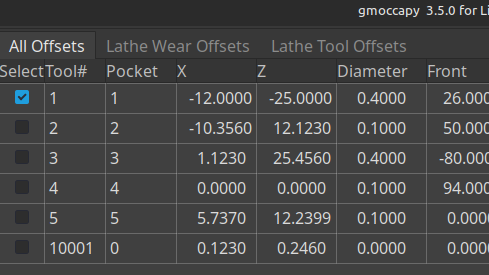
I have sometime issue with precision after tool change +-0.01mm with OWT grinded tool post fixtures with manual toolchange .hal stuff.. I noticed that in the default tool table for lathe is not the waer offsets .. I can switch on them by
Code:
LATHE_WEAR_OFFSETS = 1

where I can define them for the each tool separately 

And then add the the remapping ?

Then I will need to change T1 G43 to T01XX in the postprocessor I think ..

Thanks,

Regards

Please Log in or Create an account to join the conversation.
More
1 year 4 months ago #330568 by Aciera
Replied by Aciera on topic Fanuc-Style Toolchange
You don't really need the expanded tool editor for this:


Have a look at the sim config:
configs/sim/axis/lathe-fanucy
The following user(s) said Thank You: endian

Please Log in or Create an account to join the conversation.

More
1 year 4 months ago #330753 by endian
Replied by endian on topic Fanuc-Style Toolchange
okay thanks ...

If I want to fanuc style tool offsets .. I will do remap
Code:
[RS274NGC] SUBROUTINE_PATH = ./:../           REMAP = T prolog=get_T_number ngc=toolchange  PARAMETER_FILE = sim-lathe.var
change tool table
Code:
[EMCIO]                  TOOL_TABLE = lathe-fanucy.tbl
then allow the wear offsets
Code:
# for details see nc_files/subroutines/maco_instructions.txt [DISPLAY] LATHE = 1 BACK_TOOL_LATHE = 0 LATHE_WEAR_OFFSETS = TRUE

all other files have to be in the same folder too?

I want to move from 2.8.4 to 2.9.4 and I am searching for updates which should improve my life

thanks

Please Log in or Create an account to join the conversation.

More
1 year 4 months ago #330757 by Aciera
Replied by Aciera on topic Fanuc-Style Toolchange
usually you would have the files in your config folder but the main thing is that they can be found where the file paths in the ini file point to, so don't forget to add the [PYTHON] section and contents to your ini file and set the appropriate paths.
See the sim configs for how to set things up.
The following user(s) said Thank You: endian

Please Log in or Create an account to join the conversation.

Time to create page: 0.297 seconds
Powered by Kunena Forum
