
- Configuring LinuxCNC
- Advanced Configuration
- Spindle Uppper and Lower Limit (Or, how to change speed step size)
Spindle Uppper and Lower Limit (Or, how to change speed step size)
- andypugh
-

- Offline
- Moderator
-

Less
More
- Posts: 19898
- Thank you received: 4655
21 Jan 2023 00:03 #262531
by andypugh
Replied by andypugh on topic Spindle Uppper and Lower Limit (Or, how to change speed step size)
That won't work. It would be nice if it did, but you have to put in the x and y individually.So I just went to Chat GPT and asked it...
setp my_lincurve.table 0 0 0 0 1 9500 1 2 10500 2 3 15500 3 4 20500 40000 4
The following user(s) said Thank You: Askjerry
Please Log in or Create an account to join the conversation.
- Askjerry
-
 Topic Author
- Offline
- Elite Member
-

Less
More
- Posts: 239
- Thank you received: 31
21 Jan 2023 00:13 #262532
by Askjerry
Replied by Askjerry on topic Spindle Uppper and Lower Limit (Or, how to change speed step size)
And a quick Google search later... from this forum :-/
loadrt lincurve personality=4
addf lincurve.0 servo-thread
setp lincurve.0.x-val-00 0
setp lincurve.0.y-val-00 0
setp lincurve.0.x-val-01 200
setp lincurve.0.y-val-01 250
setp lincurve.0.x-val-02 550
setp lincurve.0.y-val-02 500
setp lincurve.0.x-val-03 1000
setp lincurve.0.y-val-03 1000
net spindle-raw motion.spindle-out => lincurve.0.in
net spindle-corrected lincurve.0.out => pwmgen.0.in
So I should just have to adjust the numbers to fit my demands... ah... forward progress! Thank you andypugh !!
loadrt lincurve personality=4
addf lincurve.0 servo-thread
setp lincurve.0.x-val-00 0
setp lincurve.0.y-val-00 0
setp lincurve.0.x-val-01 200
setp lincurve.0.y-val-01 250
setp lincurve.0.x-val-02 550
setp lincurve.0.y-val-02 500
setp lincurve.0.x-val-03 1000
setp lincurve.0.y-val-03 1000
net spindle-raw motion.spindle-out => lincurve.0.in
net spindle-corrected lincurve.0.out => pwmgen.0.in
So I should just have to adjust the numbers to fit my demands... ah... forward progress! Thank you andypugh !!
Please Log in or Create an account to join the conversation.
- rodw
-

- Offline
- Platinum Member
-

Less
More
- Posts: 12159
- Thank you received: 4150
21 Jan 2023 02:51 #262541
by rodw
Replied by rodw on topic Spindle Uppper and Lower Limit (Or, how to change speed step size)
You and Andy must be teachin it Jerry!
it gave me this:
it gave me this:
loadrt lincurve

setp lincurve.0.x1 0
setp lincurve.0.y1 0
setp lincurve.0.x2 9500
setp lincurve.0.y2 1

setp lincurve.0.x3 10500
setp lincurve.0.y3 2
setp lincurve.0.x4 15500
setp lincurve.0.y4 3

setp lincurve.0.x5 20500
setp lincurve.0.y5 4
setp lincurve.0.x6 40000

# Connect lincurve output to your program
net lincurve-out-0 => your-program-variable
Please Log in or Create an account to join the conversation.
- Askjerry
-
Topic Author
- Offline
- Elite Member
-
Less
More
- Posts: 239
- Thank you received: 31
21 Jan 2023 15:11 - 21 Jan 2023 15:22 #262585
by Askjerry
Replied by Askjerry on topic Spindle Uppper and Lower Limit (Or, how to change speed step size)
I do not think lincurve is the answer to my issue.
I installed the following code into my HAL for testing...
The spindle I have uses four signals, S0 S1 S2 S3 to operate.
S0 will be connected to pin SPINDLE-ON where it will activate or deactivate the VFD.
My speed choices then are
10,000 : S1=1 S2=0 S3=0 (Decimal 1 Binary 001)
15,000 : S1=0 S2=1 S3=0 (Decimal 2 Binary 010)
20,000 : S1=1 S2=1 S3=0 (Decimal 3 Binary 011)
25,000 : S1=0 S2=0 S3=1 (Decimal 4 Binary 100)
The bit pattern continues to 40,000 RPM... but I want to stop at 25,000 so anything from 25K to 40K should equal 25K, or bit pattern 100
S0 = PARAPORT PIN 8 Spindle ON/OFF
S1 = PARAPORT PIN 9 VFD S1 Input high/low
S2 = PARAPORT PIN 16 VFD S2 Input high/low
S3 = PARAPORT PIN 17 VFD S3 Input high/low
My goal was to get a number 1 to 4, take that bit pattern and put it onto the appropriate S1 to S3 pins... and have them net to the appropriate PARAPORT pin.
The problem...
If I send M3 S5000 I would expect to get an answer of "1" so a bit pattern of 001 could be sent to the pins. Instead, the result is 10500 which is incorrect.
As you can see... this is not an output from 1 to 4.
I installed the following code into my HAL for testing...
#-------------------------------------------------
# Install LINCURVE
loadrt lincurve personality=5
addf lincurve.0 servo-thread

# OFF
setp lincurve.0.x-val-00 0
setp lincurve.0.y-val-00 0

# 10K
setp lincurve.0.x-val-01 1
setp lincurve.0.y-val-01 10500

# 15K
setp lincurve.0.x-val-02 10500
setp lincurve.0.y-val-02 15500

# 20K
setp lincurve.0.x-val-03 15500
setp lincurve.0.y-val-03 20500

# 25K
setp lincurve.0.x-val-04 20500
setp lincurve.0.y-val-04 40000

# Tie Commanded Spindle Speed to LINCURVE
net spindle-cmd => lincurve.0.in
#-------------------------------------------------
The spindle I have uses four signals, S0 S1 S2 S3 to operate.
S0 will be connected to pin SPINDLE-ON where it will activate or deactivate the VFD.
My speed choices then are
10,000 : S1=1 S2=0 S3=0 (Decimal 1 Binary 001)
15,000 : S1=0 S2=1 S3=0 (Decimal 2 Binary 010)
20,000 : S1=1 S2=1 S3=0 (Decimal 3 Binary 011)
25,000 : S1=0 S2=0 S3=1 (Decimal 4 Binary 100)
The bit pattern continues to 40,000 RPM... but I want to stop at 25,000 so anything from 25K to 40K should equal 25K, or bit pattern 100
S0 = PARAPORT PIN 8 Spindle ON/OFF
S1 = PARAPORT PIN 9 VFD S1 Input high/low
S2 = PARAPORT PIN 16 VFD S2 Input high/low
S3 = PARAPORT PIN 17 VFD S3 Input high/low
My goal was to get a number 1 to 4, take that bit pattern and put it onto the appropriate S1 to S3 pins... and have them net to the appropriate PARAPORT pin.
The problem...
If I send M3 S5000 I would expect to get an answer of "1" so a bit pattern of 001 could be sent to the pins. Instead, the result is 10500 which is incorrect.
As you can see... this is not an output from 1 to 4.
Attachments:
Last edit: 21 Jan 2023 15:22 by Askjerry.
Please Log in or Create an account to join the conversation.
- chris@cnc
- Offline
- Platinum Member
-
Less
More
- Posts: 529
- Thank you received: 140
21 Jan 2023 16:45 - 21 Jan 2023 16:50 #262590
by chris@cnc
Replied by chris@cnc on topic Spindle Uppper and Lower Limit (Or, how to change speed step size)
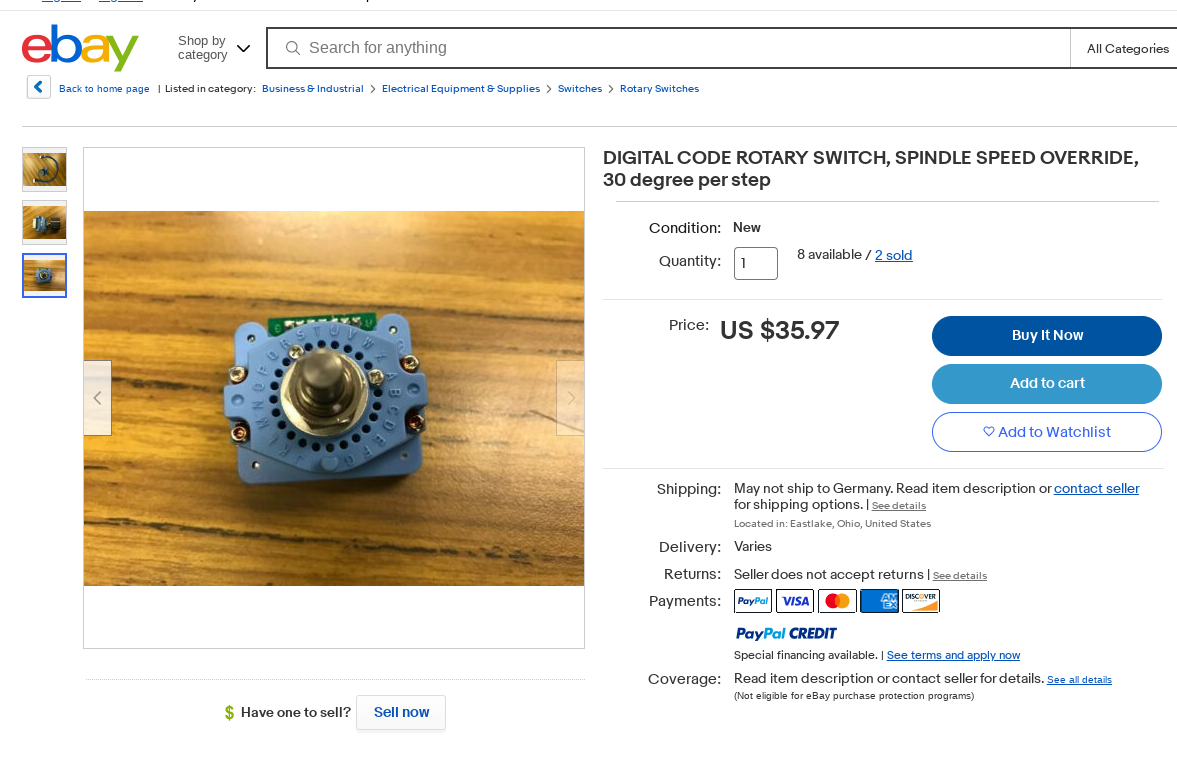
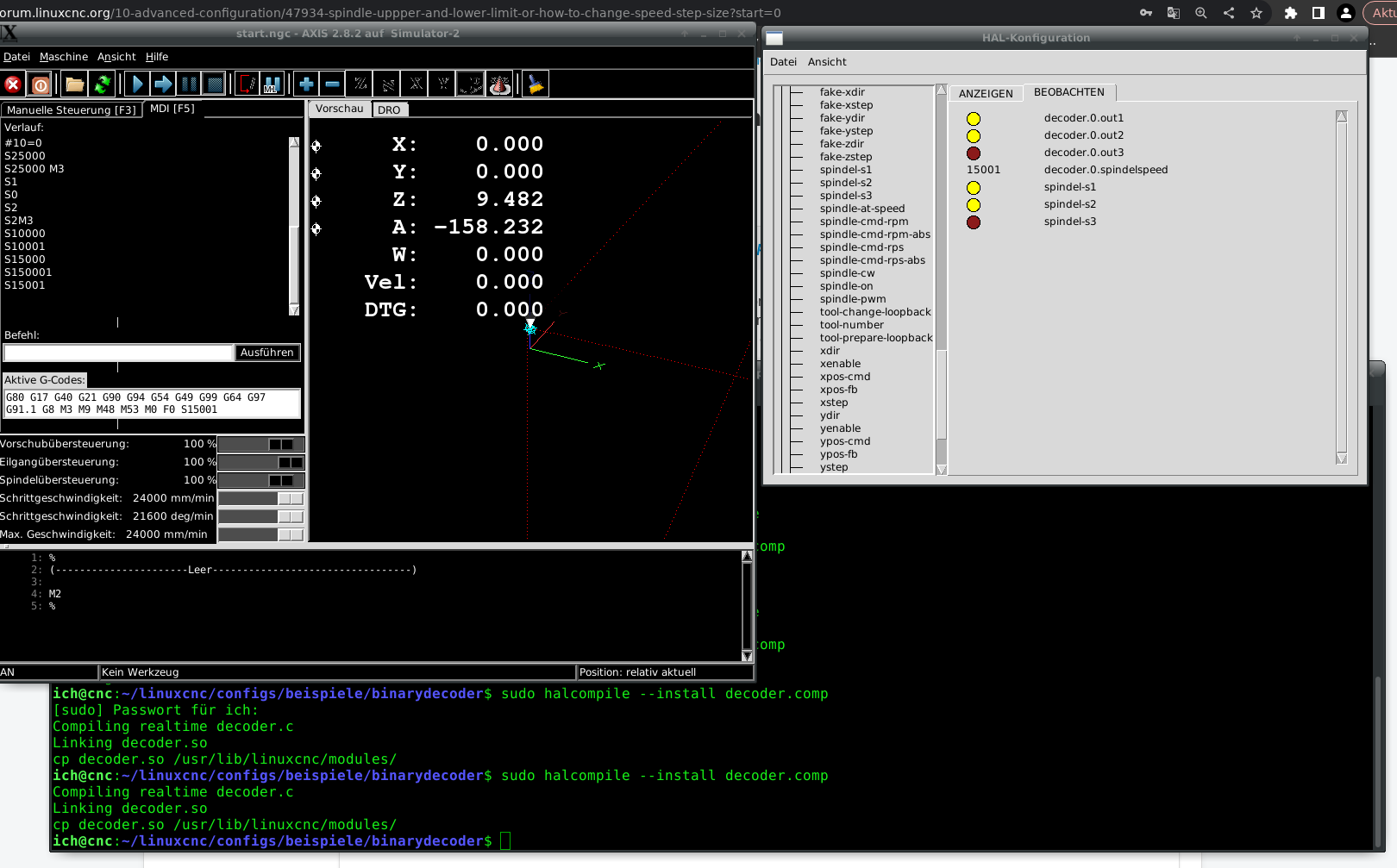
Hi, i would do it with a short custom comp or pure hardware digital rotary switch.
I made short working example. Ready to use...
I made short working example. Ready to use...
Last edit: 21 Jan 2023 16:50 by chris@cnc.
The following user(s) said Thank You: Askjerry
Please Log in or Create an account to join the conversation.
- Askjerry
-
Topic Author
- Offline
- Elite Member
-
Less
More
- Posts: 239
- Thank you received: 31
21 Jan 2023 18:27 #262596
by Askjerry
Replied by Askjerry on topic Spindle Uppper and Lower Limit (Or, how to change speed step size)
This is exactly it... now I just need to learn how to implement it...
This part I understand... perfect... I can install it in the LAGUNA.HAL or in the CUSTOM.HAL comfortable with that...
What I do not understand is what to do with this code...
Where does it go and/or how do I use it? It looks like C, I get that... but what IDE are you using? What do I need to load?
I'm excited, because if I can learn this... I can probably figure out how to change a bunch of things. I do not need an external encoder... One of my thoughts was to make a pyVCP panel with buttons like...
[ 10K ]
[ 15K ]
[ 20K ]
[ 25K ]
That I know how to do...
looking at your code: // seems to be a REM statement as does the /* something /* part. The rest makes sense too.
So how do I compile it and get it into AXIS? I see the loadrt command... so I guess I need...
1) How do I compile the code?
2) Where does the compiled code need to go? (My LAGUNA folder? A system folder?)
Thanks in advance!
Jerry
This part I understand... perfect... I can install it in the LAGUNA.HAL or in the CUSTOM.HAL comfortable with that...
loadrt decoder
addf decoder.0 servo-thread
setp decoder.0.spindelspeed 0

net spindle-cmd-rpm-abs <= spindle.0.speed-out-abs => decoder.0.spindelspeed
net spindel-s1 <= decoder.0.out1
net spindel-s2 <= decoder.0.out2
net spindel-s3 <= decoder.0.out3
What I do not understand is what to do with this code...
component decoder " ";description
"""
//Compile :
//halcompile --compile decoder.comp
//sudo halcompile --install decoder.comp
//Halfile load :
//loadrt decoder
//addf decoder.0 servo-thread
//setp decoder.0.spindelspeed 0
/* 4 Bit Spindelspeed decoder
	If speed 0-10000 -> out1
	If speed 10000-15000 -> out2
	If speed 15000-20000 -> out1 + out2
	If speed 20000-25000 -> out3
*/
""";

author "Christian Schorsch";

license "GPL";

// Input pins
pin in float spindelspeed=0;		//speed float in


// Output pins
pin out bit out1=0;
pin out bit out2=0;
pin out bit out3=0;

// Global variables
//variable float timer=0;

function _;

;;

#include "rtapi_math.h"

FUNCTION(_) {

	if((spindelspeed) >0 && (spindelspeed) <=10000) {
		out1=1;
		out2=0;
		out3=0;
		}

	else if((spindelspeed) >=10001 && (spindelspeed) <=15000) {
		out1=0;
		out2=1;
		out3=0;		}

	else if((spindelspeed) >=15001 && (spindelspeed) <=20000) {
		out1=1;
		out2=1;
		out3=0;
		}

	else if((spindelspeed) >=20001 && (spindelspeed) <=25000) {
		out1=0;
		out2=0;
		out3=1;
		}

	else	{
		out1=0;
		out2=0;
		out3=0;
	}

}
Where does it go and/or how do I use it? It looks like C, I get that... but what IDE are you using? What do I need to load?
I'm excited, because if I can learn this... I can probably figure out how to change a bunch of things. I do not need an external encoder... One of my thoughts was to make a pyVCP panel with buttons like...
[ 10K ]
[ 15K ]
[ 20K ]
[ 25K ]
That I know how to do...
looking at your code: // seems to be a REM statement as does the /* something /* part. The rest makes sense too.
So how do I compile it and get it into AXIS? I see the loadrt command... so I guess I need...
1) How do I compile the code?
2) Where does the compiled code need to go? (My LAGUNA folder? A system folder?)
Thanks in advance!
Jerry
Please Log in or Create an account to join the conversation.
- Askjerry
-
Topic Author
- Offline
- Elite Member
-
Less
More
- Posts: 239
- Thank you received: 31
21 Jan 2023 18:38 #262598
by Askjerry
Replied by Askjerry on topic Spindle Uppper and Lower Limit (Or, how to change speed step size)
GEANY appears to be a compiler... I haven't used it...
I went in, created a new file... pasted your code... saved it.
But BUILD... that fails... likely I'm missing something... sorry I have only coded in GAMBAS and PYTHON in Liunix.
I went in, created a new file... pasted your code... saved it.
But BUILD... that fails... likely I'm missing something... sorry I have only coded in GAMBAS and PYTHON in Liunix.
Please Log in or Create an account to join the conversation.
- JPL
- Offline
- Platinum Member
-
Less
More
- Posts: 337
- Thank you received: 118
21 Jan 2023 19:38 #262602
by JPL
Replied by JPL on topic Spindle Uppper and Lower Limit (Or, how to change speed step size)
Those 2 lines after "Compile:" are the instruction how to compile and install the component:
//Compile :
//halcompile --compile decoder.comp
//sudo halcompile --install decoder.comp
So... to compile and install the component just type:
halcompile --compile decoder.comp
sudo halcompile --install decoder.comp
More info here: linuxcnc.org/docs/html/man/man1/halcompile.1.html
.
//Compile :
//halcompile --compile decoder.comp
//sudo halcompile --install decoder.comp
So... to compile and install the component just type:
halcompile --compile decoder.comp
sudo halcompile --install decoder.comp
More info here: linuxcnc.org/docs/html/man/man1/halcompile.1.html
.
The following user(s) said Thank You: Askjerry
Please Log in or Create an account to join the conversation.
- tommylight
-

- Away
- Moderator
-
Less
More
- Posts: 21999
- Thank you received: 7488
21 Jan 2023 19:54 #262603
by tommylight
Replied by tommylight on topic Spindle Uppper and Lower Limit (Or, how to change speed step size)
@AskJerry,
Please do not change subject/tittle when replying.
Thank you.
Please do not change subject/tittle when replying.
Thank you.
Please Log in or Create an account to join the conversation.
- chris@cnc
- Offline
- Platinum Member
-
Less
More
- Posts: 529
- Thank you received: 140
21 Jan 2023 19:59 - 21 Jan 2023 20:02 #262604
by chris@cnc
Replied by chris@cnc on topic Spindle Uppper and Lower Limit (Or, how to change speed step size)
Yes, it is a "C" program and need to compile. After compile and install, you have a working hal component.
I should copy in linuxcnc hal modul folder. Just load now in your custom.hal
Everything after "//" is comment. I think It's helpful to note how to compile and function of this.
You need the linuxcnc-uspace-dev package for halcompile
If halcompile not working, post your error. Maybe there is something lost by copy and paste.
I should copy in linuxcnc hal modul folder. Just load now in your custom.hal
Everything after "//" is comment. I think It's helpful to note how to compile and function of this.
You need the linuxcnc-uspace-dev package for halcompile
If halcompile not working, post your error. Maybe there is something lost by copy and paste.
Last edit: 21 Jan 2023 20:02 by chris@cnc.
The following user(s) said Thank You: Askjerry
Please Log in or Create an account to join the conversation.
- Configuring LinuxCNC
- Advanced Configuration
- Spindle Uppper and Lower Limit (Or, how to change speed step size)
Time to create page: 0.425 seconds