

- Posts: 2180
- Thank you received: 905
caxis.comp status
2 years 9 months ago - 2 years 9 months ago #290404
by spumco
Replied by spumco on topic caxis.comp - problems
Finally getting somewhere.
I think there is an error in the LCNC manual.
Under INI [AXIS] and [JOINT], the following:
[/code][/code]
So naturally I set my MAX_VELOCITY appropriately: 720 degrees per second (for 2 revs/sec). Same for the [TRAJ] and [DISPLAY] sections.
After pulling my hair out for a couple days trying to figure out why the C-axis was moving so slowly... I took a gamble tonight and bumped all the values way up.
It appears that LCNC is calculating angular axes based on machine units per MINUTE, not second. MAX_VELOCITY = 7200 started working as expected.
Same issue with homing speed - LCNC is calculating on units per minute, not second for angular axes.
Adjusted MAX_ACCEL appropriately, and now it's whipping around like a champ and I can get to PID tuning.
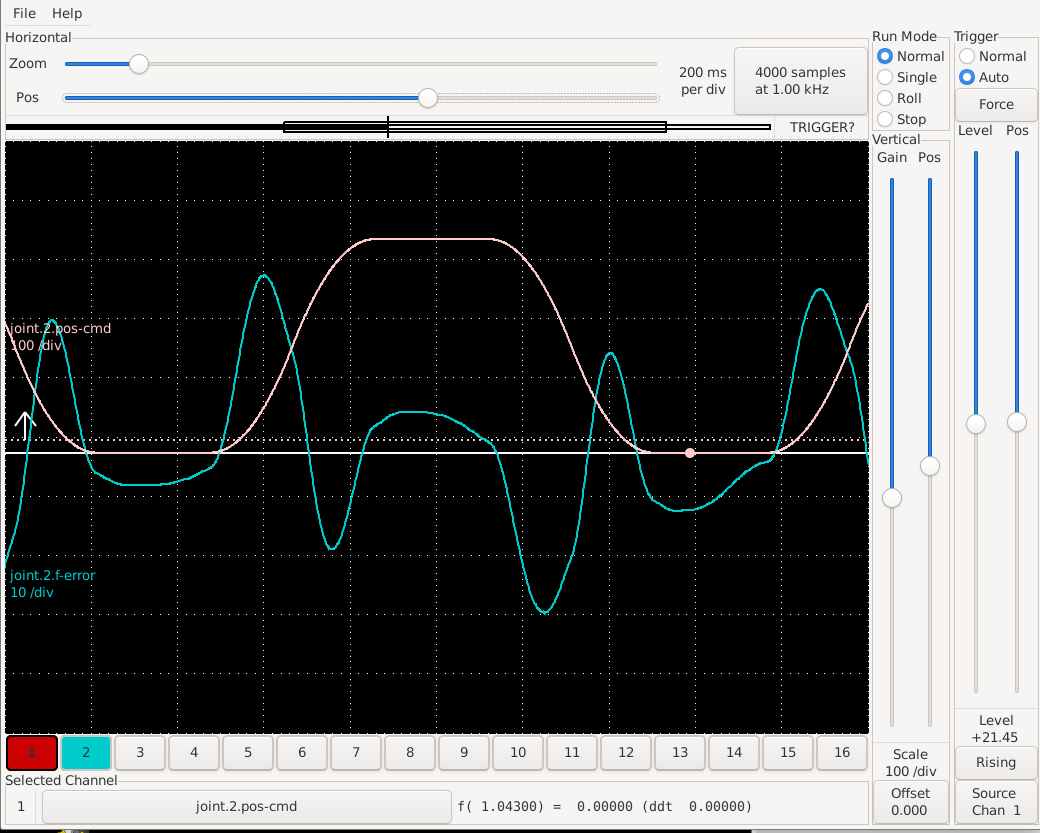
Moving forward...it's got quite a bit of overshoot and undershoot, and I'm not sure where to go from here. Not seriously unstable... just springy.
Based on these settings:
P = 0.04
I = 0
D = 0
FF0 = 0
FF1 = 0.015
FF2 = 0.015
FF3 = 0.005
maxoutput = 0
deadband = 0.2
Raising P causes it to go unstable.
I've got a scope that looks like below. Any suggestions on how to tighten it up?
[/code]
I think there is an error in the LCNC manual.
Under INI [AXIS] and [JOINT], the following:
Code:
[code][code]MAX_VELOCITY = 1.2 - Maximum velocity for this joint in machine units per second.
So naturally I set my MAX_VELOCITY appropriately: 720 degrees per second (for 2 revs/sec). Same for the [TRAJ] and [DISPLAY] sections.
After pulling my hair out for a couple days trying to figure out why the C-axis was moving so slowly... I took a gamble tonight and bumped all the values way up.
It appears that LCNC is calculating angular axes based on machine units per MINUTE, not second. MAX_VELOCITY = 7200 started working as expected.
Same issue with homing speed - LCNC is calculating on units per minute, not second for angular axes.
Adjusted MAX_ACCEL appropriately, and now it's whipping around like a champ and I can get to PID tuning.
Moving forward...it's got quite a bit of overshoot and undershoot, and I'm not sure where to go from here. Not seriously unstable... just springy.
Based on these settings:
P = 0.04
I = 0
D = 0
FF0 = 0
FF1 = 0.015
FF2 = 0.015
FF3 = 0.005
maxoutput = 0
deadband = 0.2
Raising P causes it to go unstable.
I've got a scope that looks like below. Any suggestions on how to tighten it up?
Code:
[code] [attachment=58565]Screenshot_2024-01-11_04-57-59.png[/attachment]
Last edit: 2 years 9 months ago by spumco. Reason: horrible forum editor
Please Log in or Create an account to join the conversation.
2 years 9 months ago #290405
by spumco
Replied by spumco on topic caxis.comp - problems
[not going to try to edit that again. screen cap below]
Please Log in or Create an account to join the conversation.
2 years 9 months ago #290534
by spumco
Replied by spumco on topic caxis.comp - problems
Now I'm less certain there's an error in the LCNC manual, and am suspecting there's an error between the manual and my keyboard.
For those of you silently following along it just occurred to me that I may have made a really dumb mistake.
The spindle/c-axis stepgen position-scale is 12110, and that's set in the INI [SPINDLE] section. Feedback is 2400 pulses per rev (soon to be 40k after the new encoder is wired up).
But that's 12110 pulses per revolution. And the C-axis units are in degrees.
So I'm flipping back and forth between two PID loops...Both use the same input (2400), but the outputs need to be calculated for two different units.
But LCNC isn't doing that, because I haven't told it to scale the C-axis output for degrees. No wonder it's reacting wonky.
I feel like the IT Helpdesk person has just asked me to check if the computer is plugged in... And I stifle my sense of outrage and look down to see it's unplugged.
To be continued...
For those of you silently following along it just occurred to me that I may have made a really dumb mistake.
The spindle/c-axis stepgen position-scale is 12110, and that's set in the INI [SPINDLE] section. Feedback is 2400 pulses per rev (soon to be 40k after the new encoder is wired up).
But that's 12110 pulses per revolution. And the C-axis units are in degrees.
So I'm flipping back and forth between two PID loops...Both use the same input (2400), but the outputs need to be calculated for two different units.
But LCNC isn't doing that, because I haven't told it to scale the C-axis output for degrees. No wonder it's reacting wonky.
I feel like the IT Helpdesk person has just asked me to check if the computer is plugged in... And I stifle my sense of outrage and look down to see it's unplugged.
To be continued...
Please Log in or Create an account to join the conversation.
2 years 9 months ago #290678
by spumco
Replied by spumco on topic caxis.comp - problems
[I can't be the only one who uses the forum as a 'Dear Diary' to collect my thoughts...]
I've been editing hal while attempting to change the controls scheme from a position-mode stepgen to velocity-mode using PWM. I'm trying to eliminate the (possible) problems with managing a spindle/axis having two units (revs vs. degrees) but only one stepgen scale.
Sadly, I've managed to confuse myself, possibly beyond redemption.
I think my main problem is that there are so many pins available between spindle, encoder, joints, and PID's I'm getting saturated - and most of them aren't needed as they're scaled duplicates.
Like so:
spindle.0.speed-out
spindle.0.speed-out-abs
spindle.0.speed-out-rps
spindle.0.speed-out-rps-abs
What's throwing me for a loop: it appears that despite NoJo's (and my earlier) config having two PIDs, only one is being used. There's a whole 'pid.s' section with settings and pin connections... but pid.s.output signal is not connected to anything.
So in axis mode it's closed loop, but in spindle mode it's open-loop.
It looks like the basic scheme is this:
I think what I need will look like this:
spindle command -> pid.s.input -> pid.s.output -> caxis.0.spindle-velocity-in
And pid.s is disabled when the spindle is commanded off, so it's not continually sending a velocity correction signal to caxis.comp while in axis mode.
Here goes nothing...
I've been editing hal while attempting to change the controls scheme from a position-mode stepgen to velocity-mode using PWM. I'm trying to eliminate the (possible) problems with managing a spindle/axis having two units (revs vs. degrees) but only one stepgen scale.
Sadly, I've managed to confuse myself, possibly beyond redemption.
I think my main problem is that there are so many pins available between spindle, encoder, joints, and PID's I'm getting saturated - and most of them aren't needed as they're scaled duplicates.
Like so:
spindle.0.speed-out
spindle.0.speed-out-abs
spindle.0.speed-out-rps
spindle.0.speed-out-rps-abs
What's throwing me for a loop: it appears that despite NoJo's (and my earlier) config having two PIDs, only one is being used. There's a whole 'pid.s' section with settings and pin connections... but pid.s.output signal is not connected to anything.
So in axis mode it's closed loop, but in spindle mode it's open-loop.
It looks like the basic scheme is this:
- Spindle OFF
- pid.c.output (position) is fed in to caxis.comp
- caxis.comp outputs velocity command to the stepgen
- Spindle ON
- caxis.comp disables pid.c
- takes spindle speed command in (without passing through any PID)
- caxis.comp outputs velocity command to the stepgen
- Transition from ON to OFF
- caxis.comp fiddles with the position feedback so there isn't a massive following error
- caxis.comp re-enables pid.c
- pid.c causes the axis to return to the last position prior to spindle-on
I think what I need will look like this:
spindle command -> pid.s.input -> pid.s.output -> caxis.0.spindle-velocity-in
And pid.s is disabled when the spindle is commanded off, so it's not continually sending a velocity correction signal to caxis.comp while in axis mode.
Here goes nothing...
Please Log in or Create an account to join the conversation.
2 years 9 months ago #290781
by spumco
Replied by spumco on topic caxis.comp - problems
We're in business.
After some fits & starts with the encoder and various scaling boo-boos I've got the system working via PWM command.
Spindle mode works exceptionally well once I figured out the caxis.comp parameter (caxis.0.spindle-maxaccel) was clamping spindle accel/decel values. Until I set that way higher than the standard '50' in the comp the spindle was acting very lazy. Unfortunately there's no description in the comp as to what units are used - don't know if it's degrees/sec/sec, rps, rpm, or some other mystery unit.
Now it's a matter of tuning up axis mode.
It's working OK-ish now, but I think it could be much better.
I seem to recall some recent discussions of velocity-mode servo control using FF1 and P but that presumes you know what FF1 should be first.
MAX_VEL = 720
MAX_ACCELERATION = 7200
P = 35
I = 0
D = 0
FF0 = 0
FF1 = 0.15
FF2 = 0.015
FF3 = 0
maxoutput = 200
deadband = 0.05
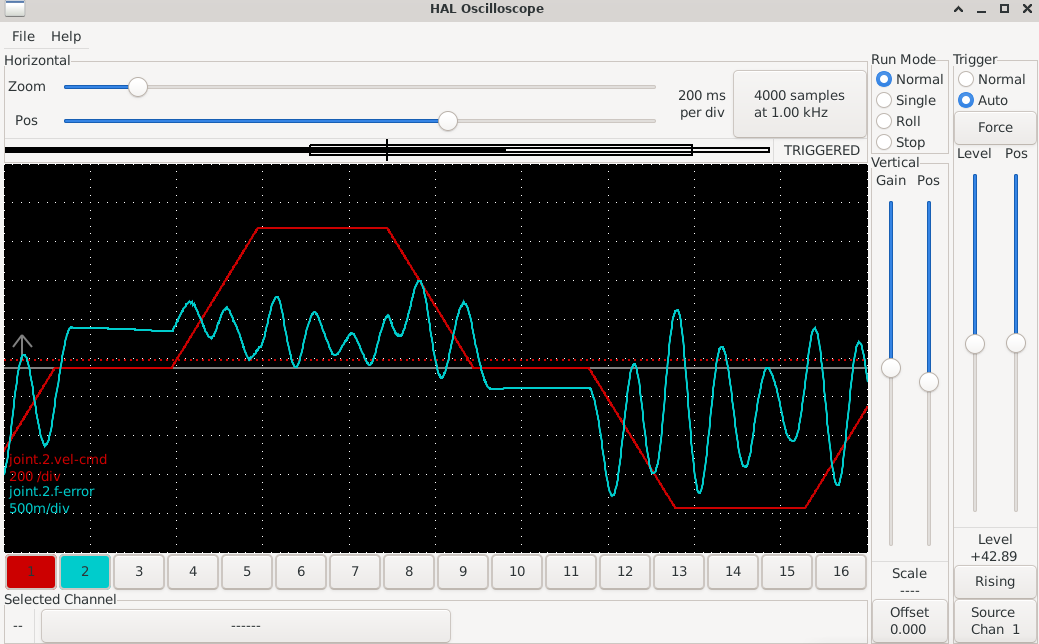
Results in lazy behavior. It reaches target position and doesn't vibrate much or overshoot, but it takes forever to finally settle down that last little bit. Doesn't move very quickly and I know this thing is capable of extremely fast moves.
Does anyone know if there's a way to calculate FF1 based on encoder count and max output? Or some other variables?
After some fits & starts with the encoder and various scaling boo-boos I've got the system working via PWM command.
Spindle mode works exceptionally well once I figured out the caxis.comp parameter (caxis.0.spindle-maxaccel) was clamping spindle accel/decel values. Until I set that way higher than the standard '50' in the comp the spindle was acting very lazy. Unfortunately there's no description in the comp as to what units are used - don't know if it's degrees/sec/sec, rps, rpm, or some other mystery unit.
Now it's a matter of tuning up axis mode.
It's working OK-ish now, but I think it could be much better.
I seem to recall some recent discussions of velocity-mode servo control using FF1 and P but that presumes you know what FF1 should be first.
MAX_VEL = 720
MAX_ACCELERATION = 7200
P = 35
I = 0
D = 0
FF0 = 0
FF1 = 0.15
FF2 = 0.015
FF3 = 0
maxoutput = 200
deadband = 0.05
Results in lazy behavior. It reaches target position and doesn't vibrate much or overshoot, but it takes forever to finally settle down that last little bit. Doesn't move very quickly and I know this thing is capable of extremely fast moves.
Does anyone know if there's a way to calculate FF1 based on encoder count and max output? Or some other variables?
The following user(s) said Thank You: jpg
Please Log in or Create an account to join the conversation.
2 years 9 months ago #290782
by spumco
Replied by spumco on topic caxis.comp - problems
If it helps, the move above is a G0C360 -> G4P0.25 -> G0C0 repeat loop.
Please Log in or Create an account to join the conversation.
Time to create page: 0.430 seconds