
- Configuring LinuxCNC
- Advanced Configuration
- freelancer needed to create a routine for ATC tool change (rackchange)
freelancer needed to create a routine for ATC tool change (rackchange)
- Masiwood123
-
 Topic Author
- Offline
- Platinum Member
-

Less
More
- Posts: 423
- Thank you received: 93
08 Dec 2025 13:54 #339866
by Masiwood123
freelancer needed to create a routine for ATC tool change (rackchange) was created by Masiwood123
this won't work either in sim mode or in reality, I tried something via chatgpt but I know that it doesn't work, it can't create a routine. here is my configuration if anyone is free to look at where the error is and what needs to be added in Hal eventually. Tx m6 works but will not return the tool to its pocket when you give it another tool, it also reports in the bottom line that there is no tool even though in reality it took it. each pocket has its own active high sensor on inputs 16-21 and the spindle has a sensor for ``flush'' input 10 the tool is in the spindle, input 12 reports that there is no tool in the spindle. Thanks
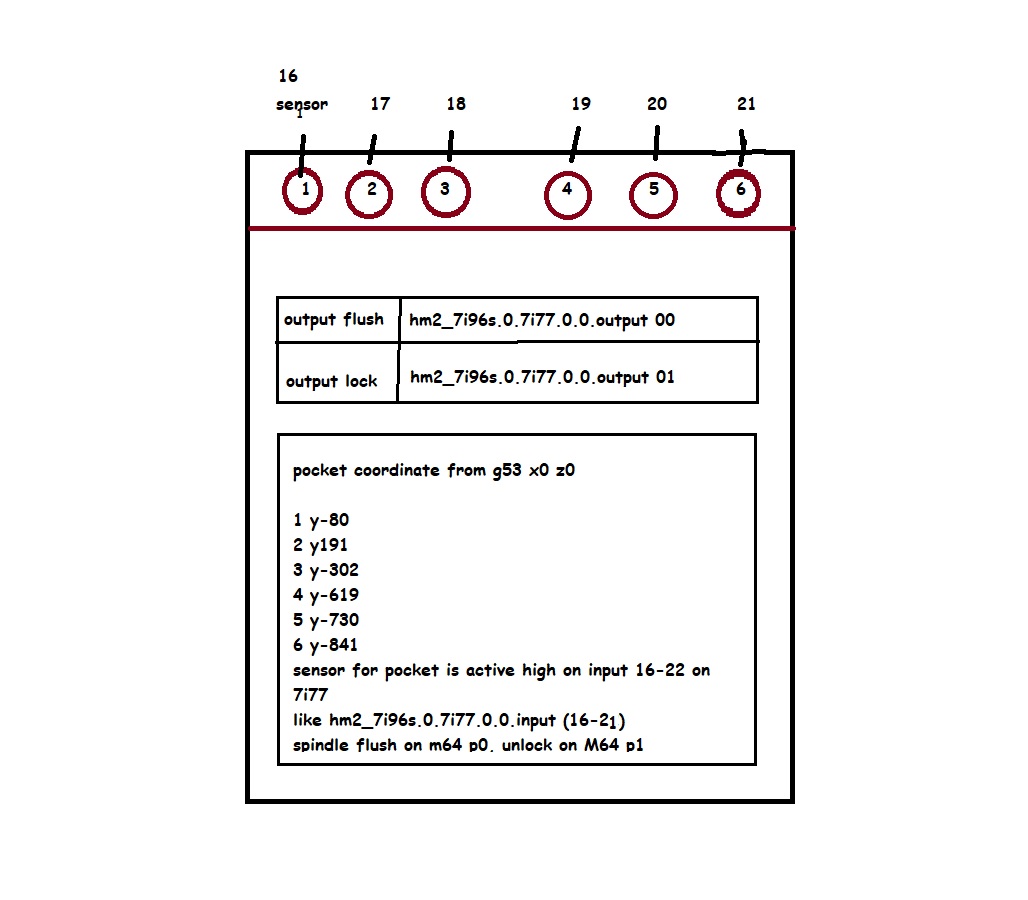
youtube.com/shorts/CXxlm92xtt8?si=KCv1wBtX9AL_1eM2
youtube.com/shorts/CXxlm92xtt8?si=KCv1wBtX9AL_1eM2
Attachments:
Please Log in or Create an account to join the conversation.
- tommylight
-

- Away
- Moderator
-

Less
More
- Posts: 21959
- Thank you received: 7478
09 Dec 2025 07:58 #339899
by tommylight
Replied by tommylight on topic freelancer needed to create a routine for ATC tool change (rackchange)
2 Y191
Pretty sure that is wrong....
Pretty sure that is wrong....
The following user(s) said Thank You: Masiwood123
Please Log in or Create an account to join the conversation.
- Masiwood123
-
Topic Author
- Offline
- Platinum Member
-
Less
More
- Posts: 423
- Thank you received: 93
09 Dec 2025 08:12 #339900
by Masiwood123
Replied by Masiwood123 on topic freelancer needed to create a routine for ATC tool change (rackchange)
yes that is y-191, I got to the point where it wants to take the tool, but it won't put it back in the pocket when I choose a new one, down in the header it also says ``no tool''
Please Log in or Create an account to join the conversation.
- tommylight
-
- Away
- Moderator
-
Less
More
- Posts: 21959
- Thank you received: 7478
09 Dec 2025 12:06 #339908
by tommylight
Replied by tommylight on topic freelancer needed to create a routine for ATC tool change (rackchange)
Here is a video i did some 5 years ago, i tested the included rack toolchanger on a machine and it just worked after editing out the sim stuff:
You can try the same thing, namely, make the sim work on another config for parallel port (no need for a machine) and after getting this to work add the required entries from it to your machine config while also editing the tool positions.
You can try the same thing, namely, make the sim work on another config for parallel port (no need for a machine) and after getting this to work add the required entries from it to your machine config while also editing the tool positions.
The following user(s) said Thank You: Masiwood123
Please Log in or Create an account to join the conversation.
- Masiwood123
-
Topic Author
- Offline
- Platinum Member
-
Less
More
- Posts: 423
- Thank you received: 93
09 Dec 2025 13:04 - 09 Dec 2025 20:35 #339914
by Masiwood123
Replied by Masiwood123 on topic freelancer needed to create a routine for ATC tool change (rackchange)
yes, I saw it on YT that you were working, I just don't know which linuxcnc it was, mine is now 2.9.0 and when I export the sim configuration for racktoolchange, it puts it in the configuration, but Linux at the start shows some errors about gladevcp or something similar related to gtk and it won't run the simulation, maybe I should try to insert my ini and hal and leave the routine in the folder, or take the routine from that configuration and insert it into mine, I don't know.
Attachments:
Last edit: 09 Dec 2025 20:35 by Masiwood123.
Please Log in or Create an account to join the conversation.
- tommylight
-
- Away
- Moderator
-
Less
More
- Posts: 21959
- Thank you received: 7478
09 Dec 2025 22:12 #339929
by tommylight
Replied by tommylight on topic freelancer needed to create a routine for ATC tool change (rackchange)
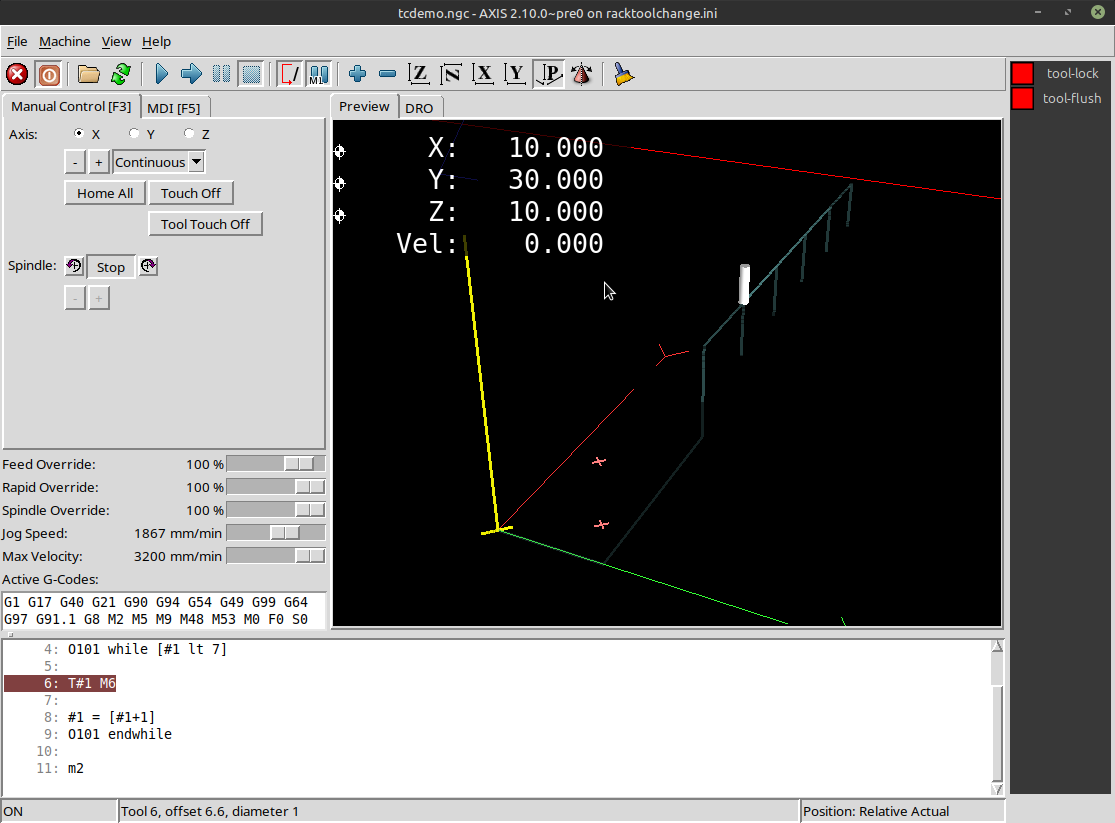
Sim works here but i am on 2.10/Master version.
Attachments:
The following user(s) said Thank You: Masiwood123
Please Log in or Create an account to join the conversation.
- Masiwood123
-
Topic Author
- Offline
- Platinum Member
-
Less
More
- Posts: 423
- Thank you received: 93
10 Dec 2025 11:33 #339940
by Masiwood123
Replied by Masiwood123 on topic freelancer needed to create a routine for ATC tool change (rackchange)
how do i upgrade linuxcnc only, without losing the configs and leaving bookworm? apt upgrade only adds office and some other things..
Please Log in or Create an account to join the conversation.
- rodw
-

- Offline
- Platinum Member
-
Less
More
- Posts: 12156
- Thank you received: 4149
10 Dec 2025 11:54 #339943
by rodw
sudo apt upgrade might do it.
I just published a video on how to upgrade to 2.9.7 on Trixie because it has 2.9.4 available in the Debian repos.
The apt pinning method I describe could be used on Bookworm as well. In fact uninstalling linuxcnc and removing the linuxcnc.list file in the APT folders would let you follow my Trixie method on Bookworm just keep the sources files pointing to bookworm
Replied by rodw on topic freelancer needed to create a routine for ATC tool change (rackchange)
Your configs are in your ~/linuxcnc folder so keep it. If you used the linuxcnc ISOhow do i upgrade linuxcnc only, without losing the configs and leaving bookworm? apt upgrade only adds office and some other things..
sudo apt upgrade might do it.
I just published a video on how to upgrade to 2.9.7 on Trixie because it has 2.9.4 available in the Debian repos.
The apt pinning method I describe could be used on Bookworm as well. In fact uninstalling linuxcnc and removing the linuxcnc.list file in the APT folders would let you follow my Trixie method on Bookworm just keep the sources files pointing to bookworm
The following user(s) said Thank You: Masiwood123
Please Log in or Create an account to join the conversation.
- tommylight
-
- Away
- Moderator
-
Less
More
- Posts: 21959
- Thank you received: 7478
11 Dec 2025 02:57 #339968
by tommylight
Replied by tommylight on topic freelancer needed to create a routine for ATC tool change (rackchange)
Just bumped into this:
See description for code.
See description for code.
The following user(s) said Thank You: Masiwood123
Please Log in or Create an account to join the conversation.
- Masiwood123
-
Topic Author
- Offline
- Platinum Member
-
Less
More
- Posts: 423
- Thank you received: 93
11 Dec 2025 09:00 #339974
by Masiwood123
Replied by Masiwood123 on topic freelancer needed to create a routine for ATC tool change (rackchange)
thank you, I managed to make a path for the first 3 tools that read ini by delta y, but the problem remained with the 4-5-6 because the raster between the tools is not the same as 1-2-3 because the motor and the ballscrew go in the middle of the machine, which was bothering them, so the other 3 tools are spaced out, I have to figure out how to do it via delta y or how to write for each tool separately... I hope I can solve it somehow.
Please Log in or Create an account to join the conversation.
- Configuring LinuxCNC
- Advanced Configuration
- freelancer needed to create a routine for ATC tool change (rackchange)
Time to create page: 0.285 seconds