Intel N100

More
2 years 10 months ago #287444 by royka
Replied by royka on topic Intel N100
This kernel has some AMD related stuff disabled, so only use with Intel.

mega.nz/folder/j2ZjUQ6A#wJAysWplOPS0-cyTy6OViQ

To compile your own is not that difficult, just download the source from GitHub, Download the matching patch from:
mirrors.edge.kernel.org/pub/linux/kernel/projects/rt/

Apply the patch:
gzip -cd ../Downloads/patch-6.7-rc3-rt3.patch.gz | patch -p1

make menuconfig - be sure it's set to full realtime and exit/save

make -j "$(nproc)"
sudo make modules_install
sudo make install

Or like Cornholio said, make packages and install the headers, then the image:
make -j "$(nproc)" bindeb-pkg
The following user(s) said Thank You: rodw, Mr. Mass

Please Log in or Create an account to join the conversation.

More
2 years 1 month ago - 2 years 1 month ago #310991 by rebelx
Replied by rebelx on topic Intel N100
Intel N100 works great with Debian 13 (Trixie pre-release) and LinuxCNC 2.9.3-1+b2

I have achieved good results with a cheap and super small N100 mini PC, with 16GB of DDR5 memory, a 256GB NVMe drive, dual LAN and Wifi/BT. It is available on AliExpress and other channels as a T8 Plus and it is sold under different brand names. The price varies between 120.- and 200.- USD depending on the configuration. I attached some images below.
It came with Windows 11 Pro pre-installed and activated. I decided to go for a dual boot system, keeping Windows and installing Debian in a separate partition, so I could use Windows for my servo motor tuning software.

In order to try something new, which is usually more fun, I decided to install Debian Trixie (yes, pre-release Debian 13), via the text based installer, which went flawlessly. I chose Cinnamon for the GUI, which often gave me somewhat unstable lacencies under Debian 12, probably due to some graphics driver issues, and I was curious if Cinnamon would perform better under Trixie. After booting my new Debian 13 system, I opened Synaptic and installed linux-image-6.10.9-rt-amd64. Then I rebooted and confirmed that Debian was running with the RT kernel:
Code:
$ uname -a


which showed:  Linux <pc-name> 6.10.9-rt-amd64 #1 SMP PREEMPT_RT Debian 6.10.9-1 (2024-09-08) x86_64 GNU/Linux

Next I installed LinuxCNC version 2.9.3-1+b2 from the Trixie repository, including the optional dev package,  via:
Code:
sudo apt install linuxcnc-uspace linuxcnc-uspace-dev


Nice to see that the latest stable release is automatically installed from the Debian Trixie repository :)

I did some latency tests without any BIOS changes or using isolcpus, and as to be expected the results were quite terrible with values for both the servo threat Max Jitter and base thread Max Jitter above 600000ns. (yes, six hundred thousand; it is not a typo). During the latency test I had 8 instances of glxgears running, internet connection via the build-in Wifi, Firefox had two tabs open with YouTube videos running and I was browsing the internet.

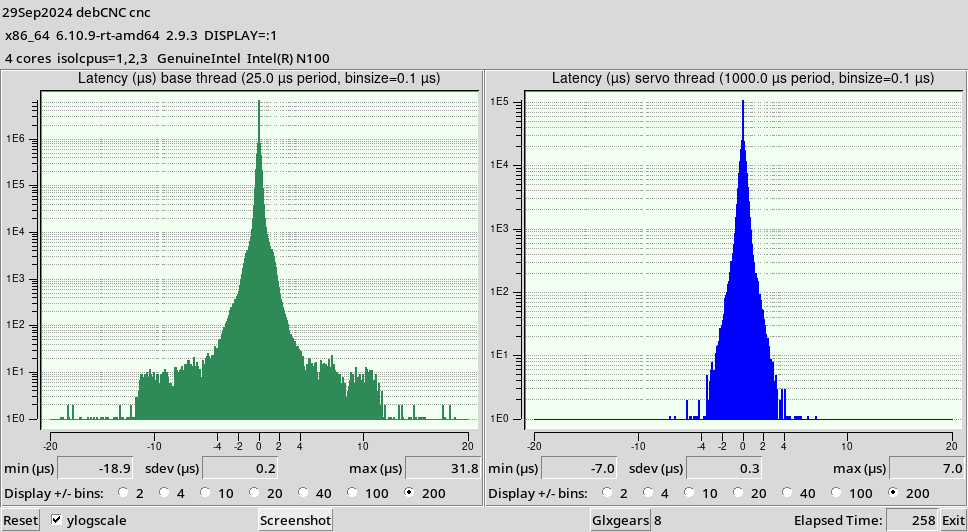
I then went into the BIOS settings and ONLY disabled Virtualization. After rebooting and doing another latency test, the results were much better, but still quite high. Before making any additional BIOS changes I decided to first play around with isolcpus to figure out which core(s) should be isolated from the general scheduler in order to get the best performance. I tested all possible combinations under the same test scenario as mentioned above, which took me several hours, and I found that isolcpus=1,2,3 resulted in the most optimal latency values. The Max Jitter values for both threads stayed below 20000ns, which is totally acceptable.
Next step was going back into the BIOS in order to disable things like C State and other power saving features, which is usually recommended to reduce latency, but strange enough disabling those only resulted in HIGHER latency instead of lower, so I stayed with only disabling virtualization and left the rest in their default settings. While I am typing this, the computer has been running for a few hours with the latency test and all those background programs running, and the Servo thread Max Jitter is 17646ns and the Base thread Max Jitter is 18711ns. Perhaps in the next few days I will take another look at the BIOS settings, trying to further reduce the latency, although I realize that is really not needed. All in all I am more than happy with this N100 mini PC. I will also test with some different desktop environments, especially lightweight environments like XFCE and LXQt. I may follow-up with another post about my findings.

As a PS: for those who want to use a Qt based GUI, like QtDragon, a Python file needs to be modified. Debian 13 comes with Python 3.12.6 installed. As from Python 3.12 locale.format is deprecated and needs to be replaced with locale.format_string in three places (lines 270, 277, 281) in the following file:
Code:
$ sudo gedit /usr/lib/python3/dist-packages/qtvcp/widgets/origin_offsetview.py


This fix is already implemented in the upcoming LinuxCNC 2.10 release, available on the LinuxCNC github page as a work in progress.

I hope this may be helpful for those looking for a modern cheap PC for LinuxCNC. N100 is definitely a suitable solution.
 
Last edit: 2 years 1 month ago by rebelx. Reason: Fixed some typos and added some more details.

Please Log in or Create an account to join the conversation.

More
2 years 1 month ago #311013 by pippin88
Replied by pippin88 on topic Intel N100
isolcpus does not disable cores

isolcpus isolates designated cores from the general scheduler
So routine tasks won't be assigned to those cores. E.g. web browser running in the background won't take CPU time on isolated cores

Please Log in or Create an account to join the conversation.

More
2 years 1 month ago - 2 years 1 month ago #311014 by rebelx
Replied by rebelx on topic Intel N100

isolcpus does not disable cores

isolcpus isolates designated cores from the general scheduler
So routine tasks won't be assigned to those cores. E.g. web browser running in the background won't take CPU time on isolated cores


Yes, that is what I actually meant, but you found a more correct way to say it :) I updated the text. Thank you for correcting me!

Isolating cores from the general scheduler and how that impacts latency always feels a bit like black magic to me, and results can vary quite a lot between different processor architectures. I remember using a J1900 board, where isolplus=1,2 gave the best results, which I guess may be related to how the cores are internally arranged on the die in two pairs, cores 0 and 1 being on one half of the die and sharing resources, and cores 2 and 3 sharing the other half. I guess limiting the general scheduler to only use one core per pair has an impact on interrupts and latency. I am not sure how the N100 is internally organized and how that may be impacting latency.
Do you know if there are any articles that explain how exactly LinuxCNC tasks are assigned to isolated cores? I would be interested in learning more about it. The main reason being that I am looking at some Arm based solutions that combine both application processors (e.g. Cortex-A53/55 capable of running Linux) and microcontrollers (e.g. CortexM7/33) in one chip. Some even have a dedicated DSP, which can be an efficient way to handle PIDs and so forth. Although my primary interest in this area is something else than CNC machine control, I think it would be very interesting to see if we could port LinuxCNC to such a platform, where the general Linux part of LinuxCNC can run on a Cortex-A, and where the real-time tasks can be performed on a Cortex-M, independently from the application processor. This separation could free us from Intel and AMD and how their platforms are more geared towards gamers than industrial low latency applications.
Last edit: 2 years 1 month ago by rebelx.

Please Log in or Create an account to join the conversation.

More
2 years 1 month ago #311018 by gambaf
Replied by gambaf on topic Intel N100
I've been running it for a while and it's been solid with a mesa card.
setting the irq affinity is important, other than that - pretty much no special tuning.

see here also:
forum.linuxcnc.org/18-computer/51678-lin...tel-n100-cpu?start=0

Please Log in or Create an account to join the conversation.

More
2 years 1 month ago - 2 years 1 month ago #311031 by rebelx
Replied by rebelx on topic Intel N100
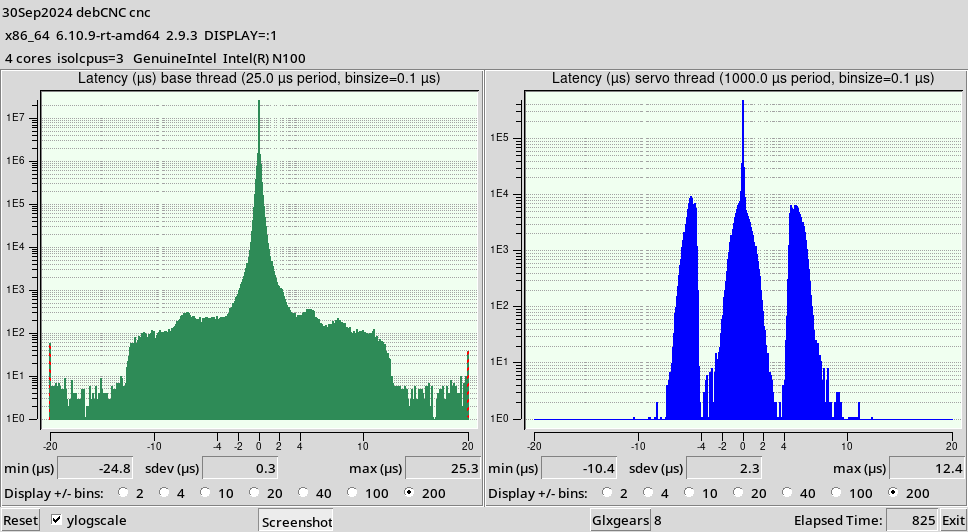
I did some further testing today, switched from Cinnamon to KDE, which runs much better and even better than XFCE. Here are the results of my stress testing, running for a couple of hours with 8 glxgears, two YouTube videos constantly playing, working with FreeCAD for my new machine design, and doing some compiling in the background.
Please notice that I run KDE on Wayland. When running on X11 the results are worse. The runtime of the test in the screenshot was only 4 minutes, but that was where the graphs had stabilized already. It looked the same after hours.


Below is the same test setup, but now with only isolcpus=3.
 
Last edit: 2 years 1 month ago by rebelx.

Please Log in or Create an account to join the conversation.

Time to create page: 0.067 seconds
Powered by Kunena Forum