
Hardware advice
- gm001
- Offline
- New Member
-

- Posts: 9
- Thank you received: 0
I'm hoping that someone can help me get my head wrapped around this, and point me in the right direction. I've spent over a dozen hours reading through threads on this forum and elsewhere - yet, I can't figure out how to proceed.
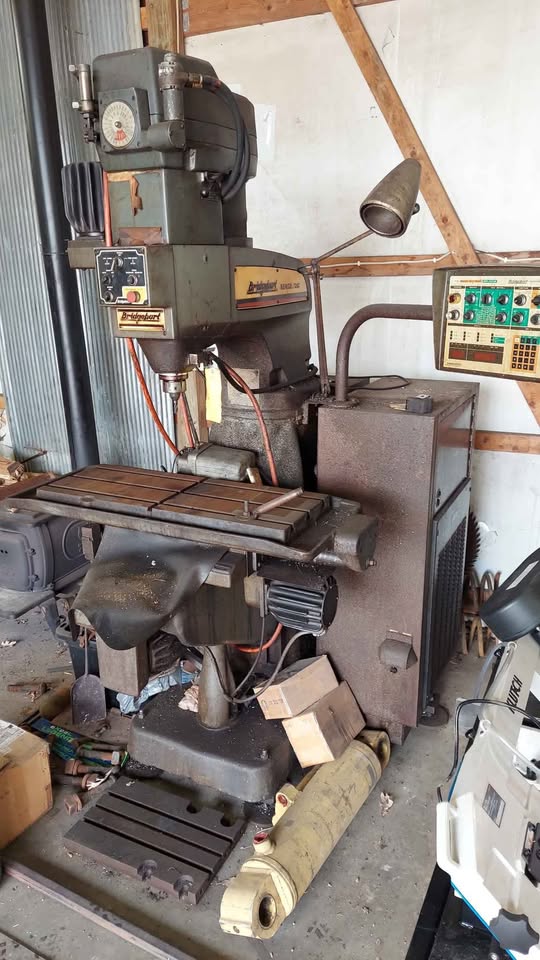
My machine is a Bridgeport Series I CNC (Boss 6) mill - and it's sitting in my shop in original condition. I'm new to CNC (having only dabbled with my Ender 3 3D printer). However, a close friend of mine who's helping me has a couple of HAAS mills and is a guru with Autodesk Fusion.
I've investigated numerous options for updating this machine. The more I study this, the more confused I've become! The simplest answer for a person like me seems to be to install an Acorn board. I'd rather not. I don't want to get vendor-locked (more than I have to). The thought of a company going under and leaving me in the position of having to gut the machine and start over is not appealing. I don't want to pay a subscription. I like the openness and configurability of LinuxCNC, and I'm a big fan and daily user of Linux (Red Hat Academy instructor).
My goals:
* Get the old Bridgeport back to making chips again.
* Have the ability to both use this machine as a CNC, and as a glorified manual machine (using LinuxCNC as a DRO).
* Not spend thousands of Dollars on this project (if possible!).
My thoughts:
* Mount a 12" touchsceen monitor in the original control panel housing for interacting with LinuxCNC.
* Hang a pendant on the side of the original control panel housing.
* Pick up a Huanyang VFD for the spindle drive (these seem to be well-supported and well regarded?).
* Replace the ancient original Bridgeport steppers with modern closed-loop NEMA 34's (1100-1200 oz in).
My questions:
* What should I run LinuxCNC on? I've got a spare RPi 4 sitting in my drawer. I've got a couple of Supermicro Intel Atom-based ITX server motherboards lying around. What's the most intelligent way to go?
* It seems that a parallel port interface is the "old-school" way of doing things. Now, it seems that most prefer an Ethernet interface. Is there a disadvantage of going one way or another?
* Since I have to replace the steppers anyway, is it foolish to go with a "traditional" setup rather than Ethercat? It seems like Ethercat will be considerably more expensive (like twice the price or more) - but is it worth the price?
* Everyone seems to agree that Mesa boards are the "gold standard." How do Pico Systems' boards compare? Jon Elson lives like 20 miles from my house. Does anyone have experience with his customer service? Is it foolish to consider anything other than a Mesa?
* If I go with a Mesa setup, which direction should I go? If I use the RPi, I could go with the 7C80 or 7C81 - I could also run an Ethernet setup. If I use the server motherboard, I could go with a parallel port setup or an Ethernet setup. Is there an advantage of going one way or another, here?
* If I go with a given Mesa board, what else will I need to buy? It seems that some of the Mesa cards (like the 7C80 and the 7I95T) will hook directly to the stepper drives, while others require a separate daughter card (BoB)?
* What hardware (if any) would I need in order to use the encoders on the steppers as a DRO? Will any of my hardware selection above affect my ability to have this feature?
* Will a cheap Amazon/Aliexpress stepper motor/drive/power supply set work, or will I need to buy the stepper drives separately? If I need a particular stepper drive, should I go with a Gecko or something else?
* If I run a touchscreen and a pendant, is there any reason why I will need a keyboard hooked up to this machine (once it is configured)?
Sorry for all of the (possibly stupid) questions. The DIY CNC and especially the LinuxCNC ecosystem is far more vast than I imagined. I really did attempt to "do my homework" before asking. There just seems to be a lot of somewhat conflicting information (possibly, due to changing technologies and best practices over the years?).
Thanks for any advice that you can provide to me!
Please Log in or Create an account to join the conversation.
- tommylight
-

- Away
- Moderator
-

- Posts: 21827
- Thank you received: 7453
Please Log in or Create an account to join the conversation.
- gm001
- Offline
- New Member
-
- Posts: 9
- Thank you received: 0
This machine has an auto oiler on it - so that will be one of the first things I mess with to ensure it's working correctly. I've seen some people state that the oiler nozzles on these machines can become clogged with gunk from sitting for so long.
Yep, the first order of business will be to remove the two big control cabinets from it, and vacuum all of the "man glitter" off if it, and give it a bath and a lube!
I'm looking at replacing the steppers for several reasons. Based upon the information I've found about these machines on various forums:
* The steppers are an old design. They apparently ran at a higher voltage than most modern steppers. This requires special drives (like a DM1182). For less than the cost of a suitable "high voltage" drive, I can buy modern steppers with matching drives and power supplies:
www.omc-stepperonline.com/ys-series-3-ax...ower-supply-3-clys90
* Given the age of the steppers, many people are stating that they are likely weak - due to the age of their magnets and the type of magnets they used.
* From what I understand, these steppers are not closed-loop.
* Again, according to others, these steppers are "notchy" and "jumpy". They aren't as smooth as modern steppers, and don't have the accuracy/resolution (though, they are probably plenty accurate for my needs).
I'm sure that some "Double-E" out there could figure out how to connect a RPi's GPIO to the existing stepper drives. However, that's well beyond my level of expertise. The existing drives are cards that are plugged into a sort of backplane. They have Bridgeport's name on the boards, so I assume that they are proprietary. There's a document floating around, which explains how to reuse the existing stepper drives and steppers with Mach 3:
manuals.chudov.com/Bridgeport/Series-I/H...Boss_6_to_Mach_3.pdf
This looks like something I could absolutely do (substituting LinuxCNC for Mach 3). I could pick up one of Byte 2 Bot's parallel port hats, and run a BoB to drive the original Bridgeport electronics. However, it also seems like a lot of work to go through - just to rely on ancient, obsolete drives, steppers, and power supplies. In the end, I have an "oddball" system that is difficult to support. These original drives were also known to run pretty hot.
Please Log in or Create an account to join the conversation.
- gm001
- Offline
- New Member
-
- Posts: 9
- Thank you received: 0
The original drives are Bridgeport cards plugged into a backplane and mounted to a three foot heatsink. These apparently take "quadrature" inputs - not "step and direction?"
I'm not sure who made the original motors. I've been unable to find any markings/tags on them (maybe I need to unscrew the back plate, and look inside?). From what I've read, Bridgeport used a couple of different brands of steppers on these - either "Sigma" or "Superior." Apparently, they are "high voltage" steppers, and require a "high voltage" drive to run.
Please Log in or Create an account to join the conversation.
- gm001
- Offline
- New Member
-
- Posts: 9
- Thank you received: 0
www.cnczone.com/forums/bridgeport-hardin...ills/210116-cnc.html
Thanks for the advice about SteppersOnline. Where do people typically buy their China-brand steppers and drives? Is there a better source I should investigate?
I've certainly looked into Gecko for the drives. However, to my knowledge, they don't build drives that are a proper match for my steppers.
Please Log in or Create an account to join the conversation.
- gm001
- Offline
- New Member
-
- Posts: 9
- Thank you received: 0
This machine has a huge cabinet for a power supply. That cabinet is full of transformers and such. I do not know if the power supply is "regulated" or "linear." When I look up those terms, they appear to refer to the same thing - a power supply that uses a transformer to regulate voltage, before rectifying and smoothing. What is the distinction I should look for? I'm positive that there are no modern switched power supplies in this machine.
I believe that this machine has several different voltages in the control cabinet. According to "Boss5" over at CNC Zone:
"You'd be spending your money in the wrong place. The original motors put out plenty if you feed them at the proper DC bus voltage and amperage. You should see 140 IPM with a 6 amp driver backed by a 160VDC bus. The matchbook sized hobby stuff is designed to run double stack size 34 motors, operates at relatively low voltage, and can generate about 200 watts under optimal conditions. Running torque starts at about 70% of holding torque values, and drops of rapidly with speed unless you have plenty of driver voltage to kick the motor in the rear and push out the constant torque zone (knee of the curve) to 1000 full steps per second and beyond, before it starts dropping. It takes serious voltage to overcome the winding inductance. If you are looking for 200 IPM, then spend money on new size 42 motors in conjunction with a proper driver.
You don't need a power supply, the stepper drivers of this style simply use 120 AC input. You can search ebay for used name brand American drives, like Pacific Scientific, Superior Slo Syn, Compumotor, or buy new China made product... goggle Leadshine. These are sold on ebay under various names, Keling appears to be a distributer that rebrands them. I'd go direct to the manufacturer's site, as it is very complete and they carry all the latest, not just old outdated models / stock. You can order online through their American distributor. Look for DM1182 or DM2282, these are digital drives sized for NEMA 42 steppers and you can buy the communications cable and download the programming software to tune for max performance, if needed. Runs around $200. A Gecko sets you back about ~$150, and then you need to build a power supply and provide a heatsink. If you want to save money, scout ebay and you should be able to find similar drives in the $75-150 range used from the previously mentioned American manufacturers, but they won't be digital programable, however robust for sure. Like I said, ditch the hobby stuff, get serious. Remember to wire the motor windings in series, they will accept 6 amps RMS (8.2 amps peak) without overheating, but make sure to use the current reduction when idle. FYI, the Bridgeport factory settings were 8.2 amps per winding unipolar, driven by 56 volts DC per winding. Wired in series, the heat load is identical to the factory setting if you use 6 amps RMS with a modern bipolar drive, and the windings will each see approximately 80 volts, thus the reliable top speed will increase to about 140 IPM, rather than 100 IPM. Make sure the machine ways are well lubed, it makes a difference."
I have no idea if any part of this machine works. I have not attempted to apply power to it, nor do I have access to 460V 3-phase power in my shop. It looks like the mice living in the bottom of the control cabinet might have been nibbling on some wires. Most of these sat in the corner of a shop for decades. They spoke a proprietary language, and the way you provided them programming was by a reel-to-reel tape drive that read holes on a punched paper tape. These machines were basically obsolete when they were new.
Please Log in or Create an account to join the conversation.
- gm001
- Offline
- New Member
-
- Posts: 9
- Thank you received: 0
However, the benefit of modern China stuff is that it's cheap, readily available, and more-or-less standardized. If I replace the steppers and drives, I'll have the same steppers and drives that countless others run. That will make potential issues easier to troubleshoot. Also, if something fails, it's cheap and easy to swap in a new component.
The DM860 is exactly what I'm considering. It seems to be well-regarded. However, from what I've read, it will not work properly with my existing steppers. I would need to go with a DM1182, instead.
Most stepper motors (except variable reluctance steppers) have permanent magnets. Modern steppers use rare earth magnets - making them smaller, more efficient, and more powerful. Brushless motors also have permanent magnets. Their magnets are located on the rotor, rather than in the stator (the reverse of brushed motors).
I understand that a transformer-type power supply will produce less noise (harmonics?) than a switching power supply. However, does it make that much of a difference in this application? Has anyone had trouble with a LinuxCNC system working correctly on a hobby-grade machine, due to the use of switching power supplies on the stepper drives? I can certainly investigate re-using one of the power supplies this machine came with - apparently, several others have done this. The appeal of the switching power supplies to me is that they are readily available and modular. However, I'm not "stuck" on using them!
Please Log in or Create an account to join the conversation.
- gm001
- Offline
- New Member
-
- Posts: 9
- Thank you received: 0
Please Log in or Create an account to join the conversation.
- Hakan
- Offline
- Platinum Member
-

- Posts: 1317
- Thank you received: 453
Atom is probably below the acceptable performance limit, but anything faster than that. There are some new mini-ITX main-boards with N100 integrated. CPU performance is more for the user experience, the later HMIs (or guis) may need a bit faster CPU, while the old Axis works with anything. For the cnc part it is about real-time jitter and there usually are ways to tweak settings to come to low jitter. I go with N100 nowadays, but its just one of many possibilities. Once you have seen the newer guis you will want to use one of those. And need at least some CPU performance. I ran on RPi4, I would think a step up to RPi5 would be nice.My questions:
* What should I run LinuxCNC on? I've got a spare RPi 4 sitting in my drawer. I've got a couple of Supermicro Intel Atom-based ITX server motherboards lying around. What's the most intelligent way to go?
Stepper performance (steps/seconds), number of IOs, and other types of IO than digital IO is what makes people move away from the parallel port. Plus that main-boards nowadays seldom have a parallel port and need to have one added.* It seems that a parallel port interface is the "old-school" way of doing things. Now, it seems that most prefer an Ethernet interface. Is there a disadvantage of going one way or another?
You won't get anything extra from the milling machine using EtherCAT. It is a different way of doing the same thing.* Since I have to replace the steppers anyway, is it foolish to go with a "traditional" setup rather than Ethercat? It seems like Ethercat will be considerably more expensive (like twice the price or more) - but is it worth the price?
From what I can see, and I may be wrong, the Pico Systems' board connect to the parallel port? If you go with a parallel port solution that can work. Mesa's board on the other hand typically use EtherNet, SPI, PCIE, or PCI (and maybe more) to connect to the computer. This gives speed and reliability.* Everyone seems to agree that Mesa boards are the "gold standard." How do Pico Systems' boards compare? Jon Elson lives like 20 miles from my house. Does anyone have experience with his customer service? Is it foolish to consider anything other than a Mesa?
I've only used Ethernet setup and see few reasons to do anything else. If you are only ever to use Raspberry one can think of the 7C line. I would like to keep all options open as far as possible.* If I go with a Mesa setup, which direction should I go? If I use the RPi, I could go with the 7C80 or 7C81 - I could also run an Ethernet setup. If I use the server motherboard, I could go with a parallel port setup or an Ethernet setup. Is there an advantage of going one way or another, here?
Send Mesa a mail with those questions, they are usually very happy to help. For a normal stepper motor system I would look at 7i96, which connects to the stepper driver with the step/dir/enable signals.* If I go with a given Mesa board, what else will I need to buy? It seems that some of the Mesa cards (like the 7C80 and the 7I95T) will hook directly to the stepper drives, while others require a separate daughter card (BoB)?
For Mesa to answer, I think you are looking at a 7i85. From what I understand, encoder counting is done by the FPGA, so the card must either do it itself on the FPGA board, or have a connector that allows a daughter board to connect the encoder inputs. The 7i96+7i85 does that.* What hardware (if any) would I need in order to use the encoders on the steppers as a DRO? Will any of my hardware selection above affect my ability to have this feature?
Yes, will work fine, just size it to suit the stepper motors. I have good experience with such stepper drives.* Will a cheap Amazon/Aliexpress stepper motor/drive/power supply set work, or will I need to buy the stepper drives separately? If I need a particular stepper drive, should I go with a Gecko or something else?
Depends on the gui and how well touch screen input is integrated. For example, I run the qtdragon gui and there the keyboard input is well integrated. Except when I need to edit the G-code file, then I bring in the keyboard. Normally I have it tucked away though.* If I run a touchscreen and a pendant, is there any reason why I will need a keyboard hooked up to this machine (once it is configured)?
Please Log in or Create an account to join the conversation.
- rodw
-

- Offline
- Platinum Member
-
- Posts: 12086
- Thank you received: 4128
I have always used a wireless keyboard tucked away for when needed with QTPlasmac and QTDragon. Take care to check the screen resolution is compatible with the GUI. I had to replace a monitor for QTDragon.
Please Log in or Create an account to join the conversation.