
stepper motor does not move
- geebee
- Offline
- New Member
-

Less
More
- Posts: 11
- Thank you received: 2
12 Oct 2026 14:40 #350213
by geebee
stepper motor does not move was created by geebee
Hallo
I cant get my stepper motor to turn. It is linuxcnc version 2.9.4, a leadshine cs-d508 and a transmotec SHW4247-09-168. The configuration files originate from a 7i95t setup via MesaCT, but I have tried to adjust the prarameters of the ini file in order to get it running. When starting linuxcnc (axis gui) it powers the motor up (blocks the shaft) and at first does not show any errors. (Later with the test ngc file error finishing read and joint following error) The gui shows the movements according to the test ngc, but goes beyond x=50.
Only the x axis was set up since I wanted to keep ini and hal files as simple as possible in order to alleviate debuging and error tracking. I am aware the cs-d508 is a closed loop driver. After the system is correctly behaving, I intend to retrofit a DRO to my lathe and use its signal for a closed loop system
It does turn when used with an arduino and tb6600 With linuxcnc it turns neither with cs-d508 nur tb6600.
Any ideas what I am missing ?
Thx
geebee
I cant get my stepper motor to turn. It is linuxcnc version 2.9.4, a leadshine cs-d508 and a transmotec SHW4247-09-168. The configuration files originate from a 7i95t setup via MesaCT, but I have tried to adjust the prarameters of the ini file in order to get it running. When starting linuxcnc (axis gui) it powers the motor up (blocks the shaft) and at first does not show any errors. (Later with the test ngc file error finishing read and joint following error) The gui shows the movements according to the test ngc, but goes beyond x=50.
Only the x axis was set up since I wanted to keep ini and hal files as simple as possible in order to alleviate debuging and error tracking. I am aware the cs-d508 is a closed loop driver. After the system is correctly behaving, I intend to retrofit a DRO to my lathe and use its signal for a closed loop system
It does turn when used with an arduino and tb6600 With linuxcnc it turns neither with cs-d508 nur tb6600.
Any ideas what I am missing ?
Thx
geebee
Please Log in or Create an account to join the conversation.
- PCW
-

- Offline
- Moderator
-

Less
More
- Posts: 18103
- Thank you received: 5326
12 Oct 2026 23:37 - 12 Oct 2026 23:38 #350225
by PCW
Replied by PCW on topic stepper motor does not move
You have the step length set to 10 ns
STEPLEN = 10
I would try 5 usec to start:
STEPLEN = 5000
STEPLEN = 10
I would try 5 usec to start:
STEPLEN = 5000
Last edit: 12 Oct 2026 23:38 by PCW.
Please Log in or Create an account to join the conversation.
- geebee
- Offline
- New Member
-
Less
More
- Posts: 11
- Thank you received: 2
13 Oct 2026 08:39 #350228
by geebee
Replied by geebee on topic stepper motor does not move
steplengths 5000, 7000, and 15000 all give joint following or finishing read errors.
Obviously, my parameters for speeds, acceleration, and the values in [joint 0] are still far from the right ballpark.
In addition to this, my ini in section [MESA] has an empty parameter called firmware. I copied these files in the directory as assigned by mesact. I am not sure what is required here but I want to emphasize the 7i95t manual strongly recommends not to use firmware for the 7i95 ( no T at the end) board.
Does someone have any advice on this ?
Cheers
geebee
Obviously, my parameters for speeds, acceleration, and the values in [joint 0] are still far from the right ballpark.
In addition to this, my ini in section [MESA] has an empty parameter called firmware. I copied these files in the directory as assigned by mesact. I am not sure what is required here but I want to emphasize the 7i95t manual strongly recommends not to use firmware for the 7i95 ( no T at the end) board.
Does someone have any advice on this ?
Cheers
geebee
Please Log in or Create an account to join the conversation.
- PCW
-
- Offline
- Moderator
-
Less
More
- Posts: 18103
- Thank you received: 5326
13 Oct 2026 14:22 #350230
by PCW
Replied by PCW on topic stepper motor does not move
Those errors are due to host network latency issues and this must be solved before proceeding.
You do not need to change any firmware unless you need to support an added parallel
daughtercard or add a feature like Modbus support or step/dir homing to index.
To get a rough idea where you are network latency wise, run this command:
sudo chrt 99 ping -i .001 -q -c 60000 [card_ip_address]
Where [card_ip_address] is either 192.168.1.121 or 10.10.10.10 depending on 7I95T jumpering.
The command will run for 1 minute and then print timing statistics, please post the result here.
Also, what is the host hardware?
You do not need to change any firmware unless you need to support an added parallel
daughtercard or add a feature like Modbus support or step/dir homing to index.
To get a rough idea where you are network latency wise, run this command:
sudo chrt 99 ping -i .001 -q -c 60000 [card_ip_address]
Where [card_ip_address] is either 192.168.1.121 or 10.10.10.10 depending on 7I95T jumpering.
The command will run for 1 minute and then print timing statistics, please post the result here.
Also, what is the host hardware?
Please Log in or Create an account to join the conversation.
- geebee
- Offline
- New Member
-
Less
More
- Posts: 11
- Thank you received: 2
14 Oct 2026 10:10 #350247
by geebee
Replied by geebee on topic stepper motor does not move
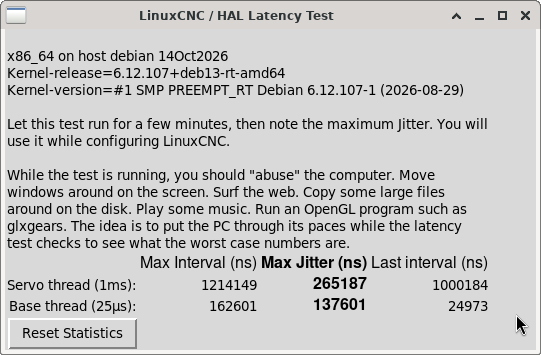
I was not really aware of latency issues since according to my understanding the signals are provided by the mesa card. Whether mine does so correctly I cannot tell ( and dont know how to test ) so far. In the attachments the information you asked for.The latency test was done while in the internet but no more additional load for the computer. Neither a latency test done in the past nor hardware recommendations from the web gave me any hint this could in my case be a problem. Next, I will do some research about how to adjust the bios in order to improve things.
Cheers
geebee
Cheers
geebee
Please Log in or Create an account to join the conversation.
- geebee
- Offline
- New Member
-
Less
More
- Posts: 11
- Thank you received: 2
14 Oct 2026 12:32 #350249
by geebee
Replied by geebee on topic stepper motor does not move
I changed the network adapters: Mesacard is now Intel 82579V, internet Realtek RTL8111/8168/8411
ping times now are 0.019 - 0.022 ms compared to approx. 0.03 ms before (see attachment).
No change in behaviour. The motor vibrates when it is supposed to move but I cannot see or feel, respectively, any movement.
ping times now are 0.019 - 0.022 ms compared to approx. 0.03 ms before (see attachment).
No change in behaviour. The motor vibrates when it is supposed to move but I cannot see or feel, respectively, any movement.
Please Log in or Create an account to join the conversation.
- PCW
-
- Offline
- Moderator
-
Less
More
- Posts: 18103
- Thank you received: 5326
14 Oct 2026 13:37 - 14 Oct 2026 13:39 #350250
by PCW
Replied by PCW on topic stepper motor does not move
You are pinging the host PC, not the 7I95T
try:
sudo chrt 99 ping -i .001 -q -c 60000 10.10.10.10
( It will run for 1 minute then print timing statistics )
try:
sudo chrt 99 ping -i .001 -q -c 60000 10.10.10.10
( It will run for 1 minute then print timing statistics )
Last edit: 14 Oct 2026 13:39 by PCW.
Please Log in or Create an account to join the conversation.
- geebee
- Offline
- New Member
-
Less
More
- Posts: 11
- Thank you received: 2
14 Oct 2026 14:56 #350251
by geebee
Replied by geebee on topic stepper motor does not move
Please note that according to the advice from tommylight I set the ip adress of the mesacard to 10.10.10.11 instead of 10.10.10.10.In opposition to the ones above the ping results are now with mesacard on the Intel adapter, not the Realtek.
--- 10.10.10.11 ping statistics ---
60000 packets transmitted, 60000 received, 0% packet loss, time 59999ms
rtt min/avg/max/mdev = 0.004/0.005/0.103/0.001 ms
geebee@debian:~$ sudo chrt 99 ping -i .001 -q -c 60000 10.10.10.10
PING 10.10.10.10 (10.10.10.10) 56(84) bytes of data.
--- 10.10.10.10 ping statistics ---
60000 packets transmitted, 60000 received, 0% packet loss, time 59999ms
rtt min/avg/max/mdev = 0.139/0.253/0.368/0.010 ms
geebee@debian:~$
--- 10.10.10.11 ping statistics ---
60000 packets transmitted, 60000 received, 0% packet loss, time 59999ms
rtt min/avg/max/mdev = 0.004/0.005/0.103/0.001 ms
geebee@debian:~$ sudo chrt 99 ping -i .001 -q -c 60000 10.10.10.10
PING 10.10.10.10 (10.10.10.10) 56(84) bytes of data.
--- 10.10.10.10 ping statistics ---
60000 packets transmitted, 60000 received, 0% packet loss, time 59999ms
rtt min/avg/max/mdev = 0.139/0.253/0.368/0.010 ms
geebee@debian:~$
Please Log in or Create an account to join the conversation.
- PCW
-
- Offline
- Moderator
-
Less
More
- Posts: 18103
- Thank you received: 5326
14 Oct 2026 15:31 #350252
by PCW
Replied by PCW on topic stepper motor does not move
The ping times show that the host is set to a 10.10.10.11 IP address and the 7I95T is set to 10.10.10.10
With and Intel MAC you should disable IRQ coalescing:
man hm2_eth
For testing, you can temporarily disable IRQ coalescing with this command:
sudo ethtool -C eno1 rx-usecs 0
( replace en01 with your Ethernet device name if different )
For testing general host latency, when a base thread is not used (like with Mesa cards),
you should run the latency test with the base thread disabled:
latency-test 1ms
or
latency-histogram --nobase -sbinsize 500
Also you should go through all the standard latency reducing methods here including the isolcpus grub setting:
linuxcnc.org/docs/html/install/latency-test.html
Just to get things going you should make sure the step time is 5000
and worst case you may need to increase the servo tread period to say 2 ms
(2000000 ns)
With and Intel MAC you should disable IRQ coalescing:
man hm2_eth
For testing, you can temporarily disable IRQ coalescing with this command:
sudo ethtool -C eno1 rx-usecs 0
( replace en01 with your Ethernet device name if different )
For testing general host latency, when a base thread is not used (like with Mesa cards),
you should run the latency test with the base thread disabled:
latency-test 1ms
or
latency-histogram --nobase -sbinsize 500
Also you should go through all the standard latency reducing methods here including the isolcpus grub setting:
linuxcnc.org/docs/html/install/latency-test.html
Just to get things going you should make sure the step time is 5000
and worst case you may need to increase the servo tread period to say 2 ms
(2000000 ns)
Please Log in or Create an account to join the conversation.
- tommylight
-
- Online
- Moderator
-
Less
More
- Posts: 21962
- Thank you received: 7478
14 Oct 2026 16:31 #350253
by tommylight
You have set it correctly as your ping results to 10.10.10.10 prove, so all is good.
Replied by tommylight on topic stepper motor does not move
It clearly states to set the PC network attached to Mesa to 10.10.10.11 or anything else except 10.10.10.10 as this is the actual Mesa card IP.Please note that according to the advice from tommylight I set the ip adress of the mesacard to 10.10.10.11 instead of 10.10.10.10.
You have set it correctly as your ping results to 10.10.10.10 prove, so all is good.
Please Log in or Create an account to join the conversation.
Time to create page: 1.992 seconds