

- Posts: 236
- Thank you received: 31
pyVCP Documents
10 years 11 months ago - 10 years 11 months ago #64968
by Askjerry
Replied by Askjerry on topic pyVCP Documents
It is also missing the <halpin>name</halpin> assignments... without those how would you pass information to it.
Also... I don't get the <disable_pin>True</disable_pin> part... don't you want to have a pin to pass the information to???
Or am I missing the context of the pin?
Thanks,
Jerry
Also... I don't get the <disable_pin>True</disable_pin> part... don't you want to have a pin to pass the information to???
Or am I missing the context of the pin?
Thanks,
Jerry
Last edit: 10 years 11 months ago by Askjerry.
Please Log in or Create an account to join the conversation.
10 years 11 months ago - 10 years 11 months ago #64969
by Askjerry
Replied by Askjerry on topic pyVCP Documents
I just checked:
linuxcnc.org/docs/html/hal/pyvcp.html#_number_displays
It still has the incorrect sample for the bar. (As of 8 NOV 2015)
<bar>
<halpin>"my-bar"</halpin>
<min_>0</min_>
<max_>150</max_>
<bgcolor>"grey"</bgcolor>
<fillcolor>"red"</fillcolor>
<range1>0,100,"green"</range1>
<range2>101,135,"orange"</range1 >
<range3>136, 150,"red"</range1 >
</bar>
Also, reference: linuxcnc.org/docs/html/hal/pyvcp.html#_buttons
It does not include the <fg> attribute.
I think you may have updated your local documents... but not yet uploaded them to the public.
Jerry
Last edit: 10 years 11 months ago by Askjerry.
Please Log in or Create an account to join the conversation.

10 years 11 months ago #64970
by ArcEye
They are not missing, just not listed. If not specified it defaults to 'multilabel' in the same way as all the widgets default to the widget name.
Yes, you are missing the point of it.
The disable field creates a disable pin, with which you can disable the widget (greyed out typically, depends upon your display manager etc)
regards
Replied by ArcEye on topic pyVCP Documents
It is also missing the <halpin>name</halpin> assignments... without those how would you pass information to it.
They are not missing, just not listed. If not specified it defaults to 'multilabel' in the same way as all the widgets default to the widget name.
Also... I don't get the <disable_pin>True</disable_pin> part... don't you want to have a pin to pass the information to???
Or am I missing the context of the pin?
Yes, you are missing the point of it.
The disable field creates a disable pin, with which you can disable the widget (greyed out typically, depends upon your display manager etc)
regards
Please Log in or Create an account to join the conversation.
10 years 11 months ago - 10 years 11 months ago #64975
by Askjerry
Replied by Askjerry on topic pyVCP Documents
I made a really cool discovery... well... for me anyway... I found that I could insert LINE BREAKS into the <label></label> and <multilabel><multilabel> objects. I was wondering if using the "\n" would work or not... and it does.
Here is the XML from a section of my PECK DRILL pyvcp panel...
The label is then associated with PROGRAM... if it is running or if it is idle.
Here is the section of my postgui file...
And here is the panel in operation...
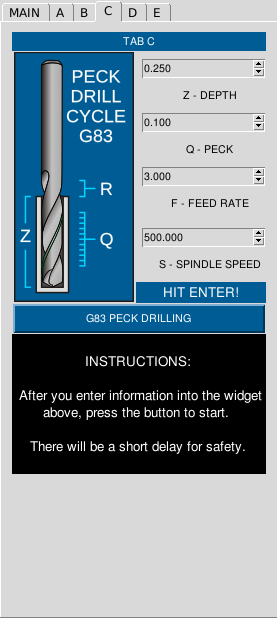
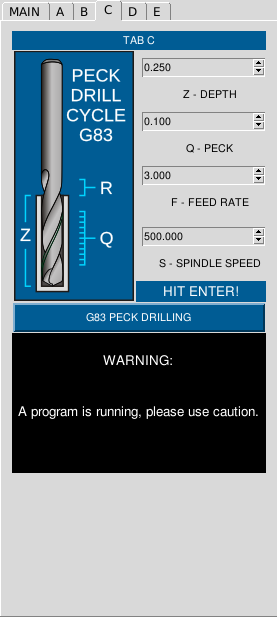
Here is the XML from a section of my PECK DRILL pyvcp panel...
Code:
<!-- Instruction message with text wrapping and updates. -->
<multilabel>
<halpin>"peck-drill-notice"</halpin>
<!-- Set label information here... big run-on lines... can't be helped. -->
<!-- ~~~~~~~~~~~~~~~~~~~~~~~~~~~~~~~~~~~~~~~~~~~~~~~~~~~~~~~~~~~~~~~~~~~~~~~~~~~~~~~~~~~~ -->
<legends>["\n INSTRUCTIONS: \n \n After you enter information into the widget above, press the button to start. \n \n There will be a short delay for safety. \n", "\n WARNING: \n \n \n A program is running, please use caution. \n \n \n"]</legends>
<!-- ~~~~~~~~~~~~~~~~~~~~~~~~~~~~~~~~~~~~~~~~~~~~~~~~~~~~~~~~~~~~~~~~~~~~~~~~~~~~~~~~~~~~ -->
<!-- Finish label information here... -->
<wraplength>"250"</wraplength>
<justify>"center"</justify>
<font>("Helvetica",10)</font>
<bg>"#000000"</bg>
<fg>"#ffffff"</fg>
<width>22</width>
</multilabel>
The label is then associated with PROGRAM... if it is running or if it is idle.
Here is the section of my postgui file...
Code:
# -=-=-=-=-=-=-=-=-=-=-=-=-=-=-=-=-=-=-=-=-=-=-=-=-=-=-=-=-=-=-=-=-=-=-=-=-=-=-=-=-=-=-=-=-=-=-=-=-=
# Custom settings.
# --------------------------------------------------------------------------------------------------
net panel-PGM-RUN <= halui.program.is-running
net panel-PGM-IDLE <= halui.program.is-idle
# -=-=-=-=-=-=-=-=-=-=-=-=-=-=-=-=-=-=-=-=-=-=-=-=-=-=-=-=-=-=-=-=-=-=-=-=-=-=-=-=-=-=-=-=-=-=-=-=-=
# Set up PECK-DRILL and BOLT-HOLE announcement system. (Multilabel Messages)
# --------------------------------------------------------------------------------------------------
net panel-PGM-IDLE => pyvcp.bolt-hole-notice.legend0 # Display IDLE message.
net panel-PGM-RUN => pyvcp.bolt-hole-notice.legend1 # Display WARNING message.
net panel-PGM-IDLE => pyvcp.peck-drill-notice.legend0 # Display IDLE message.
net panel-PGM-RUN => pyvcp.peck-drill-notice.legend1 # Display WARNING message.
# -=-=-=-=-=-=-=-=-=-=-=-=-=-=-=-=-=-=-=-=-=-=-=-=-=-=-=-=-=-=-=-=-=-=-=-=-=-=-=-=-=-=-=-=-=-=-=-=-=
And here is the panel in operation...
Last edit: 10 years 11 months ago by Askjerry. Reason: Clarity
Please Log in or Create an account to join the conversation.
Time to create page: 0.071 seconds