

- Posts: 489
- Thank you received: 297
XHC-HB04 wireless MPG pendant HAL module
12 years 4 months ago #47815
by dgarrett
A new commit for linuxcnc2.6 synthesizes axis-specific buttons for
the pendant buttons named button-zero, button-goto-zero, button-half.
These can be specified when using xhc-hb04.tcl in the ini file with no additional hal components:
See the README and the updated ini file demos for example usage.
The git commit:
git.linuxcnc.org/gitweb?p=linuxcnc.git;a...1269a04a51307c2152f9
will be available in new buildbot 2.6 debs.
Thanks for the suggestion.
~
Replied by dgarrett on topic XHC-HB04 wireless MPG pendant HAL module
But even better would be to actually implement this axis-specific functionality in the configuration files
A new commit for linuxcnc2.6 synthesizes axis-specific buttons for
the pendant buttons named button-zero, button-goto-zero, button-half.
These can be specified when using xhc-hb04.tcl in the ini file with no additional hal components:
Code:
...
[XHC_HB04_BUTTONS]
...
zero = ""
# synthesized per-axis buttons for zero button:
zero-x = halui.mdi-command-12
zero-y = halui.mdi-command-13
zero-z = halui.mdi-command-14
zero-a = halui.mdi-command-15
...
See the README and the updated ini file demos for example usage.
The git commit:
git.linuxcnc.org/gitweb?p=linuxcnc.git;a...1269a04a51307c2152f9
will be available in new buildbot 2.6 debs.
Thanks for the suggestion.
~
Please Log in or Create an account to join the conversation.

12 years 3 months ago - 12 years 3 months ago #49179
by Swapper
Replied by Swapper on topic XHC-HB04 wireless MPG pendant HAL module
Hi!
i am running with a xhc-hb04 pendant on master (2.7.0-pre0-680-gc72834b)
Its been running OK for some time but i have to be doing something wrong regarding the "Max. Velocity" together with the xhc-hb04.
When the pendant config is active the "Max. Velocity" gets put to 0 and i can't change it (slider locked).
This have happened before at times and then i messed with the pendant before starting linuxcnc and it worked.
Now i can't get it to work (after updating to above build) seems it would be possible to link some function on the pendant to the slider and set it to the DEFAULT_VELOCITY = 83.33 ini default value?
Attached is my configs if anyone have some ideas.
Greatfull for any tips.
Edit:
Seems like a race condition since it works some of the time when starting linuxcnc.
This is how its looking.
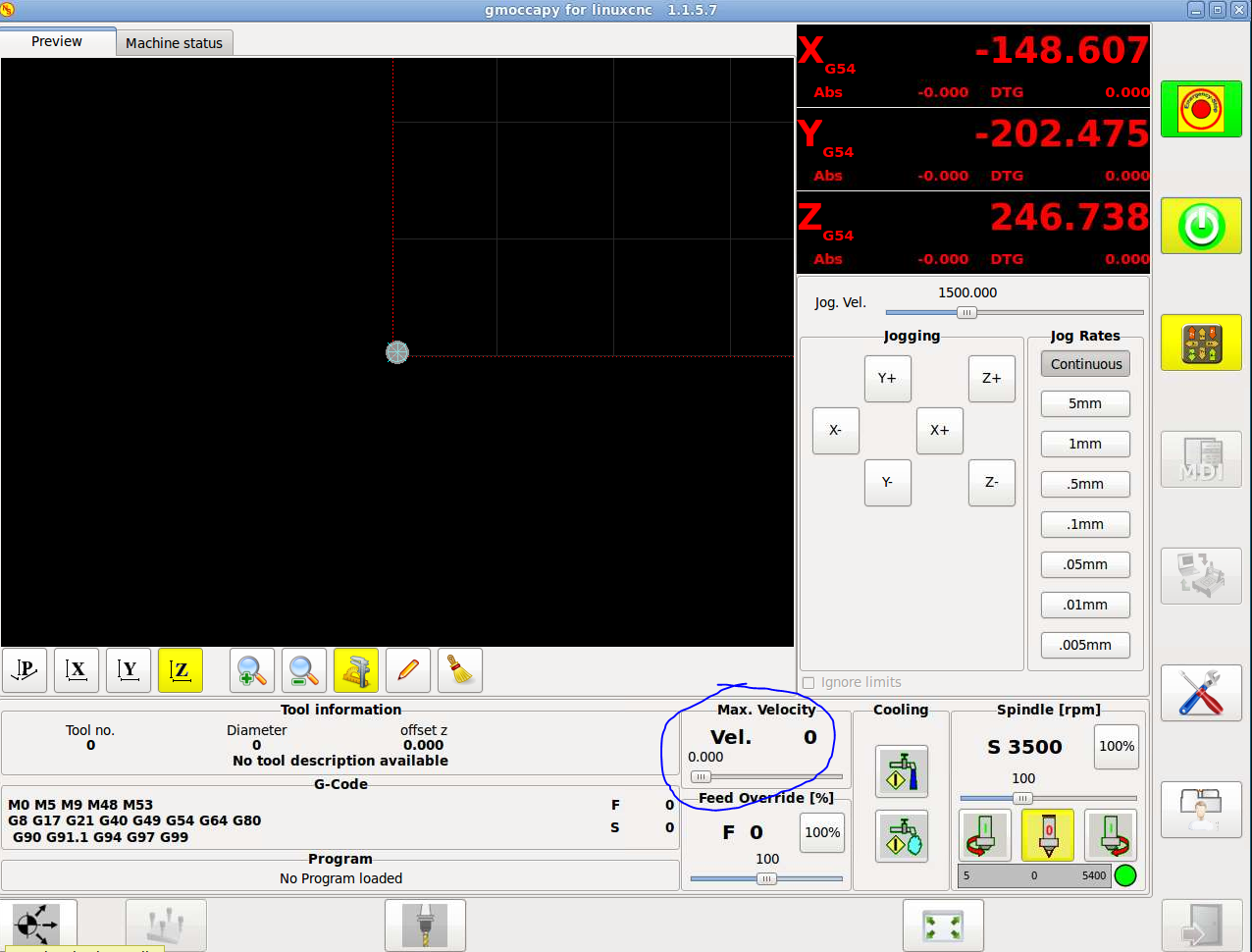
i am running with a xhc-hb04 pendant on master (2.7.0-pre0-680-gc72834b)
Its been running OK for some time but i have to be doing something wrong regarding the "Max. Velocity" together with the xhc-hb04.
When the pendant config is active the "Max. Velocity" gets put to 0 and i can't change it (slider locked).
This have happened before at times and then i messed with the pendant before starting linuxcnc and it worked.
Now i can't get it to work (after updating to above build) seems it would be possible to link some function on the pendant to the slider and set it to the DEFAULT_VELOCITY = 83.33 ini default value?
Attached is my configs if anyone have some ideas.
Greatfull for any tips.
Edit:
Seems like a race condition since it works some of the time when starting linuxcnc.
This is how its looking.
Last edit: 12 years 3 months ago by Swapper.
Please Log in or Create an account to join the conversation.
12 years 3 months ago #49221
by dgarrett
Replied by dgarrett on topic XHC-HB04 wireless MPG pendant HAL module
I haven't been able to reproduce the described behavior in a simulator -- If you can reproduce with a config that requires no special hardware or parport, please post a complete config.
Please Log in or Create an account to join the conversation.

12 years 3 days ago #52560
by mario_rl
Replied by mario_rl on topic XHC-HB04 wireless MPG pendant HAL module
Hy, I purchased reciently a HB04 (the model who has several "macro-n" buttons), but it`s behaviour is weird. When attached to the PC the first time and once edited hal and ini files, some features worked, but only for the first 3 - 4 times I launched Linuxcnc (2.6.1)... due to a unknown reason the device no more worked later, and the config is the same...
Then I ported the HB04 to a vmware Linuxcnc 2.6.3 (I readed there's bug fixes with HB04 ) but the result was the same, worked only for the first time :huh:
- Have anybody experience about reciving a defective HB04?
- Did anybody experiencied with loos connection with the HB04? The mine only shows 0.0000 in all DRO's
I tried to use the stand alone vers. of xhc-hb04 from the samples selection dialog, but nothing happens when I doble click on the launcher. I also noted that lsusb command doesn't work, and the HW GUI info utility shwows none USB devices attached all the time... :sick:
Thanks for everybody
Please Log in or Create an account to join the conversation.
12 years 3 days ago - 12 years 3 days ago #52561
by dgarrett
Replied by dgarrett on topic XHC-HB04 wireless MPG pendant HAL module
For reference, with my working xhc-hb04, when the usb dongle is plugged in, /var/log/syslog shows:
And the details reported by lsusb -v are:
Code:
$ uname -r
3.5.0-19-generic
$ tail -f /var/log/syslog
...
usb 6-2: new full-speed USB device number 3 using uhci_hcd
usb 6-2: New USB device found, idVendor=10ce, idProduct=eb70
usb 6-2: New USB device strings: Mfr=1, Product=0, SerialNumber=0
usb 6-2: Manufacturer: KTURT.LTD
mtp-probe: checking bus 6, device 3: "/sys/devices/pci0000:00/0000:00:1d.0/usb6/6-2"
mtp-probe: bus: 6, device: 3 was not an MTP device
hid-generic 0003:10CE:EB70.0002: hiddev0,hidraw0: USB HID v1.10 Device [KTURT.LTD] on usb-0000:00:1d.0-2/input0
And the details reported by lsusb -v are:
Code:
$ lsusb -v
...
Bus 006 Device 002: ID 10ce:eb70 Silicon Labs
Device Descriptor:
bLength 18
bDescriptorType 1
bcdUSB 1.10
bDeviceClass 0 (Defined at Interface level)
bDeviceSubClass 0
bDeviceProtocol 0
bMaxPacketSize0 64
idVendor 0x10ce Silicon Labs
idProduct 0xeb70
bcdDevice 0.00
iManufacturer 1 KTURT.LTD
iProduct 0
iSerial 0
bNumConfigurations 1
Configuration Descriptor:
bLength 9
bDescriptorType 2
wTotalLength 34
bNumInterfaces 1
bConfigurationValue 1
iConfiguration 0
bmAttributes 0x80
(Bus Powered)
MaxPower 100mA
Interface Descriptor:
bLength 9
bDescriptorType 4
bInterfaceNumber 0
bAlternateSetting 0
bNumEndpoints 1
bInterfaceClass 3 Human Interface Device
bInterfaceSubClass 0 No Subclass
bInterfaceProtocol 0 None
iInterface 0
HID Device Descriptor:
bLength 9
bDescriptorType 33
bcdHID 1.10
bCountryCode 0 Not supported
bNumDescriptors 1
bDescriptorType 34 Report
wDescriptorLength 46
Report Descriptors:
** UNAVAILABLE **
Endpoint Descriptor:
bLength 7
bDescriptorType 5
bEndpointAddress 0x81 EP 1 IN
bmAttributes 3
Transfer Type Interrupt
Synch Type None
Usage Type Data
wMaxPacketSize 0x0040 1x 64 bytes
bInterval 2
Device Status: 0x0000
(Bus Powered)
...
Last edit: 12 years 3 days ago by dgarrett. Reason: typo
The following user(s) said Thank You: mario_rl
Please Log in or Create an account to join the conversation.
12 years 2 days ago #52567
by mario_rl
Replied by mario_rl on topic XHC-HB04 wireless MPG pendant HAL module
my syslog shows similar
lsusb doesn't work for me....(regarding my linux experience I'm afraid)
Code:
Oct 30 09:37:37 debian kernel: [ 1101.184033] usb 4-2: new full-speed USB device number 2 using uhci_hcd
Oct 30 09:37:37 debian kernel: [ 1101.341990] usb 4-2: New USB device found, idVendor=10ce, idProduct=eb70
Oct 30 09:37:37 debian kernel: [ 1101.341997] usb 4-2: New USB device strings: Mfr=1, Product=0, SerialNumber=0
Oct 30 09:37:37 debian kernel: [ 1101.342002] usb 4-2: Manufacturer: KTURT.LTD
Oct 30 09:37:37 debian kernel: [ 1101.349856] generic-usb 0003:10CE:EB70.0002: hiddev0,hidraw1: USB HID v1.10 Device [KTURT.LTD] on usb-0000:00:1d.2-2/input0
Oct 30 09:37:37 debian mtp-probe: checking bus 4, device 2: "/sys/devices/pci0000:00/0000:00:1d.2/usb4/4-2"
Oct 30 09:37:37 debian mtp-probe: bus: 4, device: 2 was not an MTP device
^Cmario@debian:~$ lsusb
bash: lsusb: no se encontró la orden ->"command not found"
lsusb doesn't work for me....(regarding my linux experience I'm afraid)
Please Log in or Create an account to join the conversation.
Time to create page: 0.076 seconds