Spindle orient PID tuning [re-solved, yay]

More
4 years 5 months ago #243117 by andypugh

Same thing for lincurve.  I read up on the comp - looks useful - and I get how to create the x/y lookup chart, but I'm hazy on how to connect that chart a PID P-gain function.
You would connect the pid.N.error output to the X of the lincurve, then take the Y out of the lincurve to control the P-gain of the PID. 

(This is, unfortunately, a little bit circular, you either have to accept a stale error into the lincurve or have the PID gain change a cycle too late, depending on whether the "addf" of the Lincurve is before or after the "addf" for the pid.)


The following user(s) said Thank You: spumco

Please Log in or Create an account to join the conversation.
More
4 years 5 months ago #243456 by spumco
(I'm back to fiddling with orient while I'm waiting on a reply to the carousel thing)

Here's what I've got in the test HAL:

#setp pid.o.Pgain                        2000   #[TUNE]P
setp pid.o.Igain                        0   #[TUNE]I
setp pid.o.Dgain                        250   #[TUNE]D
setp pid.o.bias                         0   #[TUNE]BIAS
setp pid.o.FF0                          0   #[TUNE]FF0
setp pid.o.FF1                          0   #[TUNE]FF1
setp pid.o.FF2                          0   #[TUNE]FF2
setp pid.o.deadband                     0.005   #[TUNE]DEADBAND
setp pid.o.maxoutput                    210   #[TUNE]MAX_OUTPUT
setp pid.o.error-previous-target        true
setp orient.0.tolerance                 0.8

setp lincurve.0.x-val-00 0
setp lincurve.0.y-val-00 0
setp lincurve.0.x-val-01 0
setp lincurve.0.y-val-01 0
setp lincurve.0.x-val-02 0
setp lincurve.0.y-val-02 0
setp lincurve.0.x-val-03 0
setp lincurve.0.y-val-03 0
setp lincurve.0.x-val-04 0
setp lincurve.0.y-val-04 0

net orient-lincurve-in                  <=  pid.o.error
net orient-lincurve-in                  =>  lincurve.0.in
net orient-lincurve-out                 <=  lincurve.0.out
net orient-lincurve-out                 =>  pid.o.Pgain

Obiously I've set the lincurve pairs to 0 as this was a cut-paste from a thread on spindle pwm control. 

Suggested starting pair values based on the earlier 'moderately close' orient behavior with P=2000?

Your patience is remarkable, BTW.

Please Log in or Create an account to join the conversation.

More
4 years 5 months ago #243484 by andypugh
Something like

-5, 2000
-2, 10000
-1, 0
1, 0
2, 10000
5, 2000

To start with.
The following user(s) said Thank You: spumco

Please Log in or Create an account to join the conversation.

More
4 years 5 months ago #243529 by spumco
So lincurve addition didn't throw any errors and I started running/tuning orient.

M19 kept timing out... and I noticed something strange in halshow.

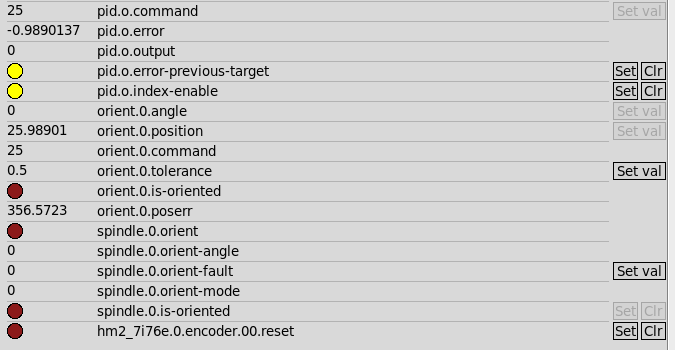
orient.0.poserr always winds up way off - which, presumably, is why it times out with an error.  But poserr looks funny, like a scaling issue or something.  The spindle is getting close and the PID is twitching/hunting, but poserr is reporting almost a full turn off.

What would cause the orient poserr to be almost a full turn off, yet the PID thinks the target is close enough to be wagging +/- just a little?


Please Log in or Create an account to join the conversation.

More
4 years 5 months ago #243546 by andypugh
I think that there is a scaling issue, indeed. It's in the lincurve. The example I gave you was in degrees, but the pid loop is working in turns.

Divide all the X by 360, and also make the centre deadband smaller, as you have a 0.5 degree tolerance. ie make the +1 and -1 +0.2/360 and -0.2/360 so that the PID only goes quiet when the spindle is inside the window.
The following user(s) said Thank You: spumco

Please Log in or Create an account to join the conversation.

More
4 years 4 months ago #244939 by spumco
Thank you Andy - the scaling put me on the right track.

Adjusted the lincurve & deadband and it's no longer wagging dramatically.  Still twitching a bit, but with the earlier lincurve values divided by 360, deadband = 0.003, and tolerance = 0.2 it's achieving 'is-oriented' within a second or two.

I copied the basic scheme from this thread:

forum.linuxcnc.org/10-advanced-configura...le-lock-brake#225912

with the thought that having an electronic spindle/orient 'brake' would be useful.

It's decision time - do I abandon the 'brake' function, or do I try to tune the remaining wiggle out down to a few counts?

Any suggestions on getting more of the wiggle out?

Please Log in or Create an account to join the conversation.

Time to create page: 0.123 seconds
Powered by Kunena Forum
