Mesa 5i25 config for chinese BOB

More
10 years 6 months ago #73544 by andypugh

pacman13b wrote: ended up with with the prb_rfx2 pin file flashed to mesa, but it seems like it is missing pwm on pin 1

It looks like the only standard bitfile with PWM on Pin1 is DMMBob, and that has the step and direction pins switched compared to what you need.

and I couldn't program an enable pin for the drives also.

That ought to be fairly easy, you just need to link a GPIO pin. However pin 14 on the RF1 bitfile is set up as the spindle PWM, so only becomes available as GPIO if you set num_pwmgens to zero in the config.
Does your BoB output an analogue voltage based on the PWM on Pin 1? If so then your simplest option is probably to use the dmmbob firmware and swap the step/dir wires at the drive end as apart from the switched step/dir lines that appears to suite your BoB well.

After manually enabling the drives I had some motion on axis x,y,z.but not good.

What sort of "not good" ? Depending on the drives you may need to invert the step pins to get the right sort of drive signal. Otherwise look at that step time setting.
The following user(s) said Thank You: pacman13b

Please Log in or Create an account to join the conversation.
More
10 years 6 months ago #73545 by G0G53Z148
Have you copied the Hostmot2 files into the %root% firmware/hm2 directory? this is important


when you start pncconf you have to select the rfx2 firmware in pncconf after flashing the card and press accept
i have no computer here with linuxcnc on it you must a little improve

at the start configurating page of mesacard in pncconf you select 0 encoders then you can use the encoderpins for I/O

only the pwm you must bridge with an adaptor to the cross of the cable
i do not use pwm regulation
and then you canb klick any pins in the dropdown list
this is all i know about this sorry more help i cant give to you

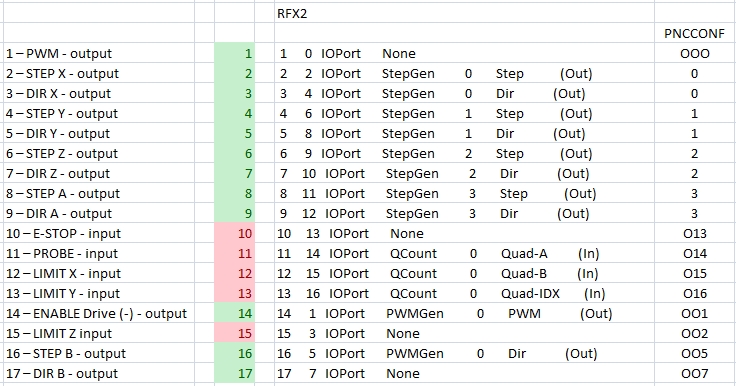
the numbers at last 000: 1: 001: are the digital inside pins this are not the output pins this is important
the grean and red numbers in the pictures should be the Real pin numbers
if you want to have them others you have to seek an coder who makes a custom bitfile

i hope you help this to get it up

Please Log in or Create an account to join the conversation.

More
10 years 6 months ago #73552 by pacman13b
Thanks mate, I'll give it a go. :)

Please Log in or Create an account to join the conversation.

More
10 years 6 months ago #73657 by pacman13b
hurray...... Got movement on all axes's . Had to dig up and read the manual twice overnight to hook up manually by hand and not with pncconf the gpio to HAL. Anyhow got it all setup switches input - outputs working and motors working with dmm_bb2.bit file.

G0G53Z148 your post really helped me on getting the idea of how to map things out.. thank you.

The only thing I can't bypass and I'mm stuck is when testing for motor movement velocity etc. the motor moves but doesn't stop on time
maybe after a long while it keeps on moving and incrementing speed . can't seem to understand, step drivers are DQ860MA, maybe step time delay?? I tried different numbers up to 5000ms but same issue numbers below 2000ms don't run at all. DataSheet of driver say 2500, so I left it there.
Any ideas has anybody reference this situation.

If I do a motor test inside pcnconf +-50mm goes 50.5xx then it comes back to 50.0 with microsteps and vise versa.

The mesa fpga card is really high end. Keep up the excellent hardware r&d.. .

Thank you all for getting me up and running .. :) :)

Please Log in or Create an account to join the conversation.

More
10 years 6 months ago #73658 by PCW
If you dont have the latest PnCConf version, it will set the PID P terms to 50
These need to be set to 1000 in the ini file for a 1 KHz servo thread

Please Log in or Create an account to join the conversation.

More
10 years 6 months ago #73677 by pacman13b
Got it.. Can't find that in the manual comes from experience..

Great Thnx....

Looks like it is comming alive to a real pro-CNC, I have backed up my setup and how to set mesa gpio to parallel etc.. ALL looks good. Anyone needs info I'll be here..

I also have a wireless renishaw probe has anyone hooked this up. Since I have it I think I'll try to hook it up for tool probe and workpiece probing..

Thank you all..
The following user(s) said Thank You: G0G53Z148

Please Log in or Create an account to join the conversation.

Moderators: PCW, jmelson
Time to create page: 0.230 seconds
Powered by Kunena Forum
