Raspberry Pi 4 8Gb version 2 / Raspberry Pi OS 32-bit / Mesa 7c81 / Gecko G540

More
4 years 3 weeks ago #253601 by kdsands88

Please Log in or Create an account to join the conversation.
More
4 years 3 weeks ago #253602 by kdsands88
Again, thanks PCW.

I started with a HobbyCNC PRO 4 Axis Kit with EMC, then two DueCore hp and G540 with LinuxCNC.

But the DueCore hard drives are going to give up some time soon. They are over 10 year old IDE drives. So, I though I would upgrade to Raspberry Pi's with remote login like the Duet 3 3d printer board I have.

Once I am done with my upgrade, I will repost every detail on how to install Raspberry Pi 4 8Gb version 2 / Raspberry Pi OS 32-bit / Mesa 7c81 / Gecko G540.  That why you do not need to reexplain over and over to the next enduser. 

Please Log in or Create an account to join the conversation.
More
4 years 3 weeks ago #253772 by kdsands88
@PCW

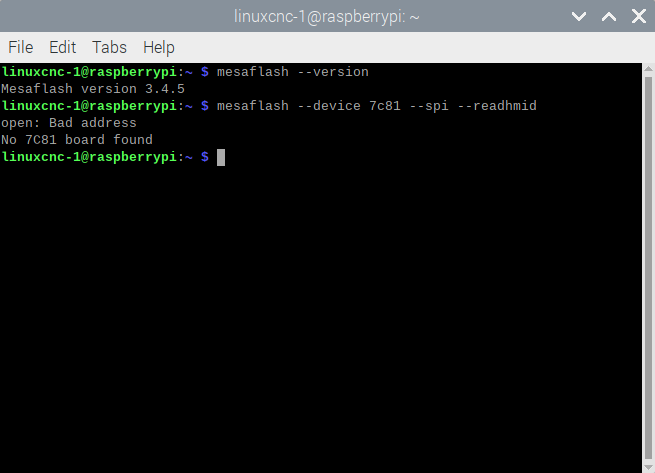
I can not see the board from the Terminal:
 

Do I need to send both boards back to MESA?  Who should I contact?

Please Log in or Create an account to join the conversation.

More
4 years 3 weeks ago - 4 years 3 weeks ago #253776 by PCW
You are missing the spi device name (thats what the "bad address" is all about)

sudo mesaflash --device 7c81 --addr /dev/spidev0.0 --spi --readhmid
Last edit: 4 years 3 weeks ago by PCW.

Please Log in or Create an account to join the conversation.

More
4 years 3 weeks ago #253785 by kdsands88
@PCW
Again, thank you.

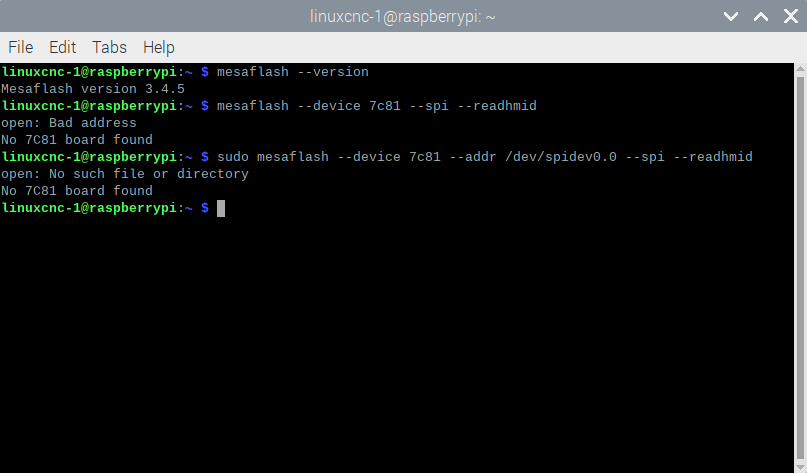
But, I still get no board found:
 

Please Log in or Create an account to join the conversation.

More
4 years 3 weeks ago #253789 by PCW
open: no such file or directory

means there is no /dev/spidev0.0

which probably means SPI is disabled in the RPI configuration
The following user(s) said Thank You: kdsands88

Please Log in or Create an account to join the conversation.

Moderators: PCW, jmelson
Time to create page: 0.352 seconds
Powered by Kunena Forum