

- Posts: 17533
- Thank you received: 5334
Crusader II retrofit
10 years 8 months ago #69719
by PCW
Replied by PCW on topic Crusader II retrofit
If the jog direction is backwards you need to reverse both input _and_ output scale
Reversing either one by itself will result in a runaway
Reversing either one by itself will result in a runaway
Please Log in or Create an account to join the conversation.

10 years 8 months ago #69723
by jamby
Replied by jamby on topic Crusader II retrofit
PCW
Once again I am getting lost. I find the "OUTPUT_SCALE = -10" in the ini file but I haven't found the "input".
I did see something about the "You should be able to see where the mumble.mumble.scalemax
parameters are initialized by looking at the HAL file" but I am not seeing anything to change there.
Changing just the OUTPUT_SCALE causes runaways so for now its staying at minus 10.
Sorry
Jim
Once again I am getting lost. I find the "OUTPUT_SCALE = -10" in the ini file but I haven't found the "input".
I did see something about the "You should be able to see where the mumble.mumble.scalemax
parameters are initialized by looking at the HAL file" but I am not seeing anything to change there.
Changing just the OUTPUT_SCALE causes runaways so for now its staying at minus 10.
Sorry
Jim
Please Log in or Create an account to join the conversation.
10 years 8 months ago #69724
by PCW
Replied by PCW on topic Crusader II retrofit
Sorry PNCConfs ini file name for INPUT SCALE is ENCODER_SCALE
Please Log in or Create an account to join the conversation.
10 years 8 months ago - 10 years 8 months ago #69725
by jamby
Replied by jamby on topic Crusader II retrofit
PCW
That got it. The settings were this.
ENCODER_SCALE = 2540
OUTPUT_SCALE = -10
To:
ENCODER_SCALE = -2540
OUTPUT_SCALE = 10
Thanks again
Jim
That got it. The settings were this.
ENCODER_SCALE = 2540
OUTPUT_SCALE = -10
To:
ENCODER_SCALE = -2540
OUTPUT_SCALE = 10
Thanks again
Jim
Last edit: 10 years 8 months ago by jamby.
Please Log in or Create an account to join the conversation.
10 years 8 months ago #70344
by jamby
Replied by jamby on topic Crusader II retrofit
Hey
Just a note to bring this up to date. I started a new posting with the idea of checking how to do something and it went off with me. That post is HERE So now I have a running machine that I just finished a circle-diamond-square test on. While not ISO-9000 ready, it will do for me, for now.
I will start the next phase of this conversion soon.
Thanks to all the great people here who helped me along this far.
Jim
Just a note to bring this up to date. I started a new posting with the idea of checking how to do something and it went off with me. That post is HERE So now I have a running machine that I just finished a circle-diamond-square test on. While not ISO-9000 ready, it will do for me, for now.
I will start the next phase of this conversion soon.
Thanks to all the great people here who helped me along this far.
Jim
Please Log in or Create an account to join the conversation.
10 years 8 months ago - 10 years 8 months ago #70412
by jamby
Replied by jamby on topic Crusader II retrofit
Hello again
Well I decided to continue in this post instead of opening a third in this series.
I am hoping some of the people who have done a retrofit on a Crusader II control before might have some ideas how I can take the Original Crusader Control out of my setup.
The machine is now working well with linuxcnc, mesa 5i25 & 7i77, and using the original control box that still has ( connections to it through a Bendix 28-16 connector.
Numbering is from the P7 connection shown in the photo.
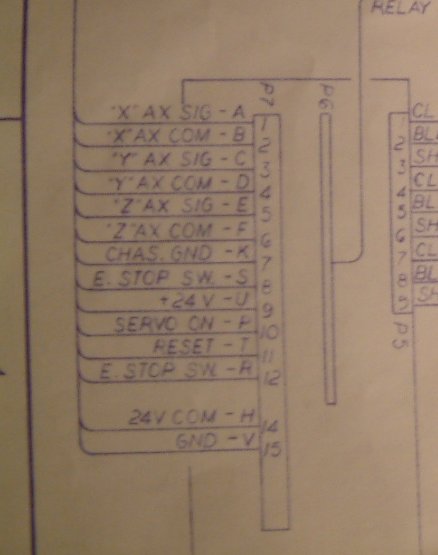
7) Chassis Ground
15) Electrical Ground
E-stop SW
11) Reset
12) E-stop SW
7) 24 volt common
9) +24 volt
10) Servo on
7,15
The first two grounds are self explanatory.
8,11,12
The E-stop has one leg in common with the Reset the other leg back to the 28-16 plug
Reset one leg in common with the E-stop the other leg back to the 28-16
The E-stop button is normally Closed when not set. If pushed it goes to Open.
With the E-stop closed the reset button closes and the main power cabinet comes on. Any time a limit switch is met the E-stop must be opened ( hit ) then released and the reset button pressed and released.
7,9,10
The 24 volt positive, common, and the Servo ON connect to the "Red" card in the anilam crusader II control. The "Red" card is the output card show HERE
Hopefully these connections can be changed to the IO of the Mesa 7i77 card using either HAL or ladder.
Thanks
Jim
Well I decided to continue in this post instead of opening a third in this series.
I am hoping some of the people who have done a retrofit on a Crusader II control before might have some ideas how I can take the Original Crusader Control out of my setup.
The machine is now working well with linuxcnc, mesa 5i25 & 7i77, and using the original control box that still has (
connections to it through a Bendix 28-16 connector.Numbering is from the P7 connection shown in the photo.
7) Chassis Ground
15) Electrical Ground
E-stop SW11) Reset
12) E-stop SW
7) 24 volt common
9) +24 volt
10) Servo on
7,15
The first two grounds are self explanatory.
8,11,12
The E-stop has one leg in common with the Reset the other leg back to the 28-16 plug
Reset one leg in common with the E-stop the other leg back to the 28-16
The E-stop button is normally Closed when not set. If pushed it goes to Open.
With the E-stop closed the reset button closes and the main power cabinet comes on. Any time a limit switch is met the E-stop must be opened ( hit ) then released and the reset button pressed and released.
7,9,10
The 24 volt positive, common, and the Servo ON connect to the "Red" card in the anilam crusader II control. The "Red" card is the output card show HERE
Hopefully these connections can be changed to the IO of the Mesa 7i77 card using either HAL or ladder.
Thanks
Jim
Last edit: 10 years 8 months ago by jamby.
Please Log in or Create an account to join the conversation.
Time to create page: 0.112 seconds