
How to set current machine position manually?
- WobblyZ
- Offline
- New Member
-

Less
More
- Posts: 2
- Thank you received: 0
15 Jan 2026 00:30 #341394
by WobblyZ
How to set current machine position manually? was created by WobblyZ
Hello, I have a machine with handwheels that can be moved with the power off. For reasons that I won't get into, I want to be able to set everything up manually, move the tool to the part origin and then directly tell linux CNC that my tool is at X0 Y0 Z0.25" from home and then touch off the part.
I don't see a shortcut in AXIS to do this? Is there g code that I can put in the MDI to tell it where the current machine position is?
Thanks.
I don't see a shortcut in AXIS to do this? Is there g code that I can put in the MDI to tell it where the current machine position is?
Thanks.
Please Log in or Create an account to join the conversation.
- rodw
-

- Offline
- Platinum Member
-

Less
More
- Posts: 12136
- Thank you received: 4141
15 Jan 2026 01:17 #341398
by rodw
Replied by rodw on topic How to set current machine position manually?
Axis has a touch off features for each axis. Its not really any different to a manual mill when you set up your DR0. Use a edgefinder to locate X0 and then touch off with an offset of 0.5 x radius. eg for a 6 mm dia edge finder, touch off at x -3 and repeat for Y axis y -3 (for top left hand corner)
then roll a drill or milling cutter (say 10mm dia) under the tool until you feel you have light drag. Then touch off Z +10
There are cheap Chinese edge finders but the Starrett is a class on its own by comparison
www.amazon.com/Edge-Finder-Single-End-0-...ps%2C474&sr=8-3&th=1
then roll a drill or milling cutter (say 10mm dia) under the tool until you feel you have light drag. Then touch off Z +10
There are cheap Chinese edge finders but the Starrett is a class on its own by comparison
www.amazon.com/Edge-Finder-Single-End-0-...ps%2C474&sr=8-3&th=1
Please Log in or Create an account to join the conversation.
- WobblyZ
- Offline
- New Member
-
Less
More
- Posts: 2
- Thank you received: 0
15 Jan 2026 02:14 #341402
by WobblyZ
Replied by WobblyZ on topic How to set current machine position manually?
From what I can see, touch off sets the part origin relative to the current position, but linuxCNC doesn't know what the real current position is because I moved it with the handwheels and not the jog function. So when I touch off, it thinks I'm still at home position and sets the part origin relative to home which causes the tool paths to be outside the machine limits.
Is there no way to set the current position relative to home directly? I can't use the jog function because my computer is too slow and the machine keeps moving long after I've let go of the mouse.
Is there no way to set the current position relative to home directly? I can't use the jog function because my computer is too slow and the machine keeps moving long after I've let go of the mouse.
Please Log in or Create an account to join the conversation.
- rodw
-
- Offline
- Platinum Member
-
Less
More
- Posts: 12136
- Thank you received: 4141
15 Jan 2026 02:48 #341403
by rodw
Replied by rodw on topic How to set current machine position manually?
if you expect a CNC machine to be able to be moved without using the CNC control to move it you are outside the normal paradigm.
You could try immediate homing without limit switches but I think that may restrict you motion to just one quadrant.
Try changing the jog scale when jogging in the gui.
There is something to be said for a good pendant
You could try immediate homing without limit switches but I think that may restrict you motion to just one quadrant.
Try changing the jog scale when jogging in the gui.
There is something to be said for a good pendant
Please Log in or Create an account to join the conversation.
- tommylight
-

- Away
- Moderator
-

Less
More
- Posts: 21901
- Thank you received: 7465
15 Jan 2026 03:22 #341407
by tommylight
Replied by tommylight on topic How to set current machine position manually?
See immediate homing :
linuxcnc.org/docs/html/config/ini-homing.html#_immediate_homing
linuxcnc.org/docs/html/config/ini-homing.html#_immediate_homing
Please Log in or Create an account to join the conversation.
- NWE
-
- Offline
- Elite Member
-

Less
More
- Posts: 259
- Thank you received: 80
15 Jan 2026 05:14 - 15 Jan 2026 05:46 #341410
by NWE
Replied by NWE on topic How to set current machine position manually?
Not sure if I caught on, am I correct:
1. You're jogging the machine by turning handwheels attached to each axis while the motors are powered off,
2. You want the resulting position to be your starting point.
Which GUI are you using? I experimented in Axis, I can do touch-off and enter a value instead of 0 to tell it where it is starting. You will need to know how far from home you jogged it, and enter that value in touch off for each axis.
EDIT:
Sorry, I was wrong. That will not work. Entering an offset moves the part away from the tool. I think my brain needs sleep soon.
Lacking any other options to reliably jog it, you might use MDI commands to send it to the touchoff point. If it is in incremental mode 'jogging' might be less complicated compared to absolute mode depending how quick you are with math.
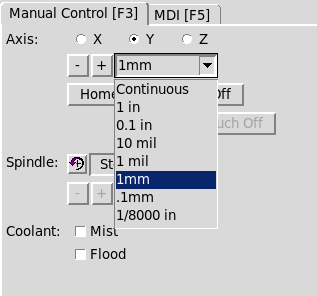
Surely switching the jog increments from 'continous' to a specific value would suffice, and be easier than MDI commands. It should then only move the specified distance each time you press a key, if it continues anyway, I would suspect a problem with the keyboard auto-repeat on your system.
1. You're jogging the machine by turning handwheels attached to each axis while the motors are powered off,
2. You want the resulting position to be your starting point.
Which GUI are you using? I experimented in Axis, I can do touch-off and enter a value instead of 0 to tell it where it is starting. You will need to know how far from home you jogged it, and enter that value in touch off for each axis.
EDIT:
Sorry, I was wrong. That will not work. Entering an offset moves the part away from the tool. I think my brain needs sleep soon.
Lacking any other options to reliably jog it, you might use MDI commands to send it to the touchoff point. If it is in incremental mode 'jogging' might be less complicated compared to absolute mode depending how quick you are with math.
Surely switching the jog increments from 'continous' to a specific value would suffice, and be easier than MDI commands. It should then only move the specified distance each time you press a key, if it continues anyway, I would suspect a problem with the keyboard auto-repeat on your system.
Last edit: 15 Jan 2026 05:46 by NWE.
Please Log in or Create an account to join the conversation.
- rodw
-
- Offline
- Platinum Member
-
Less
More
- Posts: 12136
- Thank you received: 4141
15 Jan 2026 07:05 #341417
by rodw
Replied by rodw on topic How to set current machine position manually?
set machine for immediate homing, move to position with hand wheels, home all
Try it.
Try it.
Please Log in or Create an account to join the conversation.
- timo
- Offline
- Elite Member
-
Less
More
- Posts: 210
- Thank you received: 61
21 Jan 2026 10:44 - 21 Jan 2026 10:45 #341641
by timo
Replied by timo on topic How to set current machine position manually?
Just questions that come to mind (i did not do research on it)
a) How do they probably do it on my "store bought" milling machine? No need to home it. The beast knows where it is after it is powered on.
b) Can the home position be defined in the center of the machine travel? That would make the request easy. The axis can be homed at the position that was reached and the G54 can be "touched off".
c) Can the machine be homed normally, then after disabling the motors moving it around and keep track of the position? Provided some feedback is available e.g. rotary encoder on the hand wheel, or linear encoders?
(that would allow to use the Linux similar to a normal DRO, when the motors are disabled.)
This kind of tracking without motors might be also interesting to teach a machine.
a) How do they probably do it on my "store bought" milling machine? No need to home it. The beast knows where it is after it is powered on.
b) Can the home position be defined in the center of the machine travel? That would make the request easy. The axis can be homed at the position that was reached and the G54 can be "touched off".
c) Can the machine be homed normally, then after disabling the motors moving it around and keep track of the position? Provided some feedback is available e.g. rotary encoder on the hand wheel, or linear encoders?
(that would allow to use the Linux similar to a normal DRO, when the motors are disabled.)
This kind of tracking without motors might be also interesting to teach a machine.
Last edit: 21 Jan 2026 10:45 by timo.
Please Log in or Create an account to join the conversation.
- tommylight
-
- Away
- Moderator
-
Less
More
- Posts: 21901
- Thank you received: 7465
21 Jan 2026 10:53 #341642
by tommylight
It will home normally at axis ends, and move to wherever you would like it to be home.
Teaching should also be possible without encoders, jogging the machine to required positions and saving coordinates.
Replied by tommylight on topic How to set current machine position manually?
Absolute encoders.a) How do they probably do it on my "store bought" milling machine? No need to home it. The beast knows where it is after it is powered on.
Yes, even with normal encoder or without them, must have home switches.b) Can the home position be defined in the center of the machine travel? That would make the request easy. The axis can be homed at the position that was reached and the G54 can be "touched off".
It will home normally at axis ends, and move to wherever you would like it to be home.
Yes, all that can be done.c) Can the machine be homed normally, then after disabling the motors moving it around and keep track of the position? Provided some feedback is available e.g. rotary encoder on the hand wheel, or linear encoders?
(that would allow to use the Linux similar to a normal DRO, when the motors are disabled.)
This kind of tracking without motors might be also interesting to teach a machine.
Teaching should also be possible without encoders, jogging the machine to required positions and saving coordinates.
The following user(s) said Thank You: timo
Please Log in or Create an account to join the conversation.
Time to create page: 0.156 seconds