
- LinuxCNC
- General LinuxCNC Questions
- PLC + LinuxCNC for industrial machine with simple HMI (non-G-code operators)
PLC + LinuxCNC for industrial machine with simple HMI (non-G-code operators)
- Marcos DC
-
 Topic Author
- Offline
- Senior Member
-

Less
More
- Posts: 74
- Thank you received: 47
06 Feb 2026 05:49 - 06 Feb 2026 05:56 #342524
by Marcos DC
Replied by Marcos DC on topic PLC + LinuxCNC for industrial machine with simple HMI (non-G-code operators)
Thanks for sharing your experience — this is exactly the kind of real-world example we were hoping to hear about.
Your description matches very closely the architecture we are targeting: a PLC/HMI as the cell controller (sequencing, recipes, operator workflow, interlocks), and LinuxCNC used strictly as a motion controller. The Python “bridge” approach you described, using Modbus TCP on the PLC side and the LinuxCNC Python interface on the PC side, is a very pragmatic way to implement a clean command/status boundary between the two domains.
What I find especially valuable in your example is that the operator never interacts with LinuxCNC directly: the PLC/HMI owns the workflow, selects the product/recipe, and LinuxCNC is treated as a subordinate motion engine that executes the required paths and reports status back. That is exactly the separation of responsibilities we are aiming for.
It is also very useful to hear that this setup has been running in production for several years, daily, with good reliability. This addresses one of the main concerns in industrial environments: long-term robustness and maintainability, not just theoretical capability.
Your comment about Modbus TCP being “simple and universal” is also a good reminder that, in many industrial contexts, simplicity and familiarity often translate directly into better supportability and uptime.
Thanks again for sharing this — it’s a very strong reference point for PLC + LinuxCNC architectures in real machines.
Your description matches very closely the architecture we are targeting: a PLC/HMI as the cell controller (sequencing, recipes, operator workflow, interlocks), and LinuxCNC used strictly as a motion controller. The Python “bridge” approach you described, using Modbus TCP on the PLC side and the LinuxCNC Python interface on the PC side, is a very pragmatic way to implement a clean command/status boundary between the two domains.
What I find especially valuable in your example is that the operator never interacts with LinuxCNC directly: the PLC/HMI owns the workflow, selects the product/recipe, and LinuxCNC is treated as a subordinate motion engine that executes the required paths and reports status back. That is exactly the separation of responsibilities we are aiming for.
It is also very useful to hear that this setup has been running in production for several years, daily, with good reliability. This addresses one of the main concerns in industrial environments: long-term robustness and maintainability, not just theoretical capability.
Your comment about Modbus TCP being “simple and universal” is also a good reminder that, in many industrial contexts, simplicity and familiarity often translate directly into better supportability and uptime.
Thanks again for sharing this — it’s a very strong reference point for PLC + LinuxCNC architectures in real machines.
Last edit: 06 Feb 2026 05:56 by Marcos DC.
Please Log in or Create an account to join the conversation.
- ruediger123
- Offline
- Junior Member
-

Less
More
- Posts: 34
- Thank you received: 34
06 Feb 2026 06:40 #342528
by ruediger123
Replied by ruediger123 on topic PLC + LinuxCNC for industrial machine with simple HMI (non-G-code operators)
There is also the option of equipping the LinuxCNC PC with an EtherCAT slave interface.
Data exchange can then take place via this interface.
Data exchange can then take place via this interface.
The following user(s) said Thank You: Marcos DC
Please Log in or Create an account to join the conversation.
- hhscott
- Offline
- Senior Member
-
Less
More
- Posts: 40
- Thank you received: 15
06 Feb 2026 07:58 - 06 Feb 2026 08:08 #342531
by hhscott
Replied by hhscott on topic PLC + LinuxCNC for industrial machine with simple HMI (non-G-code operators)
A few more details:
Because you will have 2 separate controllers (PC with LinuxCNC and a PLC) startup handshaking has to be worked out. In my case, I set up the linux pc to autostart on power just like a PLC does. Then, on the linux PC I set LinuxCNC to Auto Start on boot. After a few seconds of delay, I Auto Start the "Python Bridge" script. The Python bridge requires that LinuxCNC be up and running before it starts because the python linuxCNC module goes out and looks for linuxCNC to be running. This all takes less than a minute.
Once the Python bridge is up and running it does two things, checks the status of LinuxCNC and starts setting and unsetting a bit in the PLC via modbus. The bit sets and then resets every 250 ms. This is my heartbeat that lets the PLC know that everything is up and running. LinuxCNCs status concerning "Power On", "E-Stop active", and "Axis Home Status" are all read by the Python bridge and this information is passed to the PLC through registers and bits. The PLC then directs that power be turned on, after confirmation that the power is on (again through the python bridge) the PLC issues a "Home All Axis" command. After all axis are homes the Python bridge sets a bit in the PLC that lets the PLC know its ready for operation. In this control scenario, the PLC is always the Master controller, it just checks on and commands LinuxCNC through the Python bridge script.
Safety is handled like any other industrial set up. A separate safety controller (not the PLC or LinuxCNC) disables all motion and potential in the machine including disabling the CNC servos. The PLC and LinuxCNC are both wired into the safety output so they both stop any motion in the event of an emergency stop. When the safety status is cleared, the PLC issues a "Power back on" command to LinuxCNC and then a re-home command.
It sounds like a lot, but it is really straightforward and pretty simple once you get the workflow sorted out.
The machine as it is today can produce 28 unique product variations (potential is almost limitless) and the operator only has to select the
product number via the HMI. Everything else is handled in the background automatically. The operator doesn't have to have any knowledge or CNC experience to run the machine. Training takes less than 30 minutes for a new operator.
Because you will have 2 separate controllers (PC with LinuxCNC and a PLC) startup handshaking has to be worked out. In my case, I set up the linux pc to autostart on power just like a PLC does. Then, on the linux PC I set LinuxCNC to Auto Start on boot. After a few seconds of delay, I Auto Start the "Python Bridge" script. The Python bridge requires that LinuxCNC be up and running before it starts because the python linuxCNC module goes out and looks for linuxCNC to be running. This all takes less than a minute.
Once the Python bridge is up and running it does two things, checks the status of LinuxCNC and starts setting and unsetting a bit in the PLC via modbus. The bit sets and then resets every 250 ms. This is my heartbeat that lets the PLC know that everything is up and running. LinuxCNCs status concerning "Power On", "E-Stop active", and "Axis Home Status" are all read by the Python bridge and this information is passed to the PLC through registers and bits. The PLC then directs that power be turned on, after confirmation that the power is on (again through the python bridge) the PLC issues a "Home All Axis" command. After all axis are homes the Python bridge sets a bit in the PLC that lets the PLC know its ready for operation. In this control scenario, the PLC is always the Master controller, it just checks on and commands LinuxCNC through the Python bridge script.
Safety is handled like any other industrial set up. A separate safety controller (not the PLC or LinuxCNC) disables all motion and potential in the machine including disabling the CNC servos. The PLC and LinuxCNC are both wired into the safety output so they both stop any motion in the event of an emergency stop. When the safety status is cleared, the PLC issues a "Power back on" command to LinuxCNC and then a re-home command.
It sounds like a lot, but it is really straightforward and pretty simple once you get the workflow sorted out.
The machine as it is today can produce 28 unique product variations (potential is almost limitless) and the operator only has to select the
product number via the HMI. Everything else is handled in the background automatically. The operator doesn't have to have any knowledge or CNC experience to run the machine. Training takes less than 30 minutes for a new operator.
Last edit: 06 Feb 2026 08:08 by hhscott.
The following user(s) said Thank You: Marcos DC
Please Log in or Create an account to join the conversation.
- Marcos DC
-
Topic Author
- Offline
- Senior Member
-
Less
More
- Posts: 74
- Thank you received: 47
06 Feb 2026 08:24 #342535
by Marcos DC
Replied by Marcos DC on topic PLC + LinuxCNC for industrial machine with simple HMI (non-G-code operators)
Thanks for the additional details — this is very helpful.
At the moment I don’t have EtherCAT hardware available, so I’m starting by validating the architecture with what I already have: Modbus (mb2hal / Python bridge). The goal is to first prove the PLC-as-master / LinuxCNC-as-motion-controller workflow, including startup handshaking, heartbeat, status exchange, and command flow, before moving to other transports like EtherCAT.
Your description of the startup sequence, heartbeat bit, status propagation (power, E-stop, homed), and the PLC-driven workflow matches very closely what we are trying to implement. It’s also very encouraging to hear this has been running reliably in production for years with operators completely abstracted from LinuxCNC.
Once this is stable with Modbus, we can evaluate other interfaces, but for now the focus is on validating the control model and the command/status contract between PLC and LinuxCNC.
Thanks again for sharing the detailed workflow — this is exactly the kind of practical guidance we were looking for.
At the moment I don’t have EtherCAT hardware available, so I’m starting by validating the architecture with what I already have: Modbus (mb2hal / Python bridge). The goal is to first prove the PLC-as-master / LinuxCNC-as-motion-controller workflow, including startup handshaking, heartbeat, status exchange, and command flow, before moving to other transports like EtherCAT.
Your description of the startup sequence, heartbeat bit, status propagation (power, E-stop, homed), and the PLC-driven workflow matches very closely what we are trying to implement. It’s also very encouraging to hear this has been running reliably in production for years with operators completely abstracted from LinuxCNC.
Once this is stable with Modbus, we can evaluate other interfaces, but for now the focus is on validating the control model and the command/status contract between PLC and LinuxCNC.
Thanks again for sharing the detailed workflow — this is exactly the kind of practical guidance we were looking for.
Please Log in or Create an account to join the conversation.
- hhscott
- Offline
- Senior Member
-
Less
More
- Posts: 40
- Thank you received: 15
06 Feb 2026 09:17 #342538
by hhscott
Replied by hhscott on topic PLC + LinuxCNC for industrial machine with simple HMI (non-G-code operators)
Attachments:
The following user(s) said Thank You: NWE
Please Log in or Create an account to join the conversation.
- Marcos DC
-
Topic Author
- Offline
- Senior Member
-
Less
More
- Posts: 74
- Thank you received: 47
07 Feb 2026 08:29 - 07 Feb 2026 11:42 #342588
by Marcos DC
Replied by Marcos DC on topic PLC + LinuxCNC for industrial machine with simple HMI (non-G-code operators)
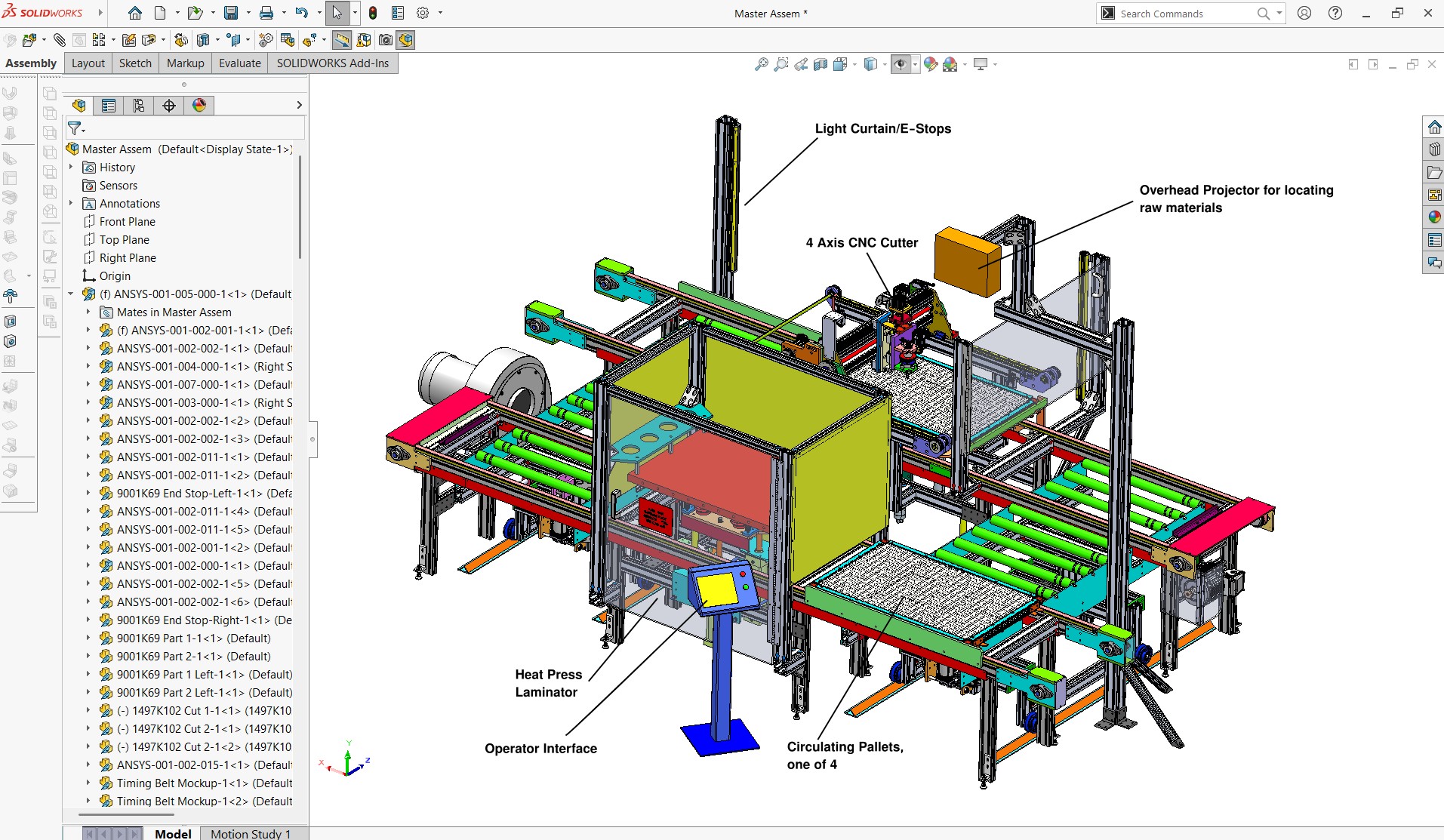
Congratulations on the project, the PLC + LinuxCNC integration looks really nice and the machine layout seems very well thought out and organized.
Looking at the machine layout (heat press laminator, 4-axis CNC cutter, pallet transport, and the overhead projector), I was curious about the main application: is it aimed at processing sheet/panel materials in general (plastics/polymers, MDF, composites, laminates), or is it focused on a more specific material or process?
In my case, I’m working on a different kind of machine, more focused on laser cleaning and painting, with a modular gantry-style structure (about 2 m modules, extendable up to ~16 m on X, with ~2000 mm usable Z and ~300 mm Y). So it was really interesting to see how you handled the integration and the production flow in your system.
Regarding the integration approach: I started by trying to validate the same PLC-as-master / LinuxCNC-as-motion-controller model using mb2hal / Modbus directly, just to keep things simple and close to the field. In practice, I ran into some interoperability issues with the specific setup I have (mainly around protocol framing and what the HMI/PLC side actually exposes as “Modbus TCP”).
In the end, I validated the architecture using a Python bridge as well, but instead of Modbus TCP I used OPC UA as the integration layer between the HMI/SCADA side and LinuxCNC. With Python (using an OPC UA client library) talking to a running LinuxCNC instance, I can exchange status, commands, and recipe parameters in a very similar way to what you described: the operator never interacts with LinuxCNC directly, everything is driven from the HMI/PLC side, and LinuxCNC stays focused purely on motion.
Conceptually, the control model ends up being very close to yours: PLC/HMI remains the master, LinuxCNC is the motion controller, and the Python bridge handles the handshake, heartbeat, status propagation, and command flow between the two worlds. The main difference is just the transport layer (OPC UA instead of Modbus TCP) due to the constraints of my current hardware/software stack.
By the way, for systems like yours, do you usually integrate them with a SCADA layer, or do you prefer to keep it as PLC + HMI + LinuxCNC only? And if you do integrate SCADA, have you ever used or evaluated any open-source solutions?
Thanks again for sharing the real-world experience — it’s very valuable to see these hybrid architectures working reliably in production for years.
Looking at the machine layout (heat press laminator, 4-axis CNC cutter, pallet transport, and the overhead projector), I was curious about the main application: is it aimed at processing sheet/panel materials in general (plastics/polymers, MDF, composites, laminates), or is it focused on a more specific material or process?
In my case, I’m working on a different kind of machine, more focused on laser cleaning and painting, with a modular gantry-style structure (about 2 m modules, extendable up to ~16 m on X, with ~2000 mm usable Z and ~300 mm Y). So it was really interesting to see how you handled the integration and the production flow in your system.
Regarding the integration approach: I started by trying to validate the same PLC-as-master / LinuxCNC-as-motion-controller model using mb2hal / Modbus directly, just to keep things simple and close to the field. In practice, I ran into some interoperability issues with the specific setup I have (mainly around protocol framing and what the HMI/PLC side actually exposes as “Modbus TCP”).
In the end, I validated the architecture using a Python bridge as well, but instead of Modbus TCP I used OPC UA as the integration layer between the HMI/SCADA side and LinuxCNC. With Python (using an OPC UA client library) talking to a running LinuxCNC instance, I can exchange status, commands, and recipe parameters in a very similar way to what you described: the operator never interacts with LinuxCNC directly, everything is driven from the HMI/PLC side, and LinuxCNC stays focused purely on motion.
Conceptually, the control model ends up being very close to yours: PLC/HMI remains the master, LinuxCNC is the motion controller, and the Python bridge handles the handshake, heartbeat, status propagation, and command flow between the two worlds. The main difference is just the transport layer (OPC UA instead of Modbus TCP) due to the constraints of my current hardware/software stack.
By the way, for systems like yours, do you usually integrate them with a SCADA layer, or do you prefer to keep it as PLC + HMI + LinuxCNC only? And if you do integrate SCADA, have you ever used or evaluated any open-source solutions?
Thanks again for sharing the real-world experience — it’s very valuable to see these hybrid architectures working reliably in production for years.
Last edit: 07 Feb 2026 11:42 by Marcos DC.
The following user(s) said Thank You: rodw
Please Log in or Create an account to join the conversation.
- Marcos DC
-
Topic Author
- Offline
- Senior Member
-
Less
More
- Posts: 74
- Thank you received: 47
07 Feb 2026 11:48 - 07 Feb 2026 11:49 #342596
by Marcos DC
Replied by Marcos DC on topic PLC + LinuxCNC for industrial machine with simple HMI (non-G-code operators)
By the way, after re-reading your post I realized this was for a medical product line. When I mentioned sheet/panel materials (plastics, laminates, composites, etc.) I meant it in a very generic sense. I’d be really interested to know what kind of materials you were actually processing (e.g. medical-grade films, technical fabrics, multilayer laminates, polymers, etc.), since the combination of a heat press laminator and an ultrasonic cutter suggests a quite specialized process.
Last edit: 07 Feb 2026 11:49 by Marcos DC.
Please Log in or Create an account to join the conversation.
- Marcos DC
-
Topic Author
- Offline
- Senior Member
-
Less
More
- Posts: 74
- Thank you received: 47
16 Feb 2026 05:13 - 16 Feb 2026 05:17 #343039
by Marcos DC
Replied by Marcos DC on topic PLC + LinuxCNC for industrial machine with simple HMI (non-G-code operators)
Hi all, just to close the loop on this thread.
I ended up implementing a small Python bridge between a PLC/HMI (via OPC UA) and LinuxCNC, following the “PLC as cell controller, LinuxCNC as motion controller” approach discussed here (handshake, heartbeat, command/status boundary, etc.).
The script is vendor-agnostic (standard OPC UA) and already includes an MIT license header, so feel free to use, modify, or adapt it for your own setups.
If someone adapts it to Modbus TCP, MQTT, or another transport, feel free to share back.
Thanks to everyone for the input in this thread — it helped a lot to shape the final architecture.
— Marcos DC
I ended up implementing a small Python bridge between a PLC/HMI (via OPC UA) and LinuxCNC, following the “PLC as cell controller, LinuxCNC as motion controller” approach discussed here (handshake, heartbeat, command/status boundary, etc.).
The script is vendor-agnostic (standard OPC UA) and already includes an MIT license header, so feel free to use, modify, or adapt it for your own setups.
If someone adapts it to Modbus TCP, MQTT, or another transport, feel free to share back.
Thanks to everyone for the input in this thread — it helped a lot to shape the final architecture.
— Marcos DC
Attachments:
Last edit: 16 Feb 2026 05:17 by Marcos DC.
The following user(s) said Thank You: tommylight, meister, rodw
Please Log in or Create an account to join the conversation.
- LinuxCNC
- General LinuxCNC Questions
- PLC + LinuxCNC for industrial machine with simple HMI (non-G-code operators)
Time to create page: 0.361 seconds