
7i92T and mx3660 request for help
- ClarkSavage
- Offline
- Junior Member
-

Less
More
- Posts: 24
- Thank you received: 4
16 Feb 2026 18:20 #343060
by ClarkSavage
7i92T and mx3660 request for help was created by ClarkSavage
I hope this is not a double post - tried earlier, reported only 8 files attached so I cancelled, will try here and then follow with the other files
Below tells what I have and have done - what I could use some help with.What I am trying to do is simply hook the 7i92T to my mx3660 without moving anything - just wish to replace my parallel port with the MESA, so keep all my parallel stuff - limits and other as is just need to get the 7i92T to be the faux parallel port and work in LinuxCNC.
Below tells what I have and have done - what I could use some help with.What I am trying to do is simply hook the 7i92T to my mx3660 without moving anything - just wish to replace my parallel port with the MESA, so keep all my parallel stuff - limits and other as is just need to get the 7i92T to be the faux parallel port and work in LinuxCNC.
- Had a working 2.9.8 with an MX3660 controlling steppers VIA parallel port
- Have new install of LinuxCNC 2.9.8, a MESA 7i92tm with P2 being a parallel DB25.
- I did learn that the 7i92tm and 7i92T are both named in configs as 7i92T with no M or other.
- Have everything wired, network works, network can see the MESA and a parallel cable out of P2 on the card to my MX3660.
- Finally flashed the 7i92 with the bin file: 7i92t_mx3660d.bin
- 7i92 reported successful flash.
- Shut everything down and rebooted all.
- The 7i92 gets red and green lights then the red goes out and the green is on like I understand it should be.
- Proceeded to Pncconfig figuring this will be easy.
- When I go into pncconfig I do not see in the "hardware" select able anything like "mx3660" but I do see such as "7i92 internal" and "Geckoxxxxxx" [x where I do not remember] and so on, tried several. Wondering if the flash did not give me the mx3660 - thought it would just show up as mx3660d in the list.
- Also, after reading the manual, the forum search, everything including youtube videos the pages do not look like the ones in those shown. I can get to the card setup and after accepting the changes - including 10.10.10.10 for the card I do get the P1 and P2 pages for the card.Anyway, stumped. Tried several manual configs of the card, tried setting the X axis and testing - when I actually do "test axis" for calibrate the red light on the 7i92 lights. I have to power cycle to get it off, as soon as I test the axis it red lights. So I am attaching what I see others have - the output of the card from a terminal, along with my old ini and hal files - whatever may be of use. Please note the name of my ini and hal files reference 2.8.4 but that's just the names I gave the last working configs I did update but left the bookworm file name in the configs.I appreciate anything to get on track I can get. FYI - the 7i92 is connected to the MX3660, what I really could use is what the pins or setup should be. Why I went to the 7i95 is to offload some from the computer port since I would get occasional errors if trying to run faster than 180ipm. I do not mind 180ipm it's just that the computer port appeared to choke on the data stream once in a while.If I can get this to work I intend to write it all up and post it for others as a complete - including that the bin file needs to be in the home usr directory to flash. Instructions were to put the file in the same directory as "mesaflash" but that isn't true, unless I am seriously missing something and I may be.Thanks
Please Log in or Create an account to join the conversation.
- ClarkSavage
- Offline
- Junior Member
-
Less
More
- Posts: 24
- Thank you received: 4
16 Feb 2026 18:22 #343061
by ClarkSavage
Replied by ClarkSavage on topic 7i92T and mx3660 request for help
MESA files attached for previous message
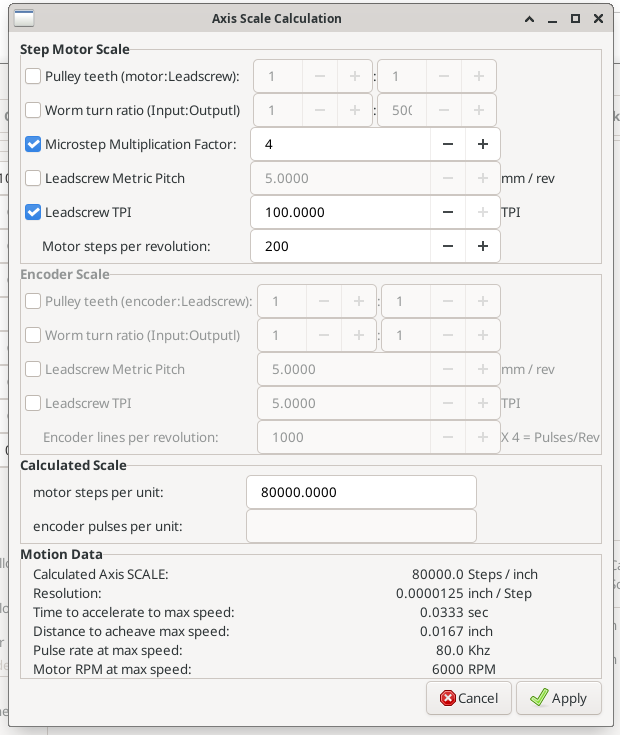
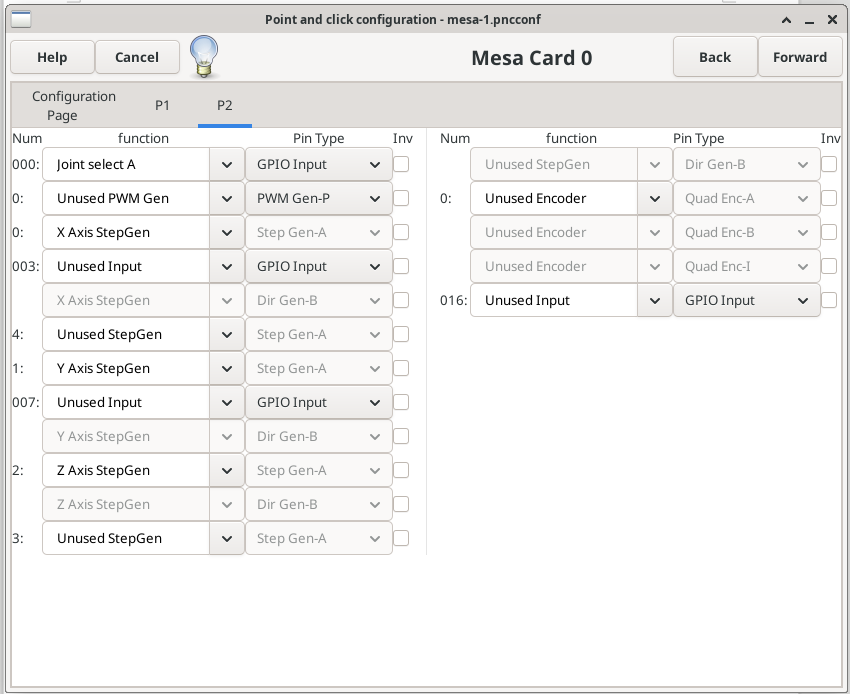
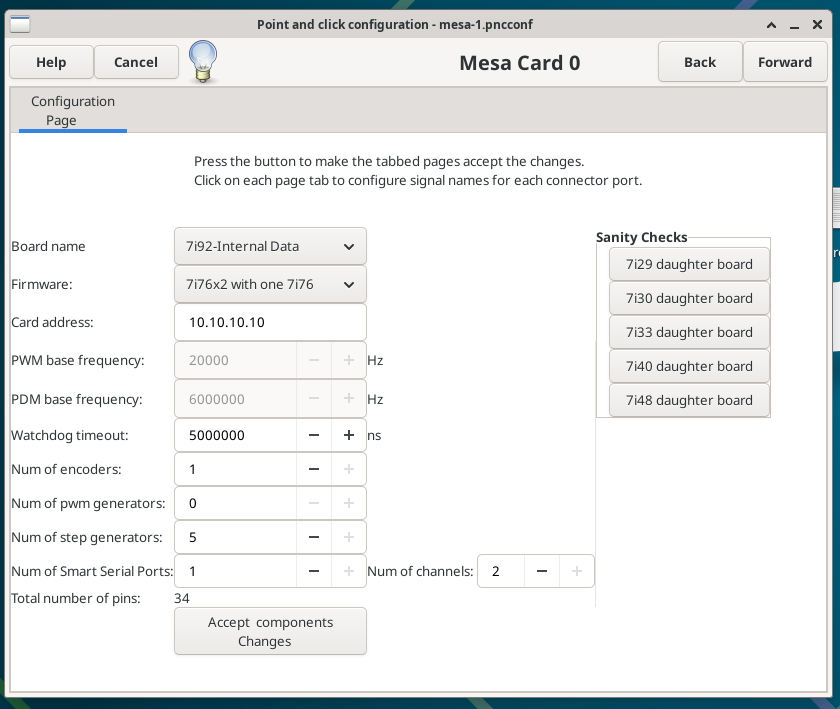
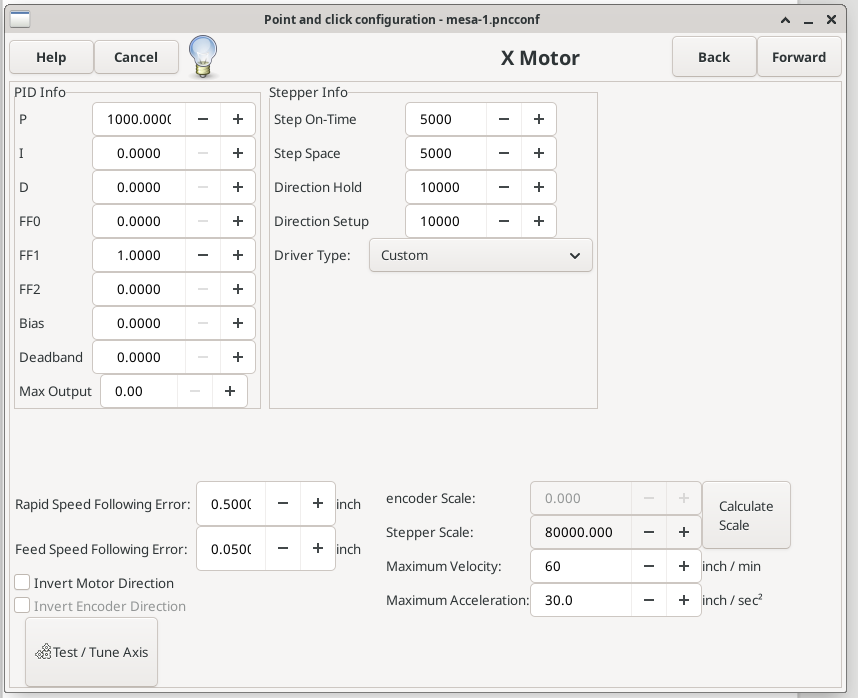
Please Log in or Create an account to join the conversation.
- PCW
-

- Offline
- Moderator
-

Less
More
- Posts: 18111
- Thank you received: 5330
16 Feb 2026 20:17 - 16 Feb 2026 20:39 #343067
by PCW
Replied by PCW on topic 7i92T and mx3660 request for help
1. I would use pncconfs "Discovery" option so pncconf "knows" what the firmware options are.
2. Then set the number of stepgens, encoders, PWMgens actually used
If this is not done, the GPIO pins these functions use will be masked
and unavailable for limit/home switches etc
3. If you want to know stepgenN --> MX3660 mapping etc:
mesaflash --device 7i92T --addr 10.10.10.10 --dbname1 mx3660 --readhmid
2. Then set the number of stepgens, encoders, PWMgens actually used
If this is not done, the GPIO pins these functions use will be masked
and unavailable for limit/home switches etc
3. If you want to know stepgenN --> MX3660 mapping etc:
mesaflash --device 7i92T --addr 10.10.10.10 --dbname1 mx3660 --readhmid
Last edit: 16 Feb 2026 20:39 by PCW.
The following user(s) said Thank You: ClarkSavage
Please Log in or Create an account to join the conversation.
- ClarkSavage
- Offline
- Junior Member
-
Less
More
- Posts: 24
- Thank you received: 4
22 Feb 2026 13:48 #343309
by ClarkSavage
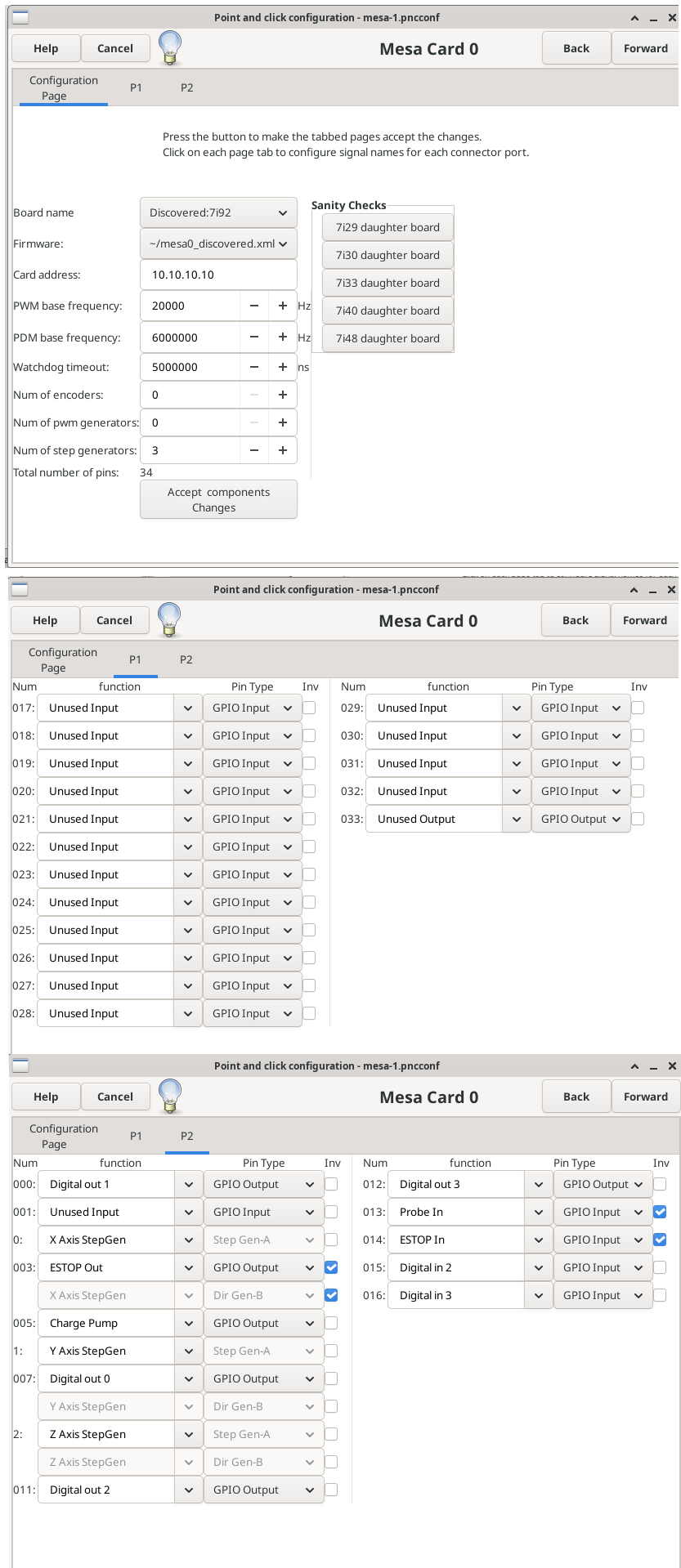
 Ok, been changing everything for over a week, still stumped and machine not running - obviously. Just too many permutations.
Replied by ClarkSavage on topic 7i92T and mx3660 request for help
- Asking - I do not require a PWM gen because I do not have my spindle connected at this time, but would like too in the future. I can live with manual speed set. Therefore removed it from the 7i92 setup page.
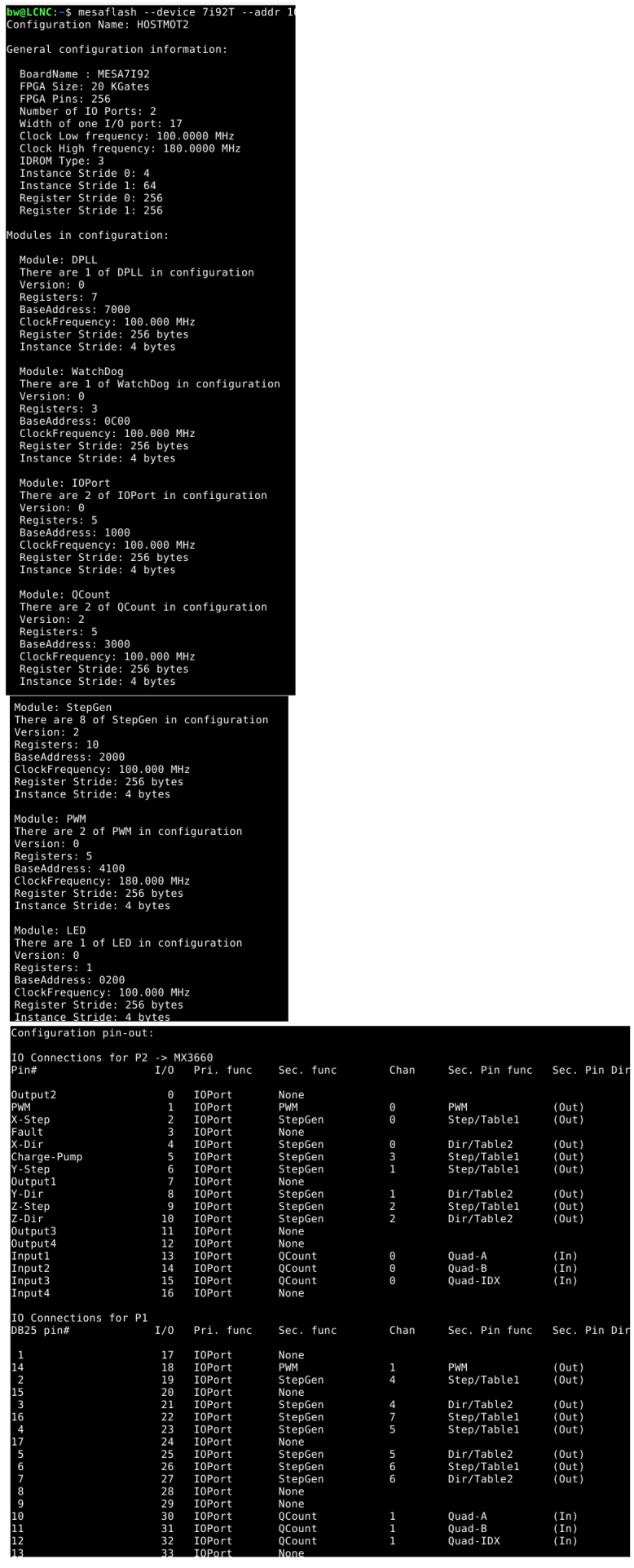
- I did run "mesaflash --device 7i92T --addr 10.10.10.10 --dbname1 mx3660 --readhmid" and it provided what I thought was the info I required to setup my 7i92 to control the mx3660 as a faux parallel port.
- No luck for me, maybe I just don't understand.
So attaching the relevant images - asking again for help. Such as if I take the readhim output and translate to the 7i92 the pins are 16 to 16 in the settings but I can not get some of the 7i82 pins to go "active" so I can set them.
No matter what I do, when I go to the first axis - x - I CAN now enable it. But when I try to jog it the 7i92 lights the red LED and needs a reset.
Comments very welcome.
Attachments:
Please Log in or Create an account to join the conversation.
- ClarkSavage
- Offline
- Junior Member
-
Less
More
- Posts: 24
- Thank you received: 4
22 Feb 2026 13:49 #343310
by ClarkSavage
Replied by ClarkSavage on topic 7i92T and mx3660 request for help
sorry - did not think they attached - hit the below buttons too for inserft, will know better next time
Please Log in or Create an account to join the conversation.
- PCW
-
- Offline
- Moderator
-
Less
More
- Posts: 18111
- Thank you received: 5330
22 Feb 2026 21:55 - 22 Feb 2026 21:55 #343328
by PCW
Replied by PCW on topic 7i92T and mx3660 request for help
If you get a red LED on the 7I92 when LinuxCNC is running, that indicates latency issues with the host PC
This does not require a reset but the issue must be solved before you can have reliable operation
I would no bother with pncconfs tests, but simply run your newly created configuration with LinuxCNC
To check network latency, run:
sudo chrt 99 ping -i .001 -q -c 60000 10.10.10.10
This will run for 1 minute then print timing statistics.
This does not require a reset but the issue must be solved before you can have reliable operation
I would no bother with pncconfs tests, but simply run your newly created configuration with LinuxCNC
To check network latency, run:
sudo chrt 99 ping -i .001 -q -c 60000 10.10.10.10
This will run for 1 minute then print timing statistics.
Last edit: 22 Feb 2026 21:55 by PCW.
Please Log in or Create an account to join the conversation.
- ClarkSavage
- Offline
- Junior Member
-
Less
More
- Posts: 24
- Thank you received: 4
02 Mar 2026 19:21 #343745
by ClarkSavage
Replied by ClarkSavage on topic 7i92T and mx3660 request for help
Ok, I have managed the following but have a few lingering issues that I am asking for help with:
One statement - the 7i91 is connected through a short parallel cable to the mx3660. ALL pins are that way. Nothing is connected to the 7i92 directly, only have another parallel [header] no wire connections.
Solved:
I have tried the old permutations of limit switch setup - setting like my old working stepconf, setting the switch to 0 and the home to 2 sort of like the setup diagram on linuxcnc, tried "-" on first the latch velocity like i read somewhere, and everything in between one change at a time, restart and run - no luck. Do not understand what is different. Axis scale is check and accurate, DRO reads correct, ballscrews dialed in and all that.
Thanks for trying.
One statement - the 7i91 is connected through a short parallel cable to the mx3660. ALL pins are that way. Nothing is connected to the 7i92 directly, only have another parallel [header] no wire connections.
Solved:
- I can now run xyz axis in Pnnconf to test. Note the speeds I can use are much higher than what the parallel gave me. The axis no longer crashes or loses step such as when testing in Stepconf. Happy about that.
- Can run linuxcnc - but my Estop and limits do not work so constantly running a side terminal to use mesaflash xxxx --reload
- Jog and limit switch setup attemps the axis do run in the right direction for both program and jog - according to DRO
- Did insert - use isocplus - I have 12 processors so I set it to 2-11 and the latency nose dived. Yes I have the file if asked for - less than 13,000 everywhere.
- Did learn a lot and after getting the mx3660 --readhmid file and looking at my old ini/hal set everything in a spreadsheet detailing the 7i92 pins and the corresponding mx3660 bin, allowed me to match what I had from my old Stepconf hal for pin number. Played with the stepgen number till realized I only needed three.
- Found out it was easier to edit speeds and both home/limits in the ini file.
- thought I had a working X axis limit but lost it.
- did use the same limits/home both settings from my earlier stepconf ini - but no matter what I do the axis moves, trips the limit and stays there. I also get limit error messages when enabling so I need to over ride limits to run anything and then recheck over ride limits ever time I move something.
- I may be wrong - I think my charge pump must be set up correctly or I think the axis would not be enabled. They disable - the 7i92 red light goes on - as soon as i exit linuxcnc and upon restarting, the red light goes off.
- Could it be that because my Estop still does nothing and is setup wrong? It is still connected to the mx3660, and it disables the mx3660 when tripped but there is no relative indication or any change in linuxcnc to either enable or the abort button in AXIS - does not matter what position the switch is in but of course it must be off to enable the mx3660 to move axis in linuxcnc.
I have tried the old permutations of limit switch setup - setting like my old working stepconf, setting the switch to 0 and the home to 2 sort of like the setup diagram on linuxcnc, tried "-" on first the latch velocity like i read somewhere, and everything in between one change at a time, restart and run - no luck. Do not understand what is different. Axis scale is check and accurate, DRO reads correct, ballscrews dialed in and all that.
Thanks for trying.
Please Log in or Create an account to join the conversation.
- ClarkSavage
- Offline
- Junior Member
-
Less
More
- Posts: 24
- Thank you received: 4
02 Mar 2026 19:24 #343748
by ClarkSavage
Replied by ClarkSavage on topic 7i92T and mx3660 request for help
I should have stated - the limit / homing, picked off machine, home axis - trying to home one at a time, the axis moves to the limit switch and locks, need to over ride limits, move axis off limits - all axis
Please Log in or Create an account to join the conversation.
- tommylight
-

- Away
- Moderator
-
Less
More
- Posts: 22001
- Thank you received: 7488
02 Mar 2026 20:12 #343752
by tommylight
Replied by tommylight on topic 7i92T and mx3660 request for help
In the ini file
HOME_OFFSET = -3
for each joint/axis
That is for metric machine, adjust accordingly for imperial.
HOME_OFFSET = -3
for each joint/axis
That is for metric machine, adjust accordingly for imperial.
Please Log in or Create an account to join the conversation.
- ClarkSavage
- Offline
- Junior Member
-
Less
More
- Posts: 24
- Thank you received: 4
03 Mar 2026 11:39 #343785
by ClarkSavage
[JOINT_0]
TYPE = LINEAR
HOME = 0.0
FERROR = 10.0
MIN_FERROR = 0.05
MAX_VELOCITY = 3.0
MAX_ACCELERATION = 2.0
# works - can use after home limits estop fixed - MAX_VELOCITY = 5.0
# works - can use after home limits estop fixed - MAX_ACCELERATION = 7.0
# The values below should be 25% larger than MAX_VELOCITY and MAX_ACCELERATION
# If using BACKLASH compensation STEPGEN_MAXACCEL should be 100% larger.
STEPGEN_MAXVEL = 6.25
STEPGEN_MAXACCEL = 8.75
P = 1000.0
I = 0.0
D = 0.0
FF0 = 0.0
FF1 = 1.0
FF2 = 0.0
BIAS = 0.0
DEADBAND = 0.0
MAX_OUTPUT = 0.0
# these are in nanoseconds
DIRSETUP = 10000
DIRHOLD = 10000
STEPLEN = 5000
STEPSPACE = 5000
STEP_SCALE = -1016.0030642800001
MIN_LIMIT = 0.0
MAX_LIMIT = 32.0
HOME_OFFSET = -0.118
HOME_SEARCH_VEL = 1.166667
HOME_LATCH_VEL = 1.066667
HOME_FINAL_VEL = 1.100000
HOME_USE_INDEX = NO
HOME_IGNORE_LIMITS = YES
HOME_SEQUENCE = 2
#******************************************
what worked in stepconf and parallel port
[AXIS_X]
MAX_VELOCITY = 3.25
MAX_ACCELERATION = 3.8
MIN_LIMIT = -0.25
MAX_LIMIT = 36.5
[JOINT_0]
TYPE = LINEAR
HOME = 0.0
MIN_LIMIT = -0.25
MAX_LIMIT = 36.5
MAX_VELOCITY = 3.25
MAX_ACCELERATION = 3.8
STEPGEN_MAXACCEL = 6.0
SCALE = 1016.00000104
FERROR = 0.05
MIN_FERROR = 0.01
HOME_OFFSET = -0.750000
HOME_SEARCH_VEL = -1.100000
HOME_LATCH_VEL = -0.40000
HOME_IGNORE_LIMITS = YES
HOME_SEQUENCE = 1
#******************************************
should I purchase an addon card to the 7i92TM to get the home /limits /estop working and wire direct to it?
Replied by ClarkSavage on topic 7i92T and mx3660 request for help
- Ok, setup the HOME_OFFSET to -0.118 [equivalent inch to the 0.3mm) no luck.
- Tried inverting /- latch and others.Axis has errors so attaching the image
- When attempting MACHINE / HOMING / "any single axis" I get an error message
- Home setup / limits of one [x] axis as exampleExample - output of ini for X-axis[JOINT_0]TYPE = LINEARHOME = 0.0FERROR = 10.0MIN_FERROR = 0.05MAX_VELOCITY = 3.0MAX_ACCELERATION = 2.0
[JOINT_0]
TYPE = LINEAR
HOME = 0.0
FERROR = 10.0
MIN_FERROR = 0.05
MAX_VELOCITY = 3.0
MAX_ACCELERATION = 2.0
# works - can use after home limits estop fixed - MAX_VELOCITY = 5.0
# works - can use after home limits estop fixed - MAX_ACCELERATION = 7.0
# The values below should be 25% larger than MAX_VELOCITY and MAX_ACCELERATION
# If using BACKLASH compensation STEPGEN_MAXACCEL should be 100% larger.
STEPGEN_MAXVEL = 6.25
STEPGEN_MAXACCEL = 8.75
P = 1000.0
I = 0.0
D = 0.0
FF0 = 0.0
FF1 = 1.0
FF2 = 0.0
BIAS = 0.0
DEADBAND = 0.0
MAX_OUTPUT = 0.0
# these are in nanoseconds
DIRSETUP = 10000
DIRHOLD = 10000
STEPLEN = 5000
STEPSPACE = 5000
STEP_SCALE = -1016.0030642800001
MIN_LIMIT = 0.0
MAX_LIMIT = 32.0
HOME_OFFSET = -0.118
HOME_SEARCH_VEL = 1.166667
HOME_LATCH_VEL = 1.066667
HOME_FINAL_VEL = 1.100000
HOME_USE_INDEX = NO
HOME_IGNORE_LIMITS = YES
HOME_SEQUENCE = 2
#******************************************
what worked in stepconf and parallel port
[AXIS_X]
MAX_VELOCITY = 3.25
MAX_ACCELERATION = 3.8
MIN_LIMIT = -0.25
MAX_LIMIT = 36.5
[JOINT_0]
TYPE = LINEAR
HOME = 0.0
MIN_LIMIT = -0.25
MAX_LIMIT = 36.5
MAX_VELOCITY = 3.25
MAX_ACCELERATION = 3.8
STEPGEN_MAXACCEL = 6.0
SCALE = 1016.00000104
FERROR = 0.05
MIN_FERROR = 0.01
HOME_OFFSET = -0.750000
HOME_SEARCH_VEL = -1.100000
HOME_LATCH_VEL = -0.40000
HOME_IGNORE_LIMITS = YES
HOME_SEQUENCE = 1
#******************************************
should I purchase an addon card to the 7i92TM to get the home /limits /estop working and wire direct to it?
Please Log in or Create an account to join the conversation.
Moderators: cmorley
Time to create page: 1.914 seconds