
Conversational CAD CAM
- Becksvill
- Offline
- Elite Member
-

Less
More
- Posts: 224
- Thank you received: 115
02 Aug 2026 07:33 - 02 Aug 2026 07:43 #348370
by Becksvill
Conversational CAD CAM was created by Becksvill
Hey guys just wanted to upload this config with a cnc conversational gcode software. I will try make some videos as this is the coolest thing ever i think. its all made with claude so i can't really take credit for it. but i have been machining for 16 years now and used fagor and semiens lathe controls with conversational software like shop turn. and this is the closest i could make to something like that. this runs as a embedded glade vcp tab in axis gui. so as simple as you can get with linuxcnc. and has no dependancy's that i could find, everything runs on python and there is no subroutines in the conversational software. so if you want to add this to your own config i think that all you will need to do is copy any python files you can find and add the right lines to the ini to load the glade tab which you can copy from my ini.
All code is long hand so no canned cycles. and the profile cycles are made based off the linuxcnc canned cycles.
you can reload a old program made with this back into the conversational software and make changes in a few seconds and re post it.
this is still a work in progress but its been running large cnc lathes for a few weeks and no issues so far. and you can see in the preview anyway enjoy and if anyone uses it let me know cheers. just hoping to give back a little to linuxcnc a bit and this has been massively missing for ages. even ecam only does mills i think.
if you want to install this i have made it as simple as i know how to.
step 1 if on a brand new install from the ISO then open the linuxcnc config picker first and open any sim. that will make folders for linuxcnc and configs etc
step 2 copy and past this file into the normal configs directory. and unzip or unzip before copying
open the linuxcnc config picker again and open this config. click desktop shortcut.
run it post code and have a look.
Ps just a few things to warn about. this uses chris morley's wear patch so t0101 and also uses g30 for tool change positiion. and assumes a encode for g33.1 tapping and for threading
this was tested today on a fresh install of 2.10 cheers
Andrew
All code is long hand so no canned cycles. and the profile cycles are made based off the linuxcnc canned cycles.
you can reload a old program made with this back into the conversational software and make changes in a few seconds and re post it.
this is still a work in progress but its been running large cnc lathes for a few weeks and no issues so far. and you can see in the preview anyway enjoy and if anyone uses it let me know cheers. just hoping to give back a little to linuxcnc a bit and this has been massively missing for ages. even ecam only does mills i think.
if you want to install this i have made it as simple as i know how to.
step 1 if on a brand new install from the ISO then open the linuxcnc config picker first and open any sim. that will make folders for linuxcnc and configs etc
step 2 copy and past this file into the normal configs directory. and unzip or unzip before copying
open the linuxcnc config picker again and open this config. click desktop shortcut.
run it post code and have a look.
Ps just a few things to warn about. this uses chris morley's wear patch so t0101 and also uses g30 for tool change positiion. and assumes a encode for g33.1 tapping and for threading
this was tested today on a fresh install of 2.10 cheers
Andrew
Last edit: 02 Aug 2026 07:43 by Becksvill.
The following user(s) said Thank You: tommylight, rodw, besriworld
Please Log in or Create an account to join the conversation.
- tuxcnc
- Offline
- Elite Member
-
Less
More
- Posts: 256
- Thank you received: 46
02 Aug 2026 12:01 #348381
by tuxcnc
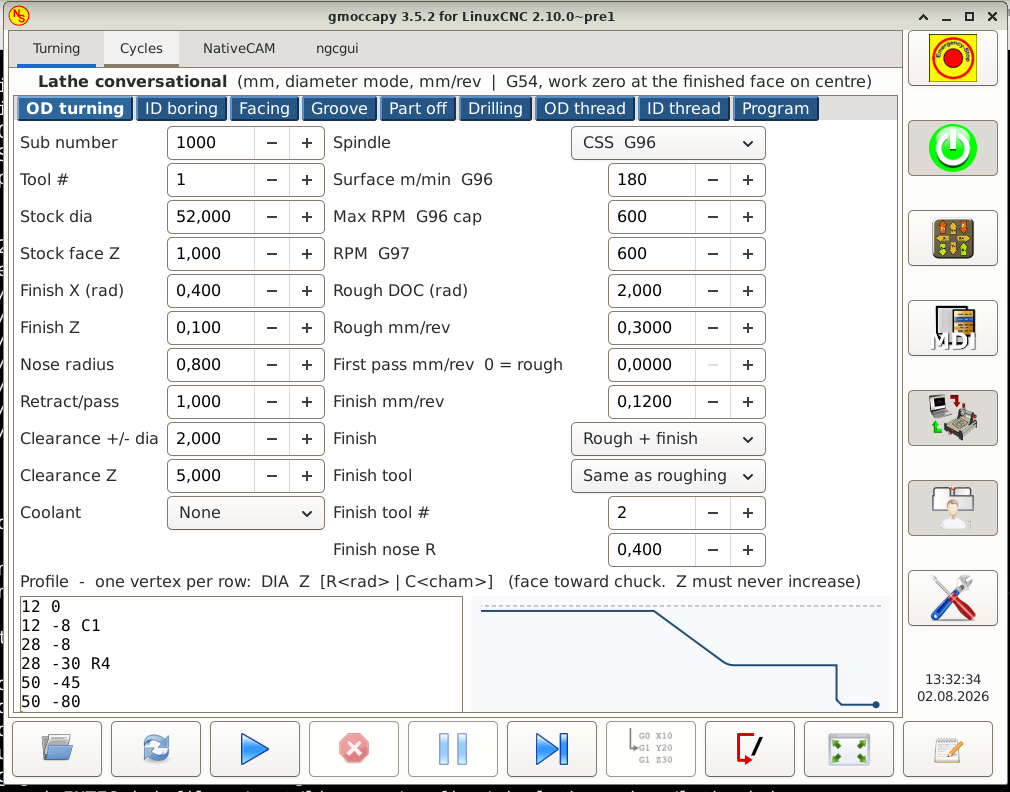
In my opinion, the better way is you collect only necessary files and say what we have to change in standard sim ini.
I did some test with config copied from sample-configs/sim/gmoccapy/lathe_configs.
This is gmoccapy and I recommend for you.
The 6,5 font size is not readable for me. I suspect this is from lack of space in Axis.
In gmoccapy you can safely use 12 font size.
There is one problem to solve - "generate & load" button works partially, generate, save, but not load. Manually loaded lathe_profile.ngc works as expected. Maybe rename button to "generate" only?
For me fanuc style Tnnnn is a problem. I never used this, don't want this, and tried to remove this "advantage", but no luck.
How to change sources for use standard Tnn tools?
I tested only "OD turning", seems this is good idea and good software, and worth to test the rest.
Replied by tuxcnc on topic Conversational CAD CAM
For me this not works. LinuxCNC starts, but you can't homing or do any moving (following error).if you want to install this i have made it as simple as i know how to.
step 1 if on a brand new install from the ISO then open the linuxcnc config picker first and open any sim. that will make folders for linuxcnc and configs etc
step 2 copy and past this file into the normal configs directory. and unzip or unzip before copying
open the linuxcnc config picker again and open this config. click desktop shortcut.
In my opinion, the better way is you collect only necessary files and say what we have to change in standard sim ini.
I did some test with config copied from sample-configs/sim/gmoccapy/lathe_configs.
This is gmoccapy and I recommend for you.
The 6,5 font size is not readable for me. I suspect this is from lack of space in Axis.
In gmoccapy you can safely use 12 font size.
There is one problem to solve - "generate & load" button works partially, generate, save, but not load. Manually loaded lathe_profile.ngc works as expected. Maybe rename button to "generate" only?
For me fanuc style Tnnnn is a problem. I never used this, don't want this, and tried to remove this "advantage", but no luck.
How to change sources for use standard Tnn tools?
I tested only "OD turning", seems this is good idea and good software, and worth to test the rest.
Attachments:
The following user(s) said Thank You: Becksvill
Please Log in or Create an account to join the conversation.
- tuxcnc
- Offline
- Elite Member
-
Less
More
- Posts: 256
- Thank you received: 46
02 Aug 2026 13:13 #348382
by tuxcnc
Replied by tuxcnc on topic Conversational CAD CAM
I found the solution for fanuc style tool numbers.
No changes to Becksvill's code, this will work anywhere.
1. Create settool.ngc file2. Add to your ini file in [RS274NGC] sectionNow, for example, tool 1 will be loaded even if there is T0101 in g-code and tool 101 is not present in tool table.
No changes to Becksvill's code, this will work anywhere.
1. Create settool.ngc file
o<settool> sub
O200 IF [#<t> GT 100]
    #<t> = [#<t> MOD 100]
O200 ENDIF
T#<t>
o<settool> endsubREMAP = T argspec=t ngc=settool
The following user(s) said Thank You: Becksvill
Please Log in or Create an account to join the conversation.
- Becksvill
- Offline
- Elite Member
-
Less
More
- Posts: 224
- Thank you received: 115
03 Aug 2026 10:20 #348407
by Becksvill
Replied by Becksvill on topic Conversational CAD CAM
Hey tux CNC
Thanks for the feed back
This software is still getting worked on. It was just made for me but hoping to help others also.. Thanks for the feedback. And keep adding to it as you test and I'll try fix stuff if that's possible.
About the sizing yes made for axis so it's a nice fit on my screen.
Thanks for the feed back
This software is still getting worked on. It was just made for me but hoping to help others also.. Thanks for the feedback. And keep adding to it as you test and I'll try fix stuff if that's possible.
About the sizing yes made for axis so it's a nice fit on my screen.
Please Log in or Create an account to join the conversation.
- Becksvill
- Offline
- Elite Member
-
Less
More
- Posts: 224
- Thank you received: 115
07 Aug 2026 09:11 #348521
by Becksvill
Replied by Becksvill on topic Conversational CAD CAM
for those who are interested here is a new config that has the simulated motion in it
it's based off the lathe fanuc axis gui that linuxcnc comes with
you have two options. you can just unzip and copy and paste the sim config. into your linuxcnc configs folder and then use the config picker to run it. that takes 2 min and like 10 mouse clicks. for those who want to understand it and hopefully add this to their own machines there is the manual option where you can copy the right files into the sim config and actually understand it.
i just used Claude Ai for the whole project and got it to spit out the text file that is in the config. here is the first bit from the text file. cheers Andrew
===============================================================================
RUNNING THE BIG BLUE CONVERSATIONAL TAB ON A SIMULATED LATHE
How to graft it onto LinuxCNC's own sim / axis / lathe-fanucy sample config
Written 2026-08-07. Every step below was built and tested before writing.
===============================================================================
WHY THIS FILE
The big-blue-lathe config drives real servos through a Mesa 7i92 and needs a
ClassicLadder E-stop chain, gearbox solenoids and sensors to even come out of
E-stop. A friend with no hardware cannot jog it or run a program.
So instead of shipping the machine config, we bolt the CONVERSATIONAL TURNING
TAB onto a stock LinuxCNC sim. You get a machine that homes instantly, jogs,
runs programs, does manual tool changes and simulates a spindle - and the
Turning tab writes exactly the same G-code it writes on the real lathe.
The base is sim/axis/lathe-fanucy rather than sim/axis/lathe , because
lathe-fanucy already ships the T-word / wear-offset remap plumbing that big
blue depends on: the REMAP = T line, the [PYTHON] section, remap.py and
toplevel.py. That is most of the fiddly part done for you.
===============================================================================
TWO WAYS TO DO THIS - PICK ONE
===============================================================================
ROUTE A - USE THE READY-MADE CONFIG. Two minutes, nothing to type.
If you have big-blue-sim.zip , everything below has already been done for
you. The whole finished config is in it. On the test PC:
mkdir -p ~/linuxcnc/configs
unzip big-blue-sim.zip -d ~/linuxcnc/configs/
linuxcnc ~/linuxcnc/configs/big-blue-sim/big-blue-sim.ini
That is it. Skip to STEP 4 - RUN IT.
You do NOT need to create the lathe-fanucy sample config first. The zip
already contains its remap.py and toplevel.py, which is the only thing that
was ever taken from it.
ROUTE B - BUILD IT BY HAND. Steps 1 to 3 below.
Do this if you have not got the zip, or if you want to understand what is
in it, or if you are redoing this on a future LinuxCNC version.
The only difference between the two routes is the NAME. Route A gives you
~/linuxcnc/configs/big-blue-sim/big-blue-sim.ini
and Route B gives you
~/linuxcnc/configs/lathe-fanucy/lathe-fanucy.ini
with identical contents. Wherever this file says "lathe-fanucy.ini" below,
read it as "whichever of those two you have".
NOTE FOR THE BIG BLUE MACHINE ITSELF: copying this text file into the
big-blue-lathe config folder does nothing on its own - it is only a set of
instructions. The sim is a SEPARATE config directory. Nothing here changes
or touches the real machine's config.
it's based off the lathe fanuc axis gui that linuxcnc comes with
you have two options. you can just unzip and copy and paste the sim config. into your linuxcnc configs folder and then use the config picker to run it. that takes 2 min and like 10 mouse clicks. for those who want to understand it and hopefully add this to their own machines there is the manual option where you can copy the right files into the sim config and actually understand it.
i just used Claude Ai for the whole project and got it to spit out the text file that is in the config. here is the first bit from the text file. cheers Andrew
===============================================================================
RUNNING THE BIG BLUE CONVERSATIONAL TAB ON A SIMULATED LATHE
How to graft it onto LinuxCNC's own sim / axis / lathe-fanucy sample config
Written 2026-08-07. Every step below was built and tested before writing.
===============================================================================
WHY THIS FILE
The big-blue-lathe config drives real servos through a Mesa 7i92 and needs a
ClassicLadder E-stop chain, gearbox solenoids and sensors to even come out of
E-stop. A friend with no hardware cannot jog it or run a program.
So instead of shipping the machine config, we bolt the CONVERSATIONAL TURNING
TAB onto a stock LinuxCNC sim. You get a machine that homes instantly, jogs,
runs programs, does manual tool changes and simulates a spindle - and the
Turning tab writes exactly the same G-code it writes on the real lathe.
The base is sim/axis/lathe-fanucy rather than sim/axis/lathe , because
lathe-fanucy already ships the T-word / wear-offset remap plumbing that big
blue depends on: the REMAP = T line, the [PYTHON] section, remap.py and
toplevel.py. That is most of the fiddly part done for you.
===============================================================================
TWO WAYS TO DO THIS - PICK ONE
===============================================================================
ROUTE A - USE THE READY-MADE CONFIG. Two minutes, nothing to type.
If you have big-blue-sim.zip , everything below has already been done for
you. The whole finished config is in it. On the test PC:
mkdir -p ~/linuxcnc/configs
unzip big-blue-sim.zip -d ~/linuxcnc/configs/
linuxcnc ~/linuxcnc/configs/big-blue-sim/big-blue-sim.ini
That is it. Skip to STEP 4 - RUN IT.
You do NOT need to create the lathe-fanucy sample config first. The zip
already contains its remap.py and toplevel.py, which is the only thing that
was ever taken from it.
ROUTE B - BUILD IT BY HAND. Steps 1 to 3 below.
Do this if you have not got the zip, or if you want to understand what is
in it, or if you are redoing this on a future LinuxCNC version.
The only difference between the two routes is the NAME. Route A gives you
~/linuxcnc/configs/big-blue-sim/big-blue-sim.ini
and Route B gives you
~/linuxcnc/configs/lathe-fanucy/lathe-fanucy.ini
with identical contents. Wherever this file says "lathe-fanucy.ini" below,
read it as "whichever of those two you have".
NOTE FOR THE BIG BLUE MACHINE ITSELF: copying this text file into the
big-blue-lathe config folder does nothing on its own - it is only a set of
instructions. The sim is a SEPARATE config directory. Nothing here changes
or touches the real machine's config.
Attachments:
Please Log in or Create an account to join the conversation.
- Becksvill
- Offline
- Elite Member
-
Less
More
- Posts: 224
- Thank you received: 115
08 Aug 2026 10:15 #348552
by Becksvill
Replied by Becksvill on topic Conversational CAD CAM
Hey Tuxcnc
just wanted to message back here and explain some of the reasons for the tool wear remap t0101 etc
On almost all commerical cnc controllers (fagor fanuc mazak misubishi semiens heidenhain (also Pathpilot which is sort of a commerical version of linuxcnc) you can change a offset to account for the tool wearing or machining cutting slightly the wrong size over time or part to part. usually you have a option where you can just change the value by 0.05 or something and it changes the size the machine cuts a bit. if you only use T1 m6 g43 then you have to adjust the actual tool geometry offset. which if you have boring bars and also turning tools can be like 300mm different. if you muck up your maths here or make a typo. i been there and done it then the next time you run the machine it crashes. and then also if you have a unskilled operator on the machine it's even worse. anyway all these issues are good reasons to have some way to make only small changes to the tool size. the T0101 remap is not the best way i could be quite happy with just t1m6 also if there is a good way to include wear offsets but i haven't seen one so i use the remap that chris morley made years ago. I have a production lathe that would have made 50,000 parts now and wear offsets are essential in my opinion.
I can probably change the cycles to output only T1m6g43 once i am finished if you want it. though your solution you showed seems to work.
cheers becksvill
just wanted to message back here and explain some of the reasons for the tool wear remap t0101 etc
On almost all commerical cnc controllers (fagor fanuc mazak misubishi semiens heidenhain (also Pathpilot which is sort of a commerical version of linuxcnc) you can change a offset to account for the tool wearing or machining cutting slightly the wrong size over time or part to part. usually you have a option where you can just change the value by 0.05 or something and it changes the size the machine cuts a bit. if you only use T1 m6 g43 then you have to adjust the actual tool geometry offset. which if you have boring bars and also turning tools can be like 300mm different. if you muck up your maths here or make a typo. i been there and done it then the next time you run the machine it crashes. and then also if you have a unskilled operator on the machine it's even worse. anyway all these issues are good reasons to have some way to make only small changes to the tool size. the T0101 remap is not the best way i could be quite happy with just t1m6 also if there is a good way to include wear offsets but i haven't seen one so i use the remap that chris morley made years ago. I have a production lathe that would have made 50,000 parts now and wear offsets are essential in my opinion.
I can probably change the cycles to output only T1m6g43 once i am finished if you want it. though your solution you showed seems to work.
cheers becksvill
Please Log in or Create an account to join the conversation.
- tuxcnc
- Offline
- Elite Member
-
Less
More
- Posts: 256
- Thank you received: 46
08 Aug 2026 13:55 #348558
by tuxcnc
But when you share your project with others, you may find that they have different needs and preferences.
I suspect that the vast majority of LinuxCNC users use the standard M6Tn, have programs that use M6Tn, and tool tables that use M6Tn.
When standard LinuxCNC receives, for example, M6T7777, it will look for tool number 7777 in the table and if it does not find it, it will display an error and terminate the operation.
The solution to this problem is very simple - let the user decide whether he wants to use Tn or Tnnnn.
I suspect that you know your program and add one more button is not much work for you...
Replied by tuxcnc on topic Conversational CAD CAM
You have the right to use what you need, it doesn't matter why you do it and you don't have to explain it.just wanted to message back here and explain some of the reasons for the tool wear remap t0101 etc
But when you share your project with others, you may find that they have different needs and preferences.
I suspect that the vast majority of LinuxCNC users use the standard M6Tn, have programs that use M6Tn, and tool tables that use M6Tn.
When standard LinuxCNC receives, for example, M6T7777, it will look for tool number 7777 in the table and if it does not find it, it will display an error and terminate the operation.
The solution to this problem is very simple - let the user decide whether he wants to use Tn or Tnnnn.
I suspect that you know your program and add one more button is not much work for you...
Please Log in or Create an account to join the conversation.
- tuxcnc
- Offline
- Elite Member
-
Less
More
- Posts: 256
- Thank you received: 46
08 Aug 2026 15:40 - 08 Aug 2026 15:41 #348559
by tuxcnc
Replied by tuxcnc on topic Conversational CAD CAM
I did some tests with your big-blue-sim.zip.I made following changes:
1. Gmoccapy instead Axis.
2. Increased font size.
3. Removed comments from toolchange.ngc (looks horrible and unnecessary) :
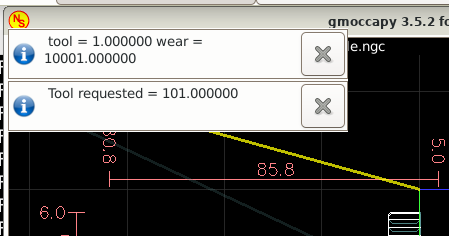
This is some bug when you use gmoccapy's builtin tolchange :
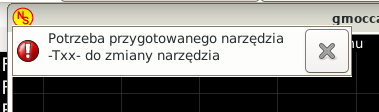
(Need tool prepared -Txx- for toolchange)
This does nothing, only irritate, so I do not investigation now.
As I wrote, in gmoccapy ~/linuxcnc/nc_files/lathe/lathe_profile.ngc is not loading automaticaly and you must load it manually.
1. Gmoccapy instead Axis.
2. Increased font size.
3. Removed comments from toolchange.ngc (looks horrible and unnecessary) :
This is some bug when you use gmoccapy's builtin tolchange :
(Need tool prepared -Txx- for toolchange)
This does nothing, only irritate, so I do not investigation now.
As I wrote, in gmoccapy ~/linuxcnc/nc_files/lathe/lathe_profile.ngc is not loading automaticaly and you must load it manually.
Attachments:
Last edit: 08 Aug 2026 15:41 by tuxcnc. Reason: duplicated text
Please Log in or Create an account to join the conversation.
- tommylight
-

- Away
- Moderator
-

Less
More
- Posts: 21932
- Thank you received: 7468
08 Aug 2026 17:40 #348564
by tommylight
Replied by tommylight on topic Conversational CAD CAM
Tux, he has huge industrial machines, not the same as small hobby routers/mills, tool wear is a must on those, not something you can choose to use or not use.
Please Log in or Create an account to join the conversation.
- tuxcnc
- Offline
- Elite Member
-
Less
More
- Posts: 256
- Thank you received: 46
08 Aug 2026 18:33 #348567
by tuxcnc
If someone share his work, shares for all, not for himself.
Replied by tuxcnc on topic Conversational CAD CAM
No matters he want, no matters I want.Tux, he has huge industrial machines, not the same as small hobby routers/mills, tool wear is a must on those, not something you can choose to use or not use.
If someone share his work, shares for all, not for himself.
Please Log in or Create an account to join the conversation.
Time to create page: 0.232 seconds