My custom designed GUI

More
10 years 2 months ago #79103 by BosniaCNC
Replied by BosniaCNC on topic My custom designed GUI
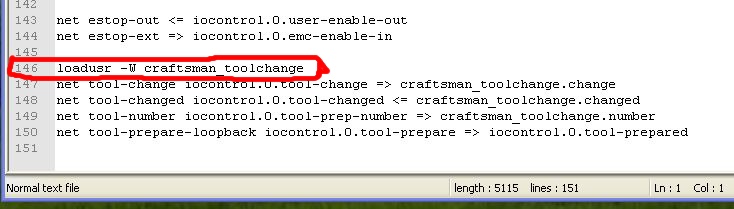
If Linux is installed as a "craftsman" then I do not understand why should alter the path if you already have your original that supposedly correct? What's that supposed to write in line 146?
Does the accompanying drawings have not seen that all copied to you in the original instructions stated?

Please Log in or Create an account to join the conversation.

More
10 years 1 month ago #80385 by aer73
Replied by aer73 on topic My custom designed GUI

cncbasher wrote: it will work on debian ,
we should be able to update to 2.7 as well
i'll have more time shortly


@CncBasher.

I hope all goes well.
Any advance with the GUI in Debian?
Many thanks in advance,

Kindly regards,

Please Log in or Create an account to join the conversation.

More
10 years 1 month ago - 10 years 1 month ago #80477 by rodw
Replied by rodw on topic My custom designed GUI
Your error messages have isolated exactly what is wrong ( not able to find a file) and the line number its happening on. So one of 2 things is wrong.
1. The file name is wrong (which it isn't)
2 The search part is telling Linux to look in the wrong spot (which by elimination is the problem).

So right now its like you are playing hide and seek and the child you are looking for is hiding in the bedroom when you are looking in the living room. Maybe the reason why you are not looking in the bedroom is becasue when you started the game you parents (Linux) said the bedroom was out of bounds. (eg not in the default path).
So the options are:
1. Fix the default search path so you can look in the right room (best option)
2. Change line 146 so it is a fully qualified path so you know exactly which room to look in straight away. (But isn't that cheating when the room is out of bounds?)
Last edit: 10 years 1 month ago by rodw.

Please Log in or Create an account to join the conversation.

More
10 years 1 month ago #80720 by skunkworks
Replied by skunkworks on topic My custom designed GUI
I was gooffing around with this - figuring out each error as it came and am now stuck with the

skunkworks@skunkworks-PC:~/linuxcnc/configs/craftsmancnc/pymodules$ ./gladevcp_update
mv: cannot stat ‘/usr/lib/pymodules/python2.6/gladevcp’: No such file or directory
mv: cannot stat ‘/usr/lib/pymodules/python2.6/gremlin.py’: No such file or directory
mv: cannot stat ‘/usr/lib/pymodules/python2.6/rs274/glcanon.py’: No such file or directory
cp: cannot stat ‘/home/craftsman/linuxcnc/configs/craftsmancnc/pymodules/gladevcp/’: No such file or directory
cp: cannot stat ‘/home/craftsman/linuxcnc/configs/craftsmancnc/pymodules/python2.6/gremlin.py’: No such file or directory
cp: cannot stat ‘/home/craftsman/linuxcnc/configs/craftsmancnc/pymodules/rs274/glcanon.py’: No such file or directory
cp: cannot stat ‘/home/craftsman/linuxcnc/configs/craftsmancnc/pymodules/python2.6/easygui.py’: No such file or directory

I know that I have to change to point to my home directory - but the /usr/lib/pymodules/python2.6/gladevcp doesn't exits.

I am running jessie

sam

Please Log in or Create an account to join the conversation.

More
10 years 1 month ago #80721 by tommylight
Replied by tommylight on topic My custom designed GUI
You have to change the user name in a lot of .py files.
His name craftsman
Your name skunkworks

Please Log in or Create an account to join the conversation.

More
9 years 9 months ago #86228 by yodaddy
Replied by yodaddy on topic My custom designed GUI
I'm a nOOb here, but not to Linux. Has anybody been able to get this to run on Python 2.7?

Please Log in or Create an account to join the conversation.

Time to create page: 0.219 seconds
Powered by Kunena Forum