hazzy - Another touchscreen GUI

More
9 years 6 months ago - 9 years 6 months ago #91894 by KCJ
Replied by KCJ on topic hazzy - Joint Position DROs
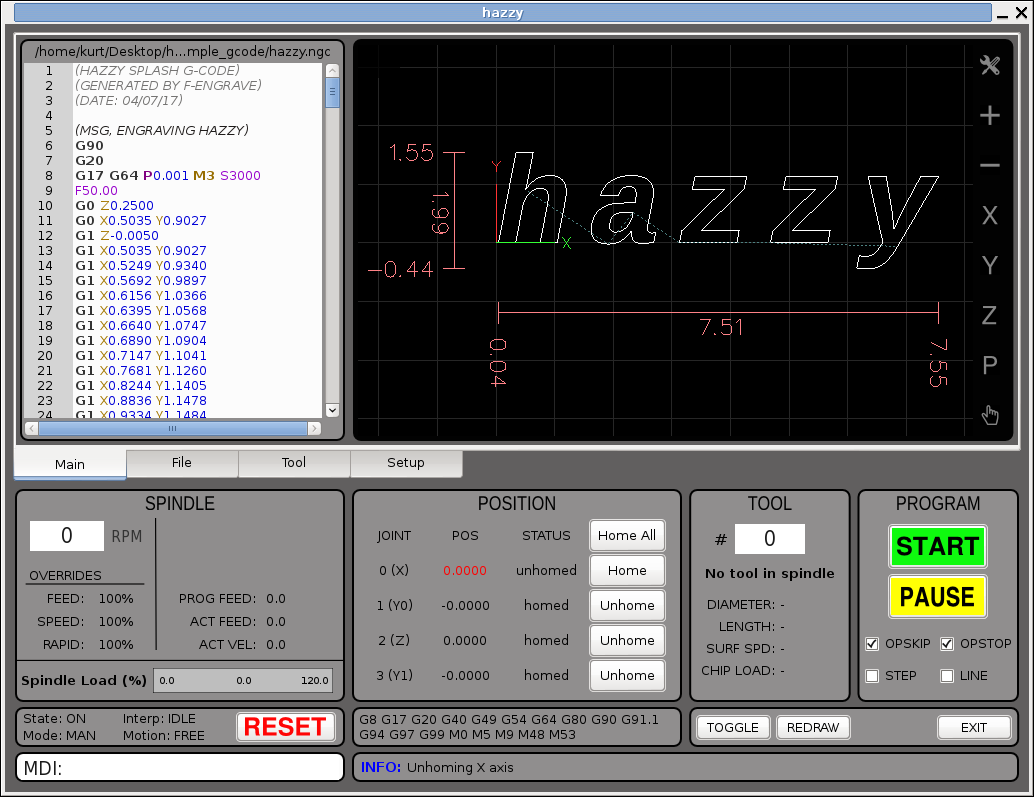
I have added joint position DROs and homing buttons that are displayed when LCNC is in motion mode FREE. Note the labels which indicate the joint number and its corresponding axis. This is on a sim gantry with double Y axis (XYZY config).


Kurt

EDIT: I am trying to decide if the joint DROs should be displayed whenever motion mode is FREE, for all types of machines, or only if the machine has not trivial kinematics. There is some advantage I guess to hiding the fact the joints even exist to users that don't really need to know about them, but then joints aren't all that scary after all. What do you all think??

Thanks!
Last edit: 9 years 6 months ago by KCJ. Reason: add some stuff

Please Log in or Create an account to join the conversation.

More
9 years 6 months ago #91902 by rodw
As a new user and also due to the changes that have been made in master to support joint axes, I would drop joints totally unless they are required for non trivial kinematics. There are no home function on axes, just on joints so I would go one step further and just present a home all button. If you want to present individual home buttons you will be using joints and attempting to map stuff in the gui which is obsolete and it will cause you a lot of extra work and pain.. If this is a new GUI then build it for master and not for V 2.7. Don't put the effort in to support V2.7, release your gui when v2.8 goes mainstream.

Because I have a joint axis machine running on master to get JA support, I have identified a few bugs in Gmoccapy because of the un anticipated changes to tbe joints, axes and homing models so have found these problems and have seen fixes flow on in other Guis following my reports.
The following user(s) said Thank You: KCJ

Please Log in or Create an account to join the conversation.

More
9 years 6 months ago #91903 by rodw
I forgot to mention you cannnot allow a user to home just one side of his gantry and tear the machine apart as your current version permits.
The following user(s) said Thank You: KCJ

Please Log in or Create an account to join the conversation.

More
9 years 6 months ago #91908 by KCJ
Replied by KCJ on topic hazzy - Another touchscreen GUI
Rod, thanks for the input! I have been following your threads with interest, and they have proved invaluable for helping me to foolproof my UI for as much as I can. In fact, I have at least one comment in the code that refers to you, and some problem you had with homing your gantry!

I am developing this GUI for 2.8, so I have to home joints, whether the user sees it that way or not. Regarding your concern about accidentally homing only one side of a gantry, as long as the INI file is correct, that is not a concern with the current master. For example if I click the home button for joint 1 in the screenshot above, LCNC will simultaneously home joint 1 and 3 and keep them synchronized so as not to skew the gantry. It knows to do this since they are on the same axis. I remember you had to modify some code in Gmoccapy to get your gantry to home safely, I don't think that is necessary anymore.

Thanks Rod!
Kurt
The following user(s) said Thank You: rodw

Please Log in or Create an account to join the conversation.

More
9 years 6 months ago #91909 by rodw
Kurt, thanks, I had a play recently with axis. I think that master has been fixed since I reported my homing issue and I no longer need custom code in gmoccapy.py. now that Norbert has resolved the bug I reported. Assuming its resolved, from a usability perspective, you should not offer the user 2 options that do the exact same thing which is what you are doing now. Maybe you should say "Joint 1,3 (Y)" for Joint 1, suppress joint3 display and internally only home 1 joint.

I've got no history with CNC so maybe I have different views. I've created a lot of user interfaces though. If the user has to home all axes before running a program, why let him home each individually? I can only see that might be necessary when setting up the machine but I managed to do this with just the home all button.
The following user(s) said Thank You: KCJ

Please Log in or Create an account to join the conversation.

More
9 years 6 months ago #91910 by grijalvap
Hi
I download the new hazzy code and tested, it run well.
Regarding the Rodw comments, I agree that until the machine is properly set up, there is no reason to have the option for drive joints individually.

thanks
The following user(s) said Thank You: KCJ

Please Log in or Create an account to join the conversation.

Time to create page: 0.121 seconds
Powered by Kunena Forum