

- Posts: 508
- Thank you received: 94
GScreen and some understanding gap of hal-widgets
7 years 4 months ago #136967
by Reinhard
GScreen and some understanding gap of hal-widgets was created by Reinhard
Hi,
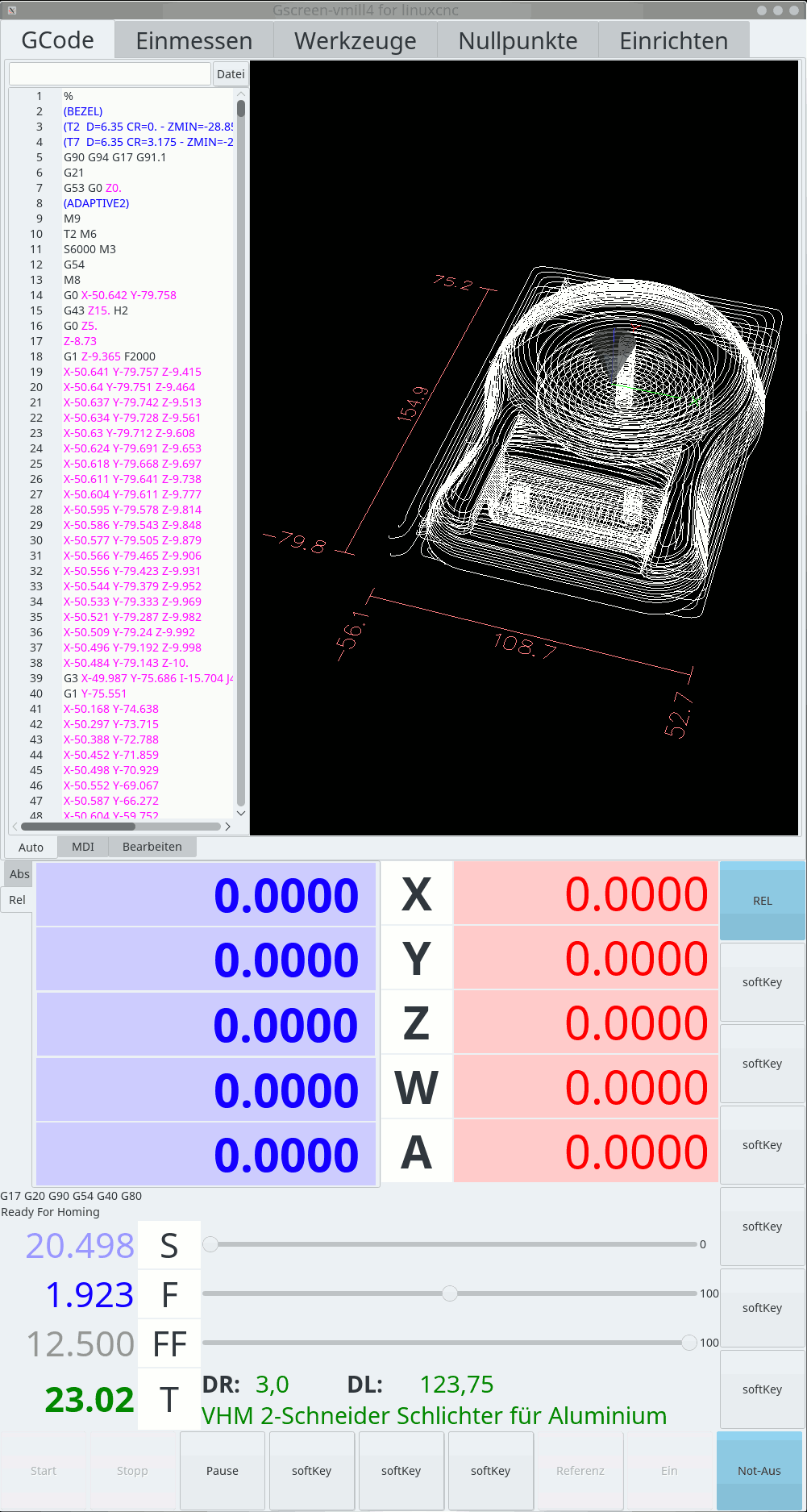
I finally got a working setup for gscreen and glade and I'm on the way to build my ideas.
Primary goal is to create a UI, which allows me to recognize machine state from the distance (3-5m), so I use bigger font sizes and colors to separate different meanings.
The small notebooktabs are to ease my work. They will be hidden in later version - and I switch tabs by external signals.
.
.
What I don't like at all are the override controls.
I would like to use a progressbar instead - but as soon as I enable different coloring, I get some errors like:
Any advice, what that "bar" should be?
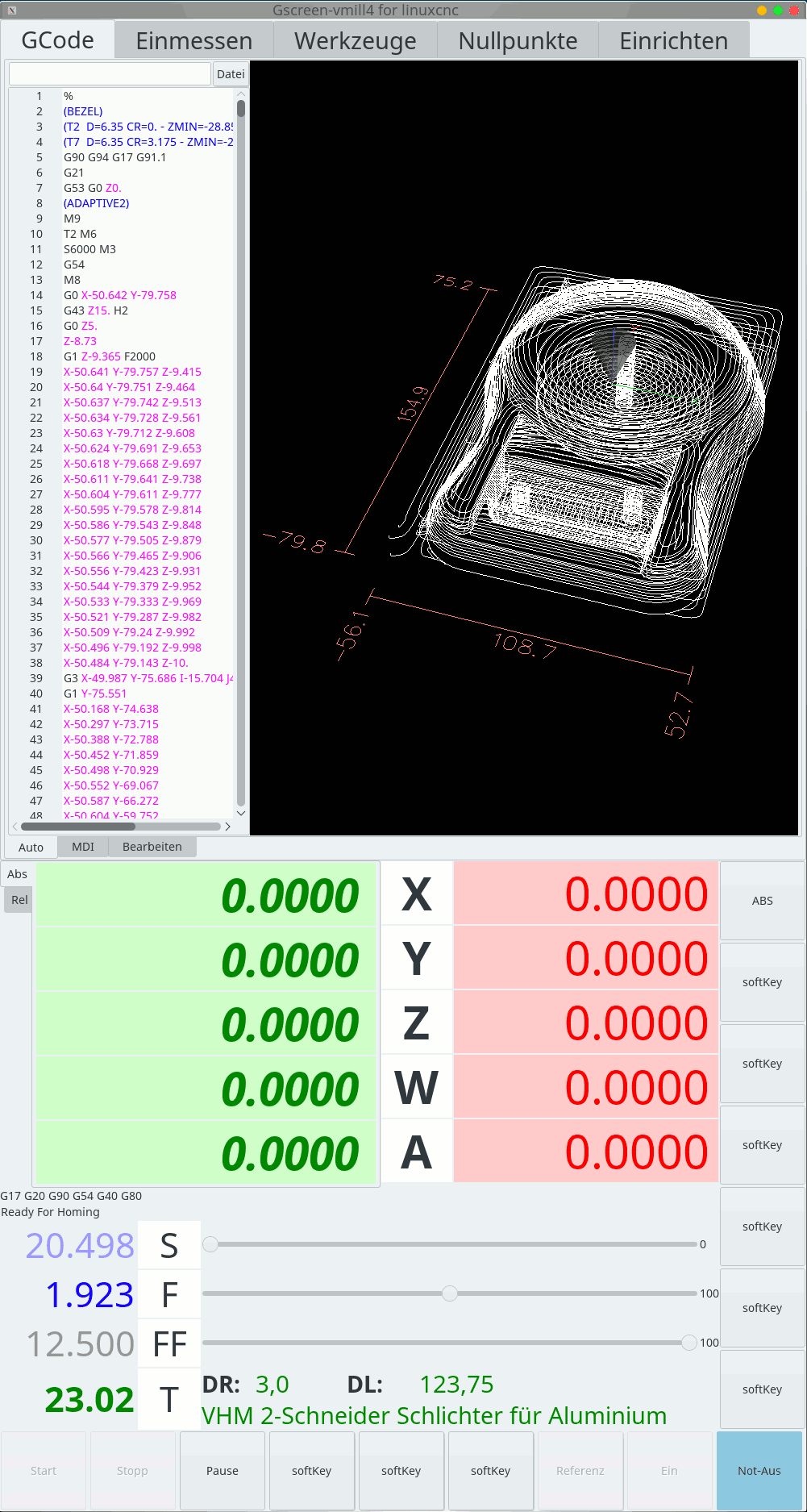
... and here is a view with the position notebook flipped to absolute positions:
.
.
In my ini-file I've set LINEAR_UNITS to mm in section [TRAJ] but the dro widgets seem to not care about that setting. How can I get the dro to use mm-templates?
I finally got a working setup for gscreen and glade and I'm on the way to build my ideas.
Primary goal is to create a UI, which allows me to recognize machine state from the distance (3-5m), so I use bigger font sizes and colors to separate different meanings.
The small notebooktabs are to ease my work. They will be hidden in later version - and I switch tabs by external signals.
.
.
What I don't like at all are the override controls.
I would like to use a progressbar instead - but as soon as I enable different coloring, I get some errors like:
Code:
Traceback (most recent call last):
File "/usr/local/src/linuxcnc-dev/bin/gscreen", line 4644, in <module>
app = Gscreen()
File "/usr/local/src/linuxcnc-dev/bin/gscreen", line 586, in __init__
panel = gladevcp.makepins.GladePanel( self.halcomp, xmlname, self.xml, None)
File "/usr/local/src/linuxcnc-dev/lib/python/gladevcp/makepins.py", line 51, in __init__
widget.hal_init(self.hal, idname)
File "/usr/local/src/linuxcnc-dev/lib/python/gladevcp/hal_widgets.py", line 27, in hal_init
self._hal_init()
File "/usr/local/src/linuxcnc-dev/lib/python/gladevcp/hal_widgets.py", line 280, in _hal_init
bar.set_fraction(0)
NameError: global name 'bar' is not defined
... and here is a view with the position notebook flipped to absolute positions:
.
.
In my ini-file I've set LINEAR_UNITS to mm in section [TRAJ] but the dro widgets seem to not care about that setting. How can I get the dro to use mm-templates?
Please Log in or Create an account to join the conversation.
7 years 4 months ago #136984
by pl7i92
Replied by pl7i92 on topic GScreen and some understanding gap of hal-widgets
Servus ich bin in KL
Das Traj ist nur für die maschine Gscreen hat unter Einrichten eine eigene UNIT angabe für den DRO
die bar ist ein bug
welche version und welches os hast du denn installiert sollte in 2.8master gefixt sein
Das Traj ist nur für die maschine Gscreen hat unter Einrichten eine eigene UNIT angabe für den DRO
die bar ist ein bug
welche version und welches os hast du denn installiert sollte in 2.8master gefixt sein
Please Log in or Create an account to join the conversation.

7 years 4 months ago #137005
by cmorley
Replied by cmorley on topic GScreen and some understanding gap of hal-widgets
You can set the display type in the GLADE editor or the python handler file
[widget name].set_property("display_units_mm",True)
linuxcnc.org/docs/devel/html/gui/gladevc...#gladevcp:dro_widget
I'll have to look into the progress bar problem can you give any more information?
Chris M
[widget name].set_property("display_units_mm",True)
linuxcnc.org/docs/devel/html/gui/gladevc...#gladevcp:dro_widget
I'll have to look into the progress bar problem can you give any more information?
Chris M
Please Log in or Create an account to join the conversation.
7 years 4 months ago - 7 years 4 months ago #137020
by Reinhard
Replied by Reinhard on topic GScreen and some understanding gap of hal-widgets
@pl7i92
Servus! - Schön jemand in der Nähe zu wissen

Ich denke, wir sollten auf English weiter schreiben.
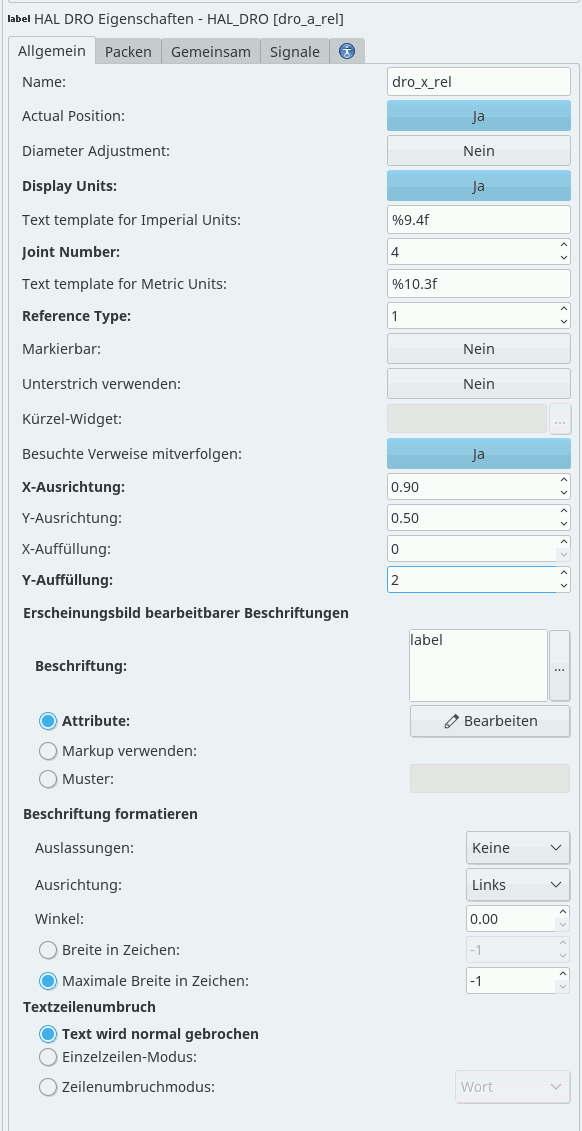
I understood "Display Units" in the sense of "should units be shown together with the numbers" and selected "no".
May be, you'd like to change togglebuttons text to "metric/imperial" or - in case the togglebutton can display yes/no only, change the prompt to "use metric units".
What else can I tell you?
Just removed an override widget and added a hal_progressbar. I would like a progressbar like the one from the first pictures from your gladevcp docs.
I started with the tester template and use the silverdragon as a guide to where I want to go to.
I have no idea of python and on any mistake linuxcnc crashes or denies to start ...
Most of the times there's no message that leads to the problem, so its very hard to progress.
So I started to read the widget source files ...
Don't know, whether I got it right.
The method position(self) of drowidget looks quite expensive to me.
I have 15 dro widgets in my screenset, which means, that there are 15 threads running the same periodic method of the dro widget class (or even worse: one thread that runs 15 instances of dro widgets periodic method).
periodic method uses position method as well as several convert_units, which will be expensive too.
Am I wrong - or does that place offer a plenitude of improvements?
Actually when I start the designer, I get these errors
Looks as if the designer is searching for an ini-file :dry:
Another issue:
I have two instances of gtksourceview - one small one, readonly, side by side with the gremlin and the other one (editable) taking the whole screen width. I'd like to increase the fontsize of the editable instance ...
The problem now is, that both get the same file loaded, but have a different buffer, so any edit changes will not be seen in the readonly gtksourceview aside the gremlin.
I tried a handler line like this:
but that raises errors like this:
... and on keypress, the terminal shows these errors on any keypress (in verbose debugging mode):
Servus! - Schön jemand in der Nähe zu wissen
Ja, dumm von mir anzunehmen, dass der Designer das auslesen würdeDas Traj ist nur für die maschine Gscreen hat unter Einrichten eine eigene UNIT angabe für den DRO
Ich denke, wir sollten auf English weiter schreiben.
I use debian stable and 2.9 master of linuxcncwelche version und welches os hast du denn installiert sollte in 2.8master gefixt sein
The dro property prompt is a bit misleading (at least it was to me):You can set the display type in the GLADE editor or the python handler file
[widget name].set_property("display_units_mm",True)
I understood "Display Units" in the sense of "should units be shown together with the numbers" and selected "no".
May be, you'd like to change togglebuttons text to "metric/imperial" or - in case the togglebutton can display yes/no only, change the prompt to "use metric units".
In the middle of the two pictures I placed the terminal output.I'll have to look into the progress bar problem can you give any more information?
What else can I tell you?
Just removed an override widget and added a hal_progressbar. I would like a progressbar like the one from the first pictures from your gladevcp docs.
I started with the tester template and use the silverdragon as a guide to where I want to go to.
I have no idea of python and on any mistake linuxcnc crashes or denies to start ...
Most of the times there's no message that leads to the problem, so its very hard to progress.
So I started to read the widget source files ...
Don't know, whether I got it right.
The method position(self) of drowidget looks quite expensive to me.
I have 15 dro widgets in my screenset, which means, that there are 15 threads running the same periodic method of the dro widget class (or even worse: one thread that runs 15 instances of dro widgets periodic method).
periodic method uses position method as well as several convert_units, which will be expensive too.
Am I wrong - or does that place offer a plenitude of improvements?
Actually when I start the designer, I get these errors
Code:
(glade-3:13854): GladeUI-CRITICAL **: Unable to load module 'gtksourceview-2.0' from any search paths
(glade-3:13854): GladeUI-WARNING **: Failed to load external library 'gtksourceview-2.0'
GladeUI-Message: No displayable values for property GtkSourceView::draw-spaces
hal_gremlin: cannot find inifile
Traceback (most recent call last):
File "/usr/local/src/linuxcnc-dev/lib/python/gladevcp/hal_gremlin.py", line 117, in __init__
inifile = linuxcnc.ini(ini_filename)
TypeError: argument 1 must be string, not None
Traceback (most recent call last):
File "/usr/local/src/linuxcnc-dev/lib/python/gladevcp/hal_gremlin.py", line 157, in do_set_property
if self.lathe_option:
AttributeError: 'HAL_Gremlin' object has no attribute 'lathe_option'
Traceback (most recent call last):
File "/usr/local/src/linuxcnc-dev/lib/python/gladevcp/hal_gremlin.py", line 157, in do_set_property
if self.lathe_option:
AttributeError: 'HAL_Gremlin' object has no attribute 'lathe_option'
**** Offsetpage widget ERROR: LINEAR_UNITS not found in INI's TRAJ section
Another issue:
I have two instances of gtksourceview - one small one, readonly, side by side with the gremlin and the other one (editable) taking the whole screen width. I'd like to increase the fontsize of the editable instance ...
The problem now is, that both get the same file loaded, but have a different buffer, so any edit changes will not be seen in the readonly gtksourceview aside the gremlin.
I tried a handler line like this:
Code:
self.widgets.work_GCodes.buf(self.widgets.edit_GCodes.buf)
Code:
*******************************************************
1
Traceback (most recent call last):
File "/usr/local/src/linuxcnc-dev/share/gscreen/skins/vmill4/vmill4_handler.py", line 136, in on_tgEdit_toggled
self.widgets.work_GCodes.buf(self.widgets.edit_GCodes.buf)
TypeError: 'gtksourceview2.Buffer' object is not callable
*******************************************************
... and on keypress, the terminal shows these errors on any keypress (in verbose debugging mode):
Code:
****Gscreen verbose debugging: Traceback (most recent call last):
File "/usr/local/src/linuxcnc-dev/bin/gscreen", line 1844, in on_key_event
return self.handler_instance[method](state,SHIFT,CNTRL,ALT)
AttributeError: HandlerClass instance has no attribute '__getitem__'
****Gscreen verbose debugging: Traceback (most recent call last):
File "/usr/local/src/linuxcnc-dev/bin/gscreen", line 1847, in on_key_event
return self.handler_instance.keybindings[method](state,SHIFT,CNTRL,ALT)
AttributeError: HandlerClass instance has no attribute 'keybindings'
****Gscreen verbose debugging: Traceback (most recent call last):
File "/usr/local/src/linuxcnc-dev/bin/gscreen", line 1850, in on_key_event
return self[method](state,SHIFT,CNTRL,ALT)
AttributeError: No widget 'notebook_main'
Last edit: 7 years 4 months ago by Reinhard.
Please Log in or Create an account to join the conversation.
7 years 4 months ago #137021
by Reinhard
Replied by Reinhard on topic GScreen and some understanding gap of hal-widgets
I found the possibility to add a GtkTextBuffer and add that object as buffer reference to (both) EMC_SourceView, but that does not work as expected.
None of both EMC_SourceView shows the file content any more
None of both EMC_SourceView shows the file content any more
Please Log in or Create an account to join the conversation.
7 years 4 months ago #137024
by pl7i92
Replied by pl7i92 on topic GScreen and some understanding gap of hal-widgets
sad
it is the 2.9 and this is the bugs one
i even can get my Gmocapy to work on that as it does not home the joints
there are allot of changes going on
and all is at least for me quite buggy
i stay with 2.7.14 on a real machine as the main advice
it is the 2.9 and this is the bugs one
i even can get my Gmocapy to work on that as it does not home the joints
there are allot of changes going on
and all is at least for me quite buggy
i stay with 2.7.14 on a real machine as the main advice
Please Log in or Create an account to join the conversation.
Time to create page: 0.108 seconds