
- User Interfaces
- Other User Interfaces
- Probe Basic conversational expansion: thread milling, pockets, contours
Probe Basic conversational expansion: thread milling, pockets, contours
- DominicZe
- Offline
- New Member
-

Less
More
- Posts: 5
- Thank you received: 8
18 Nov 2026 15:02 - 18 Nov 2026 15:18 #350806
by DominicZe
Probe Basic conversational expansion: thread milling, pockets, contours was created by DominicZe
Hi everyone,
I'd like to share a set of conversational screens and G-code generators I wrote for Probe Basic (mill), in case anyone else finds them useful:
GitHub: github.com/DominicZe-DZ/PB_Conversational
Release v1.5.0 (.run installer): github.com/DominicZe-DZ/PB_Conversational/releases/tag/v1.5.0
I built this for my own shop machines because I got tired of firing up full CAM software just to mill a thread, clean out a centered pocket, or tweak axis backlash in the .ini file.
HOW IT INTEGRATES WITH PROBE BASIC
• Zero Probe Basic package files are modified: it installs as a standard user tab (user_tabs/pb_conversational/), so Probe Basic updates won't wipe it out.
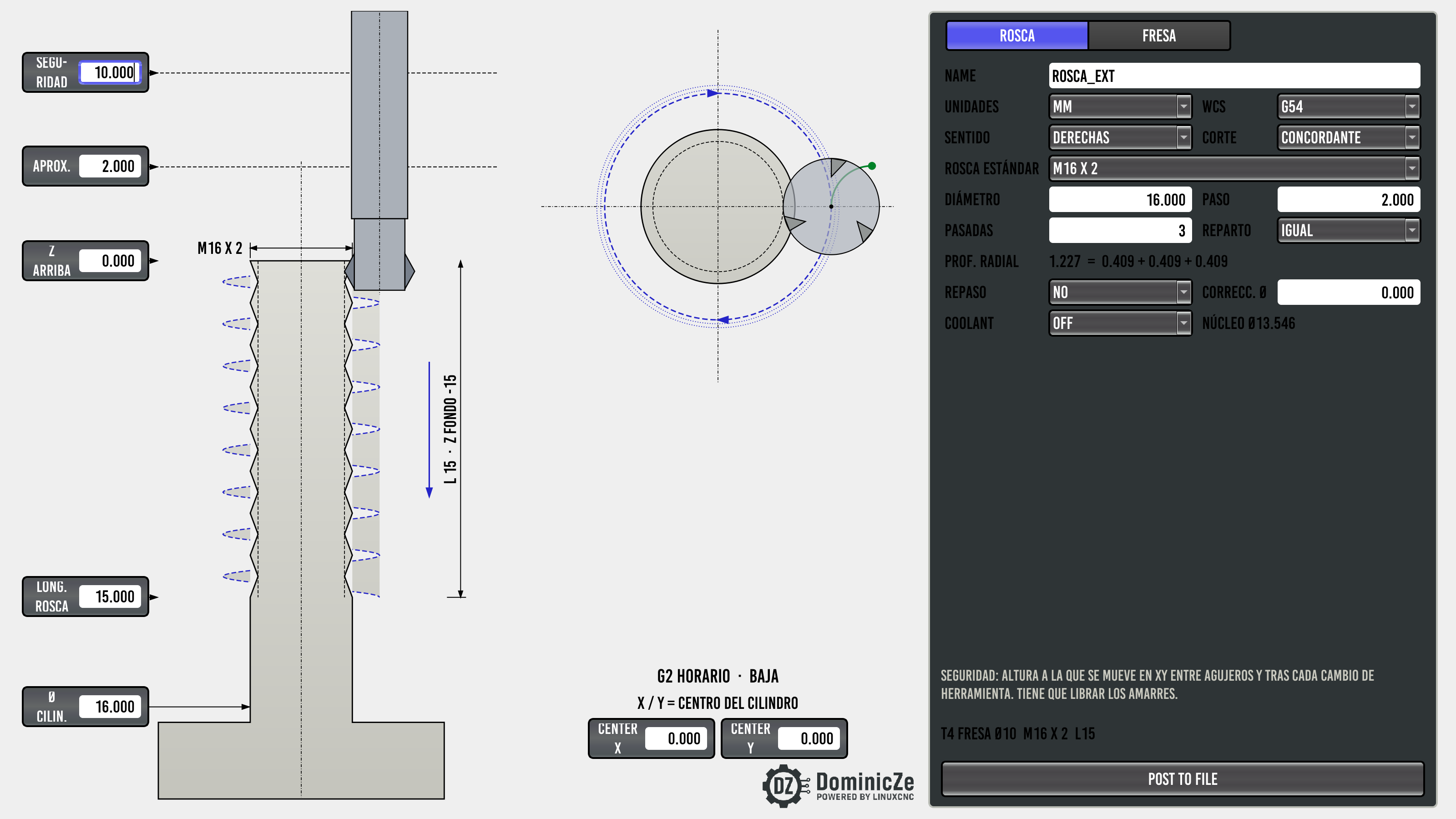
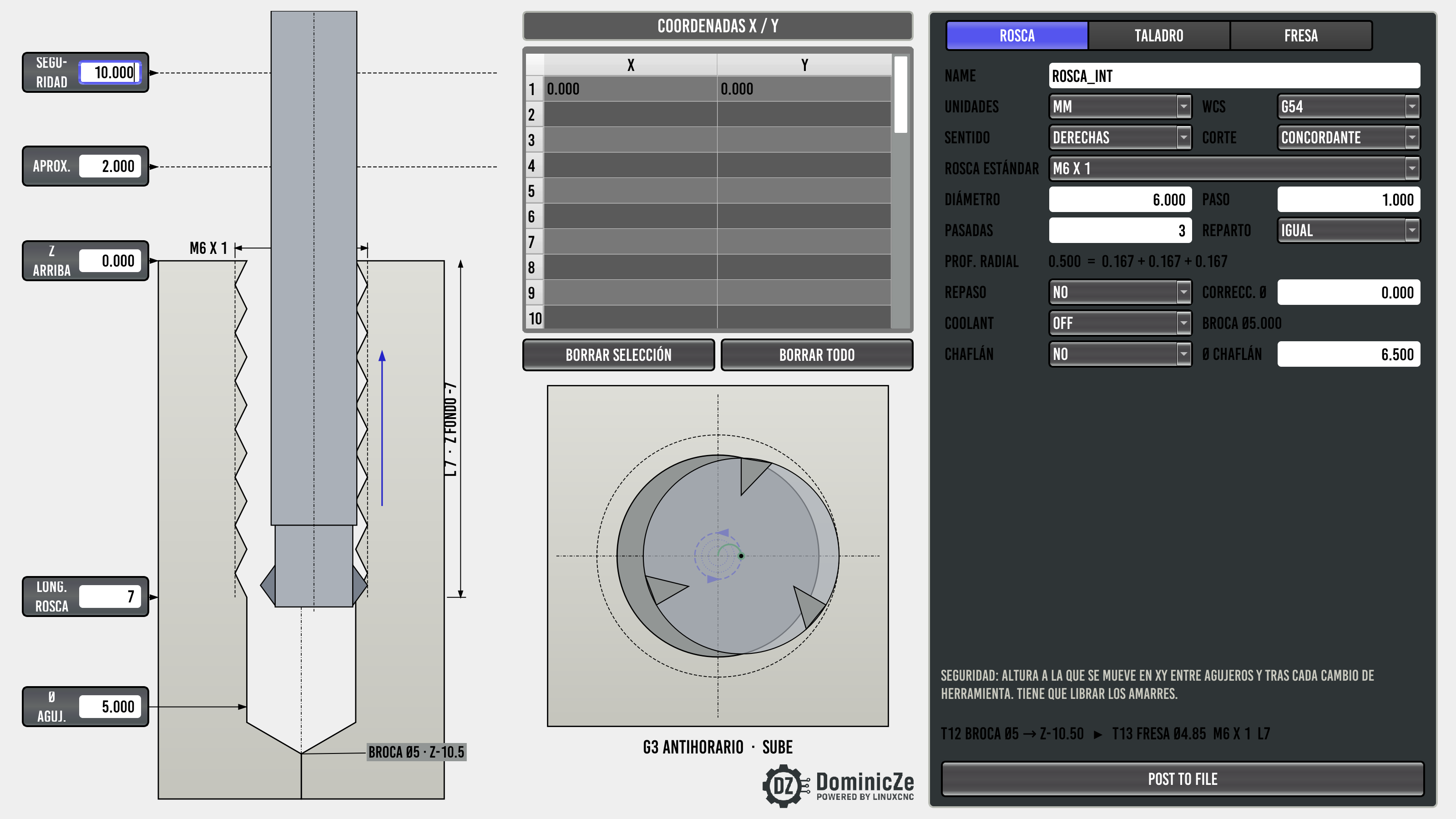
• CONVERSATIONAL > HOLE OPS: replaces the empty THREAD MILL tab with INT. THREAD and adds EXT. THREAD next to it.
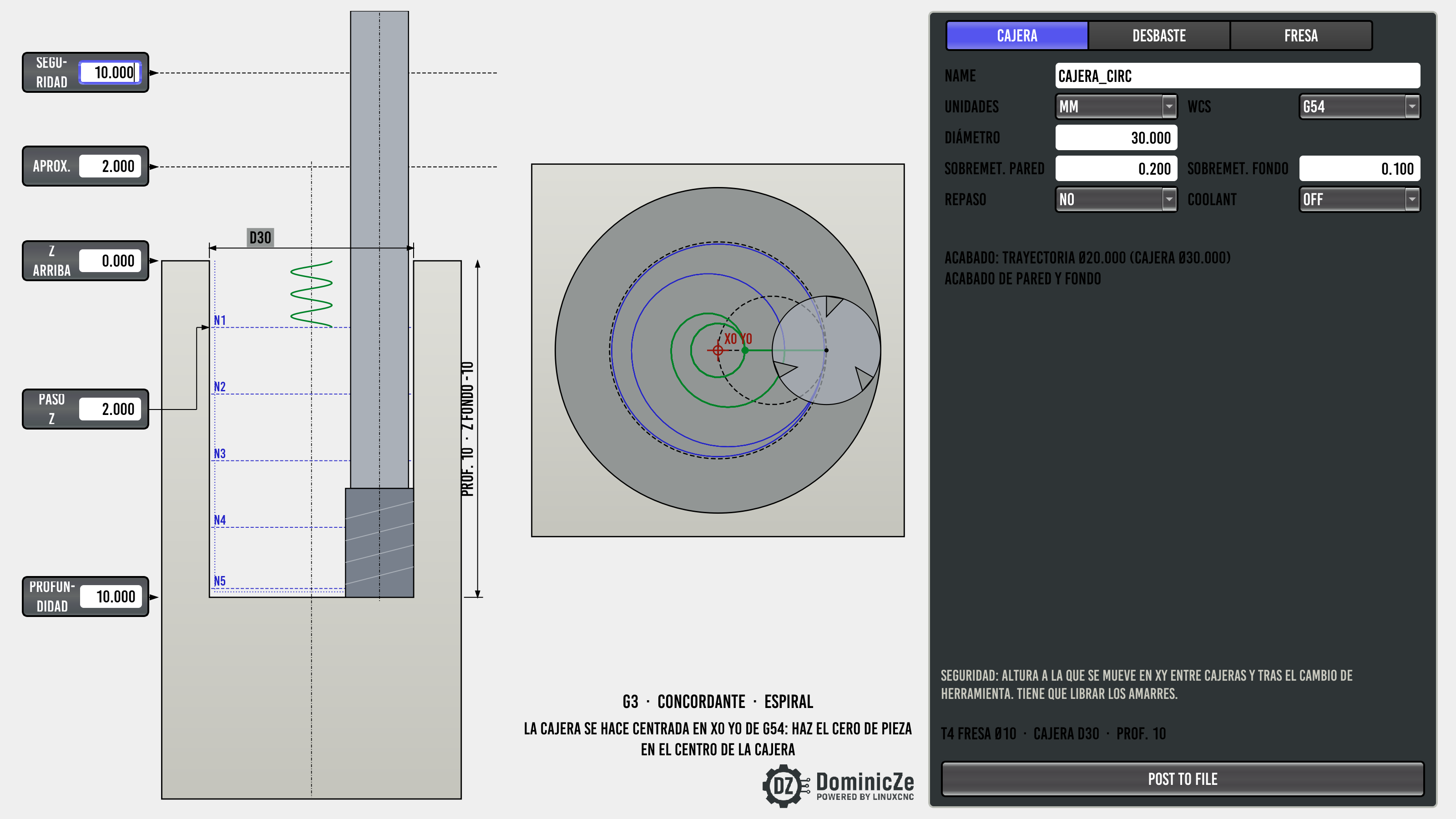
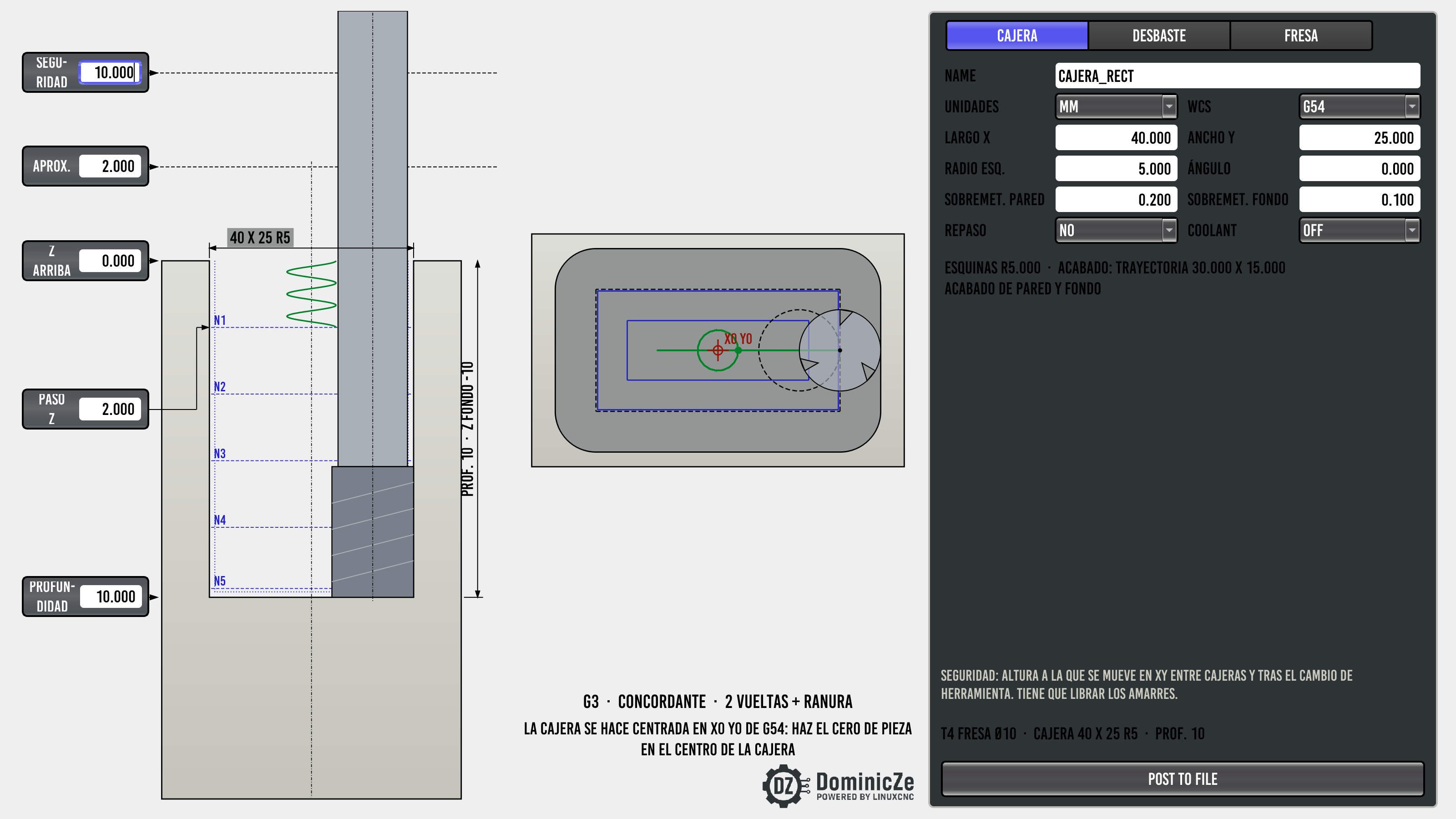
• CONVERSATIONAL > POCKETS: populates the first two empty tabs with RECT. POCKET and CIRC. POCKET.
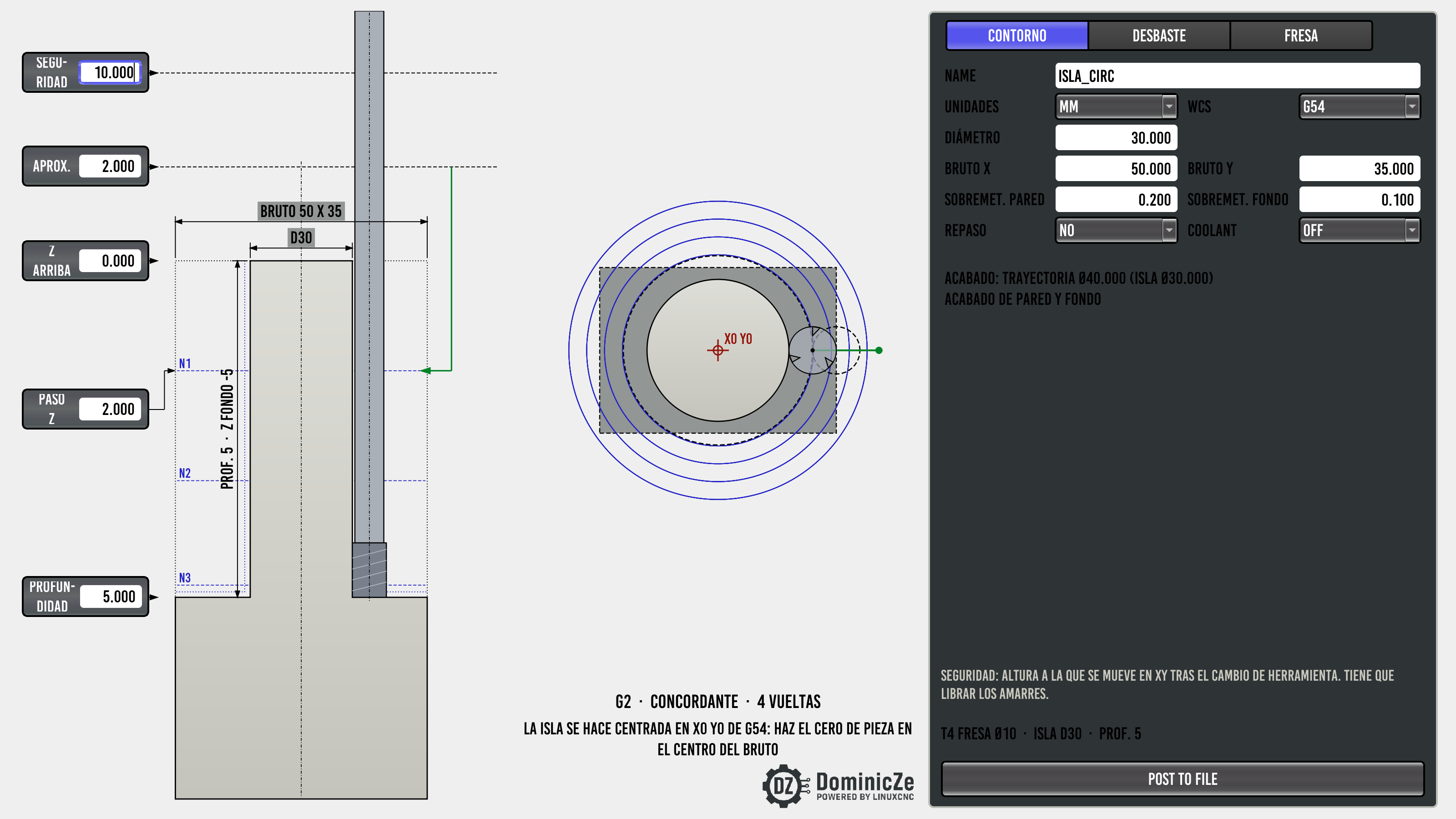
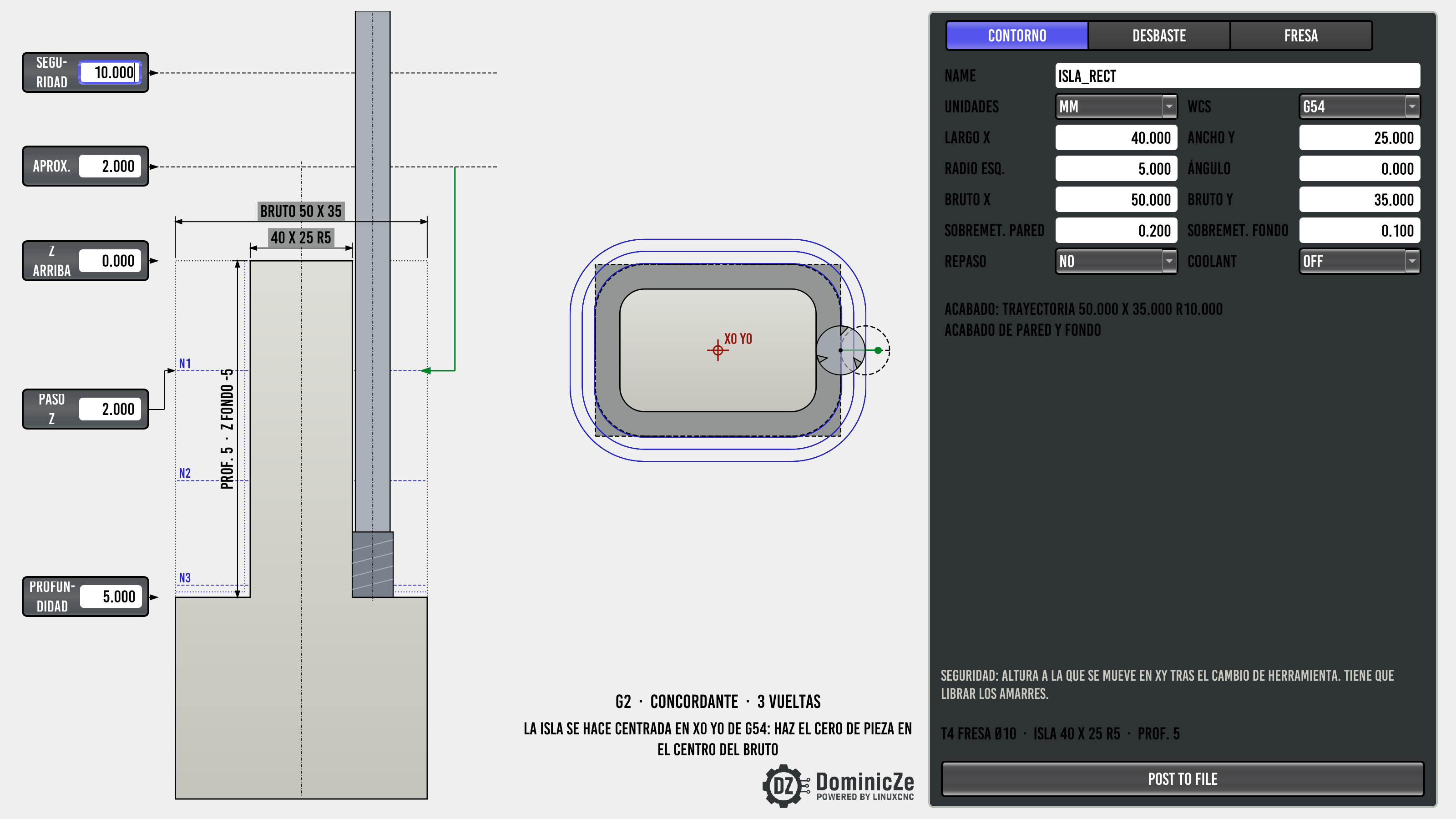
• CONVERSATIONAL > PERIMETER: populates the first two empty tabs with RECT. CONTOUR and CIRC. CONTOUR.
• SETTINGS: docks a BACKLASH COMPENSATION panel into the empty left-hand slot.
• Uses qtpy (no direct PyQt5/PySide6 imports), so it works on both Probe Basic 0.6.x (Debian 12 / PyQt5) and 1.0.x (Debian 13 / PySide6).
WHAT'S INCLUDED
1. Thread milling (INT. THREAD / EXT. THREAD)
• Metric (M1.6–M64) and Unified (UNC/UNF #0–2") presets or custom pitch/TPI.
• Optional peck drilling with full retract to the R-plane, decreasing peck depth, and rapid reentry clearance.
• Helical tangential lead-in/lead-out (P/4), decreasing radial passes (~sqrt(i/n)) or equal steps, spring pass, optional 120° mouth chamfer, and tool-center feedrate compensation.
2. Pockets (RECT. POCKET / CIRC. POCKET)
• Centered at X0 Y0 in the active WCS (fast to touch off at pocket center).
• Inside-out roughing in a single cutting direction (no zig-zag backlash reversals), helical/ramp/plunge entry, and separate wall/floor finishing passes.
3. External island contouring (RECT. CONTOUR / CIRC. CONTOUR)
• Centered at X0 Y0; plunges safely outside the stock (STOCK X x STOCK Y) and steps inward to leave a finished rectangular or circular boss.
4. Backlash compensation (SETTINGS)
• Reads/writes [JOINT_n] BACKLASH with automatic .ini backups (keeps last 30), checks STEPGEN_MAXACCEL >= 2 * MAX_ACCELERATION, and includes a dial-indicator measurement guide. (Remember to restart LinuxCNC after saving.)
INSTALLATION
You can install it manually (copy pb_conversational/ to user_tabs/ and set USER_TABS_PATH = user_tabs/ in [DISPLAY]), or use the single-file installer from Releases:
bash pb_conversational_1.5.0.run
The installer backs up your .ini byte-for-byte, enables USER_TABS_PATH = user_tabs/ (fixing missing trailing slashes or inline comments), and supports a clean "uninstall" command.
NOTES
• Make sure the tools you reference by TOOL NUMBER are defined in your Tool Table (tool.tbl).
• Always inspect generated .ngc toolpaths in the backplot and run an air cut before cutting real stock.
• The screenshots in the README are from my shop machine running the original Spanish layout; v1.5.0 translates all UI labels, tooltips, and G-code comments into English.
MIT licensed. Bug reports, feedback, and test results on different Probe Basic setups are very welcome.
You can also see a quick glimpse of the interface in action near the end of my latest YouTube video (linked below).
Mods: if this belongs in the QtPyVCP sub-forum instead, please feel free to move it.
Raúl Milla (DominicZe)
dominicze.com
www.youtube.com/@DominicZe
I'd like to share a set of conversational screens and G-code generators I wrote for Probe Basic (mill), in case anyone else finds them useful:
GitHub: github.com/DominicZe-DZ/PB_Conversational
Release v1.5.0 (.run installer): github.com/DominicZe-DZ/PB_Conversational/releases/tag/v1.5.0
I built this for my own shop machines because I got tired of firing up full CAM software just to mill a thread, clean out a centered pocket, or tweak axis backlash in the .ini file.
HOW IT INTEGRATES WITH PROBE BASIC
• Zero Probe Basic package files are modified: it installs as a standard user tab (user_tabs/pb_conversational/), so Probe Basic updates won't wipe it out.
• CONVERSATIONAL > HOLE OPS: replaces the empty THREAD MILL tab with INT. THREAD and adds EXT. THREAD next to it.
• CONVERSATIONAL > POCKETS: populates the first two empty tabs with RECT. POCKET and CIRC. POCKET.
• CONVERSATIONAL > PERIMETER: populates the first two empty tabs with RECT. CONTOUR and CIRC. CONTOUR.
• SETTINGS: docks a BACKLASH COMPENSATION panel into the empty left-hand slot.
• Uses qtpy (no direct PyQt5/PySide6 imports), so it works on both Probe Basic 0.6.x (Debian 12 / PyQt5) and 1.0.x (Debian 13 / PySide6).
WHAT'S INCLUDED
1. Thread milling (INT. THREAD / EXT. THREAD)
• Metric (M1.6–M64) and Unified (UNC/UNF #0–2") presets or custom pitch/TPI.
• Optional peck drilling with full retract to the R-plane, decreasing peck depth, and rapid reentry clearance.
• Helical tangential lead-in/lead-out (P/4), decreasing radial passes (~sqrt(i/n)) or equal steps, spring pass, optional 120° mouth chamfer, and tool-center feedrate compensation.
2. Pockets (RECT. POCKET / CIRC. POCKET)
• Centered at X0 Y0 in the active WCS (fast to touch off at pocket center).
• Inside-out roughing in a single cutting direction (no zig-zag backlash reversals), helical/ramp/plunge entry, and separate wall/floor finishing passes.
3. External island contouring (RECT. CONTOUR / CIRC. CONTOUR)
• Centered at X0 Y0; plunges safely outside the stock (STOCK X x STOCK Y) and steps inward to leave a finished rectangular or circular boss.
4. Backlash compensation (SETTINGS)
• Reads/writes [JOINT_n] BACKLASH with automatic .ini backups (keeps last 30), checks STEPGEN_MAXACCEL >= 2 * MAX_ACCELERATION, and includes a dial-indicator measurement guide. (Remember to restart LinuxCNC after saving.)
INSTALLATION
You can install it manually (copy pb_conversational/ to user_tabs/ and set USER_TABS_PATH = user_tabs/ in [DISPLAY]), or use the single-file installer from Releases:
bash pb_conversational_1.5.0.run
The installer backs up your .ini byte-for-byte, enables USER_TABS_PATH = user_tabs/ (fixing missing trailing slashes or inline comments), and supports a clean "uninstall" command.
NOTES
• Make sure the tools you reference by TOOL NUMBER are defined in your Tool Table (tool.tbl).
• Always inspect generated .ngc toolpaths in the backplot and run an air cut before cutting real stock.
• The screenshots in the README are from my shop machine running the original Spanish layout; v1.5.0 translates all UI labels, tooltips, and G-code comments into English.
MIT licensed. Bug reports, feedback, and test results on different Probe Basic setups are very welcome.
You can also see a quick glimpse of the interface in action near the end of my latest YouTube video (linked below).
Mods: if this belongs in the QtPyVCP sub-forum instead, please feel free to move it.
Raúl Milla (DominicZe)
dominicze.com
www.youtube.com/@DominicZe
Last edit: 18 Nov 2026 15:18 by DominicZe.
The following user(s) said Thank You: tommylight
Please Log in or Create an account to join the conversation.
- User Interfaces
- Other User Interfaces
- Probe Basic conversational expansion: thread milling, pockets, contours
Time to create page: 0.696 seconds