

- Posts: 65
- Thank you received: 6
Aktuelle hardware mit PCI
2 years 1 month ago #310068
by G0G53Z148
Replied by G0G53Z148 on topic Aktuelle hardware mit PCI
sag ich dir sobald Kollege ihn angeschlossen hat ich war jetzt 14 tage krank
Please Log in or Create an account to join the conversation.
2 years 1 month ago #310248
by G0G53Z148
Replied by G0G53Z148 on topic Aktuelle hardware mit PCI
hallo, bitte anbei die ping statistik, sollte okay sein finde ich.
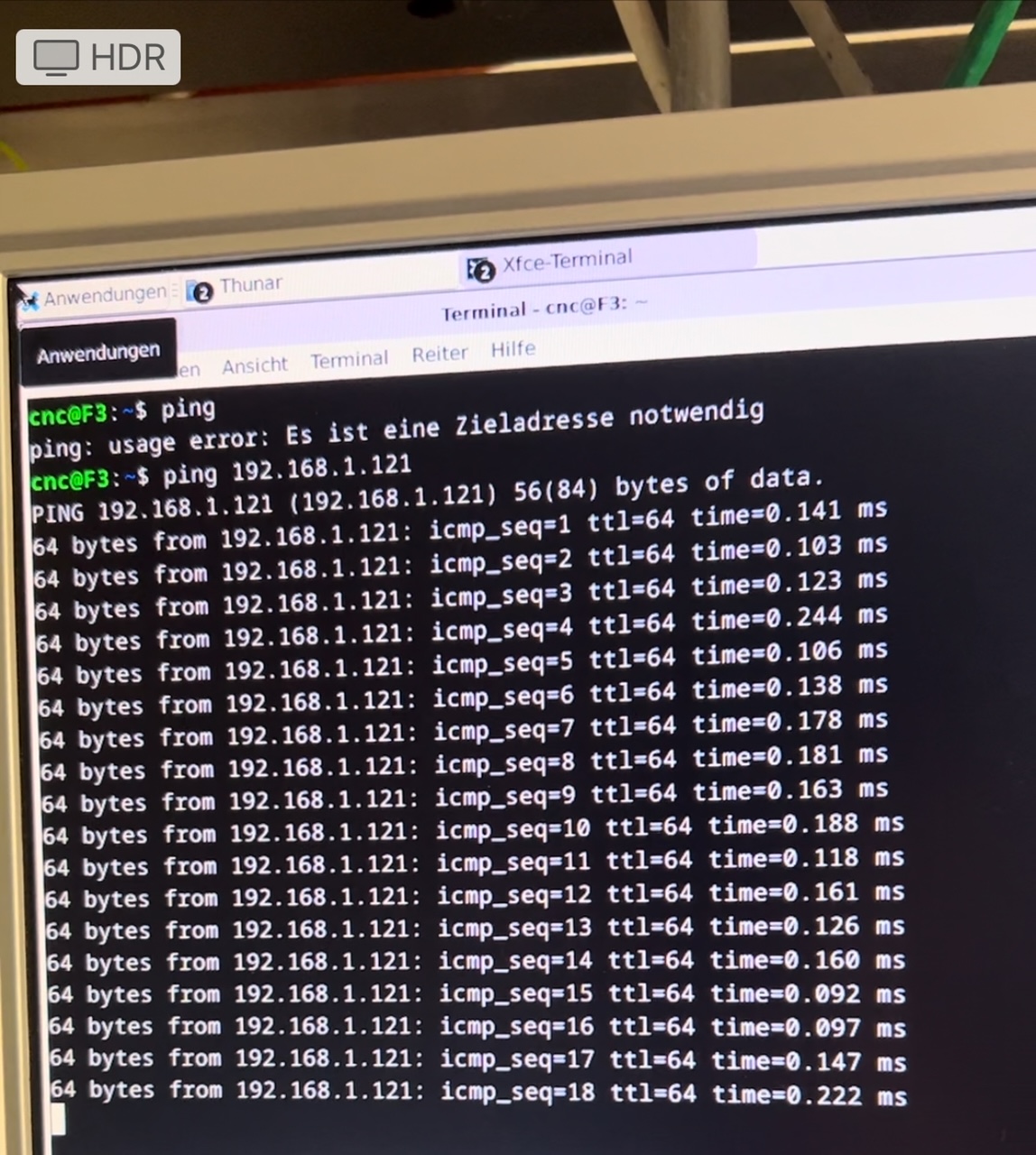
Jetzt soll die maschine mal konfiguriert werden und dann komme ich mit den restlichen problemen wieder. danke für die unterstützung
schöne grüße aus dem verregneten österreich
Jetzt soll die maschine mal konfiguriert werden und dann komme ich mit den restlichen problemen wieder. danke für die unterstützung
schöne grüße aus dem verregneten österreich
Please Log in or Create an account to join the conversation.
- tommylight
-

- Away
- Moderator
-

2 years 1 month ago #310266
by tommylight
Replied by tommylight on topic Aktuelle hardware mit PCI
Ja die ping ist OK.
The following user(s) said Thank You: G0G53Z148
Please Log in or Create an account to join the conversation.
2 years 1 month ago - 2 years 1 month ago #310544
by G0G53Z148
Replied by G0G53Z148 on topic Aktuelle hardware mit PCI
hallo, ich bin wieder da ich dachte nun alle Probleme beseitigt zu haben, der ping wie du gesehen ist gut.
aber dafür habe ich nun mit der aktuellen Installation das Problem das die Verbindung abbricht nach ca 50-60sekunden
die karte hat der Kollege am anderen Rechner getestet da läuft sie einwandfrei. dort ist aber noch die Version vor 2.9.x installiert.
hier ist das neueste Image installiert die ip der netzwerkkarte ist auf 192.168.1.20 255.255.255.0 kein Gateway installiert.
uname -a
Linux F3 6.1.0-25-rt-amd64 #1 SMP PREEMPT_RT Debian 6.1.106-3 (2024-08-26) x86_64 GNU/Linux
ip a
: lo: <LOOPBACK,UP,LOWER_UP> mtu 65536 qdisc noqueue state UNKNOWN group default qlen 1000
link/loopback 00:00:00:00:00:00 brd 00:00:00:00:00:00
inet 127.0.0.1/8 scope host lo
valid_lft forever preferred_lft forever
inet6 ::1/128 scope host noprefixroute
valid_lft forever preferred_lft forever
2: enp2s0: <BROADCAST,MULTICAST,UP,LOWER_UP> mtu 1500 qdisc fq_codel state UP group default qlen 1000
link/ether 84:47:09:3d:62:16 brd ff:ff:ff:ff:ff:ff
3: enp3s0: <BROADCAST,MULTICAST,UP,LOWER_UP> mtu 1500 qdisc fq_codel state UP group default qlen 1000
link/ether 84:47:09:3d:62:19 brd ff:ff:ff:ff:ff:ff
inet 10.0.0.xx/24 brd 10.0.0.xxx scope global dynamic noprefixroute enp3s0
valid_lft 85221sec preferred_lft 85221sec
inet6 2001:871:58:2e3f:a00:65b6:fdc:7989/64 scope global dynamic noprefixroute
valid_lft 4294966115sec preferred_lft 4294966115sec
inet6 fe80::e263:9c04:5e11:5b3d/64 scope link noprefixroute
valid_lft forever preferred_lft forever
4: wlp1s0: <NO-CARRIER,BROADCAST,MULTICAST,UP> mtu 1500 qdisc noqueue state DOWN group default qlen 1000
link/ether ea:b6:33:f8:d7:f0 brd ff:ff:ff:ff:ff:ff permaddr 34:6f:24:44:e9:13
wo könnte hier nun der Fehler wieder liegen ich bin gerade mit TeamViewer am Rechner zugeschalten
hast du eine idee wie oder was da nun wieder falsch sein kann? das mit dem nm-tray hab ich schon versucht
danke im voraus und schöne grüße
Last edit: 2 years 1 month ago by G0G53Z148.
Please Log in or Create an account to join the conversation.
2 years 1 month ago #310550
by G0G53Z148
Replied by G0G53Z148 on topic Aktuelle hardware mit PCI
so ich hab nun etwas geändert wie es in abschnitt HM-ETH Steht von
www.forum.linuxcnc.org/38-general-linuxc...nnection-lost#226460
mal sehen ob das so klappt ich werde berichten
die frage ist nur, warum musste ich das beim anderen Rechner der hardwaretechnisch voll identisch ist nicht machen
www.forum.linuxcnc.org/38-general-linuxc...nnection-lost#226460
mal sehen ob das so klappt ich werde berichten
die frage ist nur, warum musste ich das beim anderen Rechner der hardwaretechnisch voll identisch ist nicht machen
Please Log in or Create an account to join the conversation.
- tommylight
-
- Away
- Moderator
-
2 years 1 month ago #310552
by tommylight
forum.linuxcnc.org/27-driver-boards/3559...ethernet-mesa-boards
Replied by tommylight on topic Aktuelle hardware mit PCI
hier ist das neueste Image installiert die ip der netzwerkkarte ist auf 192.168.1.20 255.255.255.0 kein Gateway installiert.
Die netzwerk ist niht OK, was ist in die /etc/network/interfaces drin?3: enp3s0: <BROADCAST,MULTICAST,UP,LOWER_UP> mtu 1500 qdisc fq_codel state UP group default qlen 1000
link/ether 84:47:09:3d:62:19 brd ff:ff:ff:ff:ff:ff
inet 10.0.0.xx/24 brd 10.0.0.xxx scope global dynamic noprefixroute enp3s0
forum.linuxcnc.org/27-driver-boards/3559...ethernet-mesa-boards
Please Log in or Create an account to join the conversation.
Moderators: Muecke
Time to create page: 0.255 seconds