
MESA 7i76EU - Pinzuordnung (z.B. Endschalter)
- RaspII
- Offline
- New Member
-

Less
More
- Posts: 10
- Thank you received: 1
08 Dec 2025 19:13 #339877
by RaspII
MESA 7i76EU - Pinzuordnung (z.B. Endschalter) was created by RaspII
Hallo,
ich bin gerade am Umbau einer ISEL CPM3020 von IMC4 auf MESA 7i76EU. Die Kommunikation von LinuxCNC zur Karte funktioniert.
Aktuell hänge ich an der Konfiguration der Referenz- und Endschalter fest. Ich versuche via Pncconf die Pins festzulegen, finde aber im Menu "Mesa Karte 0" nur Zuordungen für TB2/TB3, P1 und P2. Bei P1/P2 könnte ich die Schalter zwar anlegen, dann bekomme ich aber Pin Nummern die m.E. mit den Field I/Os nichts zu tun haben sondern nur mit den I/O Expansion connectoren. Ich habe trotzdem mal darüber die Schalter konfiguriert, das Ergebnis sieht in der HAL Datei dann wie folgt aus (Leerzeilen entfernt):# externe Signaleingänge
# --- MIN-HOME-X ---
net min-home-x <= hm2_7i76e.0.gpio.017.in
# --- MAX-X ---
net max-x <= hm2_7i76e.0.gpio.018.in
# --- MIN-HOME-Y ---
net min-home-y <= hm2_7i76e.0.gpio.019.in
# --- MAX-Y ---
net max-y <= hm2_7i76e.0.gpio.020.in
# --- MIN-Z ---
net min-z <= hm2_7i76e.0.gpio.021.in
# --- MAX-HOME-Z ---
net max-home-z <= hm2_7i76e.0.gpio.022.in
Eine Konfigurationsseite für TB5 oder TB6 zur Konfiguration der Field I/Os kann ich nicht finden. Wo ist mein Denkfehler?
ich bin gerade am Umbau einer ISEL CPM3020 von IMC4 auf MESA 7i76EU. Die Kommunikation von LinuxCNC zur Karte funktioniert.
Aktuell hänge ich an der Konfiguration der Referenz- und Endschalter fest. Ich versuche via Pncconf die Pins festzulegen, finde aber im Menu "Mesa Karte 0" nur Zuordungen für TB2/TB3, P1 und P2. Bei P1/P2 könnte ich die Schalter zwar anlegen, dann bekomme ich aber Pin Nummern die m.E. mit den Field I/Os nichts zu tun haben sondern nur mit den I/O Expansion connectoren. Ich habe trotzdem mal darüber die Schalter konfiguriert, das Ergebnis sieht in der HAL Datei dann wie folgt aus (Leerzeilen entfernt):# externe Signaleingänge
# --- MIN-HOME-X ---
net min-home-x <= hm2_7i76e.0.gpio.017.in
# --- MAX-X ---
net max-x <= hm2_7i76e.0.gpio.018.in
# --- MIN-HOME-Y ---
net min-home-y <= hm2_7i76e.0.gpio.019.in
# --- MAX-Y ---
net max-y <= hm2_7i76e.0.gpio.020.in
# --- MIN-Z ---
net min-z <= hm2_7i76e.0.gpio.021.in
# --- MAX-HOME-Z ---
net max-home-z <= hm2_7i76e.0.gpio.022.in
Eine Konfigurationsseite für TB5 oder TB6 zur Konfiguration der Field I/Os kann ich nicht finden. Wo ist mein Denkfehler?
Please Log in or Create an account to join the conversation.
- PCW
-
- Offline
- Moderator
-

Less
More
- Posts: 18109
- Thank you received: 5329
08 Dec 2025 19:47 - 08 Dec 2025 19:49 #339878
by PCW
Replied by PCW on topic MESA 7i76EU - Pinzuordnung (z.B. Endschalter)
You should get a screen like this:
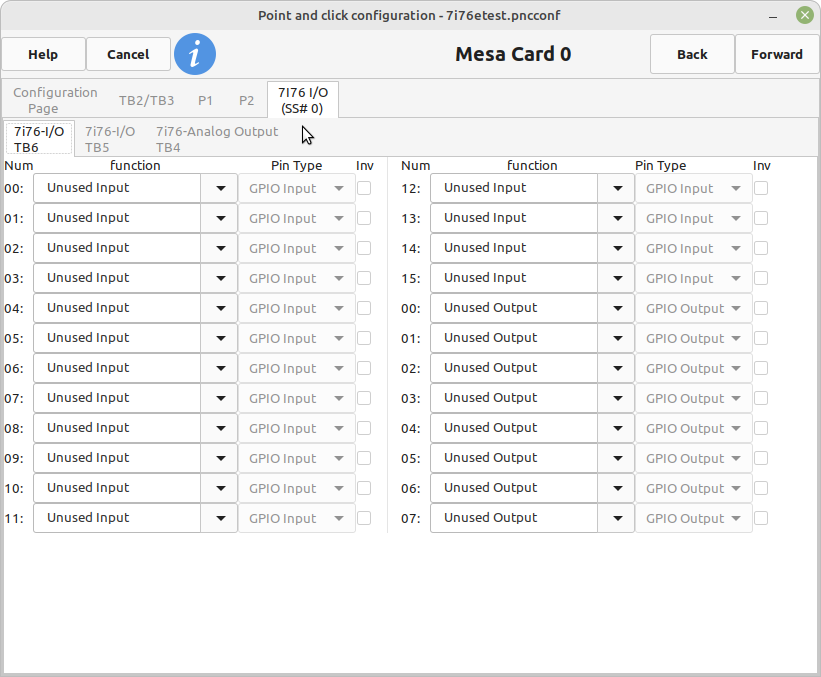
If not. it may be that you have hit a locale bug in pncconf and may have to
temporarily set the locale language to en_US to work around the issue.
If not. it may be that you have hit a locale bug in pncconf and may have to
temporarily set the locale language to en_US to work around the issue.
Attachments:
Last edit: 08 Dec 2025 19:49 by PCW.
Please Log in or Create an account to join the conversation.
- RaspII
- Offline
- New Member
-
Less
More
- Posts: 10
- Thank you received: 1
08 Dec 2025 22:02 - 08 Dec 2025 22:10 #339884
by RaspII
Replied by RaspII on topic MESA 7i76EU - Pinzuordnung (z.B. Endschalter)
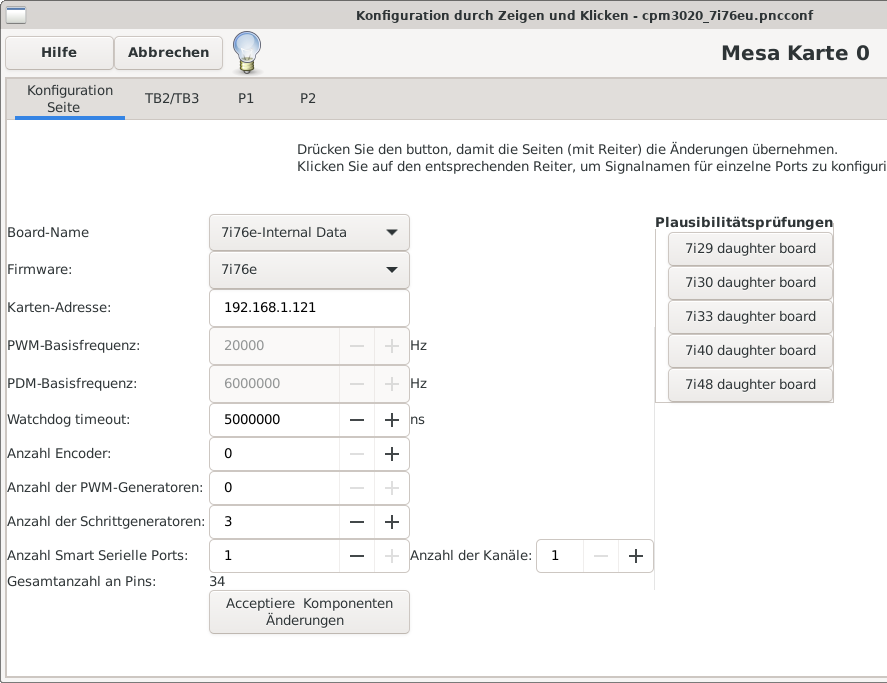
I don't have the tab with "7i76 I/O,
Attachments:
Last edit: 08 Dec 2025 22:10 by RaspII.
Please Log in or Create an account to join the conversation.
- tommylight
-

- Offline
- Moderator
-
Less
More
- Posts: 21990
- Thank you received: 7487
08 Dec 2025 22:42 #339887
by tommylight
Replied by tommylight on topic MESA 7i76EU - Pinzuordnung (z.B. Endschalter)
Use the LinuxCNC ISO written to USB to boot the PC in English language, start PncConf to make the config, save it on the hard drive or another USB.
Or change locale to UTF-8 EN_US
Or change locale to UTF-8 EN_US
Please Log in or Create an account to join the conversation.
- RaspII
- Offline
- New Member
-
Less
More
- Posts: 10
- Thank you received: 1
08 Dec 2025 22:42 #339888
by RaspII
Replied by RaspII on topic MESA 7i76EU - Pinzuordnung (z.B. Endschalter)
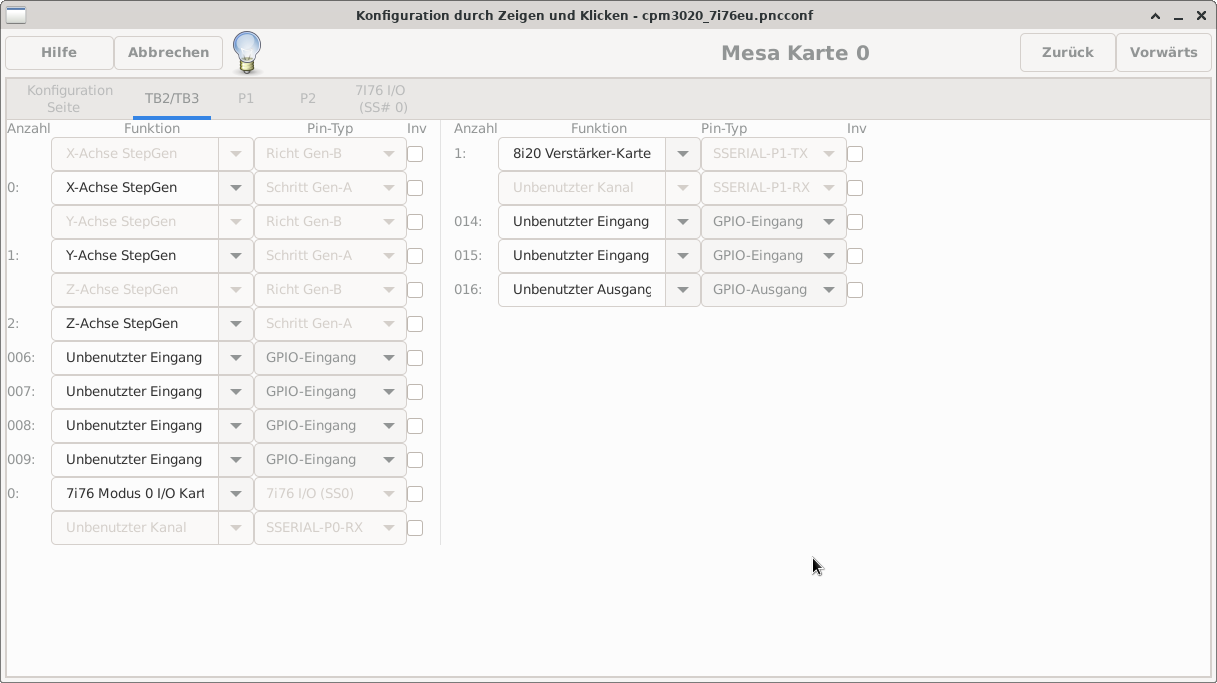
ok, after searching for the missing tab i found this
post
After enabling the option „Show advanced config pages“ I could modify the value "0: 7i76 Modus I/O Kart..". After modification the tab 7i76 I/O (SS#0) is available, now.
After enabling the option „Show advanced config pages“ I could modify the value "0: 7i76 Modus I/O Kart..". After modification the tab 7i76 I/O (SS#0) is available, now.
Attachments:
The following user(s) said Thank You: tommylight
Please Log in or Create an account to join the conversation.
- RaspII
- Offline
- New Member
-
Less
More
- Posts: 10
- Thank you received: 1
08 Dec 2025 23:04 - 08 Dec 2025 23:08 #339889
by RaspII
Replied by RaspII on topic MESA 7i76EU - Pinzuordnung (z.B. Endschalter)
But If I don't select "7i76 Modus 2 I/O card" my settings are lost after closing and reloading Pncconf.
Do I have to select Modus 2 anyway even If I change locale to UTF-8 EN_US ?
Do I have to select Modus 2 anyway even If I change locale to UTF-8 EN_US ?
Last edit: 08 Dec 2025 23:08 by RaspII.
Please Log in or Create an account to join the conversation.
- 2tinker
- Offline
- Junior Member
-

Less
More
- Posts: 23
- Thank you received: 3
09 Dec 2025 08:50 #339903
by 2tinker
Replied by 2tinker on topic MESA 7i76EU - Pinzuordnung (z.B. Endschalter)
Hallo Raspll,
danke für deinen Post! Jetzt wird mir einiges klarer.
Ich arbeite mich gerade durch das Handbuch um HAL und INI händisch anzupassen.
Genau aus dem von dir beschriebenen Grund.
danke für deinen Post! Jetzt wird mir einiges klarer.
Ich arbeite mich gerade durch das Handbuch um HAL und INI händisch anzupassen.
Genau aus dem von dir beschriebenen Grund.
Please Log in or Create an account to join the conversation.
- RaspII
- Offline
- New Member
-
Less
More
- Posts: 10
- Thank you received: 1
09 Dec 2025 08:54 - 09 Dec 2025 09:02 #339905
by RaspII
Replied by RaspII on topic MESA 7i76EU - Pinzuordnung (z.B. Endschalter)
Gerne, aber ich bin noch nicht sicher ober der Parameter "7i76 Modus 2 I/O card" so richtig gesetzt ist oder ob ich Linux doch noch auf "UTF-8 EN_US" umstellen muss.
Nachtrag: Zumindest funktionieren jetzt die Endschalter (kann den Status in LinuxCNC richtig sehen, die Schalter ändern sich auch
Nachtrag: Zumindest funktionieren jetzt die Endschalter (kann den Status in LinuxCNC richtig sehen, die Schalter ändern sich auch
Last edit: 09 Dec 2025 09:02 by RaspII.
Please Log in or Create an account to join the conversation.
- RaspII
- Offline
- New Member
-
Less
More
- Posts: 10
- Thank you received: 1
09 Dec 2025 14:42 - 09 Dec 2025 15:12 #339920
by RaspII
Replied by RaspII on topic MESA 7i76EU - Pinzuordnung (z.B. Endschalter)
Die Eingänge laufen bei mir wie gewünscht, leider bekomme ich die Ausgänge nicht in Betrieb. Ich möchte gegen Gnd schalten, passieren tut nichts
Nachtrag: Verdrahte ich Output 0 auf TP6 als Schalter gegen + 24V (d.h. die Last liegt auf der anderen Seite an Masse) dann funktioniert es. Ich dachte die 7i76EU hat Universal Outputs, d.h. kann beide Modis?
Nachtrag: Verdrahte ich Output 0 auf TP6 als Schalter gegen + 24V (d.h. die Last liegt auf der anderen Seite an Masse) dann funktioniert es. Ich dachte die 7i76EU hat Universal Outputs, d.h. kann beide Modis?
Last edit: 09 Dec 2025 15:12 by RaspII. Reason: additional tests done
Please Log in or Create an account to join the conversation.
- PCW
-
- Offline
- Moderator
-
Less
More
- Posts: 18109
- Thank you received: 5329
09 Dec 2025 16:56 #339921
by PCW
Replied by PCW on topic MESA 7i76EU - Pinzuordnung (z.B. Endschalter)
pncconf does not know about the field output options of the 7I76EU
(it only knows about the 7I76E)
The 7I76EU has individually settable output modes for each output.
The default setting is sourcing mode on all outputs.
Sourcing mode means the 7I76EU outputs supply positive field voltage to a ground referred load
This is identical to the original 7I76E.
To set up sinking or push-pull outputs you must set the source or sink
parameters. These parameters are 16 bit numbers where each bit determines
the output mode of a single output. Bit 0 in the source and sink parameters
control the operation of output 0 and so on.
The default setting is source = 0xFFFF and sink = 0x0000 meaning all outputs are set to
sourcing mode.
To set to sinking mode, you set the desired sink bit to 1 and the corresponding source bit to 0
To set push-pull mode, you set both the sink and source bits for the corresponding output.
That is if you wanted the first 8 outputs (0..7) to be sourcing and the last 8 outputs (8..15) to be sinking
you would set the source parameter to 0x00FF and the sink parameter to 0xFF00
This is described on page 17 of the 7I76EU manual
Note the these parameters cannot be set dynamically, they must be set with setp commands in the hal file.
(it only knows about the 7I76E)
The 7I76EU has individually settable output modes for each output.
The default setting is sourcing mode on all outputs.
Sourcing mode means the 7I76EU outputs supply positive field voltage to a ground referred load
This is identical to the original 7I76E.
To set up sinking or push-pull outputs you must set the source or sink
parameters. These parameters are 16 bit numbers where each bit determines
the output mode of a single output. Bit 0 in the source and sink parameters
control the operation of output 0 and so on.
The default setting is source = 0xFFFF and sink = 0x0000 meaning all outputs are set to
sourcing mode.
To set to sinking mode, you set the desired sink bit to 1 and the corresponding source bit to 0
To set push-pull mode, you set both the sink and source bits for the corresponding output.
That is if you wanted the first 8 outputs (0..7) to be sourcing and the last 8 outputs (8..15) to be sinking
you would set the source parameter to 0x00FF and the sink parameter to 0xFF00
This is described on page 17 of the 7I76EU manual
Note the these parameters cannot be set dynamically, they must be set with setp commands in the hal file.
Please Log in or Create an account to join the conversation.
Moderators: Muecke
Time to create page: 0.774 seconds