
- International LinuxCNC Users
- Deutsch
- LinuxCNC 2.9 / Debian 12 RT – EtherCAT Master Setup für 750W Servo gesucht
LinuxCNC 2.9 / Debian 12 RT – EtherCAT Master Setup für 750W Servo gesucht
- Muecke
-
 Topic Author
- Offline
- Moderator
-

Less
More
- Posts: 886
- Thank you received: 93
31 May 2026 18:16 #346811
by Muecke
LinuxCNC 2.9 / Debian 12 RT – EtherCAT Master Setup für 750W Servo gesucht was created by Muecke
Hallo zusammen,
ich versuche aktuell einen StepperOnline 750W EtherCAT AC-Servomotor (17-bit Absolutencoder, ohne Bremse) in mein LinuxCNC System zu integrieren.
Der Motor ist bereits mechanisch und elektrisch angeschlossen (Netzfilter, Treiber, Motor + Encoder), soweit ist die Hardware grundsätzlich lauffähig.
Mein Ziel ist es, LinuxCNC als EtherCAT Master einzurichten, um zunächst den einzelnen Motor in Betrieb zu nehmen und später mehrere Achsen meiner Maschine schrittweise auf EtherCAT umzubauen.
Ich hatte bereits einen ersten Installationsversuch mit EtherCAT (vermutlich IgH oder SOEM / LinuxCNC Integration), dabei traten jedoch wiederholt Fehler auf. Nach meiner (mehr GPT) Analyse waren vermutlich noch Reste einer früheren (nicht sauberen) Installation bzw. evtl. Raspberry-Pi-bezogene Pakete oder Konfigurationen im System vorhanden, die Konflikte verursacht haben könnten. Diese habe ich inzwischen entfernt bzw. bereinigt, mit GPT .
.
Aktuell möchte ich deshalb bewusst mit einer sauberen und nachvollziehbaren Schritt-für-Schritt Anleitung neu beginnen, da ich vermeiden möchte, erneut eine fehlerhafte Konfiguration aufzubauen, die ich nicht verstehe.
Ziel ist es zunächst:
- einen einzelnen EtherCAT Servo in LinuxCNC zu betreiben
- einfache Bewegungen und Tests durchzuführen
- später schrittweise weitere Motoren der Maschine (Masacard/Alt-System) auf EtherCAT umzubauen
- langfristig die gesamte Anlage auf EtherCAT umzustellen
---
## Systeminformationen
Distribution:
Debian GNU/Linux 12 (bookworm)
Kernel:
6.1.0-48-rt-amd64 (PREEMPT_RT)
LinuxCNC:
2.9.8 (linuxcnc-uspace)
CPU:
Intel Core i3-6100 @ 3.70 GHz (4 Threads)
RAM:
8 GB
Storage:
Toshiba SSD ~120 GB (ext4)
Network:
- enp1s0: Realtek RTL8111/8168/8411 (r8168 driver) – DOWN
- enp2s0: Realtek RTL8111/8168/8411 (r8168 driver) – UP (100 Mbit/s)
Kernel Modules:
r8168 driver is used for both NICs
PCI:
Intel H110 chipset system
---
## Kernel / RT Status
PREEMPT_RT kernel is active and confirmed.
---
## Frage
Ich suche eine saubere, empfohlene Vorgehensweise zur Installation und Konfiguration von EtherCAT (z. B. IgH EtherCAT Master oder alternative Lösung) in Kombination mit LinuxCNC 2.9.x auf Debian 12 RT.
Wichtig ist mir vor allem:
- stabile Echtzeitfähigkeit
- keine “versteckten” alten Pakete oder Konflikte
- möglichst nachvollziehbare Schritt-für-Schritt Installation
- Empfehlung für Netzwerkinterface (Realtek vs. alternative NIC falls nötig)
Vielen Dank für jede Hilfe!
Mücke
ich versuche aktuell einen StepperOnline 750W EtherCAT AC-Servomotor (17-bit Absolutencoder, ohne Bremse) in mein LinuxCNC System zu integrieren.
Der Motor ist bereits mechanisch und elektrisch angeschlossen (Netzfilter, Treiber, Motor + Encoder), soweit ist die Hardware grundsätzlich lauffähig.
Mein Ziel ist es, LinuxCNC als EtherCAT Master einzurichten, um zunächst den einzelnen Motor in Betrieb zu nehmen und später mehrere Achsen meiner Maschine schrittweise auf EtherCAT umzubauen.
Ich hatte bereits einen ersten Installationsversuch mit EtherCAT (vermutlich IgH oder SOEM / LinuxCNC Integration), dabei traten jedoch wiederholt Fehler auf. Nach meiner (mehr GPT) Analyse waren vermutlich noch Reste einer früheren (nicht sauberen) Installation bzw. evtl. Raspberry-Pi-bezogene Pakete oder Konfigurationen im System vorhanden, die Konflikte verursacht haben könnten. Diese habe ich inzwischen entfernt bzw. bereinigt, mit GPT
.Aktuell möchte ich deshalb bewusst mit einer sauberen und nachvollziehbaren Schritt-für-Schritt Anleitung neu beginnen, da ich vermeiden möchte, erneut eine fehlerhafte Konfiguration aufzubauen, die ich nicht verstehe.
Ziel ist es zunächst:
- einen einzelnen EtherCAT Servo in LinuxCNC zu betreiben
- einfache Bewegungen und Tests durchzuführen
- später schrittweise weitere Motoren der Maschine (Masacard/Alt-System) auf EtherCAT umzubauen
- langfristig die gesamte Anlage auf EtherCAT umzustellen
---
## Systeminformationen
Distribution:
Debian GNU/Linux 12 (bookworm)
Kernel:
6.1.0-48-rt-amd64 (PREEMPT_RT)
LinuxCNC:
2.9.8 (linuxcnc-uspace)
CPU:
Intel Core i3-6100 @ 3.70 GHz (4 Threads)
RAM:
8 GB
Storage:
Toshiba SSD ~120 GB (ext4)
Network:
- enp1s0: Realtek RTL8111/8168/8411 (r8168 driver) – DOWN
- enp2s0: Realtek RTL8111/8168/8411 (r8168 driver) – UP (100 Mbit/s)
Kernel Modules:
r8168 driver is used for both NICs
PCI:
Intel H110 chipset system
---
## Kernel / RT Status
PREEMPT_RT kernel is active and confirmed.
---
## Frage
Ich suche eine saubere, empfohlene Vorgehensweise zur Installation und Konfiguration von EtherCAT (z. B. IgH EtherCAT Master oder alternative Lösung) in Kombination mit LinuxCNC 2.9.x auf Debian 12 RT.
Wichtig ist mir vor allem:
- stabile Echtzeitfähigkeit
- keine “versteckten” alten Pakete oder Konflikte
- möglichst nachvollziehbare Schritt-für-Schritt Installation
- Empfehlung für Netzwerkinterface (Realtek vs. alternative NIC falls nötig)
Vielen Dank für jede Hilfe!
Mücke
Please Log in or Create an account to join the conversation.
- andrax
-

- Offline
- Platinum Member
-

Less
More
- Posts: 320
- Thank you received: 83
31 May 2026 19:42 #346819
by andrax
Replied by andrax on topic LinuxCNC 2.9 / Debian 12 RT – EtherCAT Master Setup für 750W Servo gesucht
Hi Mueke,
Der ethercat hal Driver wurde komplett überarbeitet.
Beachte diesen threat:
www.forum.linuxcnc.org/ethercat/58103-et...m-jitter-fix?start=0
Das GitHub repo ist hier:
github.com/linuxcnc-ethercat/linuxcnc-ethercat
Wenn du Hilfe benötigst, sag Bescheid
Der ethercat hal Driver wurde komplett überarbeitet.
Beachte diesen threat:
www.forum.linuxcnc.org/ethercat/58103-et...m-jitter-fix?start=0
Das GitHub repo ist hier:
github.com/linuxcnc-ethercat/linuxcnc-ethercat
Wenn du Hilfe benötigst, sag Bescheid
The following user(s) said Thank You: rodw, Muecke
Please Log in or Create an account to join the conversation.
- rodw
-

- Offline
- Platinum Member
-
Less
More
- Posts: 12136
- Thank you received: 4141
01 Jun 2026 01:23 #346828
by rodw
Replied by rodw on topic LinuxCNC 2.9 / Debian 12 RT – EtherCAT Master Setup für 750W Servo gesucht
Forgot to mention it installs the realtek dkms drivers so your NIC's should be fine as Linux will install the correct drivers but it may select the first NIC for Ethercat. The automated tuning on my tests is about 50 % better than any of my manual tuning attempts.
typing sudo verify will generate a PDF report card.
Typing sudo MrRodW-tuner --help will list some available options including selecting a different NIC but a bit untested right now. Sorry, it does not know German but I did try to treach it Italian at one stage but I could not test it here in Australia.
typing sudo verify will generate a PDF report card.
Typing sudo MrRodW-tuner --help will list some available options including selecting a different NIC but a bit untested right now. Sorry, it does not know German but I did try to treach it Italian at one stage but I could not test it here in Australia.
The following user(s) said Thank You: Muecke
Please Log in or Create an account to join the conversation.
- Muecke
-
Topic Author
- Offline
- Moderator
-
Less
More
- Posts: 886
- Thank you received: 93
01 Jun 2026 09:40 #346837
by Muecke
Replied by Muecke on topic LinuxCNC 2.9 / Debian 12 RT – EtherCAT Master Setup für 750W Servo gesucht
Hi Andrax,
 das sind 30 Seiten, das dauert, bis ich sie übersetzt und gelesen habe.
Das auf GitHub werde ich mir gleich mal anschauen und schauen, ob ich verstehe, was gemeint ist.
Hi Rodw,
Is your ISO a complete system? (Linux + LinuxCNC)?
Can I use your ISO to integrate EtherCAT and the Mesa card?
Regards, Mücke
Das auf GitHub werde ich mir gleich mal anschauen und schauen, ob ich verstehe, was gemeint ist.
Hi Rodw,
Is your ISO a complete system? (Linux + LinuxCNC)?
Can I use your ISO to integrate EtherCAT and the Mesa card?
Regards, Mücke
Please Log in or Create an account to join the conversation.
- rodw
-
- Offline
- Platinum Member
-
Less
More
- Posts: 12136
- Thank you received: 4141
01 Jun 2026 10:29 #346839
by rodw
Replied by rodw on topic LinuxCNC 2.9 / Debian 12 RT – EtherCAT Master Setup für 750W Servo gesucht
Yes its a complete system.
The optimisation/tuning for a NIC for a Mesa card is the essentially the same as ethercat, just different installation steps.
It installs Ethercat, optimised the NIC for it and configures it to use the optimised NIC.
Yes it will configure a NIC for Mesa with the 10.10.10.1 Ethernet IP address on the assumption that the Mesa card is on 10.10.10.10
I'm not sure if Mesa and Ethercat could be used together. It was never intended to do that. I guess it could be made to do that but it never made sense to use both at the same time to me.
These are the new commands I've added recently from the --help page
I can probably add German as a language now the framework is there.
Note some tuning functions are not preserved on a reboot so the --autostart function installs a service to run the tuner again in a passive mode to set them on startup.
The optimisation/tuning for a NIC for a Mesa card is the essentially the same as ethercat, just different installation steps.
It installs Ethercat, optimised the NIC for it and configures it to use the optimised NIC.
Yes it will configure a NIC for Mesa with the 10.10.10.1 Ethernet IP address on the assumption that the Mesa card is on 10.10.10.10
I'm not sure if Mesa and Ethercat could be used together. It was never intended to do that. I guess it could be made to do that but it never made sense to use both at the same time to me.
These are the new commands I've added recently from the --help page
I can probably add German as a language now the framework is there.
Usage of MrRodW-tuner:

Options:
  -autostart
        Install and enable the systemd boot service to run on startup
  -install string
        Installation mode options: 'ethercat', 'mesa', or 'none'
  -lang string
        Set runtime output localization interface language code ('en' or 'it') (default "en")
  -nic string
        Explicitly override and choose a specific network interface (e.g., eno1)
  -noboot
        Configure the system but do not reboot
  -remove string
        Removal options to revert features: 'autostart', 'ethercat', or 'mesa'

Examples:
  sudo ./MrRodW-tuner --nic eno1 --install mesa
Note some tuning functions are not preserved on a reboot so the --autostart function installs a service to run the tuner again in a passive mode to set them on startup.
The following user(s) said Thank You: Muecke
Please Log in or Create an account to join the conversation.
- Muecke
-
Topic Author
- Offline
- Moderator
-
Less
More
- Posts: 886
- Thank you received: 93
01 Jun 2026 11:31 #346840
by Muecke
Replied by Muecke on topic LinuxCNC 2.9 / Debian 12 RT – EtherCAT Master Setup für 750W Servo gesucht
Oh, that sounds great!
I still have a PC sitting in the basement; I'll use that for this. First, I'll get two network cards and install them.
1 x Internet, 1 x EtherCAT, 1 x Mesa Card.
Then I'll install your ISO.
> I can probably add German as a language now the framework is there.
What do you mean by that? Do you mean German for Linux, for the installation, or for LinuxCNC?
Having a German language option in Linux would be great for me; I'll let the translator handle the English.
> I guess it could be made to do that but it never made sense to use both at the same time to me.
I wouldn't prefer that either. My problem is: My machine was built with stepper motors, and I don't know the actual torque required.
That's why I've now purchased this A6 750 W AC servo.
I want to replace just one stepper motor at a time with this servo and check what torque is actually required.
Once I know all the torque values for my machine’s X, Y, Z, and C axes, I’ll buy the appropriate servo motors and convert everything to EtherCAT servo AC.
I still have a PC sitting in the basement; I'll use that for this. First, I'll get two network cards and install them.
1 x Internet, 1 x EtherCAT, 1 x Mesa Card.
Then I'll install your ISO.
> I can probably add German as a language now the framework is there.
What do you mean by that? Do you mean German for Linux, for the installation, or for LinuxCNC?
Having a German language option in Linux would be great for me; I'll let the translator handle the English.
> I guess it could be made to do that but it never made sense to use both at the same time to me.
I wouldn't prefer that either. My problem is: My machine was built with stepper motors, and I don't know the actual torque required.
That's why I've now purchased this A6 750 W AC servo.
I want to replace just one stepper motor at a time with this servo and check what torque is actually required.
Once I know all the torque values for my machine’s X, Y, Z, and C axes, I’ll buy the appropriate servo motors and convert everything to EtherCAT servo AC.
Please Log in or Create an account to join the conversation.
- rodw
-
- Offline
- Platinum Member
-
Less
More
- Posts: 12136
- Thank you received: 4141
01 Jun 2026 11:51 #346841
by rodw
Replied by rodw on topic LinuxCNC 2.9 / Debian 12 RT – EtherCAT Master Setup für 750W Servo gesucht
Cool,
When you go shopping, look for Intel NIC's if you can.
The translation I was referring to was my tuner.
We have only ever spoken English here so I don't know anything about how translation works in Linux.
When you install my ISO it does ask you to select a language for the Debian Operating System.
It also installs the LinuxCNC documents in several languages. I thought Linuxcnc would follow your language.
I also have a motor design spreadsheet on my website too but it won't do the C axis.
When you go shopping, look for Intel NIC's if you can.
The translation I was referring to was my tuner.
We have only ever spoken English here so I don't know anything about how translation works in Linux.
When you install my ISO it does ask you to select a language for the Debian Operating System.
It also installs the LinuxCNC documents in several languages. I thought Linuxcnc would follow your language.
I also have a motor design spreadsheet on my website too but it won't do the C axis.
The following user(s) said Thank You: Muecke
Please Log in or Create an account to join the conversation.
- Muecke
-
Topic Author
- Offline
- Moderator
-
Less
More
- Posts: 886
- Thank you received: 93
01 Jun 2026 14:06 #346842
by Muecke
Replied by Muecke on topic LinuxCNC 2.9 / Debian 12 RT – EtherCAT Master Setup für 750W Servo gesucht
Hi Rodw,
Your link to the page is gone.
Your link to the page is gone.
Please Log in or Create an account to join the conversation.
- rodw
-
- Offline
- Platinum Member
-
Less
More
- Posts: 12136
- Thank you received: 4141
01 Jun 2026 19:56 #346846
by rodw
Replied by rodw on topic LinuxCNC 2.9 / Debian 12 RT – EtherCAT Master Setup für 750W Servo gesucht
Wasn't me. Search for @MrRodW on youtubeHi Rodw,
Your link to the page is gone.
The following user(s) said Thank You: Muecke
Please Log in or Create an account to join the conversation.
- Muecke
-
Topic Author
- Offline
- Moderator
-
Less
More
- Posts: 886
- Thank you received: 93
06 Jun 2026 12:26 - 06 Jun 2026 12:27 #346937
by Muecke
Replied by Muecke on topic LinuxCNC 2.9 / Debian 12 RT – EtherCAT Master Setup für 750W Servo gesucht
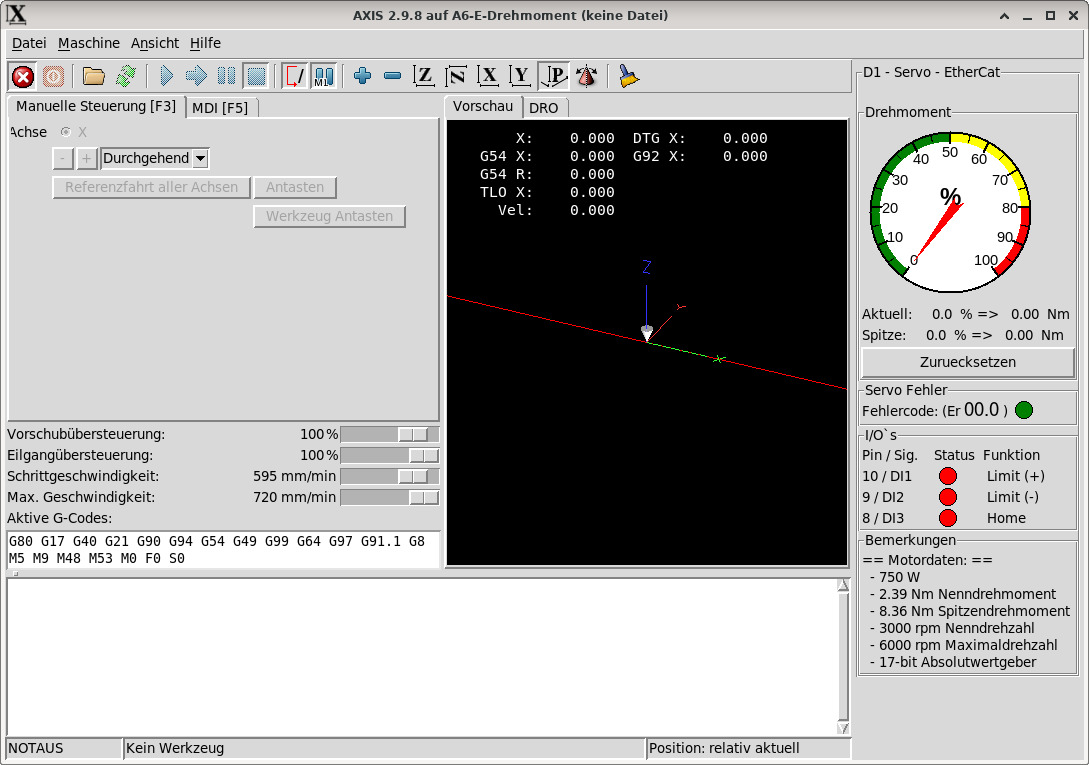
Ich habe inzwischen meinen A6-Servo 750 W EtherCAT von Stepperonline in einer kleinen Sondermaschine zum Laufen gebracht, in der sich ausschließlich dieser Motor befindet.
Dazu lese ich das Drehmoment aus und lasse mir das höchste Drehmoment anzeigen und mitloggen. Außerdem habe ich den Signalstatus der wenigen Pins, die der Motor hat, auf den Monitor gelegt. Sollte der Motor einen Fehler werfen, wird dieser ebenfalls angezeigt.
Was ich nicht verstehe, ist: Ich kann die Maschine freigeben, entriegeln etc. Wenn ich den Motor dann drehen lassen möchte, passiert jedoch nichts. Erst beim zweiten Mal (manuell auf Dauerbetrieb) beginnt er, sich zu drehen. Das finde ich etwas merkwürdig, aber so ist es eben.
Als Nächstes werde ich diesen einzelnen Motor durch einen Schrittmotor ersetzen. Das wird spannend, da alle anderen Schalter und Motoren (Schrittmotoren) über eine Mesacarte kommunizieren.
In der Anlage habe ich euch meine komplette Konfiguration beigelegt – für den Fall, dass jemand Interesse hat, darin zu stöbern.
Diese Nachricht ist als kurzes Feedback gedacht und nicht als Fragestellung der nächsten Schritte.
Was für mich bei der Installation von EtherCAT Master etwas verwirrend war, ist, dass nicht LinuxCNC der Master ist, sondern dass man auf dem Rechner noch weitere Dienste und Programme installieren muss, die man natürlich dann auch laden muss. Es ist also keine Erweiterung von LinuxCNC, sondern ein weiteres „Tool” auf dem Rechner, auf das LinuxCNC zugreift. Zumindest habe ich mir das so zurechtgelegt.
Gruß Mücke
Dazu lese ich das Drehmoment aus und lasse mir das höchste Drehmoment anzeigen und mitloggen. Außerdem habe ich den Signalstatus der wenigen Pins, die der Motor hat, auf den Monitor gelegt. Sollte der Motor einen Fehler werfen, wird dieser ebenfalls angezeigt.
Was ich nicht verstehe, ist: Ich kann die Maschine freigeben, entriegeln etc. Wenn ich den Motor dann drehen lassen möchte, passiert jedoch nichts. Erst beim zweiten Mal (manuell auf Dauerbetrieb) beginnt er, sich zu drehen. Das finde ich etwas merkwürdig, aber so ist es eben.
Als Nächstes werde ich diesen einzelnen Motor durch einen Schrittmotor ersetzen. Das wird spannend, da alle anderen Schalter und Motoren (Schrittmotoren) über eine Mesacarte kommunizieren.
In der Anlage habe ich euch meine komplette Konfiguration beigelegt – für den Fall, dass jemand Interesse hat, darin zu stöbern.
Diese Nachricht ist als kurzes Feedback gedacht und nicht als Fragestellung der nächsten Schritte.
Was für mich bei der Installation von EtherCAT Master etwas verwirrend war, ist, dass nicht LinuxCNC der Master ist, sondern dass man auf dem Rechner noch weitere Dienste und Programme installieren muss, die man natürlich dann auch laden muss. Es ist also keine Erweiterung von LinuxCNC, sondern ein weiteres „Tool” auf dem Rechner, auf das LinuxCNC zugreift. Zumindest habe ich mir das so zurechtgelegt.
Gruß Mücke
Last edit: 06 Jun 2026 12:27 by Muecke.
Please Log in or Create an account to join the conversation.
Moderators: Muecke
- International LinuxCNC Users
- Deutsch
- LinuxCNC 2.9 / Debian 12 RT – EtherCAT Master Setup für 750W Servo gesucht
Time to create page: 0.515 seconds