
- International LinuxCNC Users
- Deutsch
- Kommunikation mit Mesa 7i92 sehr instabil, Woran kann es liegen?
Kommunikation mit Mesa 7i92 sehr instabil, Woran kann es liegen?
- muddiver
- Offline
- Junior Member
-

Less
More
- Posts: 24
- Thank you received: 1
05 Sep 2026 14:53 #349349
by muddiver
Kommunikation mit Mesa 7i92 sehr instabil, Woran kann es liegen? was created by muddiver
Hallo Forum!
Ich bin nun soweit die Maschine zu testen und die Achsen zu verfahren.
Mein Hauptproblem: Ich kann selbst im Dialog "Achsen tunen" die Kommunikation mit meiner Mesa-Karte nur für kurze Zeit aufrechterhalten. Die LAN-Schnittstelle blinkt dann nicht mehr und es geht nichts mehr.
Die 5V Versorgung habe ich schon gegen eine stärkere getauscht, hat aber leider nichts gebracht.
LinuxCNC habe ich noch nie gestartet ohne diese Fehlermeldung:
Operation Error: hm2/hm_27i92:error finishing read! iter=4730
Der Rechner ist ein alter AMD Athlon(tm) II X2 250 Processor. 4GB DDR3-Ram, alt, aber eigentlich ausreichend, hoffe ich zumindest.
Leider auch mit Realtekchip für Ethernet.
lspci -nnk | grep -iA3 net gibt aus:
02:00.0 Ethernet controller [0200]: Realtek Semiconductor Co., Ltd. RTL8111/8168/8211/8411 PCI Express Gigabit Ethernet Controller [10ec:8168] (rev 03)
Subsystem: Foxconn International, Inc. Device [105b:0e22]
Kernel driver in use: r8169
Kernel modules: r8169
Ich habe bereits einen Kern isoliert mit "isolcpus=0,",
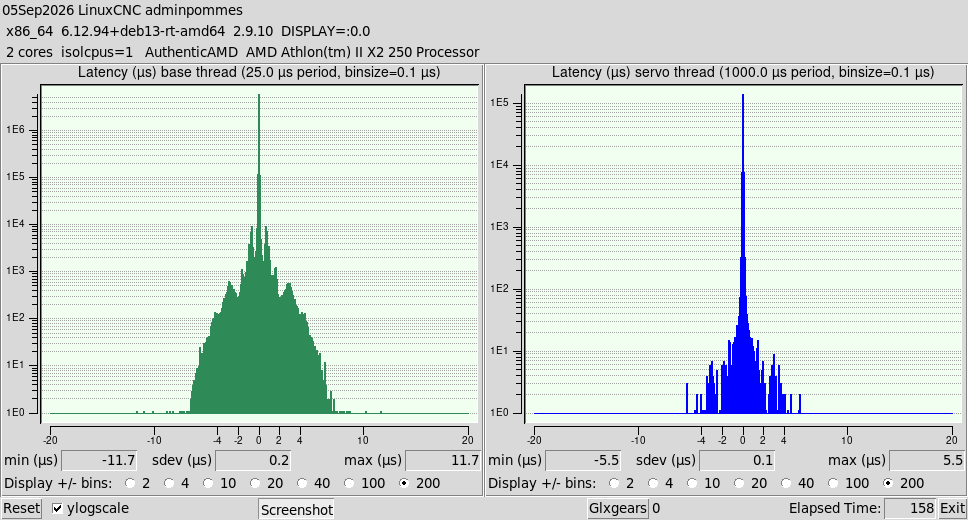
meiner Meinung nach sind die Jitterwerte auch eigentlich ganz io..
Irgendwelche Ideen?
Vielen Dank schonmal, Gruß, Thomas
Ich bin nun soweit die Maschine zu testen und die Achsen zu verfahren.
Mein Hauptproblem: Ich kann selbst im Dialog "Achsen tunen" die Kommunikation mit meiner Mesa-Karte nur für kurze Zeit aufrechterhalten. Die LAN-Schnittstelle blinkt dann nicht mehr und es geht nichts mehr.
Die 5V Versorgung habe ich schon gegen eine stärkere getauscht, hat aber leider nichts gebracht.
LinuxCNC habe ich noch nie gestartet ohne diese Fehlermeldung:
Operation Error: hm2/hm_27i92:error finishing read! iter=4730
Der Rechner ist ein alter AMD Athlon(tm) II X2 250 Processor. 4GB DDR3-Ram, alt, aber eigentlich ausreichend, hoffe ich zumindest.
Leider auch mit Realtekchip für Ethernet.
lspci -nnk | grep -iA3 net gibt aus:
02:00.0 Ethernet controller [0200]: Realtek Semiconductor Co., Ltd. RTL8111/8168/8211/8411 PCI Express Gigabit Ethernet Controller [10ec:8168] (rev 03)
Subsystem: Foxconn International, Inc. Device [105b:0e22]
Kernel driver in use: r8169
Kernel modules: r8169
Ich habe bereits einen Kern isoliert mit "isolcpus=0,",
meiner Meinung nach sind die Jitterwerte auch eigentlich ganz io..
Irgendwelche Ideen?
Vielen Dank schonmal, Gruß, Thomas
Please Log in or Create an account to join the conversation.
- tuxcnc
- Offline
- Elite Member
-

Less
More
- Posts: 283
- Thank you received: 54
05 Sep 2026 16:02 #349350
by tuxcnc
Replied by tuxcnc on topic Kommunikation mit Mesa 7i92 sehr instabil, Woran kann es liegen?
Typical.
Your network card drops the connection.
Although it can be corrupted, more often it is caused by a bad kernel or a bad kernel module.
Try installing a different kernel version or dkms driver.
Your network card drops the connection.
Although it can be corrupted, more often it is caused by a bad kernel or a bad kernel module.
Try installing a different kernel version or dkms driver.
Please Log in or Create an account to join the conversation.
- PCW
-

- Away
- Moderator
-

Less
More
- Posts: 18107
- Thank you received: 5328
05 Sep 2026 16:02 #349351
by PCW
Replied by PCW on topic Kommunikation mit Mesa 7i92 sehr instabil, Woran kann es liegen?
The standard Realtek Ethernet driver has real time issues, this can be fixed by using the DKMS driver
No sure whet the definittive installation instructions are but doing a forum search for DKMS should help
No sure whet the definittive installation instructions are but doing a forum search for DKMS should help
Please Log in or Create an account to join the conversation.
- muddiver
- Offline
- Junior Member
-
Less
More
- Posts: 24
- Thank you received: 1
05 Sep 2026 17:37 #349356
by muddiver
Replied by muddiver on topic Kommunikation mit Mesa 7i92 sehr instabil, Woran kann es liegen?
Which driver should i go for?
The command "lspci -nnk | grep -iA3 net "
tells me i have a "RTL8111/8168/8211/8411" , i read something about changing the driver to the 8168, but i'm unsure..
Other thing, if it is a bit thing to get it running, what do you think about these small computers for LinuxCNC?
They are not too expensive..
Lenovo tiny M92? Which CPU would you recommend at Least?
I learned the hard way to get a INtel-Networkchip, so i will definitly have an eye on this!
The command "lspci -nnk | grep -iA3 net "
tells me i have a "RTL8111/8168/8211/8411" , i read something about changing the driver to the 8168, but i'm unsure..
Other thing, if it is a bit thing to get it running, what do you think about these small computers for LinuxCNC?
They are not too expensive..
Lenovo tiny M92? Which CPU would you recommend at Least?
I learned the hard way to get a INtel-Networkchip, so i will definitly have an eye on this!
Please Log in or Create an account to join the conversation.
- tuxcnc
- Offline
- Elite Member
-
Less
More
- Posts: 283
- Thank you received: 54
05 Sep 2026 18:00 #349357
by tuxcnc
Replied by tuxcnc on topic Kommunikation mit Mesa 7i92 sehr instabil, Woran kann es liegen?
Try apt install r8168-dkms
You have to enable non-free tree in sources-list.
As I wrote above, sometimes it not works with some kernel versions, but can work with the previous or next version (it means, for example, 6.12.xx not works, but 6.12.yy works).
You have to enable non-free tree in sources-list.
As I wrote above, sometimes it not works with some kernel versions, but can work with the previous or next version (it means, for example, 6.12.xx not works, but 6.12.yy works).
Please Log in or Create an account to join the conversation.
- muddiver
- Offline
- Junior Member
-
Less
More
- Posts: 24
- Thank you received: 1
06 Sep 2026 07:38 #349378
by muddiver
Replied by muddiver on topic Kommunikation mit Mesa 7i92 sehr instabil, Woran kann es liegen?
Good Morning together!
the switch to r8168 did the trick for me! Communication is running, i can not say how solid, but now i can start LinuxCNC without error, and the green LED keeps flashing. Thanks for your help!
Do you think i should stay on 2.9.10 as i am now , to keep my system running?
Or how often does LinuxCNC change the Kernel during updates?
I'm not keen on holding my breath after every update if the communication is broken..
Greets, Tom
the switch to r8168 did the trick for me! Communication is running, i can not say how solid, but now i can start LinuxCNC without error, and the green LED keeps flashing. Thanks for your help!
Do you think i should stay on 2.9.10 as i am now , to keep my system running?
Or how often does LinuxCNC change the Kernel during updates?
I'm not keen on holding my breath after every update if the communication is broken..
Greets, Tom
Please Log in or Create an account to join the conversation.
- PCW
-
- Away
- Moderator
-
Less
More
- Posts: 18107
- Thank you received: 5328
06 Sep 2026 15:00 #349387
by PCW
Replied by PCW on topic Kommunikation mit Mesa 7i92 sehr instabil, Woran kann es liegen?
LinuxCNC updates never change the kernel.
Please Log in or Create an account to join the conversation.
- tuxcnc
- Offline
- Elite Member
-
Less
More
- Posts: 283
- Thank you received: 54
06 Sep 2026 16:40 #349394
by tuxcnc
Or backup working one. The deb files can vanish from repositories, you must have them locally for restore.
For test you have to run LinuxCNC for many hours, for example leave it for night. You not need do anything, simply let works.
You have to disable screensaver and screen power savings, but this is common for all hardware and configurations.
Replied by tuxcnc on topic Kommunikation mit Mesa 7i92 sehr instabil, Woran kann es liegen?
Do not upgrade the kernel.Do you think i should stay on 2.9.10 as i am now , to keep my system running?
Or how often does LinuxCNC change the Kernel during updates?
I'm not keen on holding my breath after every update if the communication is broken..
Or backup working one. The deb files can vanish from repositories, you must have them locally for restore.
For test you have to run LinuxCNC for many hours, for example leave it for night. You not need do anything, simply let works.
You have to disable screensaver and screen power savings, but this is common for all hardware and configurations.
Please Log in or Create an account to join the conversation.
- muddiver
- Offline
- Junior Member
-
Less
More
- Posts: 24
- Thank you received: 1
23 Sep 2026 15:21 - 23 Sep 2026 15:37 #349806
by muddiver
Replied by muddiver on topic Kommunikation mit Mesa 7i92 sehr instabil, Woran kann es liegen?
Hi FOrum!
i have a Foxconn A74 Mainboard with 4GB DDR3_Ram, AMD Athlon X2 250 3Ghz.
I tried to upgrade to a graphicscard, i bought an Asus Radeon R7 240 with 2GB of DDR3 Vram.
Now my problems.. The latency overall is the same as with the onboardgraphics, bit i have massive spikes, up to 600000..
I tried:
1. Grub "radeon.dpm=0"
no luck, LinuxCNC greets me with a Readerror.
2. Grub "radeon.si_support=0 amdgpu.si_support=1 amdgpu.dpm=0"
no luck, LinuxCNC greets me with a Readerror. I checked which driver is used, it was amdgpu, but no luck.
As far as i can tell, the version without any kerneltweaks worked the best for me.
I have 1 Core isolated for LinuxCNC, nothing fancy in grub customized.
Is there anything i can try to get the graphicscard to work properly?
Thank in advance, greets, TOm
i have a Foxconn A74 Mainboard with 4GB DDR3_Ram, AMD Athlon X2 250 3Ghz.
I tried to upgrade to a graphicscard, i bought an Asus Radeon R7 240 with 2GB of DDR3 Vram.
Now my problems.. The latency overall is the same as with the onboardgraphics, bit i have massive spikes, up to 600000..
I tried:
1. Grub "radeon.dpm=0"
no luck, LinuxCNC greets me with a Readerror.
2. Grub "radeon.si_support=0 amdgpu.si_support=1 amdgpu.dpm=0"
no luck, LinuxCNC greets me with a Readerror. I checked which driver is used, it was amdgpu, but no luck.
As far as i can tell, the version without any kerneltweaks worked the best for me.
I have 1 Core isolated for LinuxCNC, nothing fancy in grub customized.
Is there anything i can try to get the graphicscard to work properly?
Thank in advance, greets, TOm
Last edit: 23 Sep 2026 15:37 by muddiver.
Please Log in or Create an account to join the conversation.
Moderators: Muecke
- International LinuxCNC Users
- Deutsch
- Kommunikation mit Mesa 7i92 sehr instabil, Woran kann es liegen?
Time to create page: 0.114 seconds